Copying MP3 / CD

dande

New member
Local time
9:46 PM
Messages
2
First of all, I apologise for this basic language from this ageing but-willing-to-learn non techo. Secondly, I hope this is posted in the correct forum.

Friends have given me a few standard CD's (56X, 700MB) and on these are a hundred or more music tracks - so presumably in MP3 format??

Is it possible to copy these? Well, yes it is, I have discovered, but only onto about 10 separate CD's!

Can I replicate the original somehow and copy all the tracks to a single standard CD?

Sure it must be possible, but HELP, please.

Many thanks.
 

My Computer

OS
Windows 7
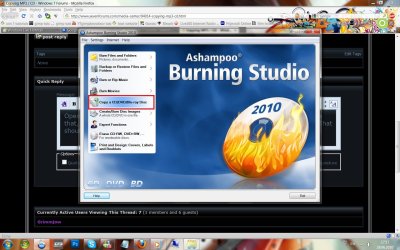
Open your burning software, there must be some option as copy cd or something like that, when the cd is copied, the tray will open, insert blank cd, wait while is burned. That should work.
Untitled.jpg
 

My Computer

Computer Manufacturer/Model Number
Micro-Star International/MS-7529
OS
Windows 7 Ultimate x32
CPU
DualCore Intel Pentium E2200, 2218 MHz (11 x 202)
Motherboard
MSI G31M3 V2 (MS-7529) (2 PCI, 1 PCI-E x16,2 DDR2 DIMM)
Memory
2 GB DDR2-800 DDR2 SDRAM
Graphics Card(s)
nVIDIA GeForce 9500GT 1GB
Sound Card
Realtek ALC888/1200 @ Intel 82801GB ICH7
Monitor(s) Displays
Samsung SyncMaster 2253BW (Digital) 22'' LCD
Screen Resolution
1680x1050
Hard Drives
SAMSUNG HD322IJ ATA Device (298 GB , IDE)
Thanks for your prompt reply. Grimmjow.

I have tried that but after I have burned the cd/mp3 format (or whatever!) the software lists all the tracks and tells me I will need a handful of CD's to copy the tracks - not just one as with the original.

Am I missing something here? Quite likely!
 

My Computer

OS
Windows 7
if you right click the original cd and click properties, how much mb it shows?
 

My Computer

Computer Manufacturer/Model Number
Micro-Star International/MS-7529
OS
Windows 7 Ultimate x32
CPU
DualCore Intel Pentium E2200, 2218 MHz (11 x 202)
Motherboard
MSI G31M3 V2 (MS-7529) (2 PCI, 1 PCI-E x16,2 DDR2 DIMM)
Memory
2 GB DDR2-800 DDR2 SDRAM
Graphics Card(s)
nVIDIA GeForce 9500GT 1GB
Sound Card
Realtek ALC888/1200 @ Intel 82801GB ICH7
Monitor(s) Displays
Samsung SyncMaster 2253BW (Digital) 22'' LCD
Screen Resolution
1680x1050
Hard Drives
SAMSUNG HD322IJ ATA Device (298 GB , IDE)
Ok mate, I have to go, hope this will be sort it out. With the information provided, I can only think that there is more then 700 MB of data on that "CD"??. Correct me if I'm wrong. Will get back to this thread.
cheers
 

My Computer

Computer Manufacturer/Model Number
Micro-Star International/MS-7529
OS
Windows 7 Ultimate x32
CPU
DualCore Intel Pentium E2200, 2218 MHz (11 x 202)
Motherboard
MSI G31M3 V2 (MS-7529) (2 PCI, 1 PCI-E x16,2 DDR2 DIMM)
Memory
2 GB DDR2-800 DDR2 SDRAM
Graphics Card(s)
nVIDIA GeForce 9500GT 1GB
Sound Card
Realtek ALC888/1200 @ Intel 82801GB ICH7
Monitor(s) Displays
Samsung SyncMaster 2253BW (Digital) 22'' LCD
Screen Resolution
1680x1050
Hard Drives
SAMSUNG HD322IJ ATA Device (298 GB , IDE)
Nice advise, Grimmjow !! hope Dande will be able to do it.

Please dont mind, pal !! I am explaining it with the free and the best (possibly ) program ImgBurn !
Download Imgburn : ImgBurn - Free software downloads and software reviews - CNET Download.com (less than 5 mb, and free) and install it.
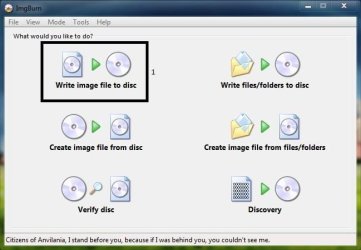
First, Insert the original cd, run imgburn, and click the middle "create image from disk "button
Capture1.jpg
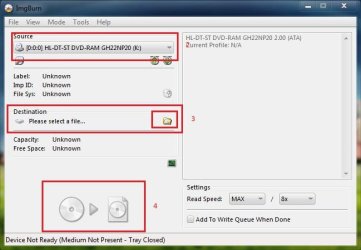
In the coming window, select source (your cd drive), select destination (any location, say desktop) and click the last button.
2.JPG
Now an image of the cd is ready to be burnt .

Noe press the first button "write image to disk"
Capture.JPG
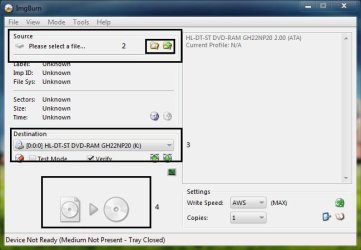
In the coming window, select source (the imge file on desktop), destination (your cd drive) , put a blank cd there, and click the last button
3.JPG

Your cd is copied now :D
CD to Cd (700mb to 700 mb) exact copy.
 

My Computer

Computer type
PC/Desktop
Computer Manufacturer/Model Number
Self Assembled
OS
Microsoft Windows 10 Pro Insider Preview 64-bit
CPU
Intel(R) Core(TM) i3-4130 CPU @ 3.40GHz
Motherboard
Gigabyte Technology Co., Ltd. B85M-D3H
Memory
Corsair Vengence 4GB x2 (8.00GB Dual-Channel DDR3 @ 798MHz)
Graphics Card(s)
2047MB GeForce GTS 450 (ZOTAC International)
Sound Card
Onboard (Realtek High Definition Audio)
Monitor(s) Displays
LG Flatron E2040T
Screen Resolution
1600x900
Hard Drives
Western Digital 1 TB
Seagate 500 GB
PSU
Corsair VS550
Case
Cooler Master K380
Cooling
Cooler Master Seidon 120V Plus
Keyboard
Logitech MK260r
Mouse
Logitech MK260r
Internet Speed
PMPL Broadband
Antivirus
Windows Defender + MBAM
Browser
Firefox
Other Info
Dell Studio 15" Laptop
Back
Top