
Core i7 920/940 overclocking guide

Mark

AKA Mr GRiM
Guru
Gold Member
VIP
Local time
7:32 AM
Messages
4,282
Location
QLD, Cairns
How To Overclock Core i7 920/940

Core i7 920/940 overclocking guide

Related links:
How to Overclock C2Q-Quads-C2D-Duals
img-intel-core2ex.png
img-intel-corei7.png
200px-Corei7p.jpg


img-shop-item2.png
Written by monkey7

Ever since the i7 was first mentioned the rumour machine about overclocking it has been spinning at full speed. The first rumour was that overclocking would be impossible because of the removal of the good old FSB, leaving the overclockers with nothing to increase. After the first rush of panic people started to actually think about what would replace the FSB: base clock (BCLK). Increasing this would increase the overall clock, right? Right. After the lifting of the NDA (and on some dubious sites before) the overclocking results were released. An average core i7 920 (2.66gHz, €300) turned out to be able to overclock nearly a full gHz.

But removal of the FSB and the introduction of the BCLK means a lot more chances. Everything is linked to the BCLK, which has confused quite a lot of the old school overclockers. Just to sort that out and set new overclockers on the right path, I've written this guide to core i7 920 overclocking.

First of all: neither me nor overclock3d is responsible for the damage you might do to your components following this guide.

Step 1: preparation
To overclock properly you should first inform yourself about the risks and advantages of overclocking. I will not be writing this all out, but this is the short version:

Risks:
- Shortened life of components when giving more volts than specified
- Extremely shortened life of components when giving an extreme voltage
- System instability
- You could contract the Megahurtz fever

Disadvantages:
- Additional heat output

Advantages:
- Higher FPS in CPU based games
- More F@H ppd
- Higher benchmark scores

Does overclocking really increase performance?
Yes it does. Just look at the CPU scores below (program used: 3DMark vantage advanced)

At stock:
wol_error.gif
This image has been resized. Click this bar to view the full image. The original image is sized 984x570.
stock_hton.jpg


At 3.7gHz:
wol_error.gif
This image has been resized. Click this bar to view the full image. The original image is sized 983x569.
37ghz_hton.jpg


With a difference of about 6000 points this would represent a considerable increase in CPU based gaming performance.

Having read this, you should start concentrating on the theory behind core i7 overclocking. The system is pretty easy: you have a base clock (BCLK), to which everything is linked using multipliers. This base clock can be adjusted from 100 to 250 in steps of 1. Stock is 133.

Multipliers
The following multipliers are available:
- CPU. With the 920 this is 12-20x
- QPI link (36, 48, slow). The QPI isn't really important for singlecpu systems, but keep it below 7-8gHz as most seem to be bugging out around that range.
- Memory (6, 8, 10, 12, 14, 16x). Well quite obvious. Make sure your ram is running as fast as possible but don't overdo it.

Voltages
When pushing hardware over its rated specifications it will most likely need more voltage to run properly. The following major voltages are available on the i7:
- vCore. This is the juice going through the actual core. Stock: 1.18 Max. safe: 1.35 Max. extreme: somewhere around 1.55
- VTT (asus names it different). This voltage is going through the memory multiplier which is now integrated into the processor unit. Stock: 1.1-1.2 Max. safe: 1.35 Max. extreme: somewhere around 1.55
- vDIMM is going through the memory. Stock: 1.5-1.65 Max safe: 1.65 Max extreme: 1.5*VTT or VTT+0.7

Energy savings
As all experienced clockers know, Intel has some features built into their CPU's that lets them use less power when idling. Overclockers however, are not interested in that power consumption at all and those features go at the cost of stability.

The following features are recommended to be turned off:
- C1E state
- SpeedStep

HyperThreading
Revived from the old P4 days is hyperThreading (HT). HT basically means that a core is pretending to be two cores. In the i7 series Intel decided to have the cpu act like an octo core while being quad. This feature could be very useful in truely multithreaded applications but seems to make the cpu require 0.05 additional vCore. As long as you are not an extreme clocker or single/dualthreaded applications (games) user I'd recommend keeping it on. Personally I have it turned off for my F@H SMP client.

To be continued

Core i7 920 overclocking guide - Overclock3D Forums


The Heart of Every Hardcore Gaming Rig is its Processor Build your own rig with desktop gaming processors from Intel.


Intel Desktop Board DX58SO

The ultimate choice for power users

This next-gen powerhouse is Intel's highest performing single-CPU desktop, providing unrivaled experiences on highly threaded games. Optimized for efficiency and speed, the DX58SO automatically gives you extra horsepower when you need it. Learn more

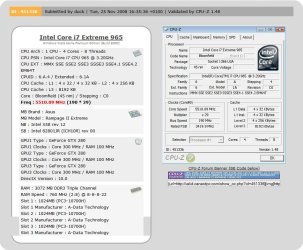
Intel's Core i7 Extreme Edition 965 overclocked to 5.5GHz
2009-03-25_005110.jpg

CPU-Z Validator 3.0

Intel's Core i7 Extreme Edition 965 overclocked to 5.5GHz
 
Last edited:

My Computer

Computer Manufacturer/Model Number
Home Brew
OS
Windows 7 Ultimate Vista Ultimate x64
CPU
Core 2 Duo E8500 3.16Ghz @ 3.8Ghz
Motherboard
eVGA 750i FTW
Memory
2x2Gigs Patriot PC2-6400 LL
Graphics Card(s)
Inno3D GeForce GTX260 216 SP
Monitor(s) Displays
ASUS VW222U 22" 2ms Response time
Screen Resolution
1680x1050
Hard Drives
SATA 150GB
SATA II 250GB
USB IDE 750GB Ext.
PSU
HYTEC 600W & Thermaltake 650W Toughpower Power Exp
Case
Thermaltake Armor LCS (Liquid Cooling System)
Cooling
Liquid Cooling System
Keyboard
Logitech G15 Gaming Keyboard
Mouse
Logitech G9 Gaming Mouse
I have hte 965 now - it is just a matter of time to find quality components and save up the money for them - Still agonizing over the monetary crunch, but hopefully I'll get to take mine to some nice OCs....
 

My Computers

System One System Two

  • Computer type
    PC/Desktop
    Computer Manufacturer/Model Number
    The Beast Model A (homebrew)
    OS
    Windows 11 21H2 Current build
    CPU
    AMD Ryzen 9 3950X
    Motherboard
    MSI MEG X570 GODLIKE
    Memory
    4 * 32 GB - Corsair Vengeance 3600 MHz
    Graphics Card(s)
    EVGA GeForce RTX 3080 Ti XC3 ULTRA GAMING (12G-P5-3955-KR)
    Sound Card
    Realtek® ALC1220 Codec
    Monitor(s) Displays
    2x Eve Spectrum ES07D03 4K Gaming Monitor (Matte) | Eve Spec
    Screen Resolution
    3x 3840 x 2160
    Hard Drives
    3x Samsung 980 Pro NVMe PCIe 4 M.2 2 TB SSD (MZ-V8P2T0B/AM) } 3x Sabrent Rocket NVMe 4.0 1 TB SSD
    PSU
    PC Power & Cooling’s Silencer Series 1050 Watt, 80 Plus Plat
    Case
    Fractal Design Define 7 XL Dark ATX Full Tower Case
    Cooling
    SteelSeries Apex Pro Wired Gaming Keyboard
    Keyboard
    SteelSeries Apex Pro
    Mouse
    Logitech MX Master 3S | MX Master 3 for business
    Internet Speed
    AT&T LightSpeed Gigabit Duplex Ftth
    Antivirus
    Windows Defender + MB 3
    Browser
    Nightly (default) + Firefox (stable),Chrome, Edge
  • Computer type
    PC/Desktop
    System Manufacturer/Model Number
    Dell Latitude E5470
    OS
    ChromeOS Flex Dev Channel (current)
    CPU
    Intel(R) Core(TM) i5-6300U CPU @ 2.40GHz, 2501 Mhz, 2 Core(s), 4 Logical Processor(s)
    Motherboard
    Dell
    Memory
    16 GB
    Graphics Card(s)
    Intel(R) HD Graphics 520
    Sound Card
    Intel(R) HD Graphics 520 + RealTek Audio
    Monitor(s) Displays
    Dell laptop display 15"
    Screen Resolution
    1920 * 1080
    Hard Drives
    Toshiba 128GB M.2 22300 drive
    INTEL Cherryville 520 Series SSDSC2CW180A 180 GB SATA III SSD
    PSU
    Dell
    Case
    Dell
    Cooling
    Dell
    Keyboard
    Dell
    Mouse
    Logitech MX Master 3S (shared w. Sys 1) | Dell TouchPad
    Internet Speed
    AT&T LightSpeed Gigabit Duplex Ftth
I have the 920, I blink and it moves. What would you possibly need more than 4 GHz at the current point in time? I can already max out crysis.
 

My Computer

Computer Manufacturer/Model Number
Custom
OS
Windows 7 x64 build
CPU
Core i7 920 @2.67GHz OC'd to 3.8GHz
Motherboard
ASUS P6T Delux
Memory
4GB 1066MHz
Graphics Card(s)
ATI Radeon 4850
Monitor(s) Displays
Acer 24"
Screen Resolution
1920x1200
Hard Drives
Hitachi 500GB 16MB Cache 7200 RPM
PSU
Rosewill 600W
Cooling
Thermaltake V1 AX
Keyboard
Logitech G15
Mouse
Logitech mx1000
Internet Speed
8Mb down
Thanks for posting this, How far can you overclock 920?
With extreme cooling (phase change, liquid nitrogen) I've seen enthusiast benchmarks reaching well over 5.0GHz+.
Prime example of 5.5GHz i7 OC.
The OP in that thread is using the D0 stepping i7 so it runs cooler than the original C0 stepping 920's.
 

My Computer

Computer Manufacturer/Model Number
Lenovo ThinkPad T61p
OS
Windows 7 Professional x64 RTM
CPU
Intel Core 2 Duo T8300 2.4GHz
Memory
4GB Corsair DDR2-667 (2x2GB)
Graphics Card(s)
NVIDIA Quadro FX 570M
Screen Resolution
1680x1050
Hard Drives
Seagate 160GB 7200rpm SATA
Mouse
Logitech MX518
Internet Speed
DSL 6Mbps
Thanks for posting this, How far can you overclock 920?

On air?

With a good C0 stepping you can reach ~4600Mhz for benchmarks, and ~4200-4300Mhz for stability.
A good D0 ~4800Mhz for benchmarks and 4300-4400Mhz for stability.

It depends. No two chips overclocks the same.
If you get a bad one, you might not even get 3800Mhz stable.
 

My Computer

OS
Windows 7 7000 64bit
CPU
Intel Core i7 920 @ 4000Mhz
Motherboard
Gigabyte EX58-UD3R
Memory
3x2 GB OCZ Platinum 1600Mhz 7-7-7-19
Graphics Card(s)
Asus GTX 260 216SP @ 720/1520/1050
Sound Card
Integrated
Monitor(s) Displays
BenQ Senseye FP202W + Mermaid Ventura
Screen Resolution
1680x1050
Hard Drives
2x Raptor @ RAID0
2x Seagate 250GB
1x WD 320GB
1x MaxWhore 160GB
PSU
Tagan TG780-U33II 780W SuperRock
Case
Cooler Master Stacker
Cooling
Stock
Keyboard
Logitec something
Mouse
Logitec MX518
Internet Speed
20/3.6 Mbit
Newbie overclocker

OK I am new to overclocking. this will be my first one. I don't do a whole lot of gaming but i do a lot of video editing and i just want a bad a$$ system.

Can someone give me a good recommendation on a good overclock speed. I also leave my computer running all night sometimes and I don't know if that's safe for an oc'd computer. Anyway here are the specs of my system

Case ( [$20 OFF Mail-In Rebate] CoolerMaster HAF 932 Full Tower Gaming Case Black )
Power Supply ( 800 Watt -- Power Supply Quad SLI Ready ) Processor Intel® Core™ i7 920 Processor (4x 2.66GHz/8MB L3 Cache) ) Processor Cooling ( Coolermaster V8 CPU Cooling Fan System ) Motherboard ( Asus P6T Deluxe V2 Intel X58 Chipset CrossFire and SLI Supported w/7.1 Sound, Triple-Channel DDR3, Dual Gb LAN, S-ATA Raid, USB 2.0, Three PCI-E MB ) Memory ( 6 GB [2 GB X3] DDR3-1600 Triple Memory Module Kingston HyperX ) Video Card ( ATI Radeon HD 4890 1GB PCI-Express x16 )
 

My Computer

OS
Windows vista x64
I just finished my initial 920 OC attempts, and wanted to see how far I could take it with just a real good fan cooler and no messing with voltages. I want a nice balance between having juice when you need it to being somewhat green.

I only adjusted the ratio, BCLK, DRAM Freq, and 5 of the DRAM timing parameters. I ended up with 3.82GHz and DDR3-1450 7-7-7-20. The QPI is around 3400. I can run with all 8 VCPUs at 100% for two hours without problems. My system wattage goes fron 294 idle to 495 at 100% :D.

Edit: New OC: 3.94GHz: manual@ 21 CPU Ratio/ 187 BCLK / 3177 UCLK / DDR-1499 / 7-7-7-22 / 1.25625v CPU / 1.31250v QPI-DRAM / 1.64v DRAM / Others Auto
Edit - lowered my CPU voltage to 1.2625

DJ
 
Last edited:

My Computer

Computer Manufacturer/Model Number
Custom workstation /// Lenovo X61t tablet notebook
OS
Windows 7 RTM x64
CPU
Core i7 980X @ 4.04GHz OC /// Core Duo L7500 @ 1.6GHz
Motherboard
Asus P6T6 WS Revolution ///
Memory
12GB G. Skill @ DDR-1600 OC /// 4GB
Graphics Card(s)
Saphire HD4870 Toxic 1GB /// Intel Mobile GMA X3100
Monitor(s) Displays
Dual Eizo 24" SX2461W /// 12"
Screen Resolution
1920x1200 /// 1400x1050
Hard Drives
Workstation:
5x 750GB Barracuda-11 on Areca ARC-1220;
4x 1.5TB Barracuda-11 on Intel ICH10R;
Volumes:
300GB RAID 0, 2.7TB RAID 10 on Intel;
100GB RAID 0, 1.4TB RAID 10 on Areca ///
Notebook: G.Skill Titan 256GB SSD
PSU
Tagan ITZ 1100
Case
GHS-1500 ///
Cooling
Thermalright IFX-14 + a slew of stealth fans ///
Keyboard
Logitech Edge ///
Mouse
Logitech Wireless Optical Trackball
Internet Speed
5Mbps down / 820Kbps up
Other Info
Main use: photography;
DVD Drive: L.G GGW-H20L Blu-Ray / DVD;
OC: QPI/DRAM @ 1.33v, CPU @ 1.293v, DRAM Bus @ 1.65v, CPU PLL @ 1.88v, CPU mult = 25x, BCLK = 160, DDR3-1604 @ 7-8-7-24
Im at 3.5 GHz on the stock cooler, although on Prime95 it begins heating up FAST. so i keep it at 3.0GHz. Does anyone have a reccomendation for an extreme air cooler?
 

My Computer

Computer Manufacturer/Model Number
Custom system number 2
OS
Windows 7
CPU
Intel Core i7 920 @ 3.6 GHz
Motherboard
Asus P6T
Memory
3 x1 GB OCZ platinum @ 1866 MHz 9-9-9-24
Graphics Card(s)
EVGA GTX 260 Superclocked 720/1220 (using a voltage bump)
Sound Card
Soundblaster Audigy 7.1
Monitor(s) Displays
Samsung 20" 2ms 3000:1 @1680x1050
Screen Resolution
1680 x 1050
Hard Drives
250GB Seagate HDD
PSU
OCZ GamexStream 700Watt
Case
Antec 900
Cooling
3 x 120mm case fans, 1x 200mm casefan (top) 1x 120 mm (PSU)
Keyboard
Saitek Eclipse II
Mouse
A4 tech Laser mouse.
Internet Speed
7 Mbit Bell

My Computer

Computer Manufacturer/Model Number
Custom workstation /// Lenovo X61t tablet notebook
OS
Windows 7 RTM x64
CPU
Core i7 980X @ 4.04GHz OC /// Core Duo L7500 @ 1.6GHz
Motherboard
Asus P6T6 WS Revolution ///
Memory
12GB G. Skill @ DDR-1600 OC /// 4GB
Graphics Card(s)
Saphire HD4870 Toxic 1GB /// Intel Mobile GMA X3100
Monitor(s) Displays
Dual Eizo 24" SX2461W /// 12"
Screen Resolution
1920x1200 /// 1400x1050
Hard Drives
Workstation:
5x 750GB Barracuda-11 on Areca ARC-1220;
4x 1.5TB Barracuda-11 on Intel ICH10R;
Volumes:
300GB RAID 0, 2.7TB RAID 10 on Intel;
100GB RAID 0, 1.4TB RAID 10 on Areca ///
Notebook: G.Skill Titan 256GB SSD
PSU
Tagan ITZ 1100
Case
GHS-1500 ///
Cooling
Thermalright IFX-14 + a slew of stealth fans ///
Keyboard
Logitech Edge ///
Mouse
Logitech Wireless Optical Trackball
Internet Speed
5Mbps down / 820Kbps up
Other Info
Main use: photography;
DVD Drive: L.G GGW-H20L Blu-Ray / DVD;
OC: QPI/DRAM @ 1.33v, CPU @ 1.293v, DRAM Bus @ 1.65v, CPU PLL @ 1.88v, CPU mult = 25x, BCLK = 160, DDR3-1604 @ 7-8-7-24
While I don't have a stock cooler I'm not sure what cooler I have since my rig is from ASUS. Check out my specs.

I added an additional 5500 RPM 80mm fan on top of the cooler fan My new fan is manually controlled. I have it set to a speed that is fairly quiet. The affect of the second fan increases the speed of the cooler fan which is temperature controlled.

Temps are 10-15 degrees less this way. Ramping up the fan to 5500 RPM lowers temps even more but is too darn loud.

System is 100% stable.
 

My Computer

Computer Manufacturer/Model Number
Asus CG5290
OS
Windows 7 x64 RTM Retail
CPU
Intel i7-920 Quad @ 4.0Ghz. Stepping D0.
Motherboard
Asus Rampage II GENE
Memory
9GB DDR3 @ 1600 Mhz. 9-8-8-24-CR1
Graphics Card(s)
XFX ATI HD5870 @ 900/1300
Sound Card
SupremeFX X/Fi HD Audio onboard
Monitor(s) Displays
Samsung 24" WS
Screen Resolution
1920x1200
Hard Drives
OCZ AGILITY-EX (64 GB, SATA-II, SSD SLC NAND Flash)
Hitachi HDT721010SLA360 (1 TB, 7200 RPM, SATA-II)
Cavalry (500 GB, 7200 RPM, eSATA-II)
PSU
Antec TruePower 650 Watts
Case
Ugly but functional.
Cooling
Oversized heat sink, lots and lots of fans.
Keyboard
MS
Mouse
MS wireless explorer
Internet Speed
101/15 - Optimum Online Ultra
While I don't have a stock cooler I'm not sure what cooler I have since my rig is from ASUS. Check out my specs.

I added an additional 5500 RPM 80mm fan on top of the cooler fan My new fan is manually controlled. I have it set to a speed that is fairly quiet. The affect of the second fan increases the speed of the cooler fan which is temperature controlled.

Temps are 10-15 degrees less this way. Ramping up the fan to 5500 RPM lowers temps even more but is too darn loud.

System is 100% stable.
Do you have any problems waking from sleep, or do you not sleep :shock::). I have problems waking with any CPU speed above 3800 @ DDR3-1600 so I had to throttle back.
 

My Computer

Computer Manufacturer/Model Number
Custom workstation /// Lenovo X61t tablet notebook
OS
Windows 7 RTM x64
CPU
Core i7 980X @ 4.04GHz OC /// Core Duo L7500 @ 1.6GHz
Motherboard
Asus P6T6 WS Revolution ///
Memory
12GB G. Skill @ DDR-1600 OC /// 4GB
Graphics Card(s)
Saphire HD4870 Toxic 1GB /// Intel Mobile GMA X3100
Monitor(s) Displays
Dual Eizo 24" SX2461W /// 12"
Screen Resolution
1920x1200 /// 1400x1050
Hard Drives
Workstation:
5x 750GB Barracuda-11 on Areca ARC-1220;
4x 1.5TB Barracuda-11 on Intel ICH10R;
Volumes:
300GB RAID 0, 2.7TB RAID 10 on Intel;
100GB RAID 0, 1.4TB RAID 10 on Areca ///
Notebook: G.Skill Titan 256GB SSD
PSU
Tagan ITZ 1100
Case
GHS-1500 ///
Cooling
Thermalright IFX-14 + a slew of stealth fans ///
Keyboard
Logitech Edge ///
Mouse
Logitech Wireless Optical Trackball
Internet Speed
5Mbps down / 820Kbps up
Other Info
Main use: photography;
DVD Drive: L.G GGW-H20L Blu-Ray / DVD;
OC: QPI/DRAM @ 1.33v, CPU @ 1.293v, DRAM Bus @ 1.65v, CPU PLL @ 1.88v, CPU mult = 25x, BCLK = 160, DDR3-1604 @ 7-8-7-24
Do you have any problems waking from sleep, or do you not sleep :shock::). I have problems waking with any CPU speed above 3800 @ DDR3-1600 so I had to throttle back.

No I don't use sleep at all.
 

My Computer

Computer Manufacturer/Model Number
Asus CG5290
OS
Windows 7 x64 RTM Retail
CPU
Intel i7-920 Quad @ 4.0Ghz. Stepping D0.
Motherboard
Asus Rampage II GENE
Memory
9GB DDR3 @ 1600 Mhz. 9-8-8-24-CR1
Graphics Card(s)
XFX ATI HD5870 @ 900/1300
Sound Card
SupremeFX X/Fi HD Audio onboard
Monitor(s) Displays
Samsung 24" WS
Screen Resolution
1920x1200
Hard Drives
OCZ AGILITY-EX (64 GB, SATA-II, SSD SLC NAND Flash)
Hitachi HDT721010SLA360 (1 TB, 7200 RPM, SATA-II)
Cavalry (500 GB, 7200 RPM, eSATA-II)
PSU
Antec TruePower 650 Watts
Case
Ugly but functional.
Cooling
Oversized heat sink, lots and lots of fans.
Keyboard
MS
Mouse
MS wireless explorer
Internet Speed
101/15 - Optimum Online Ultra

My Computer

OS
Windows 7 Home Premium SP1 64-bit
CPU
Intel™ Core™ i7 920 2.66 ghz
Motherboard
Asus P6T Deluxe V2
Memory
OCZ 6gb (triple 2gb) ddr3-1333 (Gold Edition)
Graphics Card(s)
Nvidia 9800 GT 1GB - x2 SLI
Sound Card
On board
Monitor(s) Displays
19" LCD Wide Screen / Built-in TV Tuner
Screen Resolution
1440x900
Hard Drives
250 GB Maxtor
+
1 TB Seagate
PSU
Corsair GX 800 (800watts)
Case
Thermaltake Level 10 GT
Cooling
Antec Kuhler 920
Mouse
CM Storm Sentinel Advanced
Internet Speed
1MBps

My Computer

Computer Manufacturer/Model Number
The Monolith. 3.1
OS
Windows 7 Home Premium 64 bit
CPU
i7 [email protected]
Motherboard
Gigabyte Z77-D3H
Memory
2x4GB Corsair Vegeance DDR3
Graphics Card(s)
XFX GTX 260 Black Edition
Sound Card
none-through large stereo hi fi
Monitor(s) Displays
Croosover 27MDP LED IPS Dell 2408 WFP
Screen Resolution
2560x1440 1920x1200
Hard Drives
1x Samsung 840Pro 128GB SSD
1x Samsung Spinpoint F1 1TB
PSU
Corsair AX 850 Watt
Case
Cooler Master ACTS 840
Cooling
Be Quiet! Dark Rock Pro
Keyboard
Enermax Aurora
Mouse
Logitech Ballmouse
Internet Speed
20MBPS
I'd be using the 120 True extreme ..actually I am using it....very good unit and used by a boatload of ppl into overclocking
 

My Computer

Computer Manufacturer/Model Number
home built
OS
Windows 7 Professional 64 bit
CPU
930 i7 quad O/C 4ghz
Motherboard
Asus P6X58D premium
Memory
G Skill 3x2gb O/C to 1603mhz 1T timing
Graphics Card(s)
EVGA 570
Sound Card
creative titanium
Monitor(s) Displays
samsung s23a950d..120hz 3D
Screen Resolution
1920x1080
Hard Drives
Western Digital 3X150 Velocoraptors in Raid 5
PSU
Antec Quattro 1000 watt
Case
Xigmatek Elysium
Cooling
Custom Loop..Kryos block.360rad..BP comp fittings etc
Keyboard
Razor arcosa
Mouse
Razer Diamondback
Internet Speed
Wireless so w/e I get at the time
Im at 3.5 GHz on the stock cooler, although on Prime95 it begins heating up FAST. so i keep it at 3.0GHz. Does anyone have a reccomendation for an extreme air cooler?

I have a Thermalright 120 extreme with one Nocturna fan fitted atm...running the CPU at 3.8...temps havent exceeded 41/42 degrees.
The newest one has an updated mounting bracket which would making mounting it easier (more evenly spread pressure).
cheers
 

My Computer

Computer Manufacturer/Model Number
home built
OS
Windows 7 Professional 64 bit
CPU
930 i7 quad O/C 4ghz
Motherboard
Asus P6X58D premium
Memory
G Skill 3x2gb O/C to 1603mhz 1T timing
Graphics Card(s)
EVGA 570
Sound Card
creative titanium
Monitor(s) Displays
samsung s23a950d..120hz 3D
Screen Resolution
1920x1080
Hard Drives
Western Digital 3X150 Velocoraptors in Raid 5
PSU
Antec Quattro 1000 watt
Case
Xigmatek Elysium
Cooling
Custom Loop..Kryos block.360rad..BP comp fittings etc
Keyboard
Razor arcosa
Mouse
Razer Diamondback
Internet Speed
Wireless so w/e I get at the time
Back
Top