
You are using an out of date browser. It may not display this or other websites correctly.
You should upgrade or use an alternative browser.
You should upgrade or use an alternative browser.
Corel Draw Icon Missing
- Thread starter mohhsen67
- Start date

- Local time
- 4:12 PM
- Messages
- 5,599
Hi mohhsen67, welcome to 7F! 
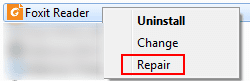
I had an experience recently where my foxit icon wouldn't work, it showed as normal but it wouldn't open the program or individual .pdf files, here's what I did to fix it.
If that doesn't work there are a few other avenues:
Questions? Post back.
I had an experience recently where my foxit icon wouldn't work, it showed as normal but it wouldn't open the program or individual .pdf files, here's what I did to fix it.
- Go to Control Panel\All Control Panel Items\Programs and Features, wait till it populates.
- Look up your Corel install and right click on it.
- Hopefully you will see a repair option like I had for foxit.
- If you do have the option make sure every thing else is closed on your machine, then click on it.
- Allow your machine to run through the repair process, mine took about 7' including a restart.
- Check to see if your icon reappeared.
If that doesn't work there are a few other avenues:
- If you have the corel disk you can try repairing it through the disk; Windows can only work with what's in the program file, if there is a corrupt file it can't repair, but with the original disk or download it has a better chance. Open the D/L or place the disk into your optical drive and open the disk, somewhere there at the very beginning you might see a window asking the same options as shown in my pix, choose the repair option and let it run. Just in case, save this for option 3 below.
- A complete uninstall then reinstall Corel; You didn't mention which corel version you have but this covers suite x3 to x5. When you're on the corel site use their upper right search bar to search further. If it comes to this don't worry about your work, they will still be there through the process and re-associate themselves when the install is finished.
Questions? Post back.
My Computer
- Computer type
- PC/Desktop
- Computer Manufacturer/Model Number
- Gateway DX4831-01e (Mid-Tower Desktop)
- OS
- Originally Win 7 Hm Prem x64 Ver 6.1.7600 Build 7601-SP1 | Upgraded to Windows 10 December 14, 2019
- CPU
- Intel i3 530 2.93GHz, 2933MHz 2 Cores 4 Logical Processors
- Motherboard
- Gateway H57M01 133 megahertz
- Memory
- 6GB of 1,333MHz DDR3 SDRAM
- Graphics Card(s)
- 32MB Intel Graphics Media Accelerator HD IGChip
- Sound Card
- Realtek High Definition Audio
- Monitor(s) Displays
- Gateway HX2000 20inch TFT active matrix TN
- Screen Resolution
- 1600 x 900 x 59 hertz
- Hard Drives
- WDC WD10EADS-00M2B0 [HDD] (1000.20 GB) -- drive 0,
HL-DT-ST DVDRAM GH41N [CD-ROM dr]
Four card readers, and Four USB 2.0
- PSU
- 300watts.
- Case
- Mid-Tower Desktop
- Cooling
- Stock from Gateway
- Keyboard
- Natural Ergonomic Keyboard 4000, see Other Info
- Mouse
- Orig. Gateway wore out now using Insignia USB wired optical
- Internet Speed
- Vz FIOS 10ms png 57.64Mbps down 65.53Mbps up Speedtest.org
- Antivirus
- Zamana Anti-logger with Anti-malware, MSE, Windows Firewall,
- Browser
- IE11.0.9600.19399-Upd ver11.0.135, Firefox 68.0.1 x64
- Other Info
- System Specs by Belarc.
BIOS: American Megatrends Inc. P01-A0 11/17/2009
Replaced the MS 'Natural' Standard PS/2 Enhanced 101-102 Keyboard with a new Natural Ergonomic Keyboard 4000 on August 1st 2014.
Canon Pixma MG3222 Printer.
Updated to IE11 on 12102015 | Fios Quantum Router g1100
Additional AV: SpywareBlaster, manual Mbam, SAS

If the icon has just disappeared from it's normal location (start Menu or Desktop Etc), you need to open the file explorer and locate the application .EXE file, It will normally be in either program files or program files (x86) but easiest to search for coreldraw.exe (going from memory so you may need to try to find it manually, Check the folders above for a corel folder and then look for a suitable exe file.
Once you have located the file right click the file and drag the file to the desktop - when you release the mouse button the will be an option shown to Copy, Move, Or Create Shortcut, choose the last option and clicking the shortcut will start the EXE file for you
Once you have located the file right click the file and drag the file to the desktop - when you release the mouse button the will be an option shown to Copy, Move, Or Create Shortcut, choose the last option and clicking the shortcut will start the EXE file for you
My Computers
System One System Two
-
- Computer type
- PC/Desktop
- Computer Manufacturer/Model Number
- ChillBlast - Custom to my design
- OS
- Windows 11 Pro x64 [Latest Release and Release Preview]
- CPU
- Ryzen 9 5950X, 3.8 - 5.2 MHz
- Motherboard
- Asus Prime X570-Pro
- Memory
- 64GB [2 x 32GB] DDR4 3200MHz
- Graphics Card(s)
- 4GB NVIDIA GEFORCE GTX 1650 Ti
- Sound Card
- On-board SPDIF to 5.1 System + HDMI [5.1 system]
- Monitor(s) Displays
- 32" UHD 32 Bit HDR Monitor + 43" UHD 4K 32Bit HDR TV
- Screen Resolution
- 2 x 3840 x 2160 @60Hz
- Hard Drives
- 1TB M2 SSD OS, 500GB Fast Access SSD, 2 x 8TB Data + Various Externals from 1TB to 4TB, 10TB NAS
- PSU
- NZXT C750 80 PLUS Gold 750W Modular PSU
- Case
- Workstation Case [Matt Black]
- Cooling
- NZXT Kraken X63 280mm CPU Cooler +2x Quiet Case fans
- Keyboard
- Logitech Wireless MX Keys & K400 + others
- Mouse
- Logitech Wireless MX Master 3S
- Internet Speed
- 920 MB Down 50 MB Up
- Antivirus
- BitDefender Total Security Pro
- Browser
- Chrome (always run latest Non-Beta)
- Other Info
- Also run ...
Laptop - Quad 8GB - Windows 10 Pro x64
Nexus 7 Android tablet x2
Samsung 10.2" tablet
Blackview TAB 8 4G Android Tablet c/w Keyboard
Wacom Intuos Pro Medium Pen Pad
Wacom Intuos Pro Small Pen Pad
Wacom Expresskeys Remote
Loopdeck+ Graphics Controller
Shuttle Pro v2 Control
-
- Computer type
- Laptop
- System Manufacturer/Model Number
- Dell XPS 17 10750H
- OS
- Windows 11 Pro x64 Latest RP
- CPU
- Intel I7 10750H 5.0GHz
- Motherboard
- Dell XPS
- Memory
- 32GB [2x16GB] DDR4 2933 MHz
- Graphics Card(s)
- nVidia GTX1650Ti 4 GB GDDR6
- Sound Card
- Stock [Realtek] 4 Speaker
- Monitor(s) Displays
- 17" IPS UHD+ Infinity Edge Touchscreen
- Screen Resolution
- 3840 x 2400
- Hard Drives
- 2TB M2 NVMe, 4TB External + various 500GB & 1TB External NVMe (also have access to spinner HDD from
- PSU
- Stock
- Case
- Stock XPS Aluminium & Carbon Fibre
- Cooling
- Stock - Active Fan Control
- Keyboard
- Backlit + Various Logitech
- Mouse
- Stock Track Pad + Logitech MX Trackball
- Internet Speed
- 72 MB Down 18MB Up
- Browser
- Chrome
- Other Info
- Also run ...
Laptop - Quad 8GB - Windows 10 Pro x64
Nexus 7 Android tablet x2
10.2" tablet
Sony Z3 Android Smartphone
Wacom Intuos Pro Medium Pen Pad
Wacom Intuos Pro Small Pen Pad
Wacom Expresskeys Remote
Loopdeck+ Graphics Controller
Shuttle Pro v2 Control Pad
10TB NAS
- Local time
- 4:12 PM
- Messages
- 5,599
Nice Nigel, that was one of the other avenues that I had in mind but it didn't come to me when I posted. Memory's not what it used to be. 
My Computer
- Computer type
- PC/Desktop
- Computer Manufacturer/Model Number
- Gateway DX4831-01e (Mid-Tower Desktop)
- OS
- Originally Win 7 Hm Prem x64 Ver 6.1.7600 Build 7601-SP1 | Upgraded to Windows 10 December 14, 2019
- CPU
- Intel i3 530 2.93GHz, 2933MHz 2 Cores 4 Logical Processors
- Motherboard
- Gateway H57M01 133 megahertz
- Memory
- 6GB of 1,333MHz DDR3 SDRAM
- Graphics Card(s)
- 32MB Intel Graphics Media Accelerator HD IGChip
- Sound Card
- Realtek High Definition Audio
- Monitor(s) Displays
- Gateway HX2000 20inch TFT active matrix TN
- Screen Resolution
- 1600 x 900 x 59 hertz
- Hard Drives
- WDC WD10EADS-00M2B0 [HDD] (1000.20 GB) -- drive 0,
HL-DT-ST DVDRAM GH41N [CD-ROM dr]
Four card readers, and Four USB 2.0
- PSU
- 300watts.
- Case
- Mid-Tower Desktop
- Cooling
- Stock from Gateway
- Keyboard
- Natural Ergonomic Keyboard 4000, see Other Info
- Mouse
- Orig. Gateway wore out now using Insignia USB wired optical
- Internet Speed
- Vz FIOS 10ms png 57.64Mbps down 65.53Mbps up Speedtest.org
- Antivirus
- Zamana Anti-logger with Anti-malware, MSE, Windows Firewall,
- Browser
- IE11.0.9600.19399-Upd ver11.0.135, Firefox 68.0.1 x64
- Other Info
- System Specs by Belarc.
BIOS: American Megatrends Inc. P01-A0 11/17/2009
Replaced the MS 'Natural' Standard PS/2 Enhanced 101-102 Keyboard with a new Natural Ergonomic Keyboard 4000 on August 1st 2014.
Canon Pixma MG3222 Printer.
Updated to IE11 on 12102015 | Fios Quantum Router g1100
Additional AV: SpywareBlaster, manual Mbam, SAS