Corrupt application windows

nerdstampede

New member
Local time
6:29 PM
Messages
10
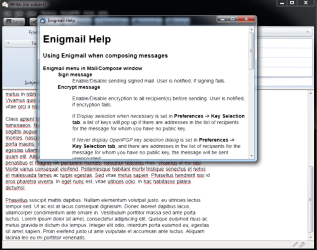
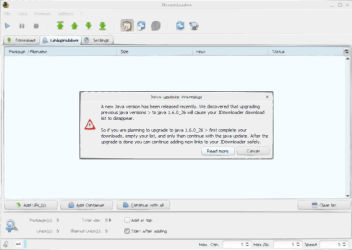
Seeing some strange behaviour from multiple applications. Interacting with them gradually results in the window becoming corrupted.

At first it was just JDownloader, but now Thunderbird is doing it too (after a 3->5 upgrade). What is interesting is that any child window or dialog inherits the corruption, even on a different LCD screen (I have 2).

I thought it might be a video card issue at first, but only these 2 applications are affected.

Another interesting piece - if I run the 64bit JDownloader binary, it does not get corrupted, but the 32bit one does.

Compatibility mode doesn't seem to make a difference in either application.

This sound familiar to anyone? I'm at my wits' end. See attached screenshot for an example.
 

Attachments
  • corrupt-window.png
    corrupt-window.png
    40.2 KB · Views: 66
Last edited:

My Computer

OS
Windows 7 Ultimate x64
Welcome to Windows Seven Forums.

I think your computer has been hit by a virus.

Download Malwarebytes and run a full scan in Safe Mode.
 

My Computer

Computer Manufacturer/Model Number
HP Pavilion Elite 495UK
OS
Windows 7 Ultimate SP1 64-Bit
CPU
Intel Core i7 870 @ 2.93GHz
Motherboard
MSI 2A9C (CPU1)
Memory
8Gb Dual-Channel DDR3 @ 664MHz
Graphics Card(s)
nVidia GeForce GTX 460 1024MB dedicated RAM
Sound Card
Realtek HD Audio
Monitor(s) Displays
HP2310i
Screen Resolution
1920 x 1080
Hard Drives
1x1954GB Hitachi HDS22020ALA 330 (RAID), 1x1954GB Hitachi External for backup and storage
PSU
460W
Case
HP Elite
Cooling
Air cooled
Keyboard
Logitech K750 solar-powered keyboard
Mouse
Logitech Wireless M180 mouse
Internet Speed
2Mb
Other Info
Pure Avanti Flow Internet Radio with iPod Dock, 64Gb iPod, HP USB Speakers, Sony MDR-V500 Headphones, Sony Vaio F-Series Laptop
I wish it was a virus, I could easily do something about that :geek: My Uni has a symantec site license, so I've been running with that for a while.

Any other ideas? It really seems to be something related to 32bit applications - I'm pretty sure Thunderbird 5 is a 32bit binary, as is the JDownloader binary that gets corrupted. The 64bit JDownloader exe does not exhibit this behaviour.
 

My Computer

OS
Windows 7 Ultimate x64
You'll need to seek help in a Java forum for that one.
 

My Computer

Computer Manufacturer/Model Number
Custom
OS
Windows 7 Ultimate RTM (Technet)
CPU
3.00 gigahertz Intel Core2 Duo E8400
Motherboard
ASUSTeK Computer INC. P5K/EPU Rev 1.xx
Memory
4GB
Graphics Card(s)
ATI Radeon X1950 Pro
Sound Card
Built in HD Audio
Monitor(s) Displays
22" Gateway LCD
Screen Resolution
1920 x 1200
Hard Drives
ST3160023A [Hard drive] (160.04 GB) -- drive 0, rev 8.01, ST3500630AS [Hard drive] (500.11 GB) -- drive 2, rev 3.AAK
ST3500630AS [Hard drive] (500.11 GB) -- drive 1, rev 3.AAK
Keyboard
Logitech G11
Mouse
Microsoft Wireless Laser Mouse 5000
Internet Speed
13.44 Mbps
If only people would run native programs, I personally hate the Java runtime, its really slow and buggy for applications, even though in theory it is great (works on MANY OS', Windows, Mac OS X, Linux, Solaris, Android, Symbian ect.).
 

My Computer

Computer Manufacturer/Model Number
HP Pavilion dv6-2020ev
OS
Ubuntu 12.10
CPU
Intel Core i7 720QM
Motherboard
Its a HP secret...
Memory
4GB RAM
Graphics Card(s)
NVIDIA GeForce 230M
Sound Card
IDT
Screen Resolution
1366x768
Hard Drives
500 GB
Mouse
HP
Internet Speed
4 Mbps
Unfortunately this is occurring with Thunderbird as well. JDownloader is just one example.

It isn't Java, since I uninstalled both 32 and 64bit JREs and Thunderbird still exhibits this behaviour.
 

My Computer

OS
Windows 7 Ultimate x64
Another screenshot

Here's Thunderbird doing the same thing. Unless it is shipping with an embedded jre/jdk, this isn't specifically a java isssue.
 

Attachments

  • corrupt-tbird.png
    corrupt-tbird.png
    94.7 KB · Views: 14
Last edited:

My Computer

OS
Windows 7 Ultimate x64
Just run a MalwareBytes scan. MalwareBytes is a very powerful AV on-demand tool compared to other AV's.
 

My Computer

Computer Manufacturer/Model Number
HP Pavilion dv6-2020ev
OS
Ubuntu 12.10
CPU
Intel Core i7 720QM
Motherboard
Its a HP secret...
Memory
4GB RAM
Graphics Card(s)
NVIDIA GeForce 230M
Sound Card
IDT
Screen Resolution
1366x768
Hard Drives
500 GB
Mouse
HP
Internet Speed
4 Mbps
Nothing from any Malwarebytes scanner - I even booted up Trinity rescue kit and ran those AV scanners. Nothing.

Again, this seems to be a 64bit Windows vs. 32bit application issue.
 

My Computer

OS
Windows 7 Ultimate x64
Are you using an OEM copy of Windows 7?
 

My Computer

Computer Manufacturer/Model Number
HP Pavilion dv6-2020ev
OS
Ubuntu 12.10
CPU
Intel Core i7 720QM
Motherboard
Its a HP secret...
Memory
4GB RAM
Graphics Card(s)
NVIDIA GeForce 230M
Sound Card
IDT
Screen Resolution
1366x768
Hard Drives
500 GB
Mouse
HP
Internet Speed
4 Mbps
If only people would run native programs, I personally hate the Java runtime, its really slow and buggy for applications, even though in theory it is great (works on MANY OS', Windows, Mac OS X, Linux, Solaris, Android, Symbian ect.).

If only MicroSoft hadn't manufactured the problem by fighting with Sun after Sun invented java. :geek:

(in the interests of historical accuracy)
 

My Computer

Computer Manufacturer/Model Number
self built
OS
W7 64bit
CPU
AMD Phenom II X4 975 Black Edition @3.9GHz
Motherboard
ASUS Crosshair IV Formula AMD 890FX AM3
Memory
8GB Corsair Vengeance 8GB PC15000 DDR3 1866MHz CL9
Graphics Card(s)
ASUS ENGTX 460 1GB DDR5
Sound Card
...On MB nvidia
Monitor(s) Displays
..Samsung T260
Screen Resolution
1440 x 900
Hard Drives
2x WD Caviar 320GB SATA-3G HD 7200/16MB/SATA-6G Raid 1
PSU
750 W
Case
minitower, it's got a cool spider design on the front
Cooling
all the fans i can cram in, water cooled cpu
Keyboard
walmart
Mouse
Kensington Expert Mouse "gods own trackball"
Internet Speed
30 Mb/s
Yes OEM.

Check this out - Chome 12.0.742.122 is now exhibiting the same behaviour, but only in a single tab. On Apple's site of all places.
 

My Computer

OS
Windows 7 Ultimate x64
Its the Windows 7 installation causing these issues... Clean re-install from a retail copy of Windows 7 is needed...

Slasher
 

My Computer

Computer Manufacturer/Model Number
HP Pavilion dv6-2020ev
OS
Ubuntu 12.10
CPU
Intel Core i7 720QM
Motherboard
Its a HP secret...
Memory
4GB RAM
Graphics Card(s)
NVIDIA GeForce 230M
Sound Card
IDT
Screen Resolution
1366x768
Hard Drives
500 GB
Mouse
HP
Internet Speed
4 Mbps
I'm more interested in finding out what the underlying issue is that is causing this problem at this point. A reinstall, while painless, does not address the root cause and there's no guarantee the issue won't reoccur.

I'm not sure how to debug this issue further - nothing in the event log indicates at problem at all, there are 0 relevant entries in the last 24 hours, and yet I've seen it happen every time i start any of the applications noted.
 

My Computer

OS
Windows 7 Ultimate x64
Well, after a clean re-install, these apps should not behave like this. While installing things one by one, after anything you change on the system, test to see if you get the problem on these apps.

Slasher
 

My Computer

Computer Manufacturer/Model Number
HP Pavilion dv6-2020ev
OS
Ubuntu 12.10
CPU
Intel Core i7 720QM
Motherboard
Its a HP secret...
Memory
4GB RAM
Graphics Card(s)
NVIDIA GeForce 230M
Sound Card
IDT
Screen Resolution
1366x768
Hard Drives
500 GB
Mouse
HP
Internet Speed
4 Mbps
I really want to figure out the root cause. This thread is in the top 5 search results for 'corrupt application windows' on Google. Respectfully, a reinstall is just not happening - there has to be a reason for this, and for anyone coming here looking for a solution, I'm certain a reinstall is 99% out of the question and is beyond their abilities.

If you can point me at somewhere to further debug this, I'd very much like to help everyone else out. Just not sure where to look beyond the event log.

As a start at debugging:
  • Using any compatibility mode doesn't help
  • Nor does uninstalling SP1
  • Nor does uninstalling .NET4
 

My Computer

OS
Windows 7 Ultimate x64
As I said in my previous post, if you would like to 'debug' this issue, you are going to have to re-install Windows yourself (clean install). Now obviously, the problem won't return from a clean install without any changes to the computer (unless the hardware is giving issues). So, after the clean re-install, install all the apps you have one by one, each time a new program is installed, check if you get this issue or not. Make all changes one by one to your computer, restoring it bit by bit to its previous state (before clean re-install). Eventually, you should get the issue again (if you are installing the same things you used to have on your computer). If you get the issue, you will know which program or thing is causing this problem. Then you can stop using the thing that gives you the problem, and get on with your computing life. If you manage to find the problem, you will have successfully 'debugged' it. This is why it is necessary to do a clean re-install. If you don't clean re-install, I cannot help you and you most likely won't be able to solve your problem.

Slasher
 

My Computer

Computer Manufacturer/Model Number
HP Pavilion dv6-2020ev
OS
Ubuntu 12.10
CPU
Intel Core i7 720QM
Motherboard
Its a HP secret...
Memory
4GB RAM
Graphics Card(s)
NVIDIA GeForce 230M
Sound Card
IDT
Screen Resolution
1366x768
Hard Drives
500 GB
Mouse
HP
Internet Speed
4 Mbps
Fascinating. I totally get the 'forget about it and move on' response, loud and clear there. But being new to Windows (experimenting with it, been using Linux since the late 90's), I just cannot comprehend how trivially people approach doing a reinstall of the entire OS.

There is plainly a flaw somewhere in Windows 7, else this behaviour would be limited to a single application. I would like to solve the problem so that others who might encounter this issue will benefit.

Again, Chrome tabs, Thunderbird, and JDownloader are misbehaving - all 3 are running 32bit code on a 64bit system. There is a commonality, and a specific portion of the OS that I am sure is possible to debug and glean more information.

Does anyone have any ideas as to where I should look?
 

My Computer

OS
Windows 7 Ultimate x64
Back
Top