Solved Corrupt or missing system files

AutumnBreeze

New member
Member
Local time
7:33 PM
Messages
48
I have run sfc /scannow, and it found problems with some of my system files but wasn't able to fix all of them.

I've had a look at the CBS log but I’m not tech savvy enough to fully understand what's going on. Would somebody here be able to have a look at the log and let me know which system files are missing / corrupt and where I can obtain good copies of these files to replace them on my system?

I have placed the CBS log file and a text file containing only the SR records from the log into a shared folder on my Google Drive (link below):

Shared Files - Google Drive

I would greatly appreciate your help.

TIA
 

My Computer

Computer type
Laptop
Computer Manufacturer/Model Number
HP
OS
Windows 7 Professional SP1 64 bit
CPU
Intel(R) Core(TM) i7-3540M CPU @ 3.00 GHz
Motherboard
HP EliteBook 8770w
Memory
16.0 GB
Graphics Card(s)
AMD FirePro M4000
Hard Drives
SAMSUNG MZ7PA256HMDR-010H1 ATA
WDC WD7500BPKT-75PK4T0 ATA
Browser
Google Chrome
Hi AutumnBreeze,

Welcome to Sevenforums!

Would you please download and run SURT Microsoft System Update Readiness Tool x64 it will provide a more detailed report as to the missing/corrupt folders/files.
This tool is from my OneDrive, AutoSURT64.exe. I automated it to run the enclosed SURT and place the CBS Folder on your Desktop with the CheckSUR.log included.
You may run either as you wish. CheckSUR.log in it's original location, CBS folder is temporary and will disappear shortly after running SURT.
 

My Computer

Computer type
PC/Desktop
Computer Manufacturer/Model Number
HP Desktop & Compaq Laptop
OS
Win 10 x64, Linux Lite, Win 7 x64, BlackArch, & Kali
Hard Drives
Samsung 850 Pro 256Gb,
Hitachi HDD 1Tb,
Crucial MX SSD 250Gb
Segate 3Tb USB 3.0 Ext. Backup HDD
Internet Speed
150Mbps dn, 20Mbps up
Antivirus
Avast Free, Malwarebytes Anti-Exploit & Anti-Ransomware
Browser
Firefox, Chrome, Opera, & VPN

My Computer

Computer type
PC/Desktop
Computer Manufacturer/Model Number
medionl/Aspire 6930G/acer x55a
OS
W7 home premium 32bit/W7HP 64bit/w10 tp insider ring
CPU
E5300 dual core
Motherboard
medion MS7366
Memory
3gb
Graphics Card(s)
Nvidia Geforce 7100 Nforce 630i
Monitor(s) Displays
avixc
Internet Speed
n (isp resticted to 72)
Antivirus
mse/pands
Browser
palemoon
Other Info
Belkin Fd7050 n USB using Railink RT2870 drivers, more upto date
haha speedy
 

My Computer

Computer type
PC/Desktop
Computer Manufacturer/Model Number
medionl/Aspire 6930G/acer x55a
OS
W7 home premium 32bit/W7HP 64bit/w10 tp insider ring
CPU
E5300 dual core
Motherboard
medion MS7366
Memory
3gb
Graphics Card(s)
Nvidia Geforce 7100 Nforce 630i
Monitor(s) Displays
avixc
Internet Speed
n (isp resticted to 72)
Antivirus
mse/pands
Browser
palemoon
Other Info
Belkin Fd7050 n USB using Railink RT2870 drivers, more upto date

My Computer

Computer type
PC/Desktop
Computer Manufacturer/Model Number
HP Desktop & Compaq Laptop
OS
Win 10 x64, Linux Lite, Win 7 x64, BlackArch, & Kali
Hard Drives
Samsung 850 Pro 256Gb,
Hitachi HDD 1Tb,
Crucial MX SSD 250Gb
Segate 3Tb USB 3.0 Ext. Backup HDD
Internet Speed
150Mbps dn, 20Mbps up
Antivirus
Avast Free, Malwarebytes Anti-Exploit & Anti-Ransomware
Browser
Firefox, Chrome, Opera, & VPN
Thank you guys.

I have already run the SURT tool a couple of weeks ago, after which I also ran sfc /scannow several times, rebooting in between, and the problem is still there.

I have run the SURT tool again just now, and placed the SURT files into my shared Google Drive folder.

Shared Files - Google Drive

I also did some more googling, and it looks like I have a corrupt or missing manifest file for .NET. Would it be possible to just uninstall / reinstall .NET? I also found a .NET repair tool on the Microsoft website, but it seems to only apply to .NET versions 6 and above, and I have version 4.
 

My Computer

Computer type
Laptop
Computer Manufacturer/Model Number
HP
OS
Windows 7 Professional SP1 64 bit
CPU
Intel(R) Core(TM) i7-3540M CPU @ 3.00 GHz
Motherboard
HP EliteBook 8770w
Memory
16.0 GB
Graphics Card(s)
AMD FirePro M4000
Hard Drives
SAMSUNG MZ7PA256HMDR-010H1 ATA
WDC WD7500BPKT-75PK4T0 ATA
Browser
Google Chrome
AutumnBreeze

Code:
Summary: Seconds executed: 1958  Found 1 errors   CSI Manifest All Zeros Total count: 1  Unavailable repair files:     winsxs\manifests\msil_mscorlib.resources_b77a5c561934e089_6.1.7601.24553_en-us_4fbb934a8f6ed045.manifest
Here is your missing manifest from my OneDrive

CheckSUR.zip

Please unzip/decompress file. Place CheckSUR folder in C:\Windows\Temp\ and SURT Again, peruse CheckSUR.log, it should report no errors and (fix) preceding the error.

SURT will find the folder, take permission from Trusted Installer, replace the winsxs folder and reestablish permission to Trusted Installer.

Check your PMs (private messages)

:D

Snick
 
Last edited:

My Computer

Computer type
PC/Desktop
Computer Manufacturer/Model Number
HP Desktop & Compaq Laptop
OS
Win 10 x64, Linux Lite, Win 7 x64, BlackArch, & Kali
Hard Drives
Samsung 850 Pro 256Gb,
Hitachi HDD 1Tb,
Crucial MX SSD 250Gb
Segate 3Tb USB 3.0 Ext. Backup HDD
Internet Speed
150Mbps dn, 20Mbps up
Antivirus
Avast Free, Malwarebytes Anti-Exploit & Anti-Ransomware
Browser
Firefox, Chrome, Opera, & VPN
AutumnBreeze

Code:
Summary: Seconds executed: 1958  Found 1 errors   CSI Manifest All Zeros Total count: 1  Unavailable repair files:     winsxs\manifests\msil_mscorlib.resources_b77a5c561934e089_6.1.7601.24553_en-us_4fbb934a8f6ed045.manifest
Here is your missing manifest from my OneDrive

CheckSUR.zip

Please unzip/decompress file. Place CheckSUR folder in C:\Windows\Temp\ and SURT Again, peruse CheckSUR.log, it should report no errors and (fix) preceding the error.

SURT will find the folder, take permission from Trusted Installer, replace the winsxs folder and reestablish permission to Trusted Installer.

Check your PMs (private messages)

:D

Snick

It worked! Thank you very much!

Several weeks of struggle. It's all fixed now :) So relieved.
 

My Computer

Computer type
Laptop
Computer Manufacturer/Model Number
HP
OS
Windows 7 Professional SP1 64 bit
CPU
Intel(R) Core(TM) i7-3540M CPU @ 3.00 GHz
Motherboard
HP EliteBook 8770w
Memory
16.0 GB
Graphics Card(s)
AMD FirePro M4000
Hard Drives
SAMSUNG MZ7PA256HMDR-010H1 ATA
WDC WD7500BPKT-75PK4T0 ATA
Browser
Google Chrome

My Computer

Computer type
PC/Desktop
OS
Windows 7 Ultimate x64
The reason why you may have corrupted files in the first place may be due to a hard drive issue. And if it is a hard drive issue, no amount of fixing will solve the problem as it will manifest itself again. What I would do is find your hard drive manufacture's hard drive checking tool and run that. For a basic test try CrystalDiskInfo or HDTune. There's also HD Sentinal.

CrystalDiskInfo – Crystal Dew World

HD Tune website

Hard Disk Sentinel - HDD health and temperature monitoring

Was only one winsxs manifest, all zeros, that is not necessarily a drive beginning to fail. Usually a corrupt KB install.

Your suggestion/recommendation certainly won't hurt. I agree!
 

My Computer

Computer type
PC/Desktop
Computer Manufacturer/Model Number
HP Desktop & Compaq Laptop
OS
Win 10 x64, Linux Lite, Win 7 x64, BlackArch, & Kali
Hard Drives
Samsung 850 Pro 256Gb,
Hitachi HDD 1Tb,
Crucial MX SSD 250Gb
Segate 3Tb USB 3.0 Ext. Backup HDD
Internet Speed
150Mbps dn, 20Mbps up
Antivirus
Avast Free, Malwarebytes Anti-Exploit & Anti-Ransomware
Browser
Firefox, Chrome, Opera, & VPN
I was just going by what was stated here in the OP verbatim.

I have run sfc /scannow, and it found problems with some of my system files but wasn't able to fix all of them.
"Wasn't able to fix all of them" to me sounded like sfc /scan now had detected more than one corrupt system file.
 

My Computer

Computer type
PC/Desktop
OS
Windows 7 Ultimate x64
I actually tried to edit a manifest file once. What a PITA! LOL In the end, found out I couldn't do it and had to resort to a system restore point which I rarely ever do.
 

My Computer

Computer type
PC/Desktop
OS
Windows 7 Ultimate x64
The reason why you may have corrupted files in the first place may be due to a hard drive issue. And if it is a hard drive issue, no amount of fixing will solve the problem as it will manifest itself again. What I would do is find your hard drive manufacture's hard drive checking tool and run that. For a basic test try CrystalDiskInfo or HDTune. There's also HD Sentinal.

CrystalDiskInfo – Crystal Dew World

HD Tune website

Hard Disk Sentinel - HDD health and temperature monitoring

Thank you, Simpilot

The first thing I did was check for bad segments using a Microsoft utility. Didn't find any. My system drive is an SSD, so hopefully will last me a while. It was most likely a botched install.

However, your suggestions are appreciated. I will save those tools for future use.
 

My Computer

Computer type
Laptop
Computer Manufacturer/Model Number
HP
OS
Windows 7 Professional SP1 64 bit
CPU
Intel(R) Core(TM) i7-3540M CPU @ 3.00 GHz
Motherboard
HP EliteBook 8770w
Memory
16.0 GB
Graphics Card(s)
AMD FirePro M4000
Hard Drives
SAMSUNG MZ7PA256HMDR-010H1 ATA
WDC WD7500BPKT-75PK4T0 ATA
Browser
Google Chrome
I was just going by what was stated here in the OP verbatim.

"Wasn't able to fix all of them" to me sounded like sfc /scan now had detected more than one corrupt system file.

No, sfc just doesn't make a distinction in its messaging between one and many. I have run it again after I did the fix, just to be sure. No errors found.
 

My Computer

Computer type
Laptop
Computer Manufacturer/Model Number
HP
OS
Windows 7 Professional SP1 64 bit
CPU
Intel(R) Core(TM) i7-3540M CPU @ 3.00 GHz
Motherboard
HP EliteBook 8770w
Memory
16.0 GB
Graphics Card(s)
AMD FirePro M4000
Hard Drives
SAMSUNG MZ7PA256HMDR-010H1 ATA
WDC WD7500BPKT-75PK4T0 ATA
Browser
Google Chrome
AutumnBreeze
Did you read your PM I sent you?
The links explain SURT somewhat!

Again
Sevenforums Troubleshooting with System Update readiness Tool ...
Sevenforums System Update Readiness Tool - CheckSur.log File Analyzis ...
Microsoft's How to fix errors found in the CheckSUR.log


:D;)

:thumbsup:

After replacing the corrupt folder/files in winsxs the system now has the file needed to correct the error. Thus, when you run sfc /scannow, you will see no errors.
If you opened the CheckSUR.log, and peruse, you will see the file with an (f), if it has been fixed it will be followed by (Fix), The end of the report will not have any missing/corrupt files listed in the summary!

You cannot copy and paste system files or files to winsxs due to security permissions. Trusted installer has control of those files. Simply taking control with a 3rd party tool, replacing the missing/corrupt files and then using that tool to reestablish the control (supposedly) to Trusted Installer is not recommended. That is part of the function of SURT. SFCFix.exe by Niemiro also performs that function with a script file (as well as other functions) added to a zip/compressed folder. You place the payload and script within the zip. You drag the zip onto SFCFix.exe and your directive in the script is executed by SFCFix.exe.
 

My Computer

Computer type
PC/Desktop
Computer Manufacturer/Model Number
HP Desktop & Compaq Laptop
OS
Win 10 x64, Linux Lite, Win 7 x64, BlackArch, & Kali
Hard Drives
Samsung 850 Pro 256Gb,
Hitachi HDD 1Tb,
Crucial MX SSD 250Gb
Segate 3Tb USB 3.0 Ext. Backup HDD
Internet Speed
150Mbps dn, 20Mbps up
Antivirus
Avast Free, Malwarebytes Anti-Exploit & Anti-Ransomware
Browser
Firefox, Chrome, Opera, & VPN
AutumnBreeze
Did you read your PM I sent you?
The links explain SURT somewhat!

Again
Sevenforums Troubleshooting with System Update readiness Tool ...
Sevenforums System Update Readiness Tool - CheckSur.log File Analyzis ...
Microsoft's How to fix errors found in the CheckSUR.log


:D;)

:thumbsup:

After replacing the corrupt folder/files in winsxs the system now has the file needed to correct the error. Thus, when you run sfc /scannow, you will see no errors.
If you opened the CheckSUR.log, and peruse, you will see the file with an (f), if it has been fixed it will be followed by (Fix), The end of the report will not have any missing/corrupt files listed in the summary!

You cannot copy and paste system files or files to winsxs due to security permissions. Trusted installer has control of those files. Simply taking control with a 3rd party tool, replacing the missing/corrupt files and then using that tool to reestablish the control (supposedly) to Trusted Installer is not recommended. That is part of the function of SURT. SFCFix.exe by Niemiro also performs that function with a script file (as well as other functions) added to a zip/compressed folder. You place the payload and script within the zip. You drag the zip onto SFCFix.exe and your directive in the script is executed by SFCFix.exe.

Snick, yes I read your message. But haven't figured out how to reply via PM. ))

I followed your original instructions. Looking at the CheckSUR log, it said it found and fixed one error. So all's well.

Thank you very much. You are a savior! ))
 

My Computer

Computer type
Laptop
Computer Manufacturer/Model Number
HP
OS
Windows 7 Professional SP1 64 bit
CPU
Intel(R) Core(TM) i7-3540M CPU @ 3.00 GHz
Motherboard
HP EliteBook 8770w
Memory
16.0 GB
Graphics Card(s)
AMD FirePro M4000
Hard Drives
SAMSUNG MZ7PA256HMDR-010H1 ATA
WDC WD7500BPKT-75PK4T0 ATA
Browser
Google Chrome
AutumnBreeze

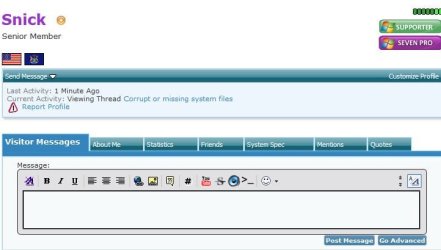
A PM can be accessed via clicking on a Username. You will be directed to that individuals Profile page, where you have options above the text box for send message, private message, and other tab functions!

Capture.JPG
 

My Computer

Computer type
PC/Desktop
Computer Manufacturer/Model Number
HP Desktop & Compaq Laptop
OS
Win 10 x64, Linux Lite, Win 7 x64, BlackArch, & Kali
Hard Drives
Samsung 850 Pro 256Gb,
Hitachi HDD 1Tb,
Crucial MX SSD 250Gb
Segate 3Tb USB 3.0 Ext. Backup HDD
Internet Speed
150Mbps dn, 20Mbps up
Antivirus
Avast Free, Malwarebytes Anti-Exploit & Anti-Ransomware
Browser
Firefox, Chrome, Opera, & VPN
Snick, I clicked 'Reply to Sender' under your PM, but couldn't find a button to send the message.

My eyesight is not very good. ))
 

My Computer

Computer type
Laptop
Computer Manufacturer/Model Number
HP
OS
Windows 7 Professional SP1 64 bit
CPU
Intel(R) Core(TM) i7-3540M CPU @ 3.00 GHz
Motherboard
HP EliteBook 8770w
Memory
16.0 GB
Graphics Card(s)
AMD FirePro M4000
Hard Drives
SAMSUNG MZ7PA256HMDR-010H1 ATA
WDC WD7500BPKT-75PK4T0 ATA
Browser
Google Chrome
Back
Top