
MyPCFails2Boot
New member
- Local time
- 5:23 AM
- Messages
- 1
let me preface this by saying I am so angry at microsoft's arrogance here. I am stuck in a world of catch 22s and need some help.
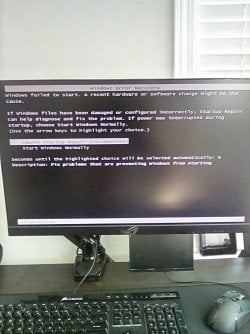
I recently added a hard drive to a old win 7 pc. specs are linked to account. It was a 500gb WD with another win7 installation. Im pretty sure this corrupted the OS. which is fine because I had to wipe both drives anyways. however now when I attempt to boot up I get this "windows error recovery" screen that prompts me to "start windows normally" or "launch startup repair" when I launch startup repair it loads for about 30 minutes then tells me that it failed to find any problems. I have tried startup repair 3 times. when I try to start normally the pc
so I need to reinstall Windows 7. I literally dont care about any data. issue is that I dont have a recovery CD and microsoft does not have an ISO or "usb stickable" download for recovery media. I also cannot find the recovery media anywhere online other than ebay where sellers are charging upwards of $30. I cannot access built in recovery tools because the entire os is corrupted. The bios is absolute crap and I am so frustrated. if anyone has anything that I can do that could fix this I would appreciate it.
I recently added a hard drive to a old win 7 pc. specs are linked to account. It was a 500gb WD with another win7 installation. Im pretty sure this corrupted the OS. which is fine because I had to wipe both drives anyways. however now when I attempt to boot up I get this "windows error recovery" screen that prompts me to "start windows normally" or "launch startup repair" when I launch startup repair it loads for about 30 minutes then tells me that it failed to find any problems. I have tried startup repair 3 times. when I try to start normally the pc
so I need to reinstall Windows 7. I literally dont care about any data. issue is that I dont have a recovery CD and microsoft does not have an ISO or "usb stickable" download for recovery media. I also cannot find the recovery media anywhere online other than ebay where sellers are charging upwards of $30. I cannot access built in recovery tools because the entire os is corrupted. The bios is absolute crap and I am so frustrated. if anyone has anything that I can do that could fix this I would appreciate it.
Attachments
My Computer
- Computer type
- PC/Desktop
- Computer Manufacturer/Model Number
- Asus
- OS
- Windows 7 Pro 64bit / Windows 10 Pro 64 bit / Raspbian OS
- CPU
- 3rd gen Core I5 S-series
- Motherboard
- some OEM board. ATX-ish
- Memory
- 16gb Balistix DDR3
- Graphics Card(s)
- Intel Integrated
- Hard Drives
- 1TB WD & 500gb WD. Both sata
- Browser
- Chrome


