
Hello all,
I need to reinstall Win 7 on my pc after my HD failed. I am thinking of using a SSD as the new primary drive.
Here are a few questions/doubts that I still have after doing a lot of research online:
1) From my understanding, the only way to reinstall the OS on a new disk without having to reinstall all the programs is through an image, is this correct?
Since, the other questions are about a possible way to get an image of my failed HD drive, I think a little background might be needed.
After the failure occurred, I was not able to boot into Windows anymore (nor normal, nor safe mode, nor last known good configuration). The only way I could access the hard drive was through the command prompt in the recovery environment, which allowed me to back up the contents of MY Documents. I was able to run chkdsk which showed no problems on my boot partition (C and a few problems on my Windows partition (D which ostensibly disappeared after running chkdsk a few times. However running sfc /scannow /offbootdir=c: /offwindir=d:\windows\ resulted in Windows Resource Protection found corrupt files but was unable to fix some of them.. The attached file sfc3.txt contains only the lines of CBS.log showing potential problems.
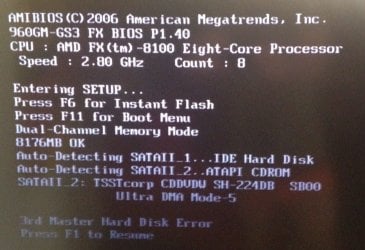
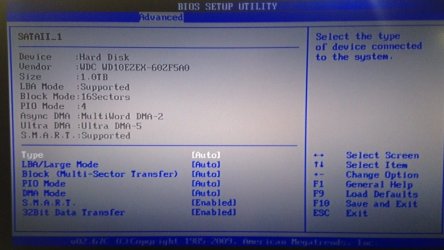
Unfortunately, I also decided to run the Western Digital HD analyzer Data Lifeguard Diagnostic for DOS whose Quick Test terminated with "Seek not complete Error/status code: 0108". After that test, I cannot see the HD anymore from the DOS prompt, both C: and D: are now non-existent drives in the recovery environment DOS prompt. During the boot (from a recovery DVD), I get a screen that says Auto-Detecting SATAII_1...IDE Hard Disk but further down 3rd Master Hard Disk Error. In the BIOS Setup Utility, I can see the Hard Disk in the Storage Configuration menu, but it completely disappeared from the Boot Devices menu.
Given this background, my questions are:
2) Is there any way that I can "force" DOS through command line tools to recognize my HD again? If I do so, I might be able to get a HD image through a third party tool like Macrium Reflect.
3) If 2 is not possible or the image is corrupted, and only a full new installation of Win7 is possible, is there anything else useful I can try to extract from the old HD before trashing it? (that is, besides the contents of My Documents, which I already saved).
4) In a full reinstallation of Win7, shall I use the Recovery Disk that I got with my computer from the OEM or is it better to use a downloaded standard Win7 .iso image burnt on a DVD? Would my product key work with that?
I know I am asking many questions, please redirect me to already existing material if necessary.
Thanks in advance
I need to reinstall Win 7 on my pc after my HD failed. I am thinking of using a SSD as the new primary drive.
Here are a few questions/doubts that I still have after doing a lot of research online:
1) From my understanding, the only way to reinstall the OS on a new disk without having to reinstall all the programs is through an image, is this correct?
Since, the other questions are about a possible way to get an image of my failed HD drive, I think a little background might be needed.
After the failure occurred, I was not able to boot into Windows anymore (nor normal, nor safe mode, nor last known good configuration). The only way I could access the hard drive was through the command prompt in the recovery environment, which allowed me to back up the contents of MY Documents. I was able to run chkdsk which showed no problems on my boot partition (C
and a few problems on my Windows partition (D which ostensibly disappeared after running chkdsk a few times. However running sfc /scannow /offbootdir=c: /offwindir=d:\windows\ resulted in Windows Resource Protection found corrupt files but was unable to fix some of them.. The attached file sfc3.txt contains only the lines of CBS.log showing potential problems. Unfortunately, I also decided to run the Western Digital HD analyzer Data Lifeguard Diagnostic for DOS whose Quick Test terminated with "Seek not complete Error/status code: 0108". After that test, I cannot see the HD anymore from the DOS prompt, both C: and D: are now non-existent drives in the recovery environment DOS prompt. During the boot (from a recovery DVD), I get a screen that says Auto-Detecting SATAII_1...IDE Hard Disk but further down 3rd Master Hard Disk Error. In the BIOS Setup Utility, I can see the Hard Disk in the Storage Configuration menu, but it completely disappeared from the Boot Devices menu.
Given this background, my questions are:
2) Is there any way that I can "force" DOS through command line tools to recognize my HD again? If I do so, I might be able to get a HD image through a third party tool like Macrium Reflect.
3) If 2 is not possible or the image is corrupted, and only a full new installation of Win7 is possible, is there anything else useful I can try to extract from the old HD before trashing it? (that is, besides the contents of My Documents, which I already saved).
4) In a full reinstallation of Win7, shall I use the Recovery Disk that I got with my computer from the OEM or is it better to use a downloaded standard Win7 .iso image burnt on a DVD? Would my product key work with that?
I know I am asking many questions, please redirect me to already existing material if necessary.
Thanks in advance
Attachments
Last edited:
My Computer
At a glance
Windows 7 Home Premium 64bit (ver 6.1.7601)AMD FX-4300 Quad Core 3.8GHz8GB DDR3 RAMNVIDIA GeForce GT720
- Computer type
- PC/Desktop
- Computer Manufacturer/Model Number
- CyberpowerPC Gamer Ultra GUA880
- OS
- Windows 7 Home Premium 64bit (ver 6.1.7601)
- CPU
- AMD FX-4300 Quad Core 3.8GHz
- Motherboard
- AMD 760G Chipset
- Memory
- 8GB DDR3 RAM
- Graphics Card(s)
- NVIDIA GeForce GT720
- Hard Drives
- 1 TB SATA III
- Antivirus
- Microsoft Security Essentials
- Browser
- Google Chrome


