Corrupted Bootloader on ASUS K55A - HI5014L cant dual boot.

eltranced

New member
Local time
11:30 AM
Messages
18
I have ASUS K55A - HI5014L laptop that came with UEFI win8 x64
I primarily use win7 x64, its setup as dual boot via (disabled EUFI and launch csm)


i've corrupted my dual-boot options by pressing multiple f1-f12 keys on start up, i couldnt boot anything (if i recall correctly it said it was missing something)

I was able to get into win7 with

bcdboot C:\Windows /l en-gb /s B: /f ALL from bootable usb

then i tried to reset bcd settings with EasyBCD software, which recreated 4 entires in bootloader, successfully

Code:
Microsoft Windows [Version 6.1.7600]
Copyright (c) 2009 Microsoft Corporation.  All rights reserved.


C:\Users\Administrator>bcdedit


Windows Boot Manager
--------------------
identifier              {bootmgr}
device                  boot
description             Windows Boot Manager
locale                  en-US
inherit                 {globalsettings}
default                 {default}
resumeobject            {1f8184a2-14de-11df-9734-f08c6d8c50b0}
displayorder            {default}
                        {aea50cdf-4ba3-11e3-b02d-08606e0fb7bc}
toolsdisplayorder       {memdiag}
timeout                 10
displaybootmenu         Yes


Windows Boot Loader
-------------------
identifier              {default}
device                  partition=C:
path                    \Windows\system32\winload.exe
description             7
locale                  en-US
osdevice                partition=C:
systemroot              \Windows


Windows Boot Loader
-------------------
identifier              {aea50cdf-4ba3-11e3-b02d-08606e0fb7bc}
device                  partition=D:
path                    \Windows\system32\winload.exe
description             8
locale                  en-US
osdevice                partition=D:
systemroot              \Windows

However
I'm still loading directly into Windows 7 without a menu poping up for 10 seconds .... as if
"bcdboot c:\Windows /l en-gb /s b: /f ALL" still preceding.

I've been reading to recreate bcd but they all refer to "c:\boot\bcd". I have same file structure only in system partition

A:\Boot\BCD

and there are other several BCD folder locations

A:\EFI\ASUS\BCD
A:\EFI\Microsoft\Boot\BCD

C:\EFI\Microsoft\Boot\BCD

Code:
DISKPART> list volume
Code:
Volume ###  Ltr  Label        Fs     Type        Size     Status     Info
  ----------  ---  -----------  -----  ----------  -------  ---------  --------
  Volume 0     A   SYSTEM       FAT32  Partition    300 MB  Healthy    System
  Volume 1     D   Win8           NTFS   Partition     93 GB  Healthy    Pagefile
  Volume 2     C   Win7             NTFS   Partition    351 GB  Healthy    Boot
  Volume 3     F   Restore      NTFS   Partition     20 GB  Healthy
  Volume 4         Recovery     NTFS   Partition    900 MB  Healthy    Hidden

BCD is new to me and Im struggling with the concept, step by step instructions, would be greatly appreciated


Should I re-enable EUFI ... then do bcdboot D:\Windows /l en-gb /s B: /f ALL from usb to boot into win8 then restore bcdedit with EasyBCD, then if i get start up options disable eufi again?
 

My Computer My Computer

At a glance

Win 7 Ultim x64
OS
Win 7 Ultim x64
You'lll not be able to boot into Win8 if you've enabled CSM unless there is a "UEFI Boot First" choice and you install to UEFI (Unified Extensible Firmware Interface) - Install Windows 7 with - Windows 7 Forums.

This is the same on any preinstalled Win8 laptop if you want to Dual Boot with extant Win8: You must shrink C to create your Dual Boot partition, reboot into BIOS setup to disable Secure Boot and then either set CSM to "Both" mode or "Enabled UEFI Boot First." Then you should be able to install to the partition created in order to Dual Boot.

If you're using a flash stick installer make sure to use UEFI Bootable USB Flash Drive - Create in Windows Option 1 to format the stick correctly.

If this fails post back the exact error message and at what step of install. Then check your choices in BIOS setup to let us know how they may vary since every BIOS is different and are being updated regularly.

You can also delete all partitions during the UEFI install or to Bypass UEFI to Install WIn7
in CSM/Legacy mode, then Clean Install Windows 7 first, then Clean Install - Windows 8 second to get a Dual Boot with superior Clean Installs instead of the bloated Eight preinstall.
 
You'lll not be able to boot into Win8 if you've enabled CSM unless there is a "UEFI Boot First" choice and you install to UEFI (Unified Extensible Firmware Interface) - Install Windows 7 with - Windows 7 Forums.

This is the same on any preinstalled Win8 laptop if you want to Dual Boot with extant Win8: You must shrink C to create your Dual Boot partition, reboot into BIOS setup to disable Secure Boot and then either set CSM to "Both" mode or "Enabled UEFI Boot First." Then you should be able to install to the partition created in order to Dual Boot.

If you're using a flash stick installer make sure to use UEFI Bootable USB Flash Drive - Create in Windows Option 1 to format the stick correctly.

If this fails post back the exact error message and at what step of install. Then check your choices in BIOS setup to let us know how they may vary since every BIOS is different and are being updated regularly.

greg i realize i posed in installation and setup subsection but thats the only one i thought would have the experts that know about booting... the setup is already running win8 and win7 successfully... i however one day pressed too many f1-f12 keys at start up not knowing which one was to get a usb recognized and this action magically corrupted bootloader....

im reading right now thru
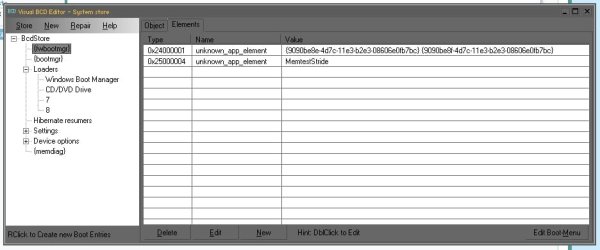
Vista Bootloader Restored but still no Dual Boot Screen with suggestion to use VisualBCD editor. Its showing me i have {fwbootmgr} and {bootmgr} so im thinking the firmware bootmanager is whats making a straight boot into win7 since i used
bcdboot C:\Windows /l en-gb /s B: /f ALL - the /f all updated the UEFI firmware/NVRAM

To me it seems that {bootmgr} is being completely ignored, if i delete {fwbootmgr} will the system still function and fall back to {bootmgr}?

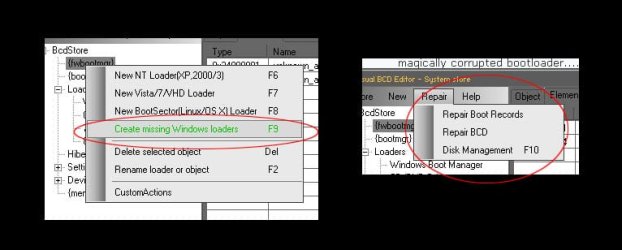
If I right click on {fwbootmgr} i have option to create missing windows loaders but if i use that im thinking the {bootmgr} will still be ignored... so if i do any changes later on inside windows with bcdedit for example they will not register.

OR if i delete {bootmgr} will windows command in cmd like bcdedit write to {fwbootmgr}?


There is also a repair menu.


*Update*
I found this line
Bcdedit /set {FWbootmgr} displayorder {Bootmgr} /addfirst

Its suppose to update the BCD firmware entry settings to reference the Windows Boot Manager as the first boot option, is this the right track?
 

Attachments

  • img_0004.jpg
    img_0004.jpg
    38.9 KB · Views: 3
  • Untitled-1.jpg
    Untitled-1.jpg
    29.6 KB · Views: 4
Last edited:

My Computer My Computer

At a glance

Win 7 Ultim x64
OS
Win 7 Ultim x64
So i just tried a few mensioned above, none of them worked... I came across bcdedit /enum firmware
My {fwbootmgr} timeout is 0, wonder if I give it seconds I will see {bootmgr} but cant find documentation on how to do it to fwbootmgr. bcdedit /timeout only does it to bootmgr


Code:
C:\Users\Administrator>bcdedit /enum firmware

Firmware Boot Manager
---------------------
identifier              {fwbootmgr}
displayorder            {bootmgr}
                        {9090be8e-4d7c-11e3-b2e3-08606e0fb7bc}
timeout                 0

Windows Boot Manager
--------------------
identifier              {bootmgr}
device                  partition=\Device\HarddiskVolume2
path                    \EFI\Microsoft\Boot\bootmgfw.efi
description             Windows Boot Manager
locale                  en-us
inherit                 {globalsettings}
default                 {default}
resumeobject            {9090be92-4d7c-11e3-b2e3-08606e0fb7bc}
displayorder            {default}
                        {9090be91-4d7c-11e3-b2e3-08606e0fb7bc}
                        {9bde5715-4ba3-11e3-b02d-08606e0fb7bc}
                        {aea50cdf-4ba3-11e3-b02d-08606e0fb7bc}
                        {0e91efe7-b3e0-415e-b9d4-1d910d184fb0}
toolsdisplayorder       {memdiag}
timeout                 30

Firmware Application (101fffff)
-------------------------------
identifier              {9090be8e-4d7c-11e3-b2e3-08606e0fb7bc}
device                  partition=\Device\HarddiskVolume1
path                    \EFI\Microsoft\Boot\bootmgfw.efi
description             Windows Boot Manager

EDIT:
found the command for fw's timeout... but ended up just a blank screen :D
bcdedit /set {fwbootmgr} timeout 15
 
Last edited:

My Computer My Computer

At a glance

Win 7 Ultim x64
OS
Win 7 Ultim x64
I'm ready to nuke fwbootmgr with "bcdedit /delete {fwbootmgr} /f" can someone tell me if that will brick my system?
 

My Computer My Computer

At a glance

Win 7 Ultim x64
OS
Win 7 Ultim x64
is firmware boot picking firmware application or my windows boot manager set up incorrectly?

jha.gif
 

My Computer My Computer

At a glance

Win 7 Ultim x64
OS
Win 7 Ultim x64
From Win7 remove all other entries in EasyBCD Edit tab.

Then add Win8 again.

If this fails boot the Win7 installation media or System Repair Disk to confirm that Win7 or it's 100mb Sytem Reserved partition (preferred) is the Partition Marked Active, then run Startup Repair - Run 3 Separate Times to see if it corrects anything so that the Dual Boot again is working or can be added by EasyBCD.

If this fails since you can boot into Win7 running a Repair Install should reconfigure a Dual Boot menu.

If this fails, change the Active flag to Win8 to boot into the Win8 installation Media to run a Windows 8 Automatic Repair.

If Win8 starts without a Dual Boot menu, try installing EasyBCD to add 7, or run a Refresh.
 
Is this a OEM manufacturer's PC with Pre-installed Windows 8?

1) Downgrade to Windows 7.
Downgrade Windows 8 to Windows 7
Warning you must have the UEFI/BIOS firmware setting in Step Three set.

Make sure you read the NOTE at Step three.

2) If Using a USB Pen drive on a PC with a UEFI BIOS.
USB Pen drive need to be formatted to FAT32 as in
UEFI Bootable USB Flash Drive - Create in Windows
Take note of Step 11 for Windows 7.
Also you will need to use a USB 2.0 port, as there are no USB 3.0 drivers in Windows 7.
 

My Computer My Computer

At a glance

ME/XP/Vista/Win7
OS
ME/XP/Vista/Win7
I found EasyBCD to be kinda buggy and wrong like adding winload.exe instead of winload.efi. so I used it with combination of Visual BCD Editor. But I also cheated (because i totally screwed everything up and couldnt boot back, bcdboot that got me out of jam last time was throwing error ) and installed second w7 thru eufi modded usb.. it created a a new fat32 100mb system partition and gave me a working windows boot manager that i could add entries to. Only right now cant boot into w8 .. get signature error "windows cannot very the digital signature of this file" on \windows\system32\winload.efi" i added that manually so that could be wrong directory or file...

btw couldnt do "active" flag as i have all gpt partitions
 

My Computer My Computer

At a glance

Win 7 Ultim x64
OS
Win 7 Ultim x64
How do you have only GPT partitions if as you say in your first post you disabled UEFI and enabled CSM to install normally. That can only be done to an MBR disk for which the repairs I gave you are known-good fixes thousands of times over here.
 
i should have said disabled UEFI's secure boot, at that time i thought, thats all UEFI was.
 

My Computer My Computer

At a glance

Win 7 Ultim x64
OS
Win 7 Ultim x64
Back
Top