Solved Corrupted External Hdd

darkf0xx

New member
Local time
4:46 AM
Messages
46
Location
USA
I noticed that my external hdd had an extra 100mb partition on it, I used partition wizard to merge the two partitions so it will be like its normal 1 partition, upon finishing the merge my 2tb external drive is now unreadable but the info is still on there, is there some way for me to make it so I can make it readable again? right now when I double click the drive it takes about 5 minutes to load then says the drive is unreadable. When I ran it through a partition recovery I can see the files are all still there and even open the files but I need to make it accessible again without the program. The files equal more than what space I have available on my hard drive or I would just transfer them like that. I have also tried un-assigning a drive letter then reassigning it but that didn't work either.
 

My Computer

Computer type
PC/Desktop
Computer Manufacturer/Model Number
Custom
OS
Windows 7 Ultimate x64
CPU
AMD FX-9590
Motherboard
ASUS crosshair Vformula-z
Memory
12gb
Graphics Card(s)
MSI R9 290X LIGHTNING
Hard Drives
2x WD 2tb
2x toshiba 2 tb externals
Antivirus
bitdefender
Browser
google chrome
Here is the message I receive when I double click the drive to open it

40d45dd4b6.png
 

My Computer

Computer type
PC/Desktop
Computer Manufacturer/Model Number
Custom
OS
Windows 7 Ultimate x64
CPU
AMD FX-9590
Motherboard
ASUS crosshair Vformula-z
Memory
12gb
Graphics Card(s)
MSI R9 290X LIGHTNING
Hard Drives
2x WD 2tb
2x toshiba 2 tb externals
Antivirus
bitdefender
Browser
google chrome

My Computer

Computer type
PC/Desktop
Computer Manufacturer/Model Number
Home made Desktop
OS
Windows 10 Pro. 64/ version 1709 Windows 7 Pro/64
CPU
Intel i7-6800K @ 4.3
Motherboard
ASUS X-99 Deluxe II
Memory
Corsair Platinum 16 gig @2400
Graphics Card(s)
EVGA GTX 1070 OC
Monitor(s) Displays
Asus 27" LED LCD/VE278Q
Screen Resolution
1920-1080 or 1280-720 HDMI
Hard Drives
INTEL SSD 730-240 Gb Sata 3.0/
PSU
EVGA Platium 1200W
Case
Phanteks Luxe Tempered Glass 8 fans/ one radiator
Cooling
XSPC/ Water Cooled CPU
Keyboard
Das 4 Professional
Mouse
Logitech M705/MX Anywhere 2-S
Internet Speed
100 mbits
Antivirus
Microsoft Security Essentials/ Malwarebytes Premium 3.0/ SAS
Browser
I.E. 11 default/Firefox/ ISP Time Warner Cable/Spectrum
Other Info
LG BluRay Burner/
Sound system-KLipsch-THX/
Icy Dock ssd Hot Swap bays.
What was the reason that messed with the 100MB partition and what exactly did you do. 100MB is a really very tiny space on a 2TB HDD.
 

My Computer

Computer Manufacturer/Model Number
HP, Dell, Gateway, Toshiba - 4 laptops and 2 desktops
OS
Vista, Windows7, Mint Mate, Zorin, Windows 8
CPU
from 1.6GHz Duo to i7
Monitor(s) Displays
2x HP w2207
Hard Drives
5x HDD, 7x SSD, 12x Externals
Keyboard
with trackball - no mices
Mouse
Trackball mice
Internet Speed
DSL 6000
What was the reason that messed with the 100MB partition and what exactly did you do. 100MB is a really very tiny space on a 2TB HDD.

mostly because I didnt like the way it looked, I wont do that again.
 

My Computer

Computer type
PC/Desktop
Computer Manufacturer/Model Number
Custom
OS
Windows 7 Ultimate x64
CPU
AMD FX-9590
Motherboard
ASUS crosshair Vformula-z
Memory
12gb
Graphics Card(s)
MSI R9 290X LIGHTNING
Hard Drives
2x WD 2tb
2x toshiba 2 tb externals
Antivirus
bitdefender
Browser
google chrome
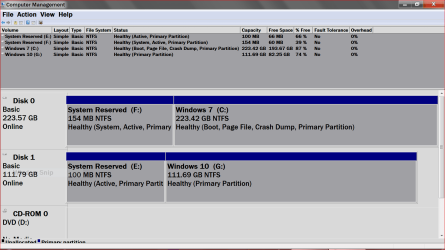
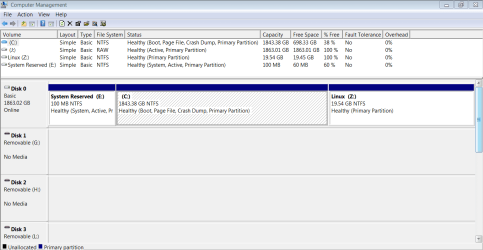
If you complete the tutorial in my Post #3 the good folks here could look and give advice.
 

My Computer

Computer type
PC/Desktop
Computer Manufacturer/Model Number
Home made Desktop
OS
Windows 10 Pro. 64/ version 1709 Windows 7 Pro/64
CPU
Intel i7-6800K @ 4.3
Motherboard
ASUS X-99 Deluxe II
Memory
Corsair Platinum 16 gig @2400
Graphics Card(s)
EVGA GTX 1070 OC
Monitor(s) Displays
Asus 27" LED LCD/VE278Q
Screen Resolution
1920-1080 or 1280-720 HDMI
Hard Drives
INTEL SSD 730-240 Gb Sata 3.0/
PSU
EVGA Platium 1200W
Case
Phanteks Luxe Tempered Glass 8 fans/ one radiator
Cooling
XSPC/ Water Cooled CPU
Keyboard
Das 4 Professional
Mouse
Logitech M705/MX Anywhere 2-S
Internet Speed
100 mbits
Antivirus
Microsoft Security Essentials/ Malwarebytes Premium 3.0/ SAS
Browser
I.E. 11 default/Firefox/ ISP Time Warner Cable/Spectrum
Other Info
LG BluRay Burner/
Sound system-KLipsch-THX/
Icy Dock ssd Hot Swap bays.
3b8e589307.png
 

My Computer

Computer type
PC/Desktop
Computer Manufacturer/Model Number
Custom
OS
Windows 7 Ultimate x64
CPU
AMD FX-9590
Motherboard
ASUS crosshair Vformula-z
Memory
12gb
Graphics Card(s)
MSI R9 290X LIGHTNING
Hard Drives
2x WD 2tb
2x toshiba 2 tb externals
Antivirus
bitdefender
Browser
google chrome
Last edited:

My Computer

Computer type
PC/Desktop
Computer Manufacturer/Model Number
Home made Desktop
OS
Windows 10 Pro. 64/ version 1709 Windows 7 Pro/64
CPU
Intel i7-6800K @ 4.3
Motherboard
ASUS X-99 Deluxe II
Memory
Corsair Platinum 16 gig @2400
Graphics Card(s)
EVGA GTX 1070 OC
Monitor(s) Displays
Asus 27" LED LCD/VE278Q
Screen Resolution
1920-1080 or 1280-720 HDMI
Hard Drives
INTEL SSD 730-240 Gb Sata 3.0/
PSU
EVGA Platium 1200W
Case
Phanteks Luxe Tempered Glass 8 fans/ one radiator
Cooling
XSPC/ Water Cooled CPU
Keyboard
Das 4 Professional
Mouse
Logitech M705/MX Anywhere 2-S
Internet Speed
100 mbits
Antivirus
Microsoft Security Essentials/ Malwarebytes Premium 3.0/ SAS
Browser
I.E. 11 default/Firefox/ ISP Time Warner Cable/Spectrum
Other Info
LG BluRay Burner/
Sound system-KLipsch-THX/
Icy Dock ssd Hot Swap bays.
despite the fact that it shows no useful info that I didn't show before Ill do it.
 

Attachments

  • Capture.PNG
    Capture.PNG
    22.7 KB · Views: 3

My Computer

Computer type
PC/Desktop
Computer Manufacturer/Model Number
Custom
OS
Windows 7 Ultimate x64
CPU
AMD FX-9590
Motherboard
ASUS crosshair Vformula-z
Memory
12gb
Graphics Card(s)
MSI R9 290X LIGHTNING
Hard Drives
2x WD 2tb
2x toshiba 2 tb externals
Antivirus
bitdefender
Browser
google chrome
Thank you and yes it does show more.

You have a nice day.
 

My Computer

Computer type
PC/Desktop
Computer Manufacturer/Model Number
Home made Desktop
OS
Windows 10 Pro. 64/ version 1709 Windows 7 Pro/64
CPU
Intel i7-6800K @ 4.3
Motherboard
ASUS X-99 Deluxe II
Memory
Corsair Platinum 16 gig @2400
Graphics Card(s)
EVGA GTX 1070 OC
Monitor(s) Displays
Asus 27" LED LCD/VE278Q
Screen Resolution
1920-1080 or 1280-720 HDMI
Hard Drives
INTEL SSD 730-240 Gb Sata 3.0/
PSU
EVGA Platium 1200W
Case
Phanteks Luxe Tempered Glass 8 fans/ one radiator
Cooling
XSPC/ Water Cooled CPU
Keyboard
Das 4 Professional
Mouse
Logitech M705/MX Anywhere 2-S
Internet Speed
100 mbits
Antivirus
Microsoft Security Essentials/ Malwarebytes Premium 3.0/ SAS
Browser
I.E. 11 default/Firefox/ ISP Time Warner Cable/Spectrum
Other Info
LG BluRay Burner/
Sound system-KLipsch-THX/
Icy Dock ssd Hot Swap bays.
Thank you and yes it does show more.

You have a nice day.

you too, the only reason I even merged the two partitions was because its been bothering me since partition wizard put it there the first time (the 100mb partition) and since its just a storage device I didn't think it would mess with its ability to load. I think after this I will uninstall partition wizard and no longer mess with partitions, it doesn't seem to be my forte. I hope someone can come up with a solution to this, I have a lot of saved files on my hdd, video projects, photos and project for photoshop (almost the full 2tb worth)
 

My Computer

Computer type
PC/Desktop
Computer Manufacturer/Model Number
Custom
OS
Windows 7 Ultimate x64
CPU
AMD FX-9590
Motherboard
ASUS crosshair Vformula-z
Memory
12gb
Graphics Card(s)
MSI R9 290X LIGHTNING
Hard Drives
2x WD 2tb
2x toshiba 2 tb externals
Antivirus
bitdefender
Browser
google chrome

My Computer

Computer Manufacturer/Model Number
HP, Dell, Gateway, Toshiba - 4 laptops and 2 desktops
OS
Vista, Windows7, Mint Mate, Zorin, Windows 8
CPU
from 1.6GHz Duo to i7
Monitor(s) Displays
2x HP w2207
Hard Drives
5x HDD, 7x SSD, 12x Externals
Keyboard
with trackball - no mices
Mouse
Trackball mice
Internet Speed
DSL 6000

everything seems to work up until I go to the part where it says "Press
Q
to go back a screen and then press enter to get to this screen.
Select WRITE and press enter in order to write our new partition table to the drive.
DO NOT WRITE A NEW PARTITION TABLE IF YOU DID NOT SEE YOUR FILES/FOLDERS That means the proper partition table was not found and you will have to try a different technique to recover your data."

it doesnt seem to give me a "write" option
 

My Computer

Computer type
PC/Desktop
Computer Manufacturer/Model Number
Custom
OS
Windows 7 Ultimate x64
CPU
AMD FX-9590
Motherboard
ASUS crosshair Vformula-z
Memory
12gb
Graphics Card(s)
MSI R9 290X LIGHTNING
Hard Drives
2x WD 2tb
2x toshiba 2 tb externals
Antivirus
bitdefender
Browser
google chrome
I have found a fix for this so I will post it on here, I got help in other locations and someone suggested a program called "Active: Partition Recovery" and it worked in 10 seconds. Here is the video that goes with the problem I had for further info
https://www.youtube.com/watch?v=ZTUDRKPdTPs&ab_channel=LSoftTechnologies
Thank you all for your help, this community is great.
 

My Computer

Computer type
PC/Desktop
Computer Manufacturer/Model Number
Custom
OS
Windows 7 Ultimate x64
CPU
AMD FX-9590
Motherboard
ASUS crosshair Vformula-z
Memory
12gb
Graphics Card(s)
MSI R9 290X LIGHTNING
Hard Drives
2x WD 2tb
2x toshiba 2 tb externals
Antivirus
bitdefender
Browser
google chrome
That looks like a good program and it is freeware. Thanks for sharing.


My Computer

Computer Manufacturer/Model Number
HP, Dell, Gateway, Toshiba - 4 laptops and 2 desktops
OS
Vista, Windows7, Mint Mate, Zorin, Windows 8
CPU
from 1.6GHz Duo to i7
Monitor(s) Displays
2x HP w2207
Hard Drives
5x HDD, 7x SSD, 12x Externals
Keyboard
with trackball - no mices
Mouse
Trackball mice
Internet Speed
DSL 6000
No problem, and thank for fixing that video link, I couldn't get it to work it would just show asterisks in place of the address when I tried inputting the YouTube URL.
 

My Computer

Computer type
PC/Desktop
Computer Manufacturer/Model Number
Custom
OS
Windows 7 Ultimate x64
CPU
AMD FX-9590
Motherboard
ASUS crosshair Vformula-z
Memory
12gb
Graphics Card(s)
MSI R9 290X LIGHTNING
Hard Drives
2x WD 2tb
2x toshiba 2 tb externals
Antivirus
bitdefender
Browser
google chrome
If you want to post the full video, you must get the URL from Youtube and only use the part behind th v= like this ZTUDRKPdTPs
 

My Computer

Computer Manufacturer/Model Number
HP, Dell, Gateway, Toshiba - 4 laptops and 2 desktops
OS
Vista, Windows7, Mint Mate, Zorin, Windows 8
CPU
from 1.6GHz Duo to i7
Monitor(s) Displays
2x HP w2207
Hard Drives
5x HDD, 7x SSD, 12x Externals
Keyboard
with trackball - no mices
Mouse
Trackball mice
Internet Speed
DSL 6000
Back
Top