
Windows7novice
New member
- Local time
- 2:00 PM
- Messages
- 4
Hi everyone
A most excellent forum and is helping me greatly, however..
I have a problem with a missing/corrupted icon in Windows Explorer..
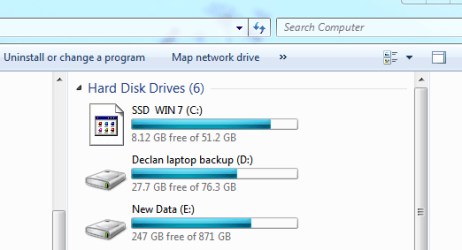
Specifcally the icon for my HDD where Windows 7 is located will not change back to an HDD icon rather it shows as a generic icon see screen shot below
I have tried deleting the iconcache and rebuilding it but it does not now appear to be rebuilding as when I look for the regenerated cache it is not present. I have hidden folders and files set to be shown.
I have also tried using Stardock s/w to reinstate the icon with out success..
I really do not want to have to do a full rebuild as have only just finsihed the upgrade and associated reinstall of my apps and data..
Any help or guidance re this gratefully received !!
A most excellent forum and is helping me greatly, however..
I have a problem with a missing/corrupted icon in Windows Explorer..
Specifcally the icon for my HDD where Windows 7 is located will not change back to an HDD icon rather it shows as a generic icon see screen shot below
I have tried deleting the iconcache and rebuilding it but it does not now appear to be rebuilding as when I look for the regenerated cache it is not present. I have hidden folders and files set to be shown.
I have also tried using Stardock s/w to reinstate the icon with out success..
I really do not want to have to do a full rebuild as have only just finsihed the upgrade and associated reinstall of my apps and data..
Any help or guidance re this gratefully received !!
Last edited:
My Computer
- Computer Manufacturer/Model Number
- Home built system based on MSI 7388 & AMD Athlon dual core processor
- OS
- Windows 7 Professional 64bit
- CPU
- AMD Athlon 64 Dual core
- Motherboard
- MSI K9A2 Neo-F
- Memory
- 4Gb
- Graphics Card(s)
- XFX 9600 GT
- Sound Card
- Creative X-Fi Fatality Pro
- Monitor(s) Displays
- Benq 19" LCD
- Hard Drives
- OCZ SSD 64Gb
WD 1Tb
WD 200Gb
- PSU
- n/known
- Case
- Tower
- Cooling
- fans


