Corrupted names for accounts, users, folders, and user profiles

JHand

New member
Local time
5:26 AM
Messages
5
People:

My Win7 Pro 64-bit machine has garbled names for accounts, users, folders, and user profiles.

I have looked into my copy of "Windows 7 Inside and Out", by Bott, et al, but can't dope out what to do. I'd like to keep the log-on screen names and conform other names to them.

In this forum's tutorials I found #147545, "Windows 7: User Profile Folder - Change User Account Folder Name" but it describes a problem much less messier than mine, so I am asking for help.

Obviously, a man who can make such a hash of things needs a problem-specific, step-by-step fix. Please, someone?

==============================================================================
Code:
EXHIBIT A:
 
 
Log-on screen 
 
JackAdmin Jack Rebecca
 
 
{log on] Jack > explorer >
 
Favorites
 
Desktop
Libraries
Jack [my files listed here]
Computer
Network
Control Panel
Recycle Bin
 
C:\Users
Guest
Jack_3 [my files listed here]
Public
Rebecca
 
 
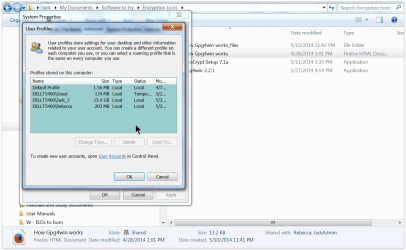
Control Panel > All CP Items > System > System Properties > User Profiles > Profiles stored on this computer
Default Profile 1.56MB
DellT5400\Guest 134MB
\Jack_3 15.3GB
\Rebecca 203MB
 
CP > All CP Items > User Accounts > Configure advanced user profile properties
Dell5400\Jack_3
 
CP > All CP Items > User Accounts > Manage another account
Jack JackAdmin
Rebecca Guest
 
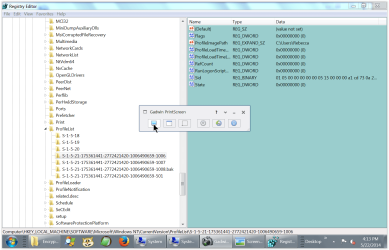
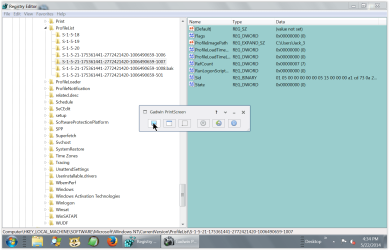
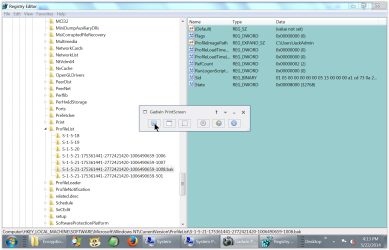
Regedit ... > ProfileList
S-1-5-18
19
20 
21 ... -1006 C:\Users\Rebecca
-1007 \Jack_3
-1008.bak \JackAdmin
-501 \Guest

=====================================================================================

How on earth did this happen?

This was a single-user machine until I added some more users so I could have different configurations, and until I tried to add WinXP Mode. I couldn't get it and the associated VM to install/work and so I then tried to uninstall them. From then on I was playing with a Tarbaby.

I've used computers for 40 years (I'm 82 now) and can find my way around the registry, but learn less and less about each succeeding version of Windows.

Machine details in my profile, this forum.

Jack Handley
 
Last edited by a moderator:

My Computer My Computer

At a glance

Win7 Professional, 64bit4GB
Computer type
PC/Desktop
Computer Manufacturer/Model Number
Dell T5400
OS
Win7 Professional, 64bit
Memory
4GB
Hard Drives
Two Seagate 700GB, Raid Configuration
Antivirus
ESET
Browser
Firefox v29
Can you post a screenshot of this?
 

My Computer My Computer

At a glance

Windows 10 x64Intel i5-3570KCrucial 16GBnVidia Geforce 660 GTX
Computer type
PC/Desktop
OS
Windows 10 x64
CPU
Intel i5-3570K
Motherboard
Asus Maximus V Gene
Memory
Crucial 16GB
Graphics Card(s)
nVidia Geforce 660 GTX
Sound Card
onboard
Monitor(s) Displays
NEC 2490WUXi2
Screen Resolution
1920x1200
Hard Drives
Crucial M4 256GB
PSU
Corsair 650TX
Case
Fractal Design - Define Mini
Keyboard
Filco Majestouch Tenkeyless Black MX
Mouse
Logitech MBJ58
I have two more screen shots but it appears that 5 is the limit. For text transcription of other images, please see my original post.

Thanks for looking.

Jack
 

Attachments

  • Regedit ProfileList -0006 Rebecca.PNG
    Regedit ProfileList -0006 Rebecca.PNG
    90.8 KB · Views: 0
  • Regedit ProfileList -0007  Jack_3.PNG
    Regedit ProfileList -0007 Jack_3.PNG
    82.6 KB · Views: 0
  • Regedit ProfileList  -0008_bak JackAdmin.PNG
    Regedit ProfileList -0008_bak JackAdmin.PNG
    88.5 KB · Views: 0
  • Control Panel Users Stored on this computer  Screen Shot.PNG
    Control Panel Users Stored on this computer Screen Shot.PNG
    186.9 KB · Views: 0
  • System Properties -- Profiles stored on this computer Screen Shot.PNG
    System Properties -- Profiles stored on this computer Screen Shot.PNG
    73.4 KB · Views: 0

My Computer My Computer

At a glance

Win7 Professional, 64bit4GB
Computer type
PC/Desktop
Computer Manufacturer/Model Number
Dell T5400
OS
Win7 Professional, 64bit
Memory
4GB
Hard Drives
Two Seagate 700GB, Raid Configuration
Antivirus
ESET
Browser
Firefox v29
Well, I don't think things are two bad. You have some extra profiles, and perhaps you don't need them. Before you go deleting them you need to get the data they may have out of them first.

A "Windows" profile shows up in three places:

1. Control Panel\All Control Panel Items\System\Advanced system settings\Advanced\Settings
2. Control Panel\All Control Panel Items\Administrative Tools\Computer Management\Local Users and Groups
3. C:\Users

Wow, that is a lot of places, eh? So, when you want to remove a profile you need to make sure it's gone from those three places, and if you do it from the first option, it takes care of the others for you (if I remember correctly).

However, you need to get the data. To do that, go to C:\Users\John (or whoever) and then copy the "Desktop", "Favorites", "My Documents", and any other folders you have data in, copy them somewhere safe.

Congratulations on being 82.
 

My Computer My Computer

At a glance

Windows 10 x64Intel i5-3570KCrucial 16GBnVidia Geforce 660 GTX
Computer type
PC/Desktop
OS
Windows 10 x64
CPU
Intel i5-3570K
Motherboard
Asus Maximus V Gene
Memory
Crucial 16GB
Graphics Card(s)
nVidia Geforce 660 GTX
Sound Card
onboard
Monitor(s) Displays
NEC 2490WUXi2
Screen Resolution
1920x1200
Hard Drives
Crucial M4 256GB
PSU
Corsair 650TX
Case
Fractal Design - Define Mini
Keyboard
Filco Majestouch Tenkeyless Black MX
Mouse
Logitech MBJ58
Me again. I didn't send a "thank you" as I hadn't tried your recommendations yet. Thank you. If you can bear it, I still need help.

A recapitulation:

I had too many users and succeeded in removing [JackAdmin] and [Jack_3] from the first of the "three places" you mentioned (shown as 1,2,and 3) below.

RESULT: [JackAdmin] disappeared entirely but [Jack_3] remains in two places:

"Jack" is profile name in places 1,2,A,B,and C, whereas "Jack_3" is profile name in places 3, and D.

Result: I'm spooked. The |profile|user|file|account| name listings appear to be incongruent, is that the right word?, or cross-linked?


Below, I show below the names that show in each of the "three places", and some additional places.

1.
Control Panel\
All Control Panel Items\
System\
Advanced system settings\
System Properties\
Advanced\User Profiles Settings\
User Profiles - Profiles stored on this computer:

Default Profile 1.56 MB
Dell 5400\Guest 134 MB
\Jack 7.76 GB
\Rebecca 197 MB

2.
Control Panel\
All Control Panel Items\
Administrative Tools\
Computer Management\
Local Users and Groups\
Users:
Name Full Name

Administrator
Guest
Jack Jack
Rebecca Rebecca

3.
C:\
Users:

All Users
Default
Default User
Guest
Jack_3
Public
Rebecca


A.
Logon screen:

Jack Rebecca

B.
Start\Favorites:
Favorites
Desktop
Libraries
Jack
Computer
Networks
Control Panel
Recycle Bin

C.
Control Panel\
All Control Panel Items\
User Accounts\
Manage another account:

Jack Rebecca
Guest

D.
Control Panel\
All Control Panel Items\
User Accounts\
Configure advanced user profile properties\
User Profiles - Profiles stored on this computer:

DellT5400\Jack

E.
Regedit ... ProfileList
S-1-5-21 ... -1006 C:\Users\Rebecca
-1007 C:\Users\Jack_3
-501 C:\Guest

===============
Thanks for looking.

I will make a point of marking the thread solved.

JHand
 

My Computer My Computer

At a glance

Win7 Professional, 64bit4GB
Computer type
PC/Desktop
Computer Manufacturer/Model Number
Dell T5400
OS
Win7 Professional, 64bit
Memory
4GB
Hard Drives
Two Seagate 700GB, Raid Configuration
Antivirus
ESET
Browser
Firefox v29
Back
Top