Corrupted Recycle Bins

Kazper

New member
Local time
9:34 AM
Messages
6
Greetings!

I am running Windows 7 Pro on a new computer (purchased 6 months ago) and keep getting the following error...


I have numerous drives (1 SSD, 2 internal HDDs and 3 external HDDs), but only get this error on two of the drives. I had one of the drives before I purchased this commuter and I bought one after. I’ve tried reformatting both drives, but the error still persists.

The error pops up every time I try to empty or view the Recycle Bin.

The two drives that keep getting the error are identical (both Seagate 5TB Backup Plus USB 3). However when the problem started I had one of the Seagate drives and a 3TB Western Digital My Backup Plus and was getting the error on both of those drives.

Any ideas on what’s causing this and how to fix it?

Thanks in advance!

Brian
 

My Computer

Computer Manufacturer/Model Number
Gateway DX4831-50c
OS
Windows 7
CPU
DualCore Intel Core i3 530, 2933 MHz (22 x 133)
Motherboard
Foxconn H57M01
Memory
6 gig
Graphics Card(s)
ATI Radeon HD 5450 (Cedar)
Sound Card
Realtek ALC888/1200 @ Intel Ibex Peak PCH - High Definition
Monitor(s) Displays
Acer AL2016W
Hard Drives
WDC WD10EADS-22M2B0 (1 TB)
WDC WD5000AAVS-00ZTB0 (500 GB)
It would be helpful for others if you posted exactly what error you are getting.
 

My Computer

Computer type
PC/Desktop
Computer Manufacturer/Model Number
Home made Desktop
OS
Windows 10 Pro. 64/ version 1709 Windows 7 Pro/64
CPU
Intel i7-6800K @ 4.3
Motherboard
ASUS X-99 Deluxe II
Memory
Corsair Platinum 16 gig @2400
Graphics Card(s)
EVGA GTX 1070 OC
Monitor(s) Displays
Asus 27" LED LCD/VE278Q
Screen Resolution
1920-1080 or 1280-720 HDMI
Hard Drives
INTEL SSD 730-240 Gb Sata 3.0/
PSU
EVGA Platium 1200W
Case
Phanteks Luxe Tempered Glass 8 fans/ one radiator
Cooling
XSPC/ Water Cooled CPU
Keyboard
Das 4 Professional
Mouse
Logitech M705/MX Anywhere 2-S
Internet Speed
100 mbits
Antivirus
Microsoft Security Essentials/ Malwarebytes Premium 3.0/ SAS
Browser
I.E. 11 default/Firefox/ ISP Time Warner Cable/Spectrum
Other Info
LG BluRay Burner/
Sound system-KLipsch-THX/
Icy Dock ssd Hot Swap bays.
Yes, there is a system for adding images to the post, if you can post a screenshot of the error, then we can do something. If you are using the old iPhone Win 7 forums app, you can't do this.
 

My Computer

Computer type
PC/Desktop
Computer Manufacturer/Model Number
Lenovo Thinkcenter M92p
OS
Windows 10/Windows 7 (My Idea- Virtual PC)
CPU
Intel(R) Core(TM) i5-3470 CPU @ 3.20GHz
Motherboard
Lenovo MahoBay
Memory
16 GB
Graphics Card(s)
nVidia GeForce GTX 750 Ti (2GB)
Sound Card
nVidia HD Audio
Monitor(s) Displays
RCA 4KTV 50"
Screen Resolution
3840p x 2160p
Hard Drives
Onboard:
Seagate ST500DM009-2F110A 500GB
WDC WD4000FYYZ-01UL1B1 (WD-WCC131910831) [3726 GB]

USB 3.0
My Book 1140 (WCAZAD122454) [1862 GB]
Apple MDT MD10EAVS-00D7B0 (0000AB123473) [931 GB]

External:
WD Blue Innostar/Matsunichi (465 GB)
WD
PSU
Stock Thinkcenter M92p
Case
Stock Thinkcenter M92p
Cooling
Active
Keyboard
BYTEC BY-GA-KT-100-AC
Mouse
BYTEC
Internet Speed
1 GHz Down, 40 Mbps Up
Antivirus
Windows Defender
Browser
EDGE
Other Info
Old Other Info:
I finally have an Intel machine that has more than 8GB of Ram.
My ASUS M2N-SE AMD Windows 7 machine is back to Windows 7. Replaced the AMD 4400+ CPU and maxed out the RAM (4GB).
My Core Duo machine is only 2GB of Ram and it is locked to Windows XP in order to run Pro Tools 6.4, which I have been using since 2004.
I have one other Dell OptiPlex 980 tower, Identical to this one,

My Computer

Computer type
PC/Desktop
Computer Manufacturer/Model Number
Home made Desktop
OS
Windows 10 Pro. 64/ version 1709 Windows 7 Pro/64
CPU
Intel i7-6800K @ 4.3
Motherboard
ASUS X-99 Deluxe II
Memory
Corsair Platinum 16 gig @2400
Graphics Card(s)
EVGA GTX 1070 OC
Monitor(s) Displays
Asus 27" LED LCD/VE278Q
Screen Resolution
1920-1080 or 1280-720 HDMI
Hard Drives
INTEL SSD 730-240 Gb Sata 3.0/
PSU
EVGA Platium 1200W
Case
Phanteks Luxe Tempered Glass 8 fans/ one radiator
Cooling
XSPC/ Water Cooled CPU
Keyboard
Das 4 Professional
Mouse
Logitech M705/MX Anywhere 2-S
Internet Speed
100 mbits
Antivirus
Microsoft Security Essentials/ Malwarebytes Premium 3.0/ SAS
Browser
I.E. 11 default/Firefox/ ISP Time Warner Cable/Spectrum
Other Info
LG BluRay Burner/
Sound system-KLipsch-THX/
Icy Dock ssd Hot Swap bays.
Sorry. I posted a screen shot, but now it's not showing. Let's try again. This is the error...
 

Attachments

  • Bad Recycle Bin.png
    Bad Recycle Bin.png
    6.5 KB · Views: 33

My Computer

Computer Manufacturer/Model Number
Gateway DX4831-50c
OS
Windows 7
CPU
DualCore Intel Core i3 530, 2933 MHz (22 x 133)
Motherboard
Foxconn H57M01
Memory
6 gig
Graphics Card(s)
ATI Radeon HD 5450 (Cedar)
Sound Card
Realtek ALC888/1200 @ Intel Ibex Peak PCH - High Definition
Monitor(s) Displays
Acer AL2016W
Hard Drives
WDC WD10EADS-22M2B0 (1 TB)
WDC WD5000AAVS-00ZTB0 (500 GB)
We have no idea which partitions in HDD &or SSD you are referring to.


Disk Management - Post a Screen Capture Image


You cannot just delete any Recycle Bin from any partition.


To view what is inside the Recycle Bin, it is not necessary to go to that particular partition to open the Recycle Bin.

To delete or find where the file you have accidentally deleted.

Go to the Desktop --> Open the Recycle Bin <-- This is the Master, and proper way to open.

When it open, the deleted files will be seen here, and include the drive letter /partition, if you select another.

Recycle Bin is always re-created if you delete it, by the system.

So do leave Recycle Bins in all the partitions alone and do not do anything.
 

My Computer

Computer type
Laptop
Computer Manufacturer/Model Number
Toshiba L630 and L735
OS
Windows 7 x64
Hard Drives
240 GB SSD
??? is their a Recycle Bin on drive "T"

Please complete this tutorial by Golden so we can see things.

Disk Management - Post a Screen Capture Image

Jack

Edit:

Hi Eric3742
I see we posted on top of each other with the same idea.
To make things easier for Kazper I will sit back and watch.

Jack.
 
Last edited:

My Computer

Computer type
PC/Desktop
Computer Manufacturer/Model Number
Home made Desktop
OS
Windows 10 Pro. 64/ version 1709 Windows 7 Pro/64
CPU
Intel i7-6800K @ 4.3
Motherboard
ASUS X-99 Deluxe II
Memory
Corsair Platinum 16 gig @2400
Graphics Card(s)
EVGA GTX 1070 OC
Monitor(s) Displays
Asus 27" LED LCD/VE278Q
Screen Resolution
1920-1080 or 1280-720 HDMI
Hard Drives
INTEL SSD 730-240 Gb Sata 3.0/
PSU
EVGA Platium 1200W
Case
Phanteks Luxe Tempered Glass 8 fans/ one radiator
Cooling
XSPC/ Water Cooled CPU
Keyboard
Das 4 Professional
Mouse
Logitech M705/MX Anywhere 2-S
Internet Speed
100 mbits
Antivirus
Microsoft Security Essentials/ Malwarebytes Premium 3.0/ SAS
Browser
I.E. 11 default/Firefox/ ISP Time Warner Cable/Spectrum
Other Info
LG BluRay Burner/
Sound system-KLipsch-THX/
Icy Dock ssd Hot Swap bays.
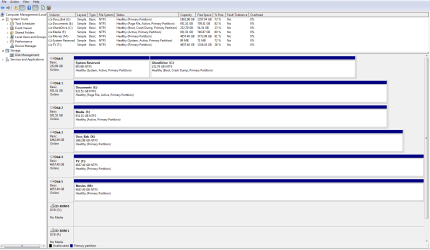
Here's the screenshot...

Disk Management Screen.png
 

My Computer

Computer Manufacturer/Model Number
Gateway DX4831-50c
OS
Windows 7
CPU
DualCore Intel Core i3 530, 2933 MHz (22 x 133)
Motherboard
Foxconn H57M01
Memory
6 gig
Graphics Card(s)
ATI Radeon HD 5450 (Cedar)
Sound Card
Realtek ALC888/1200 @ Intel Ibex Peak PCH - High Definition
Monitor(s) Displays
Acer AL2016W
Hard Drives
WDC WD10EADS-22M2B0 (1 TB)
WDC WD5000AAVS-00ZTB0 (500 GB)

My Computer

Computer type
Laptop
Computer Manufacturer/Model Number
ASUS
OS
Microsoft Windows 7 Home Premium 64-bit 7601 Multiprocessor Free Service Pack 1
CPU
AMD C-60 APU with Radeon(tm) HD Graphics
Motherboard
ASUSTeK COMPUTER INC. X501U
Memory
4.00 GB
Graphics Card(s)
AMD Radeon HD 6290 Graphics
Sound Card
(1) AMD High Definition Audio Device (2) Realtek High Defi
Screen Resolution
1366 x 768 x 32 bits (4294967296 colors) @ 60 Hz
Hard Drives
Hitachi HTS545050A7E380 SATA Disk Device
Antivirus
Comodo CIS & FW, SecureAplus App Whitelisting, Threatfire
Browser
Cyberfox 64bit, Opera 64bit, Airfox
Other Info
Spy-The-Spy, HitmanPro.Alert, Norton Connect Safe, MJRegWatcher, BitDefender TrafficLight, Voodoo Shield, Zemana AntiMalware

My Computer

Computer Manufacturer/Model Number
Gateway DX4831-50c
OS
Windows 7
CPU
DualCore Intel Core i3 530, 2933 MHz (22 x 133)
Motherboard
Foxconn H57M01
Memory
6 gig
Graphics Card(s)
ATI Radeon HD 5450 (Cedar)
Sound Card
Realtek ALC888/1200 @ Intel Ibex Peak PCH - High Definition
Monitor(s) Displays
Acer AL2016W
Hard Drives
WDC WD10EADS-22M2B0 (1 TB)
WDC WD5000AAVS-00ZTB0 (500 GB)
Confirm that you opened an elevated Elevated Command Prompt: Elevated Command Prompt Tutorial

Type:

RD /S /Q C:\$Recycle.bin

Press Enter

Type:

RD /S /Q E:\$Recycle.bin

Press Enter

Type:

RD /S /Q F:\$Recycle.bin

Press Enter

Type:

RD /S /Q X:\$Recycle.bin

Press Enter

Type:

RD /S /Q T:\$Recycle.bin

Press Enter

Type:

RD /S /Q M:\$Recycle.bin

Press Enter

Then right click desktop and choose "Refresh"

Then reboot.

If that fails check that you are using an account with admin rights. Post a screenshot of:

Start> Run

Type netplwiz

Press Enter.
 

My Computer

Computer type
Laptop
Computer Manufacturer/Model Number
ASUS
OS
Microsoft Windows 7 Home Premium 64-bit 7601 Multiprocessor Free Service Pack 1
CPU
AMD C-60 APU with Radeon(tm) HD Graphics
Motherboard
ASUSTeK COMPUTER INC. X501U
Memory
4.00 GB
Graphics Card(s)
AMD Radeon HD 6290 Graphics
Sound Card
(1) AMD High Definition Audio Device (2) Realtek High Defi
Screen Resolution
1366 x 768 x 32 bits (4294967296 colors) @ 60 Hz
Hard Drives
Hitachi HTS545050A7E380 SATA Disk Device
Antivirus
Comodo CIS & FW, SecureAplus App Whitelisting, Threatfire
Browser
Cyberfox 64bit, Opera 64bit, Airfox
Other Info
Spy-The-Spy, HitmanPro.Alert, Norton Connect Safe, MJRegWatcher, BitDefender TrafficLight, Voodoo Shield, Zemana AntiMalware
Another method. Note: Not recommended unless you have a system image backup handy that you know how to restore.

Grab a copy of this:

Download PC Hunter - MajorGeeks

It's portable so runs without installation. Your system specs are missing in your profile so run:

PCHunter32.exe for 32bit windows

or

PCHunter64.exe for 64bit windows

(right click and choose run as administrator)

If you have any security software that prevents the driver from loading configure it to allow.

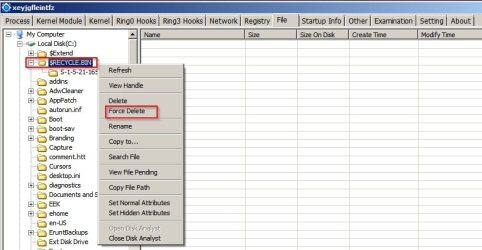
On the "File" tab navigate to your recycle bins and right click to get the force delete option for each one.

PC Hunter.jpg

Once deleted close the program, refresh your desktop and schedule a full disk check.

Start> Run then type chkdsk /r /f

exit the window and reboot. The disk check will take some time.
 

My Computer

Computer type
Laptop
Computer Manufacturer/Model Number
ASUS
OS
Microsoft Windows 7 Home Premium 64-bit 7601 Multiprocessor Free Service Pack 1
CPU
AMD C-60 APU with Radeon(tm) HD Graphics
Motherboard
ASUSTeK COMPUTER INC. X501U
Memory
4.00 GB
Graphics Card(s)
AMD Radeon HD 6290 Graphics
Sound Card
(1) AMD High Definition Audio Device (2) Realtek High Defi
Screen Resolution
1366 x 768 x 32 bits (4294967296 colors) @ 60 Hz
Hard Drives
Hitachi HTS545050A7E380 SATA Disk Device
Antivirus
Comodo CIS & FW, SecureAplus App Whitelisting, Threatfire
Browser
Cyberfox 64bit, Opera 64bit, Airfox
Other Info
Spy-The-Spy, HitmanPro.Alert, Norton Connect Safe, MJRegWatcher, BitDefender TrafficLight, Voodoo Shield, Zemana AntiMalware


Hi Callender


Please do post in full content as you have mis-understood what i meant.

By just posting on 1 sentence alone, it do not mean anything, as this is most commonly use by journalist.
I hope you are not news journalist by profession.

As stated in your 1st link, you mentioned:
Try right clicking on your "Recycle Bin" desktop icon and you should see something like this:
is in reference to my
Go to the Desktop --> Open the Recycle Bin <-- This is the Master, and proper way to open.

so it is stated.


Anyway, i thanks you for helping the OP on his problem.


Eric.
 

My Computer

Computer type
Laptop
Computer Manufacturer/Model Number
Toshiba L630 and L735
OS
Windows 7 x64
Hard Drives
240 GB SSD
Hi Kazper

From the screenshot.

For Disk 1, do remove the word Active, as it seem that you have use this HDD as system partition on another computer.

For Disk 2, do remove the word Active.

It is better to stay as "Primary Partition" as like in other HDD(s).


This is to prevent from future error, in the same way that it happened on this matter.

Sorry not able to reply as i was unable to.


Eric.
 

My Computer

Computer type
Laptop
Computer Manufacturer/Model Number
Toshiba L630 and L735
OS
Windows 7 x64
Hard Drives
240 GB SSD
Back
Top