
Could my graphics card have died?

Gaz1701

New member
Member
Local time
2:27 AM
Messages
65
Seeing as no-one was replying to my thread in the Hardware section, I thought I'd repost it here:

First of all, please read the first part here, otherwise you might miss something out with whether it can be fixed or not: http://www.sevenforums.com/hardware-devices/133915-monitor-problems-after-installing-new-ram.html


To cut a long story short, I did got a BSOD later on - after I first put the new RAM in correctly (which is included in the previous post). I didn't think it was related at first, but now I get the feeling it might be.

I've got two GeForce 8800GTS' via SLi. When I plug my monitor in the bottom card, it works (but it says it's not attached to an NVIDIA GPU, and there's no Aero etc. - although I can up the res to 1280x1024, so it's not like SafeMode in that respect), but when I plug it in to my top card - the one I've always used - the monitor doesn't come on.

So does that mean my graphics card has died? It can't really be dislodged, as both cards are pretty much firmly fixed in place.
 

My Computer My Computer

At a glance

Windows 7 Home Premium 64-bit (6.1, Build 7601)AMD Athlon(tm) 64 X2 Dual Core Processor 4400...2048MB RAM DDR2 (now installed a 2GB chip = 4...ASUS EAH5770 CU core, 1GB GDDR5 video memory
Computer type
PC/Desktop
Computer Manufacturer/Model Number
MSI MS-7325
OS
Windows 7 Home Premium 64-bit (6.1, Build 7601)
CPU
AMD Athlon(tm) 64 X2 Dual Core Processor 4400+ (2 CPUs), ~2.
Motherboard
MSI K9N4 SLI-F nForce 500 SLI chipset
Memory
2048MB RAM DDR2 (now installed a 2GB chip = 4GB altogether)
Graphics Card(s)
ASUS EAH5770 CU core, 1GB GDDR5 video memory
Sound Card
Realtek AC'97 Audio
Monitor(s) Displays
AOC I2367Fh
Screen Resolution
1920x1080
Hard Drives
SAMSUNG HD401LJ ATA Device
PSU
Tagan TG700-U25 - 700Watts
Case
NZXT Zero Aluminium Full Tower
Cooling
about 6 fans on case
Keyboard
Microsoft Natural MultiMedia Keyboard
Mouse
Trust GM-4200 Gamer Mouse Optical
Internet Speed
Not sure what speed, but it's broadband - ADSL (I think).
Antivirus
Avast! Free Antivirus
Browser
Mozillla Firefox
I apologize that you haven't gotten any assistance yet. There are so many people that post questions and only a few of us that can actually answer them :confused:

So, let's see what i can do for you. I am going to ask some questions about your previous thread, too, to keep it all together. Otherwise I will confuse the hell out of myself and will be of no use to you.

I see you got a Code 43 on your graphics card. Does your Device Manager say you have a graphics card properly installed? It should look something like this (with your card's name, of course)

Display_Adapter_Graphics_Card.JPG


When you get a Code 43, something in the card itself has gone wrong, and has to be ignored by Windows. In your case, it is most likely the card that isn't giving you a picture. Since it's in SLI, your drivers or Windows knows there's two that are supposed to work in tandem so everything is diverted to the second, functioning, card.

There are a few things you can try in this case:

  1. Remove the physical address extension patch if it is still active on your machine. I'll have more to say about this later.
  2. Update your graphics drivers if possible by going to NVIDIA DRIVERS 260.99 WHQL
  3. Remove the card that doesn't seem to be working and run off of the one card for the time being. Do you still get Code 43 or no acknowledgement that your monitor is hooked up to an nVidia card?
  4. Isolate that card that seems to not be working. By itself, does it still not give you any image on your monitor?

You are also getting a Code 28 saying your display driver is not installed.

You do not have a video card driver installed, according to Windows. See #2 above.

BSOD after new RAM is installed

This can be caused by the fact that you extended the physical addresses. With a 32-bit operating system, there are only so many addresses available for a reason. Once you get past that threshold, it is no longer functioning like a 32-bit OS yet it is only designed or equipped to handle 32-bit addresses. I'm almost positive it's being caused by your PAE. Remove it (if you haven't already)

In Summary

Don't ever use a PAE :P . It can cause more problems than necessary and it would have been a lot less difficult in the long run to back up your stuff and re-install Windows as a 64-bit OS instead. What I don't get (Just my opinion, not directed at anybody in particular, ever) is why people still install 32-bit OSes on their machines to begin with. To me, it makes no sense given there are 64-bit drivers for 98% of all hardware people use nowadays. If hardware doesn't have 64-bit drivers, the manufactuer is probably not caring too much about that hardware piece to begin with. And given 64-bit OSes have been around since Windows XP (2001), 9 years is a long time to not get with the program, so to speak. (rant done)
So there you have it. Give all that a whirl, and let us know what's up!
 

My Computer My Computer

At a glance

Windows 7 Ultimate 64-bitAMD Phenom II X6 1090T 3.2GHZG.SKILL RipJaw 3x2GB DDR3-10662x HIS Radeon HD 6850 1 GB
OS
Windows 7 Ultimate 64-bit
CPU
AMD Phenom II X6 1090T 3.2GHZ
Motherboard
MSI 890FXA-GD70
Memory
G.SKILL RipJaw 3x2GB DDR3-1066
Graphics Card(s)
2x HIS Radeon HD 6850 1 GB
Sound Card
VIA 8-channel
Monitor(s) Displays
2x 20 inch Acer LCDs, 1x 32" Sony LCD TV
Screen Resolution
4480x900
Hard Drives
1x Crucial 64GB SSD
3x 1TB HDDs (WD, Seagate, Hitatchi)
1x 500GB Seagate External
PSU
Kingwin 1000W Modular
Case
Coolermaster HAF 932
Cooling
1x 120mm, 3x 200mm, CoolerMaster Hyper 212+
Keyboard
Microsoft Wireless Keyboard 1000
Mouse
Microsoft Wiresless Mouse 5000
Internet Speed
20mbps
Other Info
Samsung BD-ROM/DVD-RW
Thanks a lot for the reply :)

First of all, how do I get rid of the PAE patch? I followed the instructions that came with it (see attachment), but a System Restore didn't get rid of it - it still has the option as the computer boots up whether to choose 'Windows 7' or 'Windows 7 (PAE patch)'.

I'll try the next step after I find out how to get rid of this thing (unless I can't, or you want me to try installing the latest NVIDIA driver anyway?)
 

Attachments

My Computer My Computer

At a glance

Windows 7 Home Premium 64-bit (6.1, Build 7601)AMD Athlon(tm) 64 X2 Dual Core Processor 4400...2048MB RAM DDR2 (now installed a 2GB chip = 4...ASUS EAH5770 CU core, 1GB GDDR5 video memory
Computer type
PC/Desktop
Computer Manufacturer/Model Number
MSI MS-7325
OS
Windows 7 Home Premium 64-bit (6.1, Build 7601)
CPU
AMD Athlon(tm) 64 X2 Dual Core Processor 4400+ (2 CPUs), ~2.
Motherboard
MSI K9N4 SLI-F nForce 500 SLI chipset
Memory
2048MB RAM DDR2 (now installed a 2GB chip = 4GB altogether)
Graphics Card(s)
ASUS EAH5770 CU core, 1GB GDDR5 video memory
Sound Card
Realtek AC'97 Audio
Monitor(s) Displays
AOC I2367Fh
Screen Resolution
1920x1080
Hard Drives
SAMSUNG HD401LJ ATA Device
PSU
Tagan TG700-U25 - 700Watts
Case
NZXT Zero Aluminium Full Tower
Cooling
about 6 fans on case
Keyboard
Microsoft Natural MultiMedia Keyboard
Mouse
Trust GM-4200 Gamer Mouse Optical
Internet Speed
Not sure what speed, but it's broadband - ADSL (I think).
Antivirus
Avast! Free Antivirus
Browser
Mozillla Firefox
Thanks a lot for the reply :)

First of all, how do I get rid of the PAE patch? I followed the instructions that came with it (see attachment), but a System Restore didn't get rid of it - it still has the option as the computer boots up whether to choose 'Windows 7' or 'Windows 7 (PAE patch)'.

I'll try the next step after I find out how to get rid of this thing (unless I can't, or you want me to try installing the latest NVIDIA driver anyway?)

No, don't do it anyways. If PAE is the source of some of the issues, the new drivers may now show any effect as one of your cards may be forced out of the memory space because of the patch.

You should probably remove the boot entry from the Windows 7 bootloader. BCDEdit is a tool built into Windows that will help you do that.

We have a tutorial here on what BCDEdit does and how to edit your bootloader.

http://www.sevenforums.com/tutorials/2676-bcdedit-how-use.html

This why you will only ALWAYS boot into normal Windows 7. After that, remove any files the patch created (if you can) and run "sfc /scannow" (WIN+R). Once that's finished, move to the drivers.
 

My Computer My Computer

At a glance

Windows 7 Ultimate 64-bitAMD Phenom II X6 1090T 3.2GHZG.SKILL RipJaw 3x2GB DDR3-10662x HIS Radeon HD 6850 1 GB
OS
Windows 7 Ultimate 64-bit
CPU
AMD Phenom II X6 1090T 3.2GHZ
Motherboard
MSI 890FXA-GD70
Memory
G.SKILL RipJaw 3x2GB DDR3-1066
Graphics Card(s)
2x HIS Radeon HD 6850 1 GB
Sound Card
VIA 8-channel
Monitor(s) Displays
2x 20 inch Acer LCDs, 1x 32" Sony LCD TV
Screen Resolution
4480x900
Hard Drives
1x Crucial 64GB SSD
3x 1TB HDDs (WD, Seagate, Hitatchi)
1x 500GB Seagate External
PSU
Kingwin 1000W Modular
Case
Coolermaster HAF 932
Cooling
1x 120mm, 3x 200mm, CoolerMaster Hyper 212+
Keyboard
Microsoft Wireless Keyboard 1000
Mouse
Microsoft Wiresless Mouse 5000
Internet Speed
20mbps
Other Info
Samsung BD-ROM/DVD-RW
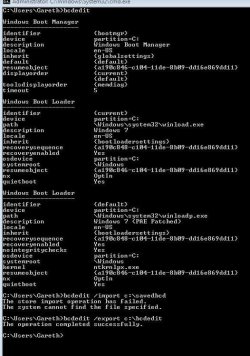
Well here's a screenshot of my BCDEdit/Windows Boot Manager (attached).

The only ones I could find in that link where you delete something are these 2:
bcdedit /deletevalue {4c21825f-e04b-11dd-b760-00195b61617a} numproc
NOTE: This deletes the numproc parameter from entry {4c21825f....}

bcdedit /delete {4c21825f-e04b-11dd-b760-00195b61617a}
NOTE: This deletes the boot entry {4c21825f....} completely. In order to delete an {ntldr} entry, you must use the /f switch to force deletion: bcdedit /delete {ntldr} /f
But since both resumeobject are the same (in fact all of the {ntldr}(?) entries are the same), how will it know to delete just the PAE patch one? OR am I missing something here?


Reading through the comments on that page I came across something I hadn't thought about:

Couldn't I just use msconfig boot config to delete it?
http://img17.imageshack.us/img17/2421/capturewgx.jpg
 

Attachments

  • BCDEdit.JPG
    BCDEdit.JPG
    69.4 KB · Views: 11

My Computer My Computer

At a glance

Windows 7 Home Premium 64-bit (6.1, Build 7601)AMD Athlon(tm) 64 X2 Dual Core Processor 4400...2048MB RAM DDR2 (now installed a 2GB chip = 4...ASUS EAH5770 CU core, 1GB GDDR5 video memory
Computer type
PC/Desktop
Computer Manufacturer/Model Number
MSI MS-7325
OS
Windows 7 Home Premium 64-bit (6.1, Build 7601)
CPU
AMD Athlon(tm) 64 X2 Dual Core Processor 4400+ (2 CPUs), ~2.
Motherboard
MSI K9N4 SLI-F nForce 500 SLI chipset
Memory
2048MB RAM DDR2 (now installed a 2GB chip = 4GB altogether)
Graphics Card(s)
ASUS EAH5770 CU core, 1GB GDDR5 video memory
Sound Card
Realtek AC'97 Audio
Monitor(s) Displays
AOC I2367Fh
Screen Resolution
1920x1080
Hard Drives
SAMSUNG HD401LJ ATA Device
PSU
Tagan TG700-U25 - 700Watts
Case
NZXT Zero Aluminium Full Tower
Cooling
about 6 fans on case
Keyboard
Microsoft Natural MultiMedia Keyboard
Mouse
Trust GM-4200 Gamer Mouse Optical
Internet Speed
Not sure what speed, but it's broadband - ADSL (I think).
Antivirus
Avast! Free Antivirus
Browser
Mozillla Firefox
Yeah, you could. I totally forgot about that!
 

My Computer My Computer

At a glance

Windows 7 Ultimate 64-bitAMD Phenom II X6 1090T 3.2GHZG.SKILL RipJaw 3x2GB DDR3-10662x HIS Radeon HD 6850 1 GB
OS
Windows 7 Ultimate 64-bit
CPU
AMD Phenom II X6 1090T 3.2GHZ
Motherboard
MSI 890FXA-GD70
Memory
G.SKILL RipJaw 3x2GB DDR3-1066
Graphics Card(s)
2x HIS Radeon HD 6850 1 GB
Sound Card
VIA 8-channel
Monitor(s) Displays
2x 20 inch Acer LCDs, 1x 32" Sony LCD TV
Screen Resolution
4480x900
Hard Drives
1x Crucial 64GB SSD
3x 1TB HDDs (WD, Seagate, Hitatchi)
1x 500GB Seagate External
PSU
Kingwin 1000W Modular
Case
Coolermaster HAF 932
Cooling
1x 120mm, 3x 200mm, CoolerMaster Hyper 212+
Keyboard
Microsoft Wireless Keyboard 1000
Mouse
Microsoft Wiresless Mouse 5000
Internet Speed
20mbps
Other Info
Samsung BD-ROM/DVD-RW
OK to update you so far:

I removed the PAE patch via msconfig, and installed the NVIDIA driver - doing it as a "clean install". It all works like normal (including the driver) when I plug the monitor into the bottom graphics card, and I don't get the Code 43 any more.

however, it doesn't acknowledge the existance of the second graphics card (my defective, top one), and I still have a Code 28 under "3D Video Controller" - all when plugged in to my working bottom card. Plugged into the 'bad' card still gives no image on the monitor, which I would guess means it's 'died'.

I'm currently in the process of backing up my stuff, ready to install the 64-bit Windows 7. It's just annoying that I've had this RSI in my wrists for the past 2 months now :(
 

My Computer My Computer

At a glance

Windows 7 Home Premium 64-bit (6.1, Build 7601)AMD Athlon(tm) 64 X2 Dual Core Processor 4400...2048MB RAM DDR2 (now installed a 2GB chip = 4...ASUS EAH5770 CU core, 1GB GDDR5 video memory
Computer type
PC/Desktop
Computer Manufacturer/Model Number
MSI MS-7325
OS
Windows 7 Home Premium 64-bit (6.1, Build 7601)
CPU
AMD Athlon(tm) 64 X2 Dual Core Processor 4400+ (2 CPUs), ~2.
Motherboard
MSI K9N4 SLI-F nForce 500 SLI chipset
Memory
2048MB RAM DDR2 (now installed a 2GB chip = 4GB altogether)
Graphics Card(s)
ASUS EAH5770 CU core, 1GB GDDR5 video memory
Sound Card
Realtek AC'97 Audio
Monitor(s) Displays
AOC I2367Fh
Screen Resolution
1920x1080
Hard Drives
SAMSUNG HD401LJ ATA Device
PSU
Tagan TG700-U25 - 700Watts
Case
NZXT Zero Aluminium Full Tower
Cooling
about 6 fans on case
Keyboard
Microsoft Natural MultiMedia Keyboard
Mouse
Trust GM-4200 Gamer Mouse Optical
Internet Speed
Not sure what speed, but it's broadband - ADSL (I think).
Antivirus
Avast! Free Antivirus
Browser
Mozillla Firefox
Let's try removing your "dead" card and starting up the system and see what we come up with.

Also run "sfc /scannow" (no quotes) for kicks.
 

My Computer My Computer

At a glance

Windows 7 Ultimate 64-bitAMD Phenom II X6 1090T 3.2GHZG.SKILL RipJaw 3x2GB DDR3-10662x HIS Radeon HD 6850 1 GB
OS
Windows 7 Ultimate 64-bit
CPU
AMD Phenom II X6 1090T 3.2GHZ
Motherboard
MSI 890FXA-GD70
Memory
G.SKILL RipJaw 3x2GB DDR3-1066
Graphics Card(s)
2x HIS Radeon HD 6850 1 GB
Sound Card
VIA 8-channel
Monitor(s) Displays
2x 20 inch Acer LCDs, 1x 32" Sony LCD TV
Screen Resolution
4480x900
Hard Drives
1x Crucial 64GB SSD
3x 1TB HDDs (WD, Seagate, Hitatchi)
1x 500GB Seagate External
PSU
Kingwin 1000W Modular
Case
Coolermaster HAF 932
Cooling
1x 120mm, 3x 200mm, CoolerMaster Hyper 212+
Keyboard
Microsoft Wireless Keyboard 1000
Mouse
Microsoft Wiresless Mouse 5000
Internet Speed
20mbps
Other Info
Samsung BD-ROM/DVD-RW
I would have suggested you have run memtest Memtest86 - Download Page at least 5 passes each 1 stick at a time once you had figured out what slots to run them in.
It is also a well know fact that mixing ram is NEVER a good idea. They should be from the same manufacture and have the same timings and voltage ratings as well as speed.
You should then refer to your manual for the proper slotting of the ram sticks.
But it sounds like you have that part worked out.

Follow the suggestion above to just install the "good card" in the top slot using the the right video out port on the card to see if it works properly. This will eliminate the slot and the card of possibly being the problem. If successful, then remove and try the "bad card in the same way. this time try both outlets on the card. If you stll have the problem then you have a bad card.
If it works in just one of your video out sockets then you know you have a bad video out socket on that card. And should be able to run the first card "good one" in the top slot and the second one "bad card" in the bottom slot and still be ble to run sli providing it only has a bad video out port.
Post back and we'll see where we are.

This whole "bad card thing has me concerned. As well as the report that it was not plugged into a Nvidia GPU
Thanks.. Fabe
 

My Computer My Computer

At a glance

Windows 7 ultimate 64 bit / XP Home sp3intel Core 2 Duo E8400 3.0ghz8 gigs 1066 OCZ Fata1tyEVGA GTX 580 Call of Duty Black Ops Edition
Computer Manufacturer/Model Number
Self Built
OS
Windows 7 ultimate 64 bit / XP Home sp3
CPU
intel Core 2 Duo E8400 3.0ghz
Motherboard
Asus P5ND bios 1401
Memory
8 gigs 1066 OCZ Fata1ty
Graphics Card(s)
EVGA GTX 580 Call of Duty Black Ops Edition
Sound Card
Creative Soundblaster Audigy 2zs
Monitor(s) Displays
Asus 24in LCD's 2MS X2
Screen Resolution
1920x1080p @60Hz
Hard Drives
WD Caviar 500 Black/ WD Caviar 200 Blue
PSU
OCZ 700W GameXtreme
Case
NZXT Apollo
Cooling
Corsair H50 CPU/120mm x3 /60mm x2 /Corsair Dominator Ram
Keyboard
Logitech Bluetooth Wireless MX5000
Mouse
Logitech Bluetooth Wireless MX1000
Internet Speed
Download 19.83 Upload 0.97
Other Info
Logitech Z2300 Speakers/ Bose Noise Cancelling Headphones/Avermedia PCI-e Hybrid TV Bravo/Epson NX415 all in one/ 4 Port Powered USB Hub/ LG 10x Bluray Burner /TSST Corp DVDRW External
The screws to my graphics cards out are so tight I can't even budge them! (the screws are awkwardly placed near where the case sticks out a bit, so I can't get much force to the screws) So I'm not sure how I'l be able to get the cards out.

I've ran 'sfc /scannow', but I've forgotten how to keep the window from disappearing so I can see the results of it (is it supposed to take a while to scan whatever? It just pops up and off almost in the blink of an eye.)

My computer is fully backed up, ready to install 64-bit Windows 7. Shall I just leave the graphics cards for now? I could always try another time, after I've installed 64-bit Win 7?
 

My Computer My Computer

At a glance

Windows 7 Home Premium 64-bit (6.1, Build 7601)AMD Athlon(tm) 64 X2 Dual Core Processor 4400...2048MB RAM DDR2 (now installed a 2GB chip = 4...ASUS EAH5770 CU core, 1GB GDDR5 video memory
Computer type
PC/Desktop
Computer Manufacturer/Model Number
MSI MS-7325
OS
Windows 7 Home Premium 64-bit (6.1, Build 7601)
CPU
AMD Athlon(tm) 64 X2 Dual Core Processor 4400+ (2 CPUs), ~2.
Motherboard
MSI K9N4 SLI-F nForce 500 SLI chipset
Memory
2048MB RAM DDR2 (now installed a 2GB chip = 4GB altogether)
Graphics Card(s)
ASUS EAH5770 CU core, 1GB GDDR5 video memory
Sound Card
Realtek AC'97 Audio
Monitor(s) Displays
AOC I2367Fh
Screen Resolution
1920x1080
Hard Drives
SAMSUNG HD401LJ ATA Device
PSU
Tagan TG700-U25 - 700Watts
Case
NZXT Zero Aluminium Full Tower
Cooling
about 6 fans on case
Keyboard
Microsoft Natural MultiMedia Keyboard
Mouse
Trust GM-4200 Gamer Mouse Optical
Internet Speed
Not sure what speed, but it's broadband - ADSL (I think).
Antivirus
Avast! Free Antivirus
Browser
Mozillla Firefox
The screws to my graphics cards out are so tight I can't even budge them! (the screws are awkwardly placed near where the case sticks out a bit, so I can't get much force to the screws) So I'm not sure how I'l be able to get the cards out.

I've ran 'sfc /scannow', but I've forgotten how to keep the window from disappearing so I can see the results of it (is it supposed to take a while to scan whatever? It just pops up and off almost in the blink of an eye.)

My computer is fully backed up, ready to install 64-bit Windows 7. Shall I just leave the graphics cards for now? I could always try another time, after I've installed 64-bit Win 7?

open up a command line window first as an administrator: "cmd", right-click, run as admin, then run "sfc /scannow".
 

My Computer My Computer

At a glance

Windows 7 Ultimate 64-bitAMD Phenom II X6 1090T 3.2GHZG.SKILL RipJaw 3x2GB DDR3-10662x HIS Radeon HD 6850 1 GB
OS
Windows 7 Ultimate 64-bit
CPU
AMD Phenom II X6 1090T 3.2GHZ
Motherboard
MSI 890FXA-GD70
Memory
G.SKILL RipJaw 3x2GB DDR3-1066
Graphics Card(s)
2x HIS Radeon HD 6850 1 GB
Sound Card
VIA 8-channel
Monitor(s) Displays
2x 20 inch Acer LCDs, 1x 32" Sony LCD TV
Screen Resolution
4480x900
Hard Drives
1x Crucial 64GB SSD
3x 1TB HDDs (WD, Seagate, Hitatchi)
1x 500GB Seagate External
PSU
Kingwin 1000W Modular
Case
Coolermaster HAF 932
Cooling
1x 120mm, 3x 200mm, CoolerMaster Hyper 212+
Keyboard
Microsoft Wireless Keyboard 1000
Mouse
Microsoft Wiresless Mouse 5000
Internet Speed
20mbps
Other Info
Samsung BD-ROM/DVD-RW
Thanks a lot; it says "windows Resource Protection did not find any integrity violations"

Should I install 64-bit Windows 7 now (and sort out the graphics card later)?
 

My Computer My Computer

At a glance

Windows 7 Home Premium 64-bit (6.1, Build 7601)AMD Athlon(tm) 64 X2 Dual Core Processor 4400...2048MB RAM DDR2 (now installed a 2GB chip = 4...ASUS EAH5770 CU core, 1GB GDDR5 video memory
Computer type
PC/Desktop
Computer Manufacturer/Model Number
MSI MS-7325
OS
Windows 7 Home Premium 64-bit (6.1, Build 7601)
CPU
AMD Athlon(tm) 64 X2 Dual Core Processor 4400+ (2 CPUs), ~2.
Motherboard
MSI K9N4 SLI-F nForce 500 SLI chipset
Memory
2048MB RAM DDR2 (now installed a 2GB chip = 4GB altogether)
Graphics Card(s)
ASUS EAH5770 CU core, 1GB GDDR5 video memory
Sound Card
Realtek AC'97 Audio
Monitor(s) Displays
AOC I2367Fh
Screen Resolution
1920x1080
Hard Drives
SAMSUNG HD401LJ ATA Device
PSU
Tagan TG700-U25 - 700Watts
Case
NZXT Zero Aluminium Full Tower
Cooling
about 6 fans on case
Keyboard
Microsoft Natural MultiMedia Keyboard
Mouse
Trust GM-4200 Gamer Mouse Optical
Internet Speed
Not sure what speed, but it's broadband - ADSL (I think).
Antivirus
Avast! Free Antivirus
Browser
Mozillla Firefox
Thanks a lot; it says "windows Resource Protection did not find any integrity violations"

Should I install 64-bit Windows 7 now (and sort out the graphics card later)?

That's your call. A clean slate wouldn't hurt. If nobody else has any protests?
 

My Computer My Computer

At a glance

Windows 7 Ultimate 64-bitAMD Phenom II X6 1090T 3.2GHZG.SKILL RipJaw 3x2GB DDR3-10662x HIS Radeon HD 6850 1 GB
OS
Windows 7 Ultimate 64-bit
CPU
AMD Phenom II X6 1090T 3.2GHZ
Motherboard
MSI 890FXA-GD70
Memory
G.SKILL RipJaw 3x2GB DDR3-1066
Graphics Card(s)
2x HIS Radeon HD 6850 1 GB
Sound Card
VIA 8-channel
Monitor(s) Displays
2x 20 inch Acer LCDs, 1x 32" Sony LCD TV
Screen Resolution
4480x900
Hard Drives
1x Crucial 64GB SSD
3x 1TB HDDs (WD, Seagate, Hitatchi)
1x 500GB Seagate External
PSU
Kingwin 1000W Modular
Case
Coolermaster HAF 932
Cooling
1x 120mm, 3x 200mm, CoolerMaster Hyper 212+
Keyboard
Microsoft Wireless Keyboard 1000
Mouse
Microsoft Wiresless Mouse 5000
Internet Speed
20mbps
Other Info
Samsung BD-ROM/DVD-RW
Back
Top