Could my PCIx16 slot be the cause of 3 bad graphics card fans?

JohnnyScience

New member
Power User
Local time
1:55 AM
Messages
889
Ok I've got an Asus mobo, this one in fact:

Newegg.com - ASUS P5K EPU LGA 775 Intel P35 ATX Intel Motherboard

I've had this mobo for the last two years without any problems.

Over the last year or so, my first Asus 9600GT graphics card went bad (the fan warped & stopped working, causing it to overheat a lot)

Then I got the new one & ran that one for maybe almost a year and then the same thing happened, the fan warped & went bad.

Now I cant not say for sure which slot the 1st bad graphics card was in, if it was in #1 or #2

But I can say for sure that the 2nd time it was in PCIx16 1

Now I've received the 3rd card & installed it in PCIx16 1 and within a little while, I noticed the card was giving off a lot of heat, I unplugged it and upon closer inspection I see the fan was slightly warped again.

I will also say that I didnt inspect the card when I got it to be sure everything was ok, maybe they sent me another bad card...?

Now the fan still turns smoothly, but you can see it starting to cock up & become warped.

I've since talked to Asus again 7 they are doing another RMA for me, so the graphics card is covered.

But I'd like to get to the bottom of things and fix the root of the problem.

Do you think in any way possible it is the PCIx16 1 slot making it go bad?

I talked to the guy at Asus about it & he said it isnt likely as the slot just transfer data & said perhaps it was my power supply.

Here is my power supply:

Newegg.com - Rosewill RX630-S-B 630W ATX12V v2.2 & EPS12V v2.91 SLI Ready CrossFire Ready 80 PLUS Certified Active PFC Power Supply

It's only 2 years old as well and powers A LOT of other stuff within my computer without any problems or hiccups at all ever.

So I'm reluctant to blame it on the power supply... but you never know.

Ideas?

Thanks.
 

My Computer My Computer

At a glance

Windows 7 64 & Ubuntu 64Intel Quad Core Q6600 2.40GHz8gNvidia 9600 GT & 9800 GT
Computer Manufacturer/Model Number
Built it myself
OS
Windows 7 64 & Ubuntu 64
CPU
Intel Quad Core Q6600 2.40GHz
Motherboard
Asus
Memory
8g
Graphics Card(s)
Nvidia 9600 GT & 9800 GT
Sound Card
Turtle Beach 5.1
Monitor(s) Displays
Three 19" Dell's & one 46" Samsung 750
Any ideas?
 

My Computer My Computer

At a glance

Windows 7 64 & Ubuntu 64Intel Quad Core Q6600 2.40GHz8gNvidia 9600 GT & 9800 GT
Computer Manufacturer/Model Number
Built it myself
OS
Windows 7 64 & Ubuntu 64
CPU
Intel Quad Core Q6600 2.40GHz
Motherboard
Asus
Memory
8g
Graphics Card(s)
Nvidia 9600 GT & 9800 GT
Sound Card
Turtle Beach 5.1
Monitor(s) Displays
Three 19" Dell's & one 46" Samsung 750
what sort of cooler and fan have you got on your cpu and\or in your case?

maybe you've got a seriously hot box and need to add extra air-flow?
 

My Computer My Computer

At a glance

ultimate 64 sp1i5 2500K [email protected]8 gigs GSkill Ripjaws 1600amd hd6950
Computer Manufacturer/Model Number
mickey megabyte 1234
OS
ultimate 64 sp1
CPU
i5 2500K [email protected]
Motherboard
MSI P67A-GD53
Memory
8 gigs GSkill Ripjaws 1600
Graphics Card(s)
amd hd6950
Sound Card
creative x-fi gamer
Monitor(s) Displays
samsung 24"
Screen Resolution
1920x1080
Hard Drives
ocz vertex 2e 60 gig, samsung f3 1tb, buffalo 2tb ext
PSU
antec 550
Case
antec three hundred
Cooling
i'm a cooling fan
Keyboard
saitek eclipse ii
Mouse
logitech g3
Internet Speed
about 4 Mbps
Other Info
i love win7
what sort of cooler and fan have you got on your cpu and\or in your case?

maybe you've got a seriously hot box and need to add extra air-flow?

EAch video card has its own fan, there is 1 fan blowing in underneath the hard drives, 1 fan pulling air out the back & then of course the power supply fan is pulling air

Heat has never been an issue with things. This is really the only problem I've had with it.

Are my chances more on having 3 bad fans on graphics card vs. a bad pci slot?
 

My Computer My Computer

At a glance

Windows 7 64 & Ubuntu 64Intel Quad Core Q6600 2.40GHz8gNvidia 9600 GT & 9800 GT
Computer Manufacturer/Model Number
Built it myself
OS
Windows 7 64 & Ubuntu 64
CPU
Intel Quad Core Q6600 2.40GHz
Motherboard
Asus
Memory
8g
Graphics Card(s)
Nvidia 9600 GT & 9800 GT
Sound Card
Turtle Beach 5.1
Monitor(s) Displays
Three 19" Dell's & one 46" Samsung 750
having three bad fans is highly unlikely - but so is having a pci-e slot that can damage fans. :confused:
 

My Computer My Computer

At a glance

ultimate 64 sp1i5 2500K [email protected]8 gigs GSkill Ripjaws 1600amd hd6950
Computer Manufacturer/Model Number
mickey megabyte 1234
OS
ultimate 64 sp1
CPU
i5 2500K [email protected]
Motherboard
MSI P67A-GD53
Memory
8 gigs GSkill Ripjaws 1600
Graphics Card(s)
amd hd6950
Sound Card
creative x-fi gamer
Monitor(s) Displays
samsung 24"
Screen Resolution
1920x1080
Hard Drives
ocz vertex 2e 60 gig, samsung f3 1tb, buffalo 2tb ext
PSU
antec 550
Case
antec three hundred
Cooling
i'm a cooling fan
Keyboard
saitek eclipse ii
Mouse
logitech g3
Internet Speed
about 4 Mbps
Other Info
i love win7
having three bad fans is highly unlikely - but so is having a pci-e slot that can damage fans. :confused:

Thats what I'm saying...

And I really dont think its the power supply either
 

My Computer My Computer

At a glance

Windows 7 64 & Ubuntu 64Intel Quad Core Q6600 2.40GHz8gNvidia 9600 GT & 9800 GT
Computer Manufacturer/Model Number
Built it myself
OS
Windows 7 64 & Ubuntu 64
CPU
Intel Quad Core Q6600 2.40GHz
Motherboard
Asus
Memory
8g
Graphics Card(s)
Nvidia 9600 GT & 9800 GT
Sound Card
Turtle Beach 5.1
Monitor(s) Displays
Three 19" Dell's & one 46" Samsung 750
If it was a problem with the PCIe slot not suppling enough power to run the fan I think you would have other problems. You would be having other graphics related problems. Does the 9800 have the extra power connector on it, and if it does do you have the required power cable plugged into it? I think the first thing I would do is see what kind of case temps you have. Depending on what program you use you could probably see your vid card temps and hard drive temps if they have temp sensors in them. I usually just run the utility bundled on motherboard CD, and I'm really not up to speed on what is good and what isn't so I'll let someone else recommend something. I'm on my third GT220, the first one was DOA out of the box. The fan didn't work at all and the card went undetected in BIOS or windows. The replacement for that one worked but the fan buzzed and didn't run at full speed. Third times a charm I guess because the last one has been fine for almost a year now. They were made by BFG so if this one dies I'll be going to a different manufacturer anyway. It kind of sounds like Asus got a bad batch of fans.
 

My Computer My Computer

At a glance

Windows 10 Education 64 bitAMD Phenom II X4 980 Black Edition Deneb 3.7GHz8GB 4GBx2 Kingston PC10600 DDR3 1333 MemoryZotac NVIDIA Geforce GT640 2 Gig DDR3 PCIe
Computer type
PC/Desktop
Computer Manufacturer/Model Number
Home Built
OS
Windows 10 Education 64 bit
CPU
AMD Phenom II X4 980 Black Edition Deneb 3.7GHz
Motherboard
Asus M4N68T-M V2 µATX Motherboard
Memory
8GB 4GBx2 Kingston PC10600 DDR3 1333 Memory
Graphics Card(s)
Zotac NVIDIA Geforce GT640 2 Gig DDR3 PCIe
Sound Card
VIA VT1708s High Definition Audio 8-channel Onboard
Monitor(s) Displays
22" LG E2242 1080p and 2 19" I-INC AG191D
Screen Resolution
1280x1024 - 1920x1080 - 1280x1024
Hard Drives
Crucial M100 256 GB SSD and 500 GB WD Blue SATA
PSU
Thermaltake TR 620
Case
Power Up Black ATX Mid-Tower Case
Cooling
Stock heatsink and fan
Keyboard
Logitech Wireless K350 Wave
Mouse
Logitech Wireless M570 Trackman Wheel
Internet Speed
80 Mbps Down 30 Mbps Up
Antivirus
Windows Defender
Browser
Internet Explorer 11
Other Info
HP DVD1040e Lightscribe - External USB2
If it was a problem with the PCIe slot not suppling enough power to run the fan I think you would have other problems. You would be having other graphics related problems. Does the 9800 have the extra power connector on it, and if it does do you have the required power cable plugged into it? I think the first thing I would do is see what kind of case temps you have. Depending on what program you use you could probably see your vid card temps and hard drive temps if they have temp sensors in them. I usually just run the utility bundled on motherboard CD, and I'm really not up to speed on what is good and what isn't so I'll let someone else recommend something. I'm on my third GT220, the first one was DOA out of the box. The fan didn't work at all and the card went undetected in BIOS or windows. The replacement for that one worked but the fan buzzed and didn't run at full speed. Third times a charm I guess because the last one has been fine for almost a year now. They were made by BFG so if this one dies I'll be going to a different manufacturer anyway. It kind of sounds like Asus got a bad batch of fans.

Yeah the 9800 has the same 6 prong power plug to it that the 9600 does (different power cords of course, but both 6 prong)

I dont know, I was blaming the cards till I thought the mobo was bad...
 

My Computer My Computer

At a glance

Windows 7 64 & Ubuntu 64Intel Quad Core Q6600 2.40GHz8gNvidia 9600 GT & 9800 GT
Computer Manufacturer/Model Number
Built it myself
OS
Windows 7 64 & Ubuntu 64
CPU
Intel Quad Core Q6600 2.40GHz
Motherboard
Asus
Memory
8g
Graphics Card(s)
Nvidia 9600 GT & 9800 GT
Sound Card
Turtle Beach 5.1
Monitor(s) Displays
Three 19" Dell's & one 46" Samsung 750
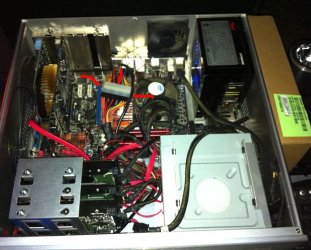
Any chance of a couple of decent pictures of the inside of the case?
 

My Computer My Computer

At a glance

Win 7 Ultimate x64FX-8350 @ 4.6 GHz so farADATA XPG V1 Series Black 8GB DDR3 1600Sapphire R9 270x Dual-X
Computer type
PC/Desktop
Computer Manufacturer/Model Number
Me
OS
Win 7 Ultimate x64
CPU
FX-8350 @ 4.6 GHz so far
Motherboard
Asus M5A97 EVO
Memory
ADATA XPG V1 Series Black 8GB DDR3 1600
Graphics Card(s)
Sapphire R9 270x Dual-X
Sound Card
Xonar DGX w/ Corsair Vengence 1300
Monitor(s) Displays
Acer S232HL Abid
Screen Resolution
1920x1080
Hard Drives
120 GB OCZ Vertex 3
500 GB Seagate 7200.12
PSU
Antec Earthwatts 650W Green
Case
Antec Three Hundred
Cooling
Cooler Master 212 EVO
Keyboard
Logitech G510
Mouse
Logitech G500s
Internet Speed
35000/3000
Any chance of a couple of decent pictures of the inside of the case?

Gave me a chance to use my new iPhone 4 :D

The center cable mass might look like a mess... but there is nothing that can be done about it, its just a busy intersection for cables. But the nice thing is that only cables reside in that area.

You will see the blue PCI slot towards the top left
 

Attachments

  • photo.JPG
    photo.JPG
    400.1 KB · Views: 30

My Computer My Computer

At a glance

Windows 7 64 & Ubuntu 64Intel Quad Core Q6600 2.40GHz8gNvidia 9600 GT & 9800 GT
Computer Manufacturer/Model Number
Built it myself
OS
Windows 7 64 & Ubuntu 64
CPU
Intel Quad Core Q6600 2.40GHz
Motherboard
Asus
Memory
8g
Graphics Card(s)
Nvidia 9600 GT & 9800 GT
Sound Card
Turtle Beach 5.1
Monitor(s) Displays
Three 19" Dell's & one 46" Samsung 750
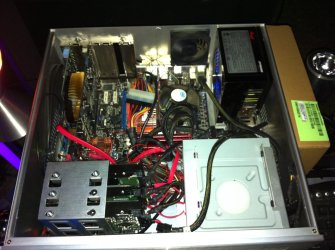
One straight on please.

P.S. If it is warping, it isn't the fan that is warping but the card itself.
 

My Computer My Computer

At a glance

Win 7 Ultimate x64FX-8350 @ 4.6 GHz so farADATA XPG V1 Series Black 8GB DDR3 1600Sapphire R9 270x Dual-X
Computer type
PC/Desktop
Computer Manufacturer/Model Number
Me
OS
Win 7 Ultimate x64
CPU
FX-8350 @ 4.6 GHz so far
Motherboard
Asus M5A97 EVO
Memory
ADATA XPG V1 Series Black 8GB DDR3 1600
Graphics Card(s)
Sapphire R9 270x Dual-X
Sound Card
Xonar DGX w/ Corsair Vengence 1300
Monitor(s) Displays
Acer S232HL Abid
Screen Resolution
1920x1080
Hard Drives
120 GB OCZ Vertex 3
500 GB Seagate 7200.12
PSU
Antec Earthwatts 650W Green
Case
Antec Three Hundred
Cooling
Cooler Master 212 EVO
Keyboard
Logitech G510
Mouse
Logitech G500s
Internet Speed
35000/3000
One straight on please.

P.S. If it is warping, it isn't the fan that is warping but the card itself.

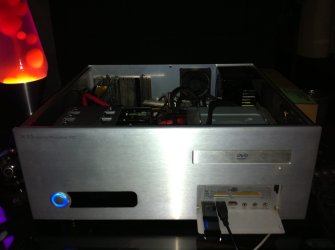
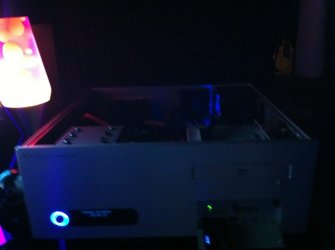
That is straight on, I dont have a tower but a box... I'll take a front view for you to see what I'm talking about...
 

Attachments

  • photo.JPG
    photo.JPG
    186.3 KB · Views: 3
  • photo (1).JPG
    photo (1).JPG
    293.8 KB · Views: 2

My Computer My Computer

At a glance

Windows 7 64 & Ubuntu 64Intel Quad Core Q6600 2.40GHz8gNvidia 9600 GT & 9800 GT
Computer Manufacturer/Model Number
Built it myself
OS
Windows 7 64 & Ubuntu 64
CPU
Intel Quad Core Q6600 2.40GHz
Motherboard
Asus
Memory
8g
Graphics Card(s)
Nvidia 9600 GT & 9800 GT
Sound Card
Turtle Beach 5.1
Monitor(s) Displays
Three 19" Dell's & one 46" Samsung 750
Could it be a slight misalignment of your motherboard relative to the case? Try loosening the motherboard mounting screws and then insert the card. When installed, retighten the screws.
 

My Computer My Computer

At a glance

Windows 8.1 Pro RTM x64Intel Core-i5-3570K 4-core @ 3.4GHz (Ivy Brid...4 x 4GB DDR3-1600 Corsair Vengeance CMZ8GX3M2...MSI GeForce GTX770 Gaming OC 2GB
Computer type
PC/Desktop
Computer Manufacturer/Model Number
Dwarf Dwf/11/2012 r09/2013
OS
Windows 8.1 Pro RTM x64
CPU
Intel Core-i5-3570K 4-core @ 3.4GHz (Ivy Bridge) (OC 4.4GHz)
Motherboard
ASRock Z77 Extreme4-M
Memory
4 x 4GB DDR3-1600 Corsair Vengeance CMZ8GX3M2A1600C9B (16GB)
Graphics Card(s)
MSI GeForce GTX770 Gaming OC 2GB
Sound Card
Realtek High Definition on board solution (ALC 898)
Monitor(s) Displays
ViewSonic VA1912w Widescreen (VGA)
Screen Resolution
1440x900
Hard Drives
OCZ Agility 3 SSD 120GB SATA III x2 (RAID 0)
Samsung HD501LJ 500GB SATA II x2
Hitachi HDS721010CLA332 1TB SATA II
Iomega 1.5TB Ext USB 2.0
WD 2.0TB Ext USB 3.0
PSU
XFX Pro Series 850W Semi-Modular
Case
Gigabyte IF233
Cooling
1 x 120mm Front Inlet 1 x 120mm Rear Exhaust
Keyboard
Microsoft Comfort Curve Keyboard 3000 (USB)
Mouse
Microsoft Comfort Mouse 3000 for Business (USB)
Internet Speed
NetGear DG834Gv3 ADSL Modem/Router (Ethernet) ~4.0 Mb/s (O2)
Antivirus
Avast! 8.0.1497
Browser
IE 11
Other Info
Optical Drive: HL-DT-ST BD-RE BH10LS30 SATA Bluray
Lexmark S305 Printer/Scanner/Copier (USB)
WEI Score: 8.1/8.1/8.5/8.5/8.25
Asus Eee PC 1011PX Netbook (Windows 7 x86 Starter)
Could it be a slight misalignment of your motherboard relative to the case? Try loosening the motherboard mounting screws and then insert the card. When installed, retighten the screws.

I dont think so, the machining on this case is really high end and very precise. Its an Origen and is all aluminum, model is X11 Home Theater PC.

Perhaps when I'm tightening down the mounting screw for the graphics card to the PCI slot on the back it does seem to move/tilt the card if tightened all the way
 

My Computer My Computer

At a glance

Windows 7 64 & Ubuntu 64Intel Quad Core Q6600 2.40GHz8gNvidia 9600 GT & 9800 GT
Computer Manufacturer/Model Number
Built it myself
OS
Windows 7 64 & Ubuntu 64
CPU
Intel Quad Core Q6600 2.40GHz
Motherboard
Asus
Memory
8g
Graphics Card(s)
Nvidia 9600 GT & 9800 GT
Sound Card
Turtle Beach 5.1
Monitor(s) Displays
Three 19" Dell's & one 46" Samsung 750
Maybe it's the angle of the dangle, but that main cable (24-pin connectors) looks to be disconnected (See red lines next to cable) :shock:

It should be connected to the motherboard! Am I missing something?

Capture.JPG
 

My Computer My Computer

At a glance

Windows 10 ProIntel Core i7-4770K (3.5Ghz)32 gig Corsair Dominator Platinum (4x8Gig)Sapphire Tri-X R9 Fury
Computer type
PC/Desktop
Computer Manufacturer/Model Number
Custom built by me.
OS
Windows 10 Pro
CPU
Intel Core i7-4770K (3.5Ghz)
Motherboard
Gigabyte G1 Sniper 5 (F10 Bios)
Memory
32 gig Corsair Dominator Platinum (4x8Gig)
Graphics Card(s)
Sapphire Tri-X R9 Fury
Sound Card
Soundblaster ZXR
Monitor(s) Displays
NEC PA242W 24" LCD Monitor
Screen Resolution
1920 x 1200
Hard Drives
Primary - Samsung 850 Pro (512gig), Samsung 840 Pro (256gig), 2TB WD Caviar Black.
PSU
EVGA Supernova 1000 G2
Case
Cooler Master HAF X
Cooling
Corsair H100i with Corsair Air Series SP120 Quiet Fans
Keyboard
Logitech Wireless Wave
Mouse
Logitech Performance MX
Internet Speed
High Speed Cable
Antivirus
Norton Security
Browser
IE11
Other Info
Memory Timings - 1866MHz @ 9-9-9-27-1T @ 1.5 volts
Looking at the image of your system, I would say that a bit of cable management would be beneficial. Your main ATX power cable is running straight across the board, and I see that you have a 20-24 pin extension fitted. Unfortunately, the connector is right next to the graphics slot. Could this be interfering with the fan on the graphics card?
 

My Computer My Computer

At a glance

Windows 8.1 Pro RTM x64Intel Core-i5-3570K 4-core @ 3.4GHz (Ivy Brid...4 x 4GB DDR3-1600 Corsair Vengeance CMZ8GX3M2...MSI GeForce GTX770 Gaming OC 2GB
Computer type
PC/Desktop
Computer Manufacturer/Model Number
Dwarf Dwf/11/2012 r09/2013
OS
Windows 8.1 Pro RTM x64
CPU
Intel Core-i5-3570K 4-core @ 3.4GHz (Ivy Bridge) (OC 4.4GHz)
Motherboard
ASRock Z77 Extreme4-M
Memory
4 x 4GB DDR3-1600 Corsair Vengeance CMZ8GX3M2A1600C9B (16GB)
Graphics Card(s)
MSI GeForce GTX770 Gaming OC 2GB
Sound Card
Realtek High Definition on board solution (ALC 898)
Monitor(s) Displays
ViewSonic VA1912w Widescreen (VGA)
Screen Resolution
1440x900
Hard Drives
OCZ Agility 3 SSD 120GB SATA III x2 (RAID 0)
Samsung HD501LJ 500GB SATA II x2
Hitachi HDS721010CLA332 1TB SATA II
Iomega 1.5TB Ext USB 2.0
WD 2.0TB Ext USB 3.0
PSU
XFX Pro Series 850W Semi-Modular
Case
Gigabyte IF233
Cooling
1 x 120mm Front Inlet 1 x 120mm Rear Exhaust
Keyboard
Microsoft Comfort Curve Keyboard 3000 (USB)
Mouse
Microsoft Comfort Mouse 3000 for Business (USB)
Internet Speed
NetGear DG834Gv3 ADSL Modem/Router (Ethernet) ~4.0 Mb/s (O2)
Antivirus
Avast! 8.0.1497
Browser
IE 11
Other Info
Optical Drive: HL-DT-ST BD-RE BH10LS30 SATA Bluray
Lexmark S305 Printer/Scanner/Copier (USB)
WEI Score: 8.1/8.1/8.5/8.5/8.25
Asus Eee PC 1011PX Netbook (Windows 7 x86 Starter)
Looking at the image of your system, I would say that a bit of cable management would be beneficial. Your main ATX power cable is running straight across the board, and I see that you have a 20-24 pin extension fitted. Unfortunately, the connector is right next to the graphics slot. Could this be interfering with the fan on the graphics card?

The cables arent long enough to do any good cable management, trust me I tried. theres a lot going on in there... 3 HDD's, 2 video cards, 8g of ram, dvd, 27 card slot etc

Nothing is disconnected, everything is good.

The fan will face left towards the other graphics card, so no, the cables are on the other side of it.
 

My Computer My Computer

At a glance

Windows 7 64 & Ubuntu 64Intel Quad Core Q6600 2.40GHz8gNvidia 9600 GT & 9800 GT
Computer Manufacturer/Model Number
Built it myself
OS
Windows 7 64 & Ubuntu 64
CPU
Intel Quad Core Q6600 2.40GHz
Motherboard
Asus
Memory
8g
Graphics Card(s)
Nvidia 9600 GT & 9800 GT
Sound Card
Turtle Beach 5.1
Monitor(s) Displays
Three 19" Dell's & one 46" Samsung 750
Maybe it's the angle of the dangle, but that main cable (24-pin connectors) looks to be disconnected (See red lines next to cable) :shock:

It should be connected to the motherboard! Am I missing something?

View attachment 102824

Angle of the dangle? haha what?

Some things are disconnected, but thats because I was working on it all day. Pretty much everything that needs to be plugged back in is. And the 24 pin is connected.
 

My Computer My Computer

At a glance

Windows 7 64 & Ubuntu 64Intel Quad Core Q6600 2.40GHz8gNvidia 9600 GT & 9800 GT
Computer Manufacturer/Model Number
Built it myself
OS
Windows 7 64 & Ubuntu 64
CPU
Intel Quad Core Q6600 2.40GHz
Motherboard
Asus
Memory
8g
Graphics Card(s)
Nvidia 9600 GT & 9800 GT
Sound Card
Turtle Beach 5.1
Monitor(s) Displays
Three 19" Dell's & one 46" Samsung 750
Could it be a slight misalignment of your motherboard relative to the case? Try loosening the motherboard mounting screws and then insert the card. When installed, retighten the screws.

I dont think so, the machining on this case is really high end and very precise. Its an Origen and is all aluminum, model is X11 Home Theater PC.

Perhaps when I'm tightening down the mounting screw for the graphics card to the PCI slot on the back it does seem to move/tilt the card if tightened all the way
Nonetheless, try what I suggested. The motherboard only has to be out of alignment by a fraction of a milimetre for problems to occur when installing cards, especially graphics cards due to the higher density of connectors in the PCIe socket when compared to a PCI one.
 

My Computer My Computer

At a glance

Windows 8.1 Pro RTM x64Intel Core-i5-3570K 4-core @ 3.4GHz (Ivy Brid...4 x 4GB DDR3-1600 Corsair Vengeance CMZ8GX3M2...MSI GeForce GTX770 Gaming OC 2GB
Computer type
PC/Desktop
Computer Manufacturer/Model Number
Dwarf Dwf/11/2012 r09/2013
OS
Windows 8.1 Pro RTM x64
CPU
Intel Core-i5-3570K 4-core @ 3.4GHz (Ivy Bridge) (OC 4.4GHz)
Motherboard
ASRock Z77 Extreme4-M
Memory
4 x 4GB DDR3-1600 Corsair Vengeance CMZ8GX3M2A1600C9B (16GB)
Graphics Card(s)
MSI GeForce GTX770 Gaming OC 2GB
Sound Card
Realtek High Definition on board solution (ALC 898)
Monitor(s) Displays
ViewSonic VA1912w Widescreen (VGA)
Screen Resolution
1440x900
Hard Drives
OCZ Agility 3 SSD 120GB SATA III x2 (RAID 0)
Samsung HD501LJ 500GB SATA II x2
Hitachi HDS721010CLA332 1TB SATA II
Iomega 1.5TB Ext USB 2.0
WD 2.0TB Ext USB 3.0
PSU
XFX Pro Series 850W Semi-Modular
Case
Gigabyte IF233
Cooling
1 x 120mm Front Inlet 1 x 120mm Rear Exhaust
Keyboard
Microsoft Comfort Curve Keyboard 3000 (USB)
Mouse
Microsoft Comfort Mouse 3000 for Business (USB)
Internet Speed
NetGear DG834Gv3 ADSL Modem/Router (Ethernet) ~4.0 Mb/s (O2)
Antivirus
Avast! 8.0.1497
Browser
IE 11
Other Info
Optical Drive: HL-DT-ST BD-RE BH10LS30 SATA Bluray
Lexmark S305 Printer/Scanner/Copier (USB)
WEI Score: 8.1/8.1/8.5/8.5/8.25
Asus Eee PC 1011PX Netbook (Windows 7 x86 Starter)

My Computer My Computer

At a glance

Windows 10 ProIntel Core i7-4770K (3.5Ghz)32 gig Corsair Dominator Platinum (4x8Gig)Sapphire Tri-X R9 Fury
Computer type
PC/Desktop
Computer Manufacturer/Model Number
Custom built by me.
OS
Windows 10 Pro
CPU
Intel Core i7-4770K (3.5Ghz)
Motherboard
Gigabyte G1 Sniper 5 (F10 Bios)
Memory
32 gig Corsair Dominator Platinum (4x8Gig)
Graphics Card(s)
Sapphire Tri-X R9 Fury
Sound Card
Soundblaster ZXR
Monitor(s) Displays
NEC PA242W 24" LCD Monitor
Screen Resolution
1920 x 1200
Hard Drives
Primary - Samsung 850 Pro (512gig), Samsung 840 Pro (256gig), 2TB WD Caviar Black.
PSU
EVGA Supernova 1000 G2
Case
Cooler Master HAF X
Cooling
Corsair H100i with Corsair Air Series SP120 Quiet Fans
Keyboard
Logitech Wireless Wave
Mouse
Logitech Performance MX
Internet Speed
High Speed Cable
Antivirus
Norton Security
Browser
IE11
Other Info
Memory Timings - 1866MHz @ 9-9-9-27-1T @ 1.5 volts
Back
Top