
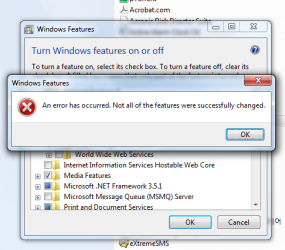
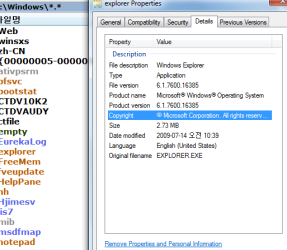
could not install ftp service

windstory

New member
Member
VIP
Local time
9:16 AM
Messages
142
My box is windows 7 x64 ultimate.

At windows feature, I added ftp service, but got an error as attached picture.

Doesn't this windows 7 edition support ftp service?

Many thanks in advance.
 

Attachments

  • 2009-08-28_ftp_error_e.png
    2009-08-28_ftp_error_e.png
    26.9 KB · Views: 103
  • 2009-08-28_winver.png
    2009-08-28_winver.png
    16.2 KB · Views: 67

My Computer

Computer Manufacturer/Model Number
self assembling
OS
windows 7 x64 16385
CPU
core2duo 6600
Motherboard
asus p5b delxe
Memory
samsung 1G x 4
Graphics Card(s)
ati x850
Sound Card
audigy2 zs
Monitor(s) Displays
lg lcd
Screen Resolution
1920 x1200
Hard Drives
samsung 520G
PSU
micronics classic 500W
Case
nctop a380
Cooling
zalman
Internet Speed
lan
I dont know the specific answer to that but you could try something like Filezilla server.
 

My Computer

Computer Manufacturer/Model Number
self built
OS
Windows 7 Professional 64-bit
CPU
Intel E8400 3GHz
Motherboard
Intel DX48BT2
Memory
Kingston PC3-10700H 4Gb
Graphics Card(s)
XFX Radeon HD 5850 BlackEd.
Sound Card
Asus Xonar DG
Monitor(s) Displays
2x Samsung SM-T220HD 22"
Screen Resolution
1680x1050 on two monitors
Hard Drives
OCZ Vertex 2 120gb 3.5" (OS)
Seagate Momentus XT 500gb
Samsung F3 1Tb (games)
2x Samsung F1 1Tb
PSU
Thermaltake ToughPower 850w
Case
Thermaltake Armor
Cooling
Scythe Mugen II
Keyboard
Microsoft Comfort Curve USB
Mouse
Razer Diamondback 3G
Internet Speed
8128/443
I dont know the specific answer to that but you could try something like Filezilla server.

+1 mate, i've had issues getting FTP working on Windows 7 x86 too.
 

My Computer

Computer Manufacturer/Model Number
Compaq Desktop
OS
Windows 7 Ultimate x64
CPU
AMD Sempron Dual Core
Memory
3GB
Graphics Card(s)
NVIDIA GeForce 6150SE nForce 430
Screen Resolution
1024x768
Hard Drives
150GB Sata
Is this an untouched build of Windows 7? No trimming or removing of its components before installation?
 

My Computer

Computer type
PC/Desktop
Computer Manufacturer/Model Number
Alienware Aurora ALX R4
OS
Windows 10 Pro (x64)
CPU
Intel Core i7-3930K (3.2GHz - 4.5GHz)
Motherboard
Alienware Aurora-R4 x79
Memory
4x Samsung 4GB PC3-12800 DDR3 (16GB 1600MHz)
Graphics Card(s)
Nvidia Geforce GTX 690
Sound Card
SteelSeries Siberia Elite
Monitor(s) Displays
Dell UltraSharp U3011
Screen Resolution
2560x1600
Hard Drives
Samsung 850 Pro 256 GB, Seagate 1TB Desktop Hybrid HDD, 2x Western Digital 4TB Green HDD
PSU
875W Some Dell PSU <.<
Case
Alienware Aurora ALX
Cooling
Custom Liquid Cooling (EK CPU & GPU blocks) dual EK 480RAD
Keyboard
Logitech G710+ Mechanical
Mouse
Logitech G700s
Internet Speed
Verizon Fios (50 mbps average)
Other Info
Server: Intel NUC D54250WYK: i5-4250U, 16GB, 256 GB mSATA, Windows Server 2012 R2
Is this an untouched build of Windows 7? No trimming or removing of its components before installation?

logicearth/ I don't know exactly. So I post here
 

My Computer

Computer Manufacturer/Model Number
self assembling
OS
windows 7 x64 16385
CPU
core2duo 6600
Motherboard
asus p5b delxe
Memory
samsung 1G x 4
Graphics Card(s)
ati x850
Sound Card
audigy2 zs
Monitor(s) Displays
lg lcd
Screen Resolution
1920 x1200
Hard Drives
samsung 520G
PSU
micronics classic 500W
Case
nctop a380
Cooling
zalman
Internet Speed
lan
By getting this message means that windows doesn't actually have this feature in order to install it, and as long as the FTP is a very important feature, this means that your windows setup wasn't completely successful, to solve the problem try to repair your windows.

Try to check for errors inside windows: start>>all programs>>accessories>>command prompt(run as admin)>>then type"sfc /scannow".

This will make windows check for errors.

Alternatively, try to repair windows, read this article.

Finally if you also couldn't repair the problem, try make sure:

  1. That you are logged in as an admin.
  2. The Windows Features service will require administrative privileges to run. If it doesn't require your permission then this is a problem, try to reboot in safe mode and then try to turn the feature back on from there.
If that shouldn't help, please reply as soon as possible and I will try to kill this problem 4 u.
 

My Computer

Computer Manufacturer/Model Number
HP compaq Presario CQ60
OS
Windows 7 Home Premium x86
CPU
AMD Athlon
Memory
2.00 GB
Graphics Card(s)
ATI Redon
Back
Top