cover problems in word 2010

leondup

New member
Local time
12:47 PM
Messages
1
Please forgive me if this is not the forum for seeking help with a problem that has been driving me dilly all day. I need, urgently, to create a document consisting of a cover plus seven pages of plain text. My problem is I simply cannot get my page numbering to start (page 1) on the second page instead of the first page which, of course, is the cover. Word 2010 for Dummies makes the issue as clear as mud for me, and I'm having no luck googling. Can anyone tell me where I might find a template that can solve the prob for me, or could some kind soul take pity on me and send me one. My gratitude would be boundless and I promise I'll get my medium to persuade Mother Teresa to instruct Pope Benedict to declare you a saint!
 

My Computer

OS
Windows 7
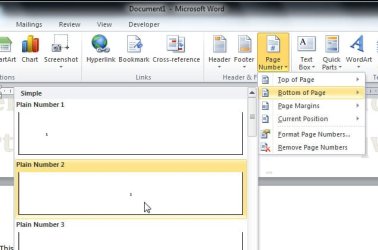
Position the cursor anywhere on the second page of your document - ie. the page immediately after the header page.

Select the Insert tab from the ribbon bar and choose 'Page Number' and select the format from the drop down menu.

In my test, this makes the second page of my document start numbering from 1. onwards.

Hope this is what you are after.
 

Attachments

  • Insert page number.jpg
    Insert page number.jpg
    32.2 KB · Views: 7
Last edited:

My Computer

Computer Manufacturer/Model Number
HP Pavilion p6040a
OS
Windows 7 Professional x64, SP1
CPU
Intel Core 2 Duo E7400 2.8GHz
Motherboard
FOXCONN Napa
Memory
4GB
Graphics Card(s)
ATI Radeon HD3540

My Computer

Computer type
PC/Desktop
Computer Manufacturer/Model Number
(7 different computers booting up to 10 systems)
OS
Linux Mint / XP / Win7 Home, Pro, Ultimate / Win8.1 / Win10
Other Info
Four desktops, two laptops, one notebook and one tablet
Back
Top