
CPU and motherboard are the same? Sound card not showing?

jseh

New member
Local time
4:41 AM
Messages
13
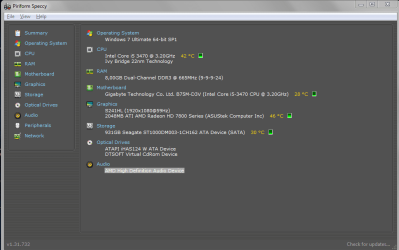
I am checking out what I actually have in my PC because I want to upgrade it so I downloaded Speccy.
It doesn't show that much more information than device manager.
I'm confused about the CPU/Motherboard because they both show Intel Core i5-3470.
Also, my sound card is not showing, yes it says "AMD High Definition Audio Device" but that's not a model.
Can anyone help me with this?
 

Attachments
  • specs.PNG
    specs.PNG
    24.5 KB · Views: 3

My Computer My Computer

At a glance

Windows 7 Ultimate 64-bitIntel Core i5 3470 @ 3.20GHzAMD Radeon HD 7800 Series
Computer type
PC/Desktop
OS
Windows 7 Ultimate 64-bit
CPU
Intel Core i5 3470 @ 3.20GHz
Graphics Card(s)
AMD Radeon HD 7800 Series
Antivirus
AVG 2015
The CPU plugs into the motherboard -- that's why you see Intel Core i5-3470 listed with the motherboard.

What sort of upgrade do you want to do? Do you want to make the computer faster? What you use the computer for will help determine what would be the best thing to do to get better performance.

Two things which usually help are (1) more memory and (2) converting from a mechanical hard drive to a solid state drive (SSD). Since you have 64-bit Windows, you can probably benefit from more memory, if you aren't already maxed out. A solid state drive is always faster than a mechanical hard drive, and you will see that benefit every time there is a disk read or write, such as when Windows starts up, or when you save something to the hard drive.

If you do a lot of gaming, then a better graphics card could help, unless you already have a good graphics card.

If your network interface card is old, you may get a better internet speed by installing a new card.

You could probably benefit from a better CPU. But you will need to get one which is fully compatible with your motherboard, memory, etc. Also, you need to handle the CPU with extreme care, and then use a good thermal paste to attach the heat sink to the new CPU. I would not advise changing out the CPU unless you know exactly what you are doing, that is, if you've done it several times before.

Sometimes the cost of upgrading your computer is more than you will pay for a new computer. Perhaps you will want to just add memory and install an SSD. Those two steps will give you just about all of the improvement you are likely to get.
 

My Computer My Computer

At a glance

Linux Mint 18.2 xfce 64-bit (VMWare host) / W...Haswell4 GB
Computer type
PC/Desktop
Computer Manufacturer/Model Number
Dell
OS
Linux Mint 18.2 xfce 64-bit (VMWare host) / Windows 8.1 Pro 32-bit (VMWare guest)
CPU
Haswell
Memory
4 GB
Monitor(s) Displays
Acer 23"
Screen Resolution
1920 x 1080
Hard Drives
Two hard drives, 1TB each: One for Linux, one for my data.
Keyboard
IBM Model M
Antivirus
Sophos (Linux), Trend Micro (Windows)
Browser
Firefox, Opera
Other Info
I use Samba to share my data drive with the other computers at my house and with my guest session in VMWare Workstation Player.
The CPU plugs into the motherboard -- that's why you see Intel Core i5-3470 listed with the motherboard.

What sort of upgrade do you want to do? Do you want to make the computer faster? What you use the computer for will help determine what would be the best thing to do to get better performance.

Two things which usually help are (1) more memory and (2) converting from a mechanical hard drive to a solid state drive (SSD). Since you have 64-bit Windows, you can probably benefit from more memory, if you aren't already maxed out. A solid state drive is always faster than a mechanical hard drive, and you will see that benefit every time there is a disk read or write, such as when Windows starts up, or when you save something to the hard drive.

If you do a lot of gaming, then a better graphics card could help, unless you already have a good graphics card.

If your network interface card is old, you may get a better internet speed by installing a new card.

You could probably benefit from a better CPU. But you will need to get one which is fully compatible with your motherboard, memory, etc. Also, you need to handle the CPU with extreme care, and then use a good thermal paste to attach the heat sink to the new CPU. I would not advise changing out the CPU unless you know exactly what you are doing, that is, if you've done it several times before.

Sometimes the cost of upgrading your computer is more than you will pay for a new computer. Perhaps you will want to just add memory and install an SSD. Those two steps will give you just about all of the improvement you are likely to get.

I want to play videogames. Right now Fallout 3 advises me to use Medium settings instead of High or Very High.
I want to play Very High at a proper speed.
 

My Computer My Computer

At a glance

Windows 7 Ultimate 64-bitIntel Core i5 3470 @ 3.20GHzAMD Radeon HD 7800 Series
Computer type
PC/Desktop
OS
Windows 7 Ultimate 64-bit
CPU
Intel Core i5 3470 @ 3.20GHz
Graphics Card(s)
AMD Radeon HD 7800 Series
Antivirus
AVG 2015
You're missing the motherboard's AUDIO driver. The only AUDIO drive installed is the one needed by your graphics card to drive audio signals on HDMI.
 

My Computer My Computer

At a glance

Windows 7 Home Premium 64-BITAMD A8 7200P8GB 1600mhzRadeon R5 (APU) + Radeon R5 M230 2GB Dual Gra...
Computer type
PC/Desktop
Computer Manufacturer/Model Number
ASUS X550ZE
OS
Windows 7 Home Premium 64-BIT
CPU
AMD A8 7200P
Motherboard
N/A
Memory
8GB 1600mhz
Graphics Card(s)
Radeon R5 (APU) + Radeon R5 M230 2GB Dual Graphics
Sound Card
Realtek ALC269 with SonicMaster
Monitor(s) Displays
Laptop Display
Screen Resolution
1920 x 1080 @60hz
Hard Drives
WDC WD50 00LPVX-80V0TT0 (500GB)
PSU
Laptop Charger
Mouse
ARMAGGEDON TEXTRON SCORPION 7
Internet Speed
100 mbps DOWN / 50 mbps UP
Antivirus
Windows Defender
Browser
Mozzila FireFox, Valve Steam in-game internet browser
Back
Top