Cpu at 50 degrees when virtually idle

Tomha

New member
Member
VIP
Local time
10:57 AM
Messages
391
Location
Auckland, New Zealand
I have noticed that my cpu wasn't always as cool as it use to be, but I have now noticed (since I installed my ram, whether that's coincidence or cause and effect I don't know) that the CPU is running at 50 degrees Celsius with a load of only 1-5%. It is an Intel i7 2600k with the stock cooler. Any suggestions? Is this normal? Because it use to be closer to 35 degrees at idle.

Thanks
 

My Computer

Computer type
PC/Desktop
Computer Manufacturer/Model Number
Custom Build
OS
Windows 7 Professional 64bit
CPU
Intel i7 3770k 3.5ghz
Motherboard
Asus P8Z77-V Deluxe
Memory
Corsair Vengeance 16gb (4x4gb)
Graphics Card(s)
Gigabyte G1 Gaming GTX970
Sound Card
None
Monitor(s) Displays
3x AOC 12367fh 23"
Screen Resolution
1920x1080
Hard Drives
Western Digital Caviar Black 1TB - 64mb cache
Western Digital Caviar Green 1TB - 32mb cache
Samsung 830 SSD 128Gb Boot Drive
PSU
Corsair AX-860W ATX
Case
Corsair 500R black
Cooling
Corsair 500r Stock cooling (3x120mm, 1x200mm) & Corsair H100
Keyboard
Logitech G110 gaming keyboard
Mouse
Logitech G500s
Other Info
Corsair Hydro 100 CPU Cooler
CPU is running at 50 degrees Celsius with a load of only 1-5%. It is an Intel i7 2600k with the stock cooler. Any suggestions? Is this normal? Because it use to be closer to 35 degrees at idle.

Thanks

50 is certainly high at near idle, assuming you are in a room with ordinary temps.

But it isn't alarming and would probably run for many years at 50.

What happens at say 70% load?

I would wonder why it had changed.

Have you tried another monitoring application? Have you checked fans speeds? What about temps other than CPU?

The stock cooler is plenty good enough if you are not overclocking.
 

My Computer

Computer type
PC/Desktop
Computer Manufacturer/Model Number
Ignatz Special; 4 speed manual gearbox; factory air conditioning; one of one
OS
Windows 7 Home Premium SP1, 64-bit
CPU
Intel Skylake i5-6600K, not overclocked
Motherboard
AsRock Z170M Extreme 4, micro ATX
Memory
8 GB HyperX DDR4-2666 (2 x 4 GB)
Graphics Card(s)
none; graphics are integrated on CPU
Sound Card
onboard: Realtek ALC1150; external: USB Behringer UF0-202
Monitor(s) Displays
Dell S2340M 23 inch IPS
Screen Resolution
1600 x 900
Hard Drives
System: Crucial MX100 series SSD, 128 GB;
Data: Samsung Spinpoint 103SJ, 1 TB;
Backup: WD Caviar Green WD30EZRX-00D8PB0, 3 TB
PSU
Rosewill SilentNight 500 watt fanless, semi-modular
Case
Antec Solo II
Cooling
Noctua NH-U12S; Noctua F12 intake, Noctua S12A exhaust
Keyboard
Microsoft 200 6JH-00001 USB
Mouse
Dell or Microsoft optical wired; USB
Antivirus
Microsoft Security Essentials and Malwarebytes Premium
Browser
Pale Moon
Other Info
All fans PWM; speeds at idle: CPU circa 500 rpm; intake circa 600 rpm; exhaust circa 600 rpm; CPU temps 27 idle and 47 C load in a warm room (27 C/81 F) when running Intel Extreme Tuning Utility stress test.
I also think that's on the warm side. Tcase Max for the cpu is 72.6C. I think Tcore would translate to ~80 C (??).
I wasn't happy with the stock cooler and used a Cooler Master Hyper 212 plus. Relatively cheap and it made a big difference. But it is a little fiddly to fit and you need to check it fits your case.
With it and artic silver 5 applied according to artic silver's instructions I idle below or around 30C (core temp) on a warm day with a well cooled case. Prime 95 or Handbrake video encoding can push the maximum of the 4 cores to ~60C (core temp).

Other non stock coolers should improve the situation.

Note: I am not overclocking.
 

My Computer

Computer type
PC/Desktop
Computer Manufacturer/Model Number
Own build
OS
Windows 7x64 Home Premium SP1
CPU
Intel i7 2600k
Motherboard
ASUS P8Z68 Deluxe
Memory
G.Skill Ripjaws (DDR3-1600) 2x4GB
Graphics Card(s)
Nvidia GeForce GTS 450; Intel HD Graphics 3000(GT2+)
Monitor(s) Displays
Dell Ultrasharp IPS panel U2311H, Samsung SyncMaster P2350
Screen Resolution
1920x1080
Hard Drives
Samsung 850 Pro SSD 256GB, Samsung SSD 840 120GB, Seagates 1TB Barracuda ST31000528AS x2
PSU
Seasonic M12II 520W
Case
Lian Li Lancool PC-K60
Cooling
Case: 1x120mm, 3x140mm CPU: Hyper 212+
Keyboard
Logitech MK520 (wireless)
Mouse
Logitech MK520
Internet Speed
6-7 Mbps
Antivirus
Norton Security Premium, Malwarebytes on 2 (MSE on 3rd PC)
Browser
FireFox
Other Info
Audio: Logitech Z523 2.1
I will try encoding a video, that normally puts it under full load, then let you know what it gets to.


Ok so a fluctuating load of between 60 and 80% for each core translates (According to core-temp each core is fluctuating between these amounts of load) to a temp of about 75 degrees, when I have had it under full load in the past it would reach the 80s. Is there a good, free cpu bench marker out there I could use to put it under a set load? I cant use anything else to obtain a constant load.
 

My Computer

Computer type
PC/Desktop
Computer Manufacturer/Model Number
Custom Build
OS
Windows 7 Professional 64bit
CPU
Intel i7 3770k 3.5ghz
Motherboard
Asus P8Z77-V Deluxe
Memory
Corsair Vengeance 16gb (4x4gb)
Graphics Card(s)
Gigabyte G1 Gaming GTX970
Sound Card
None
Monitor(s) Displays
3x AOC 12367fh 23"
Screen Resolution
1920x1080
Hard Drives
Western Digital Caviar Black 1TB - 64mb cache
Western Digital Caviar Green 1TB - 32mb cache
Samsung 830 SSD 128Gb Boot Drive
PSU
Corsair AX-860W ATX
Case
Corsair 500R black
Cooling
Corsair 500r Stock cooling (3x120mm, 1x200mm) & Corsair H100
Keyboard
Logitech G110 gaming keyboard
Mouse
Logitech G500s
Other Info
Corsair Hydro 100 CPU Cooler
Given that it is already on the warm side, I would not put it under unnecessary stress. Better to first find the cause of the heat problem. Three things come to mind

1. dirt around the unit - especially in the fan blades
2. the cooler may have come loose and is not seated correctly
3. the paste dried out and should be replaced
 

My Computer

Computer Manufacturer/Model Number
HP, Dell, Gateway, Toshiba - 4 laptops and 2 desktops
OS
Vista, Windows7, Mint Mate, Zorin, Windows 8
CPU
from 1.6GHz Duo to i7
Monitor(s) Displays
2x HP w2207
Hard Drives
5x HDD, 7x SSD, 12x Externals
Keyboard
with trackball - no mices
Mouse
Trackball mice
Internet Speed
DSL 6000
Tomha:

I know you have been experimenting with RAM settings and maybe overclocking.

Are you sure that you are now running at stock settings??

What are your fans speeds and voltages?

I wouldn't worry about putting a load on it now.

You say you were at 35 idle and are now at 50. Assuming those numbers are correct, there has to be a reason.
 

My Computer

Computer type
PC/Desktop
Computer Manufacturer/Model Number
Ignatz Special; 4 speed manual gearbox; factory air conditioning; one of one
OS
Windows 7 Home Premium SP1, 64-bit
CPU
Intel Skylake i5-6600K, not overclocked
Motherboard
AsRock Z170M Extreme 4, micro ATX
Memory
8 GB HyperX DDR4-2666 (2 x 4 GB)
Graphics Card(s)
none; graphics are integrated on CPU
Sound Card
onboard: Realtek ALC1150; external: USB Behringer UF0-202
Monitor(s) Displays
Dell S2340M 23 inch IPS
Screen Resolution
1600 x 900
Hard Drives
System: Crucial MX100 series SSD, 128 GB;
Data: Samsung Spinpoint 103SJ, 1 TB;
Backup: WD Caviar Green WD30EZRX-00D8PB0, 3 TB
PSU
Rosewill SilentNight 500 watt fanless, semi-modular
Case
Antec Solo II
Cooling
Noctua NH-U12S; Noctua F12 intake, Noctua S12A exhaust
Keyboard
Microsoft 200 6JH-00001 USB
Mouse
Dell or Microsoft optical wired; USB
Antivirus
Microsoft Security Essentials and Malwarebytes Premium
Browser
Pale Moon
Other Info
All fans PWM; speeds at idle: CPU circa 500 rpm; intake circa 600 rpm; exhaust circa 600 rpm; CPU temps 27 idle and 47 C load in a warm room (27 C/81 F) when running Intel Extreme Tuning Utility stress test.
Ok, so say I removed the cooler to clean it of dust and such, it will become detached from the cooling paste, at which point I can check the state of it, but is it then safe to put it back on as-is? Or should I re-apply the cooling paste?

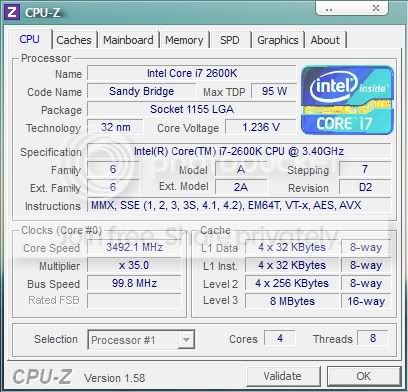
The ONLY thing I have done to alter the speeds of any part of my computer, is put my RAM into its XMP profile, I do not plan on any sort of over clock (I don't consider putting my ram into XMP an over clock, just making it run at stock settings) until I get a much better cooler. My case has 2 antec Tri Cool fans, both on medium, other than that I have not altered cooling in anyway, everything should be at stock voltage/speeds. My processor of course does alter its own voltage/speeds according to intels instructions, e.g. downclocks to 1.6 ghz when completely idle, overclocks 1 core to 3.8 if its the only one being used. I have noticed sometimes the core frequencies can be a little odd, I recall all 4 cores running at around 3.6 once at roughly 40% load.

CPU-Z.jpg
 

My Computer

Computer type
PC/Desktop
Computer Manufacturer/Model Number
Custom Build
OS
Windows 7 Professional 64bit
CPU
Intel i7 3770k 3.5ghz
Motherboard
Asus P8Z77-V Deluxe
Memory
Corsair Vengeance 16gb (4x4gb)
Graphics Card(s)
Gigabyte G1 Gaming GTX970
Sound Card
None
Monitor(s) Displays
3x AOC 12367fh 23"
Screen Resolution
1920x1080
Hard Drives
Western Digital Caviar Black 1TB - 64mb cache
Western Digital Caviar Green 1TB - 32mb cache
Samsung 830 SSD 128Gb Boot Drive
PSU
Corsair AX-860W ATX
Case
Corsair 500R black
Cooling
Corsair 500r Stock cooling (3x120mm, 1x200mm) & Corsair H100
Keyboard
Logitech G110 gaming keyboard
Mouse
Logitech G500s
Other Info
Corsair Hydro 100 CPU Cooler
Ok, so say I removed the cooler to clean it of dust and such, it will become detached from the cooling paste, at which point I can check the state of it, but is it then safe to put it back on as-is? Or should I re-apply the cooling paste?

There is little to no chance that dust is suddenly going to make idle temps jump 15 degrees. Dust is much more likely to occur gradually.

What is your CPU fan speed? Your case fan speeds? Your voltages? Your overclocking status????????????????

If you did remove the cooler, you would have to clean it and reinstall paste, but there is only a slight chance that is the issue if you had good temps recently.
 

My Computer

Computer type
PC/Desktop
Computer Manufacturer/Model Number
Ignatz Special; 4 speed manual gearbox; factory air conditioning; one of one
OS
Windows 7 Home Premium SP1, 64-bit
CPU
Intel Skylake i5-6600K, not overclocked
Motherboard
AsRock Z170M Extreme 4, micro ATX
Memory
8 GB HyperX DDR4-2666 (2 x 4 GB)
Graphics Card(s)
none; graphics are integrated on CPU
Sound Card
onboard: Realtek ALC1150; external: USB Behringer UF0-202
Monitor(s) Displays
Dell S2340M 23 inch IPS
Screen Resolution
1600 x 900
Hard Drives
System: Crucial MX100 series SSD, 128 GB;
Data: Samsung Spinpoint 103SJ, 1 TB;
Backup: WD Caviar Green WD30EZRX-00D8PB0, 3 TB
PSU
Rosewill SilentNight 500 watt fanless, semi-modular
Case
Antec Solo II
Cooling
Noctua NH-U12S; Noctua F12 intake, Noctua S12A exhaust
Keyboard
Microsoft 200 6JH-00001 USB
Mouse
Dell or Microsoft optical wired; USB
Antivirus
Microsoft Security Essentials and Malwarebytes Premium
Browser
Pale Moon
Other Info
All fans PWM; speeds at idle: CPU circa 500 rpm; intake circa 600 rpm; exhaust circa 600 rpm; CPU temps 27 idle and 47 C load in a warm room (27 C/81 F) when running Intel Extreme Tuning Utility stress test.
Download HWinfo32 and check all fans speeds.

It's odd that CPUZ shows 3492 for your CPU at the time of the screenshot.

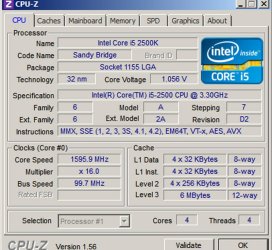
Were you idling then?? If so, I would expect a number near 1600 as per my pic below.

Are your PSU and case fans operating??
 

Attachments

  • Untitled-1.jpg
    Untitled-1.jpg
    122 KB · Views: 15

My Computer

Computer type
PC/Desktop
Computer Manufacturer/Model Number
Ignatz Special; 4 speed manual gearbox; factory air conditioning; one of one
OS
Windows 7 Home Premium SP1, 64-bit
CPU
Intel Skylake i5-6600K, not overclocked
Motherboard
AsRock Z170M Extreme 4, micro ATX
Memory
8 GB HyperX DDR4-2666 (2 x 4 GB)
Graphics Card(s)
none; graphics are integrated on CPU
Sound Card
onboard: Realtek ALC1150; external: USB Behringer UF0-202
Monitor(s) Displays
Dell S2340M 23 inch IPS
Screen Resolution
1600 x 900
Hard Drives
System: Crucial MX100 series SSD, 128 GB;
Data: Samsung Spinpoint 103SJ, 1 TB;
Backup: WD Caviar Green WD30EZRX-00D8PB0, 3 TB
PSU
Rosewill SilentNight 500 watt fanless, semi-modular
Case
Antec Solo II
Cooling
Noctua NH-U12S; Noctua F12 intake, Noctua S12A exhaust
Keyboard
Microsoft 200 6JH-00001 USB
Mouse
Dell or Microsoft optical wired; USB
Antivirus
Microsoft Security Essentials and Malwarebytes Premium
Browser
Pale Moon
Other Info
All fans PWM; speeds at idle: CPU circa 500 rpm; intake circa 600 rpm; exhaust circa 600 rpm; CPU temps 27 idle and 47 C load in a warm room (27 C/81 F) when running Intel Extreme Tuning Utility stress test.
Ok, so here is what I can gather:

Case fans:
-Top fan, 140mm, 1100rpm, 66.8 cfm, 2.4W​
-Back fan, 120mm, 1600rpm, 56 cfm, 2.4W​

PSU fan:
Working, at lower speed due to power usage​

CPU fan:
Hard to tell, speed fan suggests its running at about 1400rpm​

As I said before, the only alteration I have made personally to the clock speeds of any part of my computer is putting the RAM into XMP. I know that my cpu does downclock to 1.6ghz like there, I havent checked recently to see. According to both cpu-z and core temp, my cpu is currently at 3.5 ghz with minimal load. I have not knowingly done anything to set it there.
 

My Computer

Computer type
PC/Desktop
Computer Manufacturer/Model Number
Custom Build
OS
Windows 7 Professional 64bit
CPU
Intel i7 3770k 3.5ghz
Motherboard
Asus P8Z77-V Deluxe
Memory
Corsair Vengeance 16gb (4x4gb)
Graphics Card(s)
Gigabyte G1 Gaming GTX970
Sound Card
None
Monitor(s) Displays
3x AOC 12367fh 23"
Screen Resolution
1920x1080
Hard Drives
Western Digital Caviar Black 1TB - 64mb cache
Western Digital Caviar Green 1TB - 32mb cache
Samsung 830 SSD 128Gb Boot Drive
PSU
Corsair AX-860W ATX
Case
Corsair 500R black
Cooling
Corsair 500r Stock cooling (3x120mm, 1x200mm) & Corsair H100
Keyboard
Logitech G110 gaming keyboard
Mouse
Logitech G500s
Other Info
Corsair Hydro 100 CPU Cooler
You could try taking the ram out of xmp see what temps you get. if they do then it could be a faulty ram module or you may have knocked the cpu fan when you installed the new ram causing the over temp
 

My Computer

Computer Manufacturer/Model Number
home built PC. Laptop studio1557
OS
windows 7 64 bit and dual boot Pinguyos
CPU
PC, intel i7 920 2.7ghz, laptop i7 720
Motherboard
PC, Asus P6t .laptop probably rubbish from dell
Memory
PC 6GB, laptop 2GB, me 2 seconds after 6 pints
Graphics Card(s)
PC Asus eah5870,laptop, ati hd 4580
Monitor(s) Displays
Sharp 42" HD TV using HDMI + HDMI to onkyo surround amp
Screen Resolution
1920x1080
Hard Drives
1x ssd OCZ 60GB, 2x250GB raid0, 2x1TB (storage),2TB
PSU
OCZ 700w
Case
antec 902
Cooling
antec khuler h20 920
Keyboard
logitek wave
Mouse
x8 sidewinder
Internet Speed
dog slow
Ok, I will have a look, but first, new thing: I have done several checks, all programs say my cpu is running at 3.5ghz idle (meant to be 3.4), and despite my efforts to get it into idle/powersaver mode, it doesn't want to go.
 

My Computer

Computer type
PC/Desktop
Computer Manufacturer/Model Number
Custom Build
OS
Windows 7 Professional 64bit
CPU
Intel i7 3770k 3.5ghz
Motherboard
Asus P8Z77-V Deluxe
Memory
Corsair Vengeance 16gb (4x4gb)
Graphics Card(s)
Gigabyte G1 Gaming GTX970
Sound Card
None
Monitor(s) Displays
3x AOC 12367fh 23"
Screen Resolution
1920x1080
Hard Drives
Western Digital Caviar Black 1TB - 64mb cache
Western Digital Caviar Green 1TB - 32mb cache
Samsung 830 SSD 128Gb Boot Drive
PSU
Corsair AX-860W ATX
Case
Corsair 500R black
Cooling
Corsair 500r Stock cooling (3x120mm, 1x200mm) & Corsair H100
Keyboard
Logitech G110 gaming keyboard
Mouse
Logitech G500s
Other Info
Corsair Hydro 100 CPU Cooler
Took RAM out of XMP, CPU-Z reports 1.6ghz in idle, core temp continues to report 3.5, I can see turbo in effect because its getting up to 3.8 in core temp. Heat now in the 30-40s at idle. It still appears as though when it comes out of idle it goes to 3.5 though. What does this all mean? I mean like, do I have a faulty ram module or something?
 

My Computer

Computer type
PC/Desktop
Computer Manufacturer/Model Number
Custom Build
OS
Windows 7 Professional 64bit
CPU
Intel i7 3770k 3.5ghz
Motherboard
Asus P8Z77-V Deluxe
Memory
Corsair Vengeance 16gb (4x4gb)
Graphics Card(s)
Gigabyte G1 Gaming GTX970
Sound Card
None
Monitor(s) Displays
3x AOC 12367fh 23"
Screen Resolution
1920x1080
Hard Drives
Western Digital Caviar Black 1TB - 64mb cache
Western Digital Caviar Green 1TB - 32mb cache
Samsung 830 SSD 128Gb Boot Drive
PSU
Corsair AX-860W ATX
Case
Corsair 500R black
Cooling
Corsair 500r Stock cooling (3x120mm, 1x200mm) & Corsair H100
Keyboard
Logitech G110 gaming keyboard
Mouse
Logitech G500s
Other Info
Corsair Hydro 100 CPU Cooler
It may be that the XMP RAM setting turns off the ability of the CPU to throttle down to 1600?

Root around in control panel/power options/change plan settings/change advanced power settings/processor power management.

Do you see a choice in there for "minimum processor rate"??? Is it set to 5% or not?? I think a "balanced" power plan with ordinary RAM at stock settings would show 5%, but XMP may force another number instead?

Do you see any settings in the BIOS regarding Speedstep or CPU throttling?


Just a guess.
 

My Computer

Computer type
PC/Desktop
Computer Manufacturer/Model Number
Ignatz Special; 4 speed manual gearbox; factory air conditioning; one of one
OS
Windows 7 Home Premium SP1, 64-bit
CPU
Intel Skylake i5-6600K, not overclocked
Motherboard
AsRock Z170M Extreme 4, micro ATX
Memory
8 GB HyperX DDR4-2666 (2 x 4 GB)
Graphics Card(s)
none; graphics are integrated on CPU
Sound Card
onboard: Realtek ALC1150; external: USB Behringer UF0-202
Monitor(s) Displays
Dell S2340M 23 inch IPS
Screen Resolution
1600 x 900
Hard Drives
System: Crucial MX100 series SSD, 128 GB;
Data: Samsung Spinpoint 103SJ, 1 TB;
Backup: WD Caviar Green WD30EZRX-00D8PB0, 3 TB
PSU
Rosewill SilentNight 500 watt fanless, semi-modular
Case
Antec Solo II
Cooling
Noctua NH-U12S; Noctua F12 intake, Noctua S12A exhaust
Keyboard
Microsoft 200 6JH-00001 USB
Mouse
Dell or Microsoft optical wired; USB
Antivirus
Microsoft Security Essentials and Malwarebytes Premium
Browser
Pale Moon
Other Info
All fans PWM; speeds at idle: CPU circa 500 rpm; intake circa 600 rpm; exhaust circa 600 rpm; CPU temps 27 idle and 47 C load in a warm room (27 C/81 F) when running Intel Extreme Tuning Utility stress test.
I saw nothing unusual in my bios, although I hardly know my way around it :P. My power plan is on performance, there should be no cuts in power to lower performance.
 

My Computer

Computer type
PC/Desktop
Computer Manufacturer/Model Number
Custom Build
OS
Windows 7 Professional 64bit
CPU
Intel i7 3770k 3.5ghz
Motherboard
Asus P8Z77-V Deluxe
Memory
Corsair Vengeance 16gb (4x4gb)
Graphics Card(s)
Gigabyte G1 Gaming GTX970
Sound Card
None
Monitor(s) Displays
3x AOC 12367fh 23"
Screen Resolution
1920x1080
Hard Drives
Western Digital Caviar Black 1TB - 64mb cache
Western Digital Caviar Green 1TB - 32mb cache
Samsung 830 SSD 128Gb Boot Drive
PSU
Corsair AX-860W ATX
Case
Corsair 500R black
Cooling
Corsair 500r Stock cooling (3x120mm, 1x200mm) & Corsair H100
Keyboard
Logitech G110 gaming keyboard
Mouse
Logitech G500s
Other Info
Corsair Hydro 100 CPU Cooler
Have you moved the PC to a different place where it's hotter or where there is not free air circulation? Think about what you did/added/changed just before this temp increase. Did you find those BIOS settings ignatzatsonic mentioned?
 

My Computer

Computer type
PC/Desktop
Computer Manufacturer/Model Number
Home Built Desktop By DataTech
OS
Windows 7 Ultimate X64 SP1
CPU
Intel i5-2550K, Differing ~4.4-4.8GHz No built in GPU
Motherboard
ASUS P8Z68-V PRO/GEN3
Memory
16GB G.Skill Sniper 1866MHz @ 2133MHz 2x8GB
Graphics Card(s)
ASUS GTX650TIB-DC2OC-2GD5, (650TI Boost)
Sound Card
Onboard Realtek 5-1
Monitor(s) Displays
Samsung P2570HD
Screen Resolution
1920x1080
Hard Drives
Samsung 840 Pro 256GB SSD for OS, 500GB Seagate Constellation (Enterprise drive) for Data
PSU
Corsair HX650W
Case
Inwin Dragon Rider
Cooling
Hyper 212 EVO w/two Noctua fans, push-pull, @1300 RPM
Keyboard
E-Z Eyes, bright yellow keys with large characters
Mouse
steelseries SENSEI Laser Pro Gaming
Internet Speed
48-51Mbs Mbs down, 11 Mbs up Xfinity Cable
Antivirus
Norton Internet Security 2013
Browser
IE 10, Opera, Pale Moon if needed
Other Info
4 case fans, LG BluRay-RE, ASUS DVD-RW, Mr. Fusion power supply, 1.21 gigawatts.
No, the addition of the new RAM was the only thing.
 

My Computer

Computer type
PC/Desktop
Computer Manufacturer/Model Number
Custom Build
OS
Windows 7 Professional 64bit
CPU
Intel i7 3770k 3.5ghz
Motherboard
Asus P8Z77-V Deluxe
Memory
Corsair Vengeance 16gb (4x4gb)
Graphics Card(s)
Gigabyte G1 Gaming GTX970
Sound Card
None
Monitor(s) Displays
3x AOC 12367fh 23"
Screen Resolution
1920x1080
Hard Drives
Western Digital Caviar Black 1TB - 64mb cache
Western Digital Caviar Green 1TB - 32mb cache
Samsung 830 SSD 128Gb Boot Drive
PSU
Corsair AX-860W ATX
Case
Corsair 500R black
Cooling
Corsair 500r Stock cooling (3x120mm, 1x200mm) & Corsair H100
Keyboard
Logitech G110 gaming keyboard
Mouse
Logitech G500s
Other Info
Corsair Hydro 100 CPU Cooler
Do you still have the original ram modules if so put them back in and test if it is all ok, put in only 2 of the new ram modules and test in XMP and normal and DOCP if it is available, then do the same with the other 2 (only use 2 at a time) also make sure that they are put into the correct slots, i.e 1in1 & 2in3 or whatever your board manual suggests. The idea is to eliminate any module errors and test whether or not running 16GB of ram in a overclock profile (which XMP is) is causing your problems.
 

My Computer

Computer Manufacturer/Model Number
home built PC. Laptop studio1557
OS
windows 7 64 bit and dual boot Pinguyos
CPU
PC, intel i7 920 2.7ghz, laptop i7 720
Motherboard
PC, Asus P6t .laptop probably rubbish from dell
Memory
PC 6GB, laptop 2GB, me 2 seconds after 6 pints
Graphics Card(s)
PC Asus eah5870,laptop, ati hd 4580
Monitor(s) Displays
Sharp 42" HD TV using HDMI + HDMI to onkyo surround amp
Screen Resolution
1920x1080
Hard Drives
1x ssd OCZ 60GB, 2x250GB raid0, 2x1TB (storage),2TB
PSU
OCZ 700w
Case
antec 902
Cooling
antec khuler h20 920
Keyboard
logitek wave
Mouse
x8 sidewinder
Internet Speed
dog slow

My Computer

Computer type
PC/Desktop
Computer Manufacturer/Model Number
Own build
OS
Windows 7x64 Home Premium SP1
CPU
Intel i7 2600k
Motherboard
ASUS P8Z68 Deluxe
Memory
G.Skill Ripjaws (DDR3-1600) 2x4GB
Graphics Card(s)
Nvidia GeForce GTS 450; Intel HD Graphics 3000(GT2+)
Monitor(s) Displays
Dell Ultrasharp IPS panel U2311H, Samsung SyncMaster P2350
Screen Resolution
1920x1080
Hard Drives
Samsung 850 Pro SSD 256GB, Samsung SSD 840 120GB, Seagates 1TB Barracuda ST31000528AS x2
PSU
Seasonic M12II 520W
Case
Lian Li Lancool PC-K60
Cooling
Case: 1x120mm, 3x140mm CPU: Hyper 212+
Keyboard
Logitech MK520 (wireless)
Mouse
Logitech MK520
Internet Speed
6-7 Mbps
Antivirus
Norton Security Premium, Malwarebytes on 2 (MSE on 3rd PC)
Browser
FireFox
Other Info
Audio: Logitech Z523 2.1

My Computer

Computer type
PC/Desktop
Computer Manufacturer/Model Number
Home Built Desktop By DataTech
OS
Windows 7 Ultimate X64 SP1
CPU
Intel i5-2550K, Differing ~4.4-4.8GHz No built in GPU
Motherboard
ASUS P8Z68-V PRO/GEN3
Memory
16GB G.Skill Sniper 1866MHz @ 2133MHz 2x8GB
Graphics Card(s)
ASUS GTX650TIB-DC2OC-2GD5, (650TI Boost)
Sound Card
Onboard Realtek 5-1
Monitor(s) Displays
Samsung P2570HD
Screen Resolution
1920x1080
Hard Drives
Samsung 840 Pro 256GB SSD for OS, 500GB Seagate Constellation (Enterprise drive) for Data
PSU
Corsair HX650W
Case
Inwin Dragon Rider
Cooling
Hyper 212 EVO w/two Noctua fans, push-pull, @1300 RPM
Keyboard
E-Z Eyes, bright yellow keys with large characters
Mouse
steelseries SENSEI Laser Pro Gaming
Internet Speed
48-51Mbs Mbs down, 11 Mbs up Xfinity Cable
Antivirus
Norton Internet Security 2013
Browser
IE 10, Opera, Pale Moon if needed
Other Info
4 case fans, LG BluRay-RE, ASUS DVD-RW, Mr. Fusion power supply, 1.21 gigawatts.
Back
Top