CPU constantly goes on 100% usage

8vs

New member
Member
Local time
1:58 AM
Messages
43
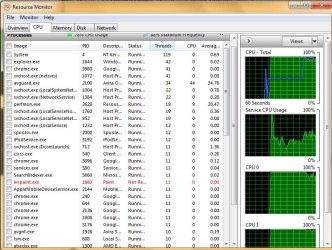
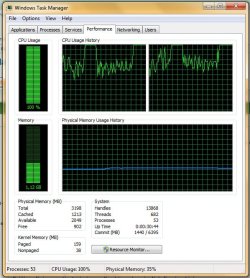
So this Packard bell laptop i have with AMD Athlon X2 Dual Core QL-65 2.1 Ghz processor, 4 GB RAM, Windows 7 Ultimate 32 bit OS is constantly going to 100% CPU usage even when there's only a browser open. It is connected to internet through wifi and the most time when it goes 100%, it disconnects from it so i need to turn off wifi and turn it on again to reconnect because the wifi spot doesnt even appear in the wireless network connection list. Not sure if this is related to the problem. In the pics i added it goes from like 70% to 100% but in most cases it's from like 10% to 100% in one second.
Does anyone have a clue what might be the cause of this?
 

Attachments
  • 1.jpg
    1.jpg
    78.9 KB · Views: 6
  • 2.jpg
    2.jpg
    101.9 KB · Views: 2

My Computer

Computer Manufacturer/Model Number
Asus F5SL
OS
Windows 7 Ultimate 32bit
CPU
Intel Pentium T2390
Memory
4 Gb
Graphics Card(s)
Ati Radeon HD 3470
Monitor(s) Displays
15.4'' WXGA
Hard Drives
250 GB - Serial ATA-150 - 5400 rpm
You're Resource Monitor window is sorted by "Threads".
Click on the "CPU" column heading to show the list sorted by CPU descending, displaying the largest numbers at the top of the list...
If the top entries show 0%, click the column heading again to switch between displaying the list ascending or descending.

In your screen print avguard.exe is using 44% CPU usage.
So, that is one program you have that is using a lot of CPU.
Sorting by CPU descending should show what other program(s) are using a lot of CPU.
 

My Computer

Computer type
PC/Desktop
Computer Manufacturer/Model Number
home built
OS
Multi-Boot W7_Pro_x64 W8.1_Pro_x64 W10_Pro_x64 +Linux_VMs +Chromium_VM
CPU
AMD Athlon II x4 620
Motherboard
Gigabyte GA-MA785G-UD3H
Memory
6GB GSkill DDR2 800
Graphics Card(s)
AMD 4670 GPU + AMD 4200 IGP
Sound Card
on board Realtek ALC889A
Monitor(s) Displays
RCA 40" LCD TV, Insignia 32" LCD TV, HP 15" LCD monitor
Screen Resolution
1680 x 1050
Hard Drives
OCZ Vertex 3 120GB,
Samsung F3 1TB (3),
Several others - WD, Seagate, Hitachi, ...
PSU
Corsair 500 W
Case
Rosewill mid tower
Cooling
CM 90mm rifle
Keyboard
Gyration wireless, Logitech wireless, Dell USB wired
Mouse
Gyration wireless, Logitech wireless, V7 USB wired
Internet Speed
Spectrum - 100Mbps D / 10Mbps U
Antivirus
Avast, MBAM3, EMET, WinPatrol
Browser
Pale Moon, Firefox, IE
Other Info
2 multi-boot PC's
Mainly HTPC/Office/Gen purpose (no gaming).
Trendnet USB KVM.
LG DVD burner/Blue Ray Player.
Tray system for removable SATA backup drives.

Not currently OCd, under-volted.
I use Hybrid sleep, rarely re-boot or shutdown.

Hauppauge HD-PVR, Avermedia PCIe TV Tuner, Hauppauge PCI TV Tuner.
Hi 8vs. The factors that contribute to high CPU usage and slow performance are varying. The problem may stem from hardware failure or software error or both. In order to diagnose the problem accurately, it's a good idea to know the common causes of high CPU usage so you might better identify the root cause. Constant, high CPU usage is not normal.

High CPU Usage May Be Caused By...
Out-of-date drivers
Running too many applications at once
Insufficient virtual memory
Overheating/Poor ventilation
Virus/Malware infections

Check for these symptoms and keep us posted.
 

My Computer

Computer type
PC/Desktop
Computer Manufacturer/Model Number
Custom Bulid/Self made
OS
Windows 11 x64
CPU
i5 2500K @ 3.3 GHz
Motherboard
ASUS P8 Z77 V pro
Memory
16 GB DDR 3 @ 1600Mhz
Graphics Card(s)
MSI 1050TI 4GB OC version
Sound Card
On Board (Realtek HD audio)
Monitor(s) Displays
Samsung 22" LCD
Screen Resolution
1920*1080
Hard Drives
Seagate 1 TB, WD 1TB, Seagate 2 TB ( I use a lot of space)
PSU
coolermaster 750 W
Case
Coolermaster HAF912
Cooling
Coolermaster hyper 212 EVO
Keyboard
Samsung
Mouse
Dell Wireless
Internet Speed
Wireless 50 Mbps
Antivirus
AVG 2016 Internet Security
Browser
Google Chrome
you are running too many programs in your PC. Do you have any system tool like task killer to free your CPU?
 

My Computer

Computer type
PC/Desktop
OS
Win7 32bit
i do not have any task killer installed. Can you recomend one?
 

My Computer

Computer Manufacturer/Model Number
Asus F5SL
OS
Windows 7 Ultimate 32bit
CPU
Intel Pentium T2390
Memory
4 Gb
Graphics Card(s)
Ati Radeon HD 3470
Monitor(s) Displays
15.4'' WXGA
Hard Drives
250 GB - Serial ATA-150 - 5400 rpm
You're Resource Monitor window is sorted by "Threads".
Click on the "CPU" column heading to show the list sorted by CPU descending, displaying the largest numbers at the top of the list...
If the top entries show 0%, click the column heading again to switch between displaying the list ascending or descending.

In your screen print avguard.exe is using 44% CPU usage.
So, that is one program you have that is using a lot of CPU.
Sorting by CPU descending should show what other program(s) are using a lot of CPU.

Its mostly avguard.exe 30 - 50%, perfmon.exe 10 - 50% and svchost.exe 1 - 40%. I have disabled avg real time protection, but it is still taking up the cpu
 

My Computer

Computer Manufacturer/Model Number
Asus F5SL
OS
Windows 7 Ultimate 32bit
CPU
Intel Pentium T2390
Memory
4 Gb
Graphics Card(s)
Ati Radeon HD 3470
Monitor(s) Displays
15.4'' WXGA
Hard Drives
250 GB - Serial ATA-150 - 5400 rpm
What anti-virus and anti-malware programs do you have installed?
Do you have Avira and AVG anti-virus installed?
 

My Computer

Computer type
PC/Desktop
Computer Manufacturer/Model Number
home built
OS
Multi-Boot W7_Pro_x64 W8.1_Pro_x64 W10_Pro_x64 +Linux_VMs +Chromium_VM
CPU
AMD Athlon II x4 620
Motherboard
Gigabyte GA-MA785G-UD3H
Memory
6GB GSkill DDR2 800
Graphics Card(s)
AMD 4670 GPU + AMD 4200 IGP
Sound Card
on board Realtek ALC889A
Monitor(s) Displays
RCA 40" LCD TV, Insignia 32" LCD TV, HP 15" LCD monitor
Screen Resolution
1680 x 1050
Hard Drives
OCZ Vertex 3 120GB,
Samsung F3 1TB (3),
Several others - WD, Seagate, Hitachi, ...
PSU
Corsair 500 W
Case
Rosewill mid tower
Cooling
CM 90mm rifle
Keyboard
Gyration wireless, Logitech wireless, Dell USB wired
Mouse
Gyration wireless, Logitech wireless, V7 USB wired
Internet Speed
Spectrum - 100Mbps D / 10Mbps U
Antivirus
Avast, MBAM3, EMET, WinPatrol
Browser
Pale Moon, Firefox, IE
Other Info
2 multi-boot PC's
Mainly HTPC/Office/Gen purpose (no gaming).
Trendnet USB KVM.
LG DVD burner/Blue Ray Player.
Tray system for removable SATA backup drives.

Not currently OCd, under-volted.
I use Hybrid sleep, rarely re-boot or shutdown.

Hauppauge HD-PVR, Avermedia PCIe TV Tuner, Hauppauge PCI TV Tuner.
Run Malware removal S/W. Malwares are not removed in just one go. It takes more than one cycle to remove them.
Check this link for information on svchost.exe and should this be disabled or not.

What is svchost.exe And Why Is It Running?
 

My Computer

Computer type
PC/Desktop
Computer Manufacturer/Model Number
Custom Bulid/Self made
OS
Windows 11 x64
CPU
i5 2500K @ 3.3 GHz
Motherboard
ASUS P8 Z77 V pro
Memory
16 GB DDR 3 @ 1600Mhz
Graphics Card(s)
MSI 1050TI 4GB OC version
Sound Card
On Board (Realtek HD audio)
Monitor(s) Displays
Samsung 22" LCD
Screen Resolution
1920*1080
Hard Drives
Seagate 1 TB, WD 1TB, Seagate 2 TB ( I use a lot of space)
PSU
coolermaster 750 W
Case
Coolermaster HAF912
Cooling
Coolermaster hyper 212 EVO
Keyboard
Samsung
Mouse
Dell Wireless
Internet Speed
Wireless 50 Mbps
Antivirus
AVG 2016 Internet Security
Browser
Google Chrome

My Computer

Computer Manufacturer/Model Number
Asus F5SL
OS
Windows 7 Ultimate 32bit
CPU
Intel Pentium T2390
Memory
4 Gb
Graphics Card(s)
Ati Radeon HD 3470
Monitor(s) Displays
15.4'' WXGA
Hard Drives
250 GB - Serial ATA-150 - 5400 rpm
i do not have any task killer installed. Can you recomend one?

Sure. But it's not a single tool. I'm using Advanced SystemCare 6. It's a small tool in its ToolBox called "Process Manager". Hope it will be useful:D ... Maybe a deep scan will make your PC better
 

My Computer

Computer type
PC/Desktop
OS
Win7 32bit
OK, avguard.exe is an Avira program.
In post # 6 you stated:
I have disabled avg real time protection
That's why i asked...AVG and Avira are different anti-virus products...
 

My Computer

Computer type
PC/Desktop
Computer Manufacturer/Model Number
home built
OS
Multi-Boot W7_Pro_x64 W8.1_Pro_x64 W10_Pro_x64 +Linux_VMs +Chromium_VM
CPU
AMD Athlon II x4 620
Motherboard
Gigabyte GA-MA785G-UD3H
Memory
6GB GSkill DDR2 800
Graphics Card(s)
AMD 4670 GPU + AMD 4200 IGP
Sound Card
on board Realtek ALC889A
Monitor(s) Displays
RCA 40" LCD TV, Insignia 32" LCD TV, HP 15" LCD monitor
Screen Resolution
1680 x 1050
Hard Drives
OCZ Vertex 3 120GB,
Samsung F3 1TB (3),
Several others - WD, Seagate, Hitachi, ...
PSU
Corsair 500 W
Case
Rosewill mid tower
Cooling
CM 90mm rifle
Keyboard
Gyration wireless, Logitech wireless, Dell USB wired
Mouse
Gyration wireless, Logitech wireless, V7 USB wired
Internet Speed
Spectrum - 100Mbps D / 10Mbps U
Antivirus
Avast, MBAM3, EMET, WinPatrol
Browser
Pale Moon, Firefox, IE
Other Info
2 multi-boot PC's
Mainly HTPC/Office/Gen purpose (no gaming).
Trendnet USB KVM.
LG DVD burner/Blue Ray Player.
Tray system for removable SATA backup drives.

Not currently OCd, under-volted.
I use Hybrid sleep, rarely re-boot or shutdown.

Hauppauge HD-PVR, Avermedia PCIe TV Tuner, Hauppauge PCI TV Tuner.
I don't use Avira, but I found this older Avira support thread for a problem like yours.
You can look at this thread, and perhaps try suggested solutions...

Hi,

Maybe I wasn't clear in my previous posts for you:
Try to (separately):

1) Disable ProActiv and monitor the situation. If you still encounter the same problem, then
2) Completely reinstall Avira using Avira RegistryCleaner, if you still encounter the same problem, then
3) Try to disable the product protection in Configuration of Avira and monitor the situation.

Also, t will be good if you will be able to catch a process dumpfile of avguard.exe during the problem... and yes, you can use the latest version of WinDbg.
Source: avguard.exe has high CPU usage

Maybe Avira had a recent program update, maybe some other program update is causing a conflict, maybe you have malware, ...

Posting the screen print by CPU when you have a problem will help more than just typing in your "findings" as in post #6.
A picture is worth a thousand words...
 

My Computer

Computer type
PC/Desktop
Computer Manufacturer/Model Number
home built
OS
Multi-Boot W7_Pro_x64 W8.1_Pro_x64 W10_Pro_x64 +Linux_VMs +Chromium_VM
CPU
AMD Athlon II x4 620
Motherboard
Gigabyte GA-MA785G-UD3H
Memory
6GB GSkill DDR2 800
Graphics Card(s)
AMD 4670 GPU + AMD 4200 IGP
Sound Card
on board Realtek ALC889A
Monitor(s) Displays
RCA 40" LCD TV, Insignia 32" LCD TV, HP 15" LCD monitor
Screen Resolution
1680 x 1050
Hard Drives
OCZ Vertex 3 120GB,
Samsung F3 1TB (3),
Several others - WD, Seagate, Hitachi, ...
PSU
Corsair 500 W
Case
Rosewill mid tower
Cooling
CM 90mm rifle
Keyboard
Gyration wireless, Logitech wireless, Dell USB wired
Mouse
Gyration wireless, Logitech wireless, V7 USB wired
Internet Speed
Spectrum - 100Mbps D / 10Mbps U
Antivirus
Avast, MBAM3, EMET, WinPatrol
Browser
Pale Moon, Firefox, IE
Other Info
2 multi-boot PC's
Mainly HTPC/Office/Gen purpose (no gaming).
Trendnet USB KVM.
LG DVD burner/Blue Ray Player.
Tray system for removable SATA backup drives.

Not currently OCd, under-volted.
I use Hybrid sleep, rarely re-boot or shutdown.

Hauppauge HD-PVR, Avermedia PCIe TV Tuner, Hauppauge PCI TV Tuner.
Back
Top