
Solved CPU fan making noise

meebers

Multicomplacator
Power User
Local time
2:08 PM
Messages
327
I have an AMD Phenom II x4 955 cpu with the factory mounted fan on top. Have noticed lately that a pronounced noise (squeal) from the fan when viewing various sites with my browser. The fan speed adjusts with the content as expected. Now it is running @ 3900 rpm while typing this, but if I select a video to watch, it will climb to around 5600-6000 rpm. That is when it is making the squeal. I am thinking the bearings are dry or have become worn. Question is, has anybody changed their cpu fan with this type processor. I hope to remove the fan and replace without taking the cpu out of its socket. Attached picture of cpu/fan, camera shot "stopped" or made it appear that it was stopped. I used Speccy to monitor the fan speed, although the readings seem very high? Tx
 

Attachments
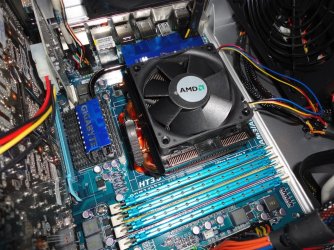
  • cpufan.JPG
    cpufan.JPG
    204.1 KB · Views: 1

My Computer

Computer type
PC/Desktop
Computer Manufacturer/Model Number
Self Build
OS
Windows 7 Professional X64 Service Pack 1
CPU
AMD Phenom II X4 955 3.20GHz
Motherboard
Gigabyte GA-MA790X-UD4P
Memory
8G
Graphics Card(s)
GX550 Ti
Sound Card
On board
Monitor(s) Displays
Asus VW246H & Syncmaster 2243swx
Screen Resolution
1920x1080 & 1920x1080
Hard Drives
M4-CT128 SSD2, Samsung 840 256GB, 1 WDC 1TB
PSU
Corsair TX750W-V2
Case
Antec
Cooling
2 120mm fan
Keyboard
Microsoft Wireless 3050
Mouse
Microsoft Wireless 5000
Internet Speed
72/6Mbs (Cable)
Other Info
Asus AC1900 router, 8 port Trendnet Switch - Logitech Webcam Pro 9000
Replace the fan if possible, but I would just buy an entire new cooler.

When you remove it use a twisting clockwise counter clockwise motion to break it loose from the thermal paste before you pull up, this should keep the cpu in the socket.

Please, be careful :)
 

My Computer

Computer type
PC/Desktop
Computer Manufacturer/Model Number
Skylake Special #666
OS
Windows 10 Pro x64
CPU
Intel Core i7 6700K
Motherboard
Asus Sabertooth Z170 Mark 1
Memory
GSkill TridentZ RGB 16GB 3600 16-16-16-36
Graphics Card(s)
EVGA GTX 980 Ti SC x2
Sound Card
Realtek High Definition
Monitor(s) Displays
AOC G2460PG
Screen Resolution
1920 x 1080 144Hz
Hard Drives
Samsung 860 Pro 256GB, Seagate Barracuda 4TB x2
PSU
EVGA 1000 P2, EVGA White Custom Braided Cables
Case
Corsair Vengeance C70 Gunmetal Black
Cooling
Corsair H100i v2, Corsair ML120 x2, Thermal Grizzly Kryonaut
Keyboard
Logitech G910 Orion Spectrum
Mouse
Logitech G700s
Internet Speed
Verizon Fios Quantum Gateway 75/75
Antivirus
Windows Defender, Malwarebytes Free 3.8.3
Browser
Chrome
Other Info
Corsair SP120 x4, LG Blu-ray Drive, Durabrand HT-395 100 Watt Dolby Digital Amp, Corsair H2100 Wireless 7.1 Headset

My Computer

Computer type
PC/Desktop
Computer Manufacturer/Model Number
Self Build
OS
Windows 7 Professional X64 Service Pack 1
CPU
AMD Phenom II X4 955 3.20GHz
Motherboard
Gigabyte GA-MA790X-UD4P
Memory
8G
Graphics Card(s)
GX550 Ti
Sound Card
On board
Monitor(s) Displays
Asus VW246H & Syncmaster 2243swx
Screen Resolution
1920x1080 & 1920x1080
Hard Drives
M4-CT128 SSD2, Samsung 840 256GB, 1 WDC 1TB
PSU
Corsair TX750W-V2
Case
Antec
Cooling
2 120mm fan
Keyboard
Microsoft Wireless 3050
Mouse
Microsoft Wireless 5000
Internet Speed
72/6Mbs (Cable)
Other Info
Asus AC1900 router, 8 port Trendnet Switch - Logitech Webcam Pro 9000
That's a pretty good cooler.

159 mm tall, so your tower case would have to be somewhat wider than that.
 

My Computer

Computer type
PC/Desktop
Computer Manufacturer/Model Number
Ignatz Special; 4 speed manual gearbox; factory air conditioning; one of one
OS
Windows 7 Home Premium SP1, 64-bit
CPU
Intel Skylake i5-6600K, not overclocked
Motherboard
AsRock Z170M Extreme 4, micro ATX
Memory
8 GB HyperX DDR4-2666 (2 x 4 GB)
Graphics Card(s)
none; graphics are integrated on CPU
Sound Card
onboard: Realtek ALC1150; external: USB Behringer UF0-202
Monitor(s) Displays
Dell S2340M 23 inch IPS
Screen Resolution
1600 x 900
Hard Drives
System: Crucial MX100 series SSD, 128 GB;
Data: Samsung Spinpoint 103SJ, 1 TB;
Backup: WD Caviar Green WD30EZRX-00D8PB0, 3 TB
PSU
Rosewill SilentNight 500 watt fanless, semi-modular
Case
Antec Solo II
Cooling
Noctua NH-U12S; Noctua F12 intake, Noctua S12A exhaust
Keyboard
Microsoft 200 6JH-00001 USB
Mouse
Dell or Microsoft optical wired; USB
Antivirus
Microsoft Security Essentials and Malwarebytes Premium
Browser
Pale Moon
Other Info
All fans PWM; speeds at idle: CPU circa 500 rpm; intake circa 600 rpm; exhaust circa 600 rpm; CPU temps 27 idle and 47 C load in a warm room (27 C/81 F) when running Intel Extreme Tuning Utility stress test.
You can also use a Thermaktake TR2-R1 with this processor. I have been using them on ALL of my AMD processors and the temps are right on the $$$. The noise is telling you do do a replacement.
Be very careful when breaking the bond between the CPU and heatsink/fan. The twisting method usually works as will a playing card. Clean the surface of the CPU using soft cloth and alcohol or Arctic Silver cleaner. Be sure that all of the old compound is removed. The new cooler will be precoated, btw.
 

My Computer

Computer type
PC/Desktop
Computer Manufacturer/Model Number
Custom Desktop (2 alike) Dell inspiron 13" W10 Laptop Dell Inspiron 17 5759
OS
Windows 7 Enterprise 64bit Desktops; Windows 7 Professional 64Bit 17"Laptop
CPU
AMD Athlon 2 X3; I5-6200 6th gen (Dell)
Motherboard
Gigabyte GA 78LMT-USB3 (2 Desktops)
Memory
8 Gig Desktop, 8Gig Laptop, 16Gig Laptop
Graphics Card(s)
Radeon R5450 1Gig
Sound Card
Creative SB X-Fi Titanium Extreme Audio Desktop 1
Monitor(s) Displays
Dell 2419
Screen Resolution
1920x1080
Hard Drives
Crucial M500 500GB SSD Desktop 1 and Laptops
Samsung 850EVO 250GB - Desktop 2
PSU
Thermaltake 600watt
Case
Rosewill
Cooling
Scythe Typhoon 120mm
Keyboard
Kensington
Mouse
Logitech M310
Internet Speed
50/50
Antivirus
Avast
Browser
Firefox 68
After much debate, with myself, I just about decided to not use this cooler master because of the work involved. This is a great cooler for the price, but it is huge. There is a metal mounting device that has to mount on the bottom of the MB, which means removal. There are several video's on Utube about this and after watching them, decided to put it off for now. I did find a computer shop in town that thought they had some but he wanted me to bring it down for exact size. 70x70x20 mm, 4 pin PWM 12 vdc fan. He did not have any, but another guy there said wait a minute, pulled out several old AMD machines, matched it up and pulled the fan motor, hooked it to a bench computer, it was quiet. It fit and works. Cleaned the CPU and heat sink, applied some Artic silver. Currently @ 3970 RPM, all cores (4x) @ 99 F. Seen it climb to 120 after some intense browser use. Ordered a new one, but will take 5-15 days to get here. At least I will have a spare.:D
 

My Computer

Computer type
PC/Desktop
Computer Manufacturer/Model Number
Self Build
OS
Windows 7 Professional X64 Service Pack 1
CPU
AMD Phenom II X4 955 3.20GHz
Motherboard
Gigabyte GA-MA790X-UD4P
Memory
8G
Graphics Card(s)
GX550 Ti
Sound Card
On board
Monitor(s) Displays
Asus VW246H & Syncmaster 2243swx
Screen Resolution
1920x1080 & 1920x1080
Hard Drives
M4-CT128 SSD2, Samsung 840 256GB, 1 WDC 1TB
PSU
Corsair TX750W-V2
Case
Antec
Cooling
2 120mm fan
Keyboard
Microsoft Wireless 3050
Mouse
Microsoft Wireless 5000
Internet Speed
72/6Mbs (Cable)
Other Info
Asus AC1900 router, 8 port Trendnet Switch - Logitech Webcam Pro 9000
Back
Top