CPU goes through the roof when syncing on iTunes

paradoximoron

New member
Local time
5:47 AM
Messages
15
First, my system info:

Acer Aspire x3200-U3600A, no modifications
AMD Phenom X3 8400 triple core processors
4 GB DDR2
320GB SATA hard disk (partitioned C: and D: drive, OS installed on C: )
Nvidia GeForce 9200 graphics card

My PC came with Vista Home 64-bit installed. My school offered a free upgrade to Windows 7 Professional x64 so I decided to give it a shot.

It's been a nightmare ever since.

When I tried to upgrade, there was a conflict between my old OS and the new old, so I had to do a full install. The install program warned me I'd lose all my files, so I backed them up onto an external drive, but they're still on C:, just with the .old extension added on.

When I try to do something major, like multitask or transfer many files or do a large sync on iTunes (yes, it's the 64 bit version), my CPU jumps from normal up to 90-100% and stays there even after I shut down all applications. It doesn't freeze up my system entirely (mouse/keyboard still work) but it makes everything lag and stutter terribly and effectively makes my PC useless until I restart.

I've been trying everything I could find on this and other forums and nothing has helped.... updated my BIOS, my audio drivers, my wireless USB driver, my graphics card driver, turned off indexing, uninstalled iTunes and AVG... nothing is working. :cry:

If anyone has any ideas, I'd be very, very grateful!!

I'm very computer literate but not highly skilled with background processes, so please list detailed instructions.

I have process explorer installed already if that's of any help.
 
Last edited:

My Computer My Computer

At a glance

Windows 7 Professional x64AMD Phenom 8400 x3 2.3Ghz4GBNvidia GEforece 8200
Computer Manufacturer/Model Number
Acer Aspire x3200
OS
Windows 7 Professional x64
CPU
AMD Phenom 8400 x3 2.3Ghz
Memory
4GB
Graphics Card(s)
Nvidia GEforece 8200
Hard Drives
320GB SATA
Sounds very odd, before I read this I was going to say blame iTunes, well for obvious reason (Apple hates Microsoft).

Have you tried doing a clean install? Since you already have your stuff backed up, it shouldn't be too much trouble.

After the reinstall, try multitasking again and if it still is doing it, let us know. :)
 

My Computer My Computer

At a glance

Windows 7 Ultimate, OS X 10.7, Ubuntu 11.04Intel E6750 @ 3.80GHz2x2GB & 2x1GB (6GB) OCZ Reaper 1066MHz @ 1080MHzEVGA nVidia GTX 260 896mb (216 Core) FTW Edition
Computer Manufacturer/Model Number
Custom | Whitebox
OS
Windows 7 Ultimate, OS X 10.7, Ubuntu 11.04
CPU
Intel E6750 @ 3.80GHz
Motherboard
Gigabyte GA-EP45-UD3L (Revision 1.1)
Memory
2x2GB & 2x1GB (6GB) OCZ Reaper 1066MHz @ 1080MHz
Graphics Card(s)
EVGA nVidia GTX 260 896mb (216 Core) FTW Edition
Sound Card
Realtek ALC888
Monitor(s) Displays
21" VIZIO TV
Screen Resolution
1680x1050 @ 60Hz
Hard Drives
Western Digital WD6401AALS - 640GB
Hitachi HDP725016GLA380 - 160GB
PSU
Corsair 750W
Case
NZXT Nemesis Elite
Cooling
Thermaltake SpinQ
Keyboard
Logitech Wireless S520
Mouse
Logitech Wireless S520 - Microsoft Wireless Arc Mouse
Internet Speed
Download: 20mbps, Upload: 3mbps
How would I go about doing that?
 

My Computer My Computer

At a glance

Windows 7 Professional x64AMD Phenom 8400 x3 2.3Ghz4GBNvidia GEforece 8200
Computer Manufacturer/Model Number
Acer Aspire x3200
OS
Windows 7 Professional x64
CPU
AMD Phenom 8400 x3 2.3Ghz
Memory
4GB
Graphics Card(s)
Nvidia GEforece 8200
Hard Drives
320GB SATA

My Computer My Computer

At a glance

Windows 7 Ultimate, OS X 10.7, Ubuntu 11.04Intel E6750 @ 3.80GHz2x2GB & 2x1GB (6GB) OCZ Reaper 1066MHz @ 1080MHzEVGA nVidia GTX 260 896mb (216 Core) FTW Edition
Computer Manufacturer/Model Number
Custom | Whitebox
OS
Windows 7 Ultimate, OS X 10.7, Ubuntu 11.04
CPU
Intel E6750 @ 3.80GHz
Motherboard
Gigabyte GA-EP45-UD3L (Revision 1.1)
Memory
2x2GB & 2x1GB (6GB) OCZ Reaper 1066MHz @ 1080MHz
Graphics Card(s)
EVGA nVidia GTX 260 896mb (216 Core) FTW Edition
Sound Card
Realtek ALC888
Monitor(s) Displays
21" VIZIO TV
Screen Resolution
1680x1050 @ 60Hz
Hard Drives
Western Digital WD6401AALS - 640GB
Hitachi HDP725016GLA380 - 160GB
PSU
Corsair 750W
Case
NZXT Nemesis Elite
Cooling
Thermaltake SpinQ
Keyboard
Logitech Wireless S520
Mouse
Logitech Wireless S520 - Microsoft Wireless Arc Mouse
Internet Speed
Download: 20mbps, Upload: 3mbps
Do I need to reformat or anything like that?
 

My Computer My Computer

At a glance

Windows 7 Professional x64AMD Phenom 8400 x3 2.3Ghz4GBNvidia GEforece 8200
Computer Manufacturer/Model Number
Acer Aspire x3200
OS
Windows 7 Professional x64
CPU
AMD Phenom 8400 x3 2.3Ghz
Memory
4GB
Graphics Card(s)
Nvidia GEforece 8200
Hard Drives
320GB SATA
Do I need to reformat or anything like that?
No, you won't need to reformat. But you will lose everything you have on the hard drive.
B4 U do that tho, have you performed any mods?
RU overclocking?
Itunes does use a lot of resources but you say cpu usage is intensive after you synch?
I suggest you go to computer management and see what services are running after you finish synch.
 

My Computer My Computer

At a glance

Windows 7 7600 1 X64AMD PHENOM II X 550 PROCESSOR 3.1 ghzCorsair 4 gig ddr 3ati radeon 3300
Computer Manufacturer/Model Number
Custom Build
OS
Windows 7 7600 1 X64
CPU
AMD PHENOM II X 550 PROCESSOR 3.1 ghz
Motherboard
ASUS M4A78-TE
Memory
Corsair 4 gig ddr 3
Graphics Card(s)
ati radeon 3300
Sound Card
ati hd
Monitor(s) Displays
syncmaster 2033sw
Screen Resolution
1600X900 60 hz refresh
Hard Drives
twin_seagates SATA's 1 TB & 500 Gig, hitachi_slimline 160 gig
PSU
antec_550 watt
Case
cooler master GLite
Cooling
stock_heat sink
Internet Speed
20mbs up/ 1.5mbs down
Other Info
favorite child "stewie"
favorite dog "brian"

My Computer My Computer

At a glance

Windows 7 Ultimate, OS X 10.7, Ubuntu 11.04Intel E6750 @ 3.80GHz2x2GB & 2x1GB (6GB) OCZ Reaper 1066MHz @ 1080MHzEVGA nVidia GTX 260 896mb (216 Core) FTW Edition
Computer Manufacturer/Model Number
Custom | Whitebox
OS
Windows 7 Ultimate, OS X 10.7, Ubuntu 11.04
CPU
Intel E6750 @ 3.80GHz
Motherboard
Gigabyte GA-EP45-UD3L (Revision 1.1)
Memory
2x2GB & 2x1GB (6GB) OCZ Reaper 1066MHz @ 1080MHz
Graphics Card(s)
EVGA nVidia GTX 260 896mb (216 Core) FTW Edition
Sound Card
Realtek ALC888
Monitor(s) Displays
21" VIZIO TV
Screen Resolution
1680x1050 @ 60Hz
Hard Drives
Western Digital WD6401AALS - 640GB
Hitachi HDP725016GLA380 - 160GB
PSU
Corsair 750W
Case
NZXT Nemesis Elite
Cooling
Thermaltake SpinQ
Keyboard
Logitech Wireless S520
Mouse
Logitech Wireless S520 - Microsoft Wireless Arc Mouse
Internet Speed
Download: 20mbps, Upload: 3mbps
Do I need to reformat or anything like that?
No, you won't need to reformat. But you will lose everything you have on the hard drive.
B4 U do that tho, have you performed any mods?
RU overclocking?
Itunes does use a lot of resources but you say cpu usage is intensive after you synch?
I suggest you go to computer management and see what services are running after you finish synch.

I'm not talented enough to mod. That's why my computer is stock ;)

I can sync for a few minutes, typically, but after a while the cpu goes up to 90-100% and stays there until I restart. I can't finish syncing...it gets so slow that it times out on my iPhone and essentially freezes up iTunes. I just ran process explorer and it says that DPCs and Hardware Interrupts are taking up about 60% and 38% of the CPU usage, respectively.
 

My Computer My Computer

At a glance

Windows 7 Professional x64AMD Phenom 8400 x3 2.3Ghz4GBNvidia GEforece 8200
Computer Manufacturer/Model Number
Acer Aspire x3200
OS
Windows 7 Professional x64
CPU
AMD Phenom 8400 x3 2.3Ghz
Memory
4GB
Graphics Card(s)
Nvidia GEforece 8200
Hard Drives
320GB SATA
Do I need to reformat or anything like that?
No, you won't need to reformat. But you will lose everything you have on the hard drive.
B4 U do that tho, have you performed any mods?
RU overclocking?
Itunes does use a lot of resources but you say cpu usage is intensive after you synch?
I suggest you go to computer management and see what services are running after you finish synch.

I'm not talented enough to mod. That's why my computer is stock ;)

I can sync for a few minutes, typically, but after a while the cpu goes up to 90-100% and stays there until I restart. I can't finish syncing...it gets so slow that it times out on my iPhone and essentially freezes up iTunes. I just ran process explorer and it says that DPCs and Hardware Interrupts are taking up about 60% and 38% of the CPU usage, respectively.
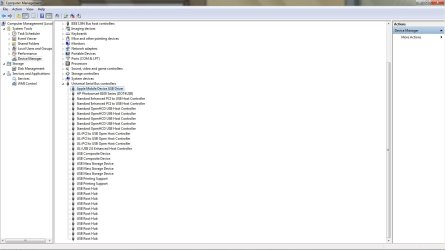
Paradox, look at your device manager, I wonder if you have any IRQ conflicts, speculation there, as I was saying. Check your USB driver with your IPhone attached. It should show like the attached screen shot.
 

Attachments

  • Apple_Driver.jpg
    Apple_Driver.jpg
    93.5 KB · Views: 230

My Computer My Computer

At a glance

Windows 7 7600 1 X64AMD PHENOM II X 550 PROCESSOR 3.1 ghzCorsair 4 gig ddr 3ati radeon 3300
Computer Manufacturer/Model Number
Custom Build
OS
Windows 7 7600 1 X64
CPU
AMD PHENOM II X 550 PROCESSOR 3.1 ghz
Motherboard
ASUS M4A78-TE
Memory
Corsair 4 gig ddr 3
Graphics Card(s)
ati radeon 3300
Sound Card
ati hd
Monitor(s) Displays
syncmaster 2033sw
Screen Resolution
1600X900 60 hz refresh
Hard Drives
twin_seagates SATA's 1 TB & 500 Gig, hitachi_slimline 160 gig
PSU
antec_550 watt
Case
cooler master GLite
Cooling
stock_heat sink
Internet Speed
20mbs up/ 1.5mbs down
Other Info
favorite child "stewie"
favorite dog "brian"
Have you ever thought about alternatives to Itunes? Personally I've had a lot of problems with Itunes hogging up resources or locking up, I use winamp or gtkpod.
 

My Computer My Computer

At a glance

Windows 7, LinuxAMD Phemon II x2 3@37501G Crucial 16668800GT OC (custom OC)
Computer Manufacturer/Model Number
Custom
OS
Windows 7, Linux
CPU
AMD Phemon II x2 3@3750
Motherboard
ASRock M3A770DE
Memory
1G Crucial 1666
Graphics Card(s)
8800GT OC (custom OC)
Sound Card
Sound Blaster Live! (never changes!)
Monitor(s) Displays
Vivitron 22"
Screen Resolution
1600x1200
Hard Drives
Western Digital 120G/160G SATA
Maxtor 80G IDE
PSU
450w
Case
Unknown
Cooling
Custom Air cooled
Keyboard
Logitech
Mouse
Logitech M-BZ15A Laser
Internet Speed
Cable 10mbit
No, you won't need to reformat. But you will lose everything you have on the hard drive.
B4 U do that tho, have you performed any mods?
RU overclocking?
Itunes does use a lot of resources but you say cpu usage is intensive after you synch?
I suggest you go to computer management and see what services are running after you finish synch.

I'm not talented enough to mod. That's why my computer is stock ;)

I can sync for a few minutes, typically, but after a while the cpu goes up to 90-100% and stays there until I restart. I can't finish syncing...it gets so slow that it times out on my iPhone and essentially freezes up iTunes. I just ran process explorer and it says that DPCs and Hardware Interrupts are taking up about 60% and 38% of the CPU usage, respectively.
Paradox, look at your device manager, I wonder if you have any IRQ conflicts, speculation there, as I was saying. Check your USB driver with your IPhone attached. It should show like the attached screen shot.

Looks good to me. (screen shot attached)
 

Attachments

My Computer My Computer

At a glance

Windows 7 Professional x64AMD Phenom 8400 x3 2.3Ghz4GBNvidia GEforece 8200
Computer Manufacturer/Model Number
Acer Aspire x3200
OS
Windows 7 Professional x64
CPU
AMD Phenom 8400 x3 2.3Ghz
Memory
4GB
Graphics Card(s)
Nvidia GEforece 8200
Hard Drives
320GB SATA
I'm not talented enough to mod. That's why my computer is stock ;)

I can sync for a few minutes, typically, but after a while the cpu goes up to 90-100% and stays there until I restart. I can't finish syncing...it gets so slow that it times out on my iPhone and essentially freezes up iTunes. I just ran process explorer and it says that DPCs and Hardware Interrupts are taking up about 60% and 38% of the CPU usage, respectively.
Paradox, look at your device manager, I wonder if you have any IRQ conflicts, speculation there, as I was saying. Check your USB driver with your IPhone attached. It should show like the attached screen shot.


Looks good to me. (screen shot attached)
Whoa, what are those to alerts in the middle of your USB drivers?
 

My Computer My Computer

At a glance

Windows 7 7600 1 X64AMD PHENOM II X 550 PROCESSOR 3.1 ghzCorsair 4 gig ddr 3ati radeon 3300
Computer Manufacturer/Model Number
Custom Build
OS
Windows 7 7600 1 X64
CPU
AMD PHENOM II X 550 PROCESSOR 3.1 ghz
Motherboard
ASUS M4A78-TE
Memory
Corsair 4 gig ddr 3
Graphics Card(s)
ati radeon 3300
Sound Card
ati hd
Monitor(s) Displays
syncmaster 2033sw
Screen Resolution
1600X900 60 hz refresh
Hard Drives
twin_seagates SATA's 1 TB & 500 Gig, hitachi_slimline 160 gig
PSU
antec_550 watt
Case
cooler master GLite
Cooling
stock_heat sink
Internet Speed
20mbs up/ 1.5mbs down
Other Info
favorite child "stewie"
favorite dog "brian"
Hmmm... dunno, guess I'll check that out.

BTW, I've reinstalled Win7 and nothing's changed. And I haven't even reinstalled iTunes yet so that's definitely not the culprit.
 

My Computer My Computer

At a glance

Windows 7 Professional x64AMD Phenom 8400 x3 2.3Ghz4GBNvidia GEforece 8200
Computer Manufacturer/Model Number
Acer Aspire x3200
OS
Windows 7 Professional x64
CPU
AMD Phenom 8400 x3 2.3Ghz
Memory
4GB
Graphics Card(s)
Nvidia GEforece 8200
Hard Drives
320GB SATA

My Computer My Computer

At a glance

Windows 7 Professional x64AMD Phenom 8400 x3 2.3Ghz4GBNvidia GEforece 8200
Computer Manufacturer/Model Number
Acer Aspire x3200
OS
Windows 7 Professional x64
CPU
AMD Phenom 8400 x3 2.3Ghz
Memory
4GB
Graphics Card(s)
Nvidia GEforece 8200
Hard Drives
320GB SATA

My Computer My Computer

At a glance

Windows 7 7600 1 X64AMD PHENOM II X 550 PROCESSOR 3.1 ghzCorsair 4 gig ddr 3ati radeon 3300
Computer Manufacturer/Model Number
Custom Build
OS
Windows 7 7600 1 X64
CPU
AMD PHENOM II X 550 PROCESSOR 3.1 ghz
Motherboard
ASUS M4A78-TE
Memory
Corsair 4 gig ddr 3
Graphics Card(s)
ati radeon 3300
Sound Card
ati hd
Monitor(s) Displays
syncmaster 2033sw
Screen Resolution
1600X900 60 hz refresh
Hard Drives
twin_seagates SATA's 1 TB & 500 Gig, hitachi_slimline 160 gig
PSU
antec_550 watt
Case
cooler master GLite
Cooling
stock_heat sink
Internet Speed
20mbs up/ 1.5mbs down
Other Info
favorite child "stewie"
favorite dog "brian"
Whoa, what are those to alerts in the middle of your USB drivers?


Well whatever it was, they're gone now. :confused:
Thats good news, re-install your itunes for windows 7 and let us know how it went.

Well, I've reinstalled Win7 and I'm still having the CPU problem... and I haven't even installed iTunes yet. So that's definitely not the problem. As I mentioned way back in my first post, any labor-intensive activities - file transfers, multitasking, syncing - do the trick. And I'd expect that... the problem is, once the CPU usage breaks 90%, it stays there, even at idle, until I restart.
 

My Computer My Computer

At a glance

Windows 7 Professional x64AMD Phenom 8400 x3 2.3Ghz4GBNvidia GEforece 8200
Computer Manufacturer/Model Number
Acer Aspire x3200
OS
Windows 7 Professional x64
CPU
AMD Phenom 8400 x3 2.3Ghz
Memory
4GB
Graphics Card(s)
Nvidia GEforece 8200
Hard Drives
320GB SATA
Well whatever it was, they're gone now. :confused:
Thats good news, re-install your itunes for windows 7 and let us know how it went.

Well, I've reinstalled Win7 and I'm still having the CPU problem... and I haven't even installed iTunes yet. So that's definitely not the problem. As I mentioned way back in my first post, any labor-intensive activities - file transfers, multitasking, syncing - do the trick. And I'd expect that... the problem is, once the CPU usage breaks 90%, it stays there, even at idle, until I restart.
Parodox, check your device manager for me, last time you had some drivers that did not install properly and then later you said they disapeared!
 

My Computer My Computer

At a glance

Windows 7 7600 1 X64AMD PHENOM II X 550 PROCESSOR 3.1 ghzCorsair 4 gig ddr 3ati radeon 3300
Computer Manufacturer/Model Number
Custom Build
OS
Windows 7 7600 1 X64
CPU
AMD PHENOM II X 550 PROCESSOR 3.1 ghz
Motherboard
ASUS M4A78-TE
Memory
Corsair 4 gig ddr 3
Graphics Card(s)
ati radeon 3300
Sound Card
ati hd
Monitor(s) Displays
syncmaster 2033sw
Screen Resolution
1600X900 60 hz refresh
Hard Drives
twin_seagates SATA's 1 TB & 500 Gig, hitachi_slimline 160 gig
PSU
antec_550 watt
Case
cooler master GLite
Cooling
stock_heat sink
Internet Speed
20mbs up/ 1.5mbs down
Other Info
favorite child "stewie"
favorite dog "brian"
Device Manager

Thats good news, re-install your itunes for windows 7 and let us know how it went.

Well, I've reinstalled Win7 and I'm still having the CPU problem... and I haven't even installed iTunes yet. So that's definitely not the problem. As I mentioned way back in my first post, any labor-intensive activities - file transfers, multitasking, syncing - do the trick. And I'd expect that... the problem is, once the CPU usage breaks 90%, it stays there, even at idle, until I restart.
Parodox, check your device manager for me, last time you had some drivers that did not install properly and then later you said they disapeared!

The USB drivers are all fine...the only thing coming up funky is "Other Devices -> Coprocessor". I tried automatically searching for a driver not nothing was found for it. The info on it says that there is no driver installed. I guess this could be the problem, huh? Although....it says it's not using any resources because it "has a problem", so would that even affect my CPU?

File of screenshot is attached.
 

Attachments

My Computer My Computer

At a glance

Windows 7 Professional x64AMD Phenom 8400 x3 2.3Ghz4GBNvidia GEforece 8200
Computer Manufacturer/Model Number
Acer Aspire x3200
OS
Windows 7 Professional x64
CPU
AMD Phenom 8400 x3 2.3Ghz
Memory
4GB
Graphics Card(s)
Nvidia GEforece 8200
Hard Drives
320GB SATA
Well, I've reinstalled Win7 and I'm still having the CPU problem... and I haven't even installed iTunes yet. So that's definitely not the problem. As I mentioned way back in my first post, any labor-intensive activities - file transfers, multitasking, syncing - do the trick. And I'd expect that... the problem is, once the CPU usage breaks 90%, it stays there, even at idle, until I restart.
Parodox, check your device manager for me, last time you had some drivers that did not install properly and then later you said they disapeared!

The USB drivers are all fine...the only thing coming up funky is "Other Devices -> Coprocessor". I tried automatically searching for a driver not nothing was found for it. The info on it says that there is no driver installed. I guess this could be the problem, huh? Although....it says it's not using any resources because it "has a problem", so would that even affect my CPU?

File of screenshot is attached.
Yep, thats it.
 

My Computer My Computer

At a glance

Windows 7 7600 1 X64AMD PHENOM II X 550 PROCESSOR 3.1 ghzCorsair 4 gig ddr 3ati radeon 3300
Computer Manufacturer/Model Number
Custom Build
OS
Windows 7 7600 1 X64
CPU
AMD PHENOM II X 550 PROCESSOR 3.1 ghz
Motherboard
ASUS M4A78-TE
Memory
Corsair 4 gig ddr 3
Graphics Card(s)
ati radeon 3300
Sound Card
ati hd
Monitor(s) Displays
syncmaster 2033sw
Screen Resolution
1600X900 60 hz refresh
Hard Drives
twin_seagates SATA's 1 TB & 500 Gig, hitachi_slimline 160 gig
PSU
antec_550 watt
Case
cooler master GLite
Cooling
stock_heat sink
Internet Speed
20mbs up/ 1.5mbs down
Other Info
favorite child "stewie"
favorite dog "brian"
Amd support

Attached is the support page for the AMD Phenom family of processors.
Technical Download Details

Download it to a known location and execute the install as administrator if possible.
 

My Computer My Computer

At a glance

Windows 7 7600 1 X64AMD PHENOM II X 550 PROCESSOR 3.1 ghzCorsair 4 gig ddr 3ati radeon 3300
Computer Manufacturer/Model Number
Custom Build
OS
Windows 7 7600 1 X64
CPU
AMD PHENOM II X 550 PROCESSOR 3.1 ghz
Motherboard
ASUS M4A78-TE
Memory
Corsair 4 gig ddr 3
Graphics Card(s)
ati radeon 3300
Sound Card
ati hd
Monitor(s) Displays
syncmaster 2033sw
Screen Resolution
1600X900 60 hz refresh
Hard Drives
twin_seagates SATA's 1 TB & 500 Gig, hitachi_slimline 160 gig
PSU
antec_550 watt
Case
cooler master GLite
Cooling
stock_heat sink
Internet Speed
20mbs up/ 1.5mbs down
Other Info
favorite child "stewie"
favorite dog "brian"
Back
Top