

Twinkle Star
New member
- Local time
- 10:38 PM
- Messages
- 1
Hello everyone 
My computer is Windows 7 Ultimate 32 Bit
I have AVG antivirus + Tune up Utility 2014
Whenever i switch on my computer The following program i ran :
- Skype
- Google Chrome
- Lightshot Screenshot program
Whenever one of these program is closed, tune up utility automatically disable program to minimise usage and loading and for the computer to have a fast performance
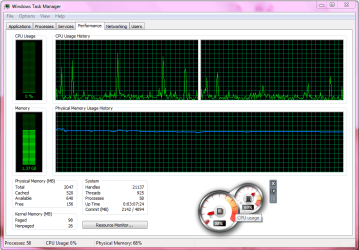
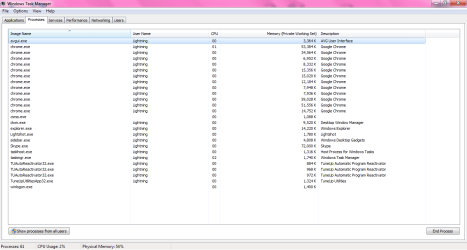
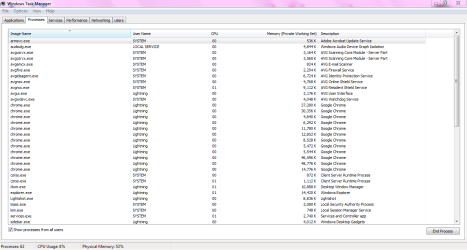
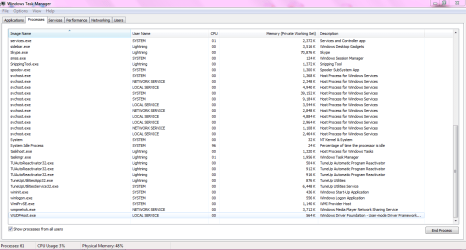
Yet recent days i have been having trouble with 'Ram' on Cpu Meter which always shows Up to 50%
I don't know why ? I have check for virus there are none.
This is freezing my computer a lot
I have only these programs on my computer :
- Utorrent
- Adobe Flash Player
- Adobe Photoshop Cs5
- Adobe Reader
- AVG
- Google Chrome
- Java
- Lightshot
- Microsoft Office Enterprise 2007
- Skype
- Tune up Utilities
- Unity web player
- Visual Studio 2012
- VLC Player
- Win RAR
I Would like to know where the problem come from ? Why is it doing such things? and What can i do to solve it ?
Please anyone who can help me
thank You for your consideration
My computer is Windows 7 Ultimate 32 Bit
I have AVG antivirus + Tune up Utility 2014
Whenever i switch on my computer The following program i ran :
- Skype
- Google Chrome
- Lightshot Screenshot program
Whenever one of these program is closed, tune up utility automatically disable program to minimise usage and loading and for the computer to have a fast performance
Yet recent days i have been having trouble with 'Ram' on Cpu Meter which always shows Up to 50%
I don't know why ? I have check for virus there are none.
This is freezing my computer a lot
I have only these programs on my computer :
- Utorrent
- Adobe Flash Player
- Adobe Photoshop Cs5
- Adobe Reader
- AVG
- Google Chrome
- Java
- Lightshot
- Microsoft Office Enterprise 2007
- Skype
- Tune up Utilities
- Unity web player
- Visual Studio 2012
- VLC Player
- Win RAR
I Would like to know where the problem come from ? Why is it doing such things? and What can i do to solve it ?
Please anyone who can help me
thank You for your consideration
Attachments
My Computer
At a glance
Windows 7 Ultimate x32Nvidia
- Computer type
- PC/Desktop
- Computer Manufacturer/Model Number
- Unknown
- OS
- Windows 7 Ultimate x32
- Graphics Card(s)
- Nvidia
- Antivirus
- No Antivirus Yet
- Browser
- Google chrome

