
cpu overheating

darknight125

New member
Member
Local time
1:24 AM
Messages
91
Location
athens
So i opened speedfan and i saw that:
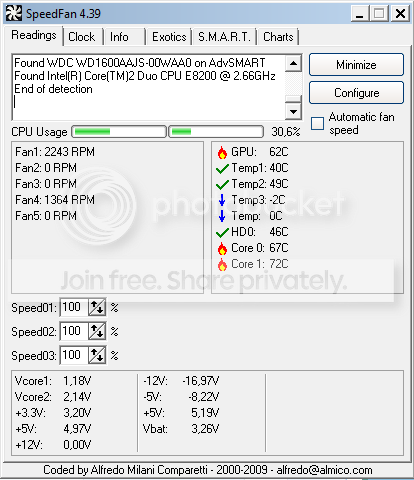
Capture-11.png

i cant understand what makes my cpu having such high temps.

fan: thermaltake tr2-500w
cpu:Intel(R) Core(TM)2 Duo CPU E8200 @ 2.66GHz
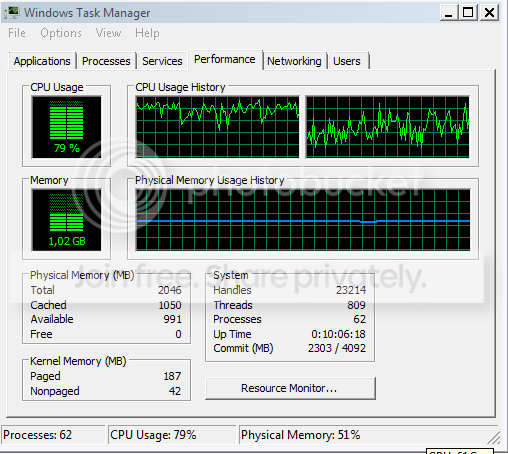
Capture2-5.png

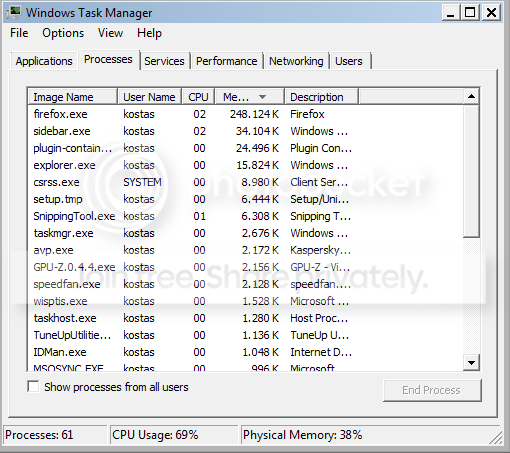
Capture-12.png


Edit:core 0 just jumped to 81C and core 1 to 83C and after like 2-3mins it went back to 70+.Anyone can figure out what the hell is going on? :S
 

My Computer

OS
windows 7
CPU
Intel(R) Core(TM)2 Duo CPU E8200 @ 2.66GHz
Motherboard
gigabyte technology EX38-DS4
Memory
symmetric 2048mbytes DDR2
Graphics Card(s)
Nvidia geforce9600gt
Screen Resolution
1920x1080
Hard Drives
WDC caviar blue 1tb
WD 500BEV External usb device
Internet Speed
24mbs
well, what is your cpu cooler? you listed a power supply
and I would turn off your computer as those are dangerous temps!
 

My Computer

Computer Manufacturer/Model Number
Custom Build #2
OS
Windows 7 Ultimate 32-Bit
CPU
Intel Core 2 Duo E6300 O.C.'d to 2.80 GHz (For Now >:) )
Motherboard
Gigabyte P43-ES3G
Memory
4x1GB OCZ Dual Channel RAM
Graphics Card(s)
HIS ATI Radeon HD 5770 1GB
Sound Card
Onboard Sound
Monitor(s) Displays
Asus VH-236
Screen Resolution
1920x1080
Hard Drives
WD Caviar-Blue 250 GB SATA
WD Caviar-Green 1.5 TB SATA
PSU
Raidmax RX-630SS
Case
Apevia X-Dreamer
Cooling
Case: Arctic Cooling CPU:Rosewill RCX Z2
well, what is your cpu cooler?
im not quite certain about that one,can i use any software to find out what is my cpu cooler or?
 

My Computer

OS
windows 7
CPU
Intel(R) Core(TM)2 Duo CPU E8200 @ 2.66GHz
Motherboard
gigabyte technology EX38-DS4
Memory
symmetric 2048mbytes DDR2
Graphics Card(s)
Nvidia geforce9600gt
Screen Resolution
1920x1080
Hard Drives
WDC caviar blue 1tb
WD 500BEV External usb device
Internet Speed
24mbs
well, is it the one that came with your processor?
also, if you overclocked your processor, set it back.
 

My Computer

Computer Manufacturer/Model Number
Custom Build #2
OS
Windows 7 Ultimate 32-Bit
CPU
Intel Core 2 Duo E6300 O.C.'d to 2.80 GHz (For Now >:) )
Motherboard
Gigabyte P43-ES3G
Memory
4x1GB OCZ Dual Channel RAM
Graphics Card(s)
HIS ATI Radeon HD 5770 1GB
Sound Card
Onboard Sound
Monitor(s) Displays
Asus VH-236
Screen Resolution
1920x1080
Hard Drives
WD Caviar-Blue 250 GB SATA
WD Caviar-Green 1.5 TB SATA
PSU
Raidmax RX-630SS
Case
Apevia X-Dreamer
Cooling
Case: Arctic Cooling CPU:Rosewill RCX Z2
well, is it the one that came with your processor?
also, if you overclocked your processor, set it back.
nah i didnt overclocked anything and i bet my cpu cooler is the one that came with my processor because i dont remember buying one when i configurate my pc.
 

My Computer

OS
windows 7
CPU
Intel(R) Core(TM)2 Duo CPU E8200 @ 2.66GHz
Motherboard
gigabyte technology EX38-DS4
Memory
symmetric 2048mbytes DDR2
Graphics Card(s)
Nvidia geforce9600gt
Screen Resolution
1920x1080
Hard Drives
WDC caviar blue 1tb
WD 500BEV External usb device
Internet Speed
24mbs
ok. don't overclock then
also, how long have you had this processor running?
 

My Computer

Computer Manufacturer/Model Number
Custom Build #2
OS
Windows 7 Ultimate 32-Bit
CPU
Intel Core 2 Duo E6300 O.C.'d to 2.80 GHz (For Now >:) )
Motherboard
Gigabyte P43-ES3G
Memory
4x1GB OCZ Dual Channel RAM
Graphics Card(s)
HIS ATI Radeon HD 5770 1GB
Sound Card
Onboard Sound
Monitor(s) Displays
Asus VH-236
Screen Resolution
1920x1080
Hard Drives
WD Caviar-Blue 250 GB SATA
WD Caviar-Green 1.5 TB SATA
PSU
Raidmax RX-630SS
Case
Apevia X-Dreamer
Cooling
Case: Arctic Cooling CPU:Rosewill RCX Z2
ok. don't overclock then
also, how long have you had this processor running?
If you mean when i bough it,it was about 2 years and a half ago.Now if you ask how much time i have to shut down my pc,it is open for about 12-15hours
 

My Computer

OS
windows 7
CPU
Intel(R) Core(TM)2 Duo CPU E8200 @ 2.66GHz
Motherboard
gigabyte technology EX38-DS4
Memory
symmetric 2048mbytes DDR2
Graphics Card(s)
Nvidia geforce9600gt
Screen Resolution
1920x1080
Hard Drives
WDC caviar blue 1tb
WD 500BEV External usb device
Internet Speed
24mbs
When was the last time you cleaned all the dust and dirt out of your computer?
 

My Computer

Computer type
Laptop
Computer Manufacturer/Model Number
Toshiba P775-S7100
OS
Windows 7 Professional SP1 64-bit
CPU
Intel Core i5-2450M @2.5 GHz
Memory
6 GB DDR3 1333MHz
Graphics Card(s)
Intel HD 3000
Monitor(s) Displays
Built-in 17.3" LED; 22" Insignia NS-L22Q-10A
Screen Resolution
1600x900; 1360x768
Hard Drives
750 GB Hitachi
1TB Seagate FreeAgent External
Internet Speed
Verizon DSL Speed(Down/Up): 3360 Kbps / 800 Kbps
Antivirus
MSE and MBAM Pro
Browser
IE10
ok, well, you might need to re apply thermal grease to your cpu heatsink.
assuming you have a stock intel cooler with a circular base, clean the old thermal grease off with isopropyl alchohol on a cotton swab or q-tip. Of course don't do this while your machine is on.
then if you have any more thermal grease, apply just a tiny drop to the die of your heatsink. Thermal paste isn't the thing that's supposed to be used in mass quantities. it is just use to fill in tiny imperfections on the surface. the metal is really what conducts the heat.
<edit> also make sure you clean the cpu surface
 

My Computer

Computer Manufacturer/Model Number
Custom Build #2
OS
Windows 7 Ultimate 32-Bit
CPU
Intel Core 2 Duo E6300 O.C.'d to 2.80 GHz (For Now >:) )
Motherboard
Gigabyte P43-ES3G
Memory
4x1GB OCZ Dual Channel RAM
Graphics Card(s)
HIS ATI Radeon HD 5770 1GB
Sound Card
Onboard Sound
Monitor(s) Displays
Asus VH-236
Screen Resolution
1920x1080
Hard Drives
WD Caviar-Blue 250 GB SATA
WD Caviar-Green 1.5 TB SATA
PSU
Raidmax RX-630SS
Case
Apevia X-Dreamer
Cooling
Case: Arctic Cooling CPU:Rosewill RCX Z2
When was the last time you cleaned all the dust and dirt out of your computer?
I cleaned all the dust about 8 months ago :o


ok, well, you might need to re apply thermal grease to your cpu heatsink.
assuming you have a stock intel cooler with a circular base, clean the old thermal grease off with isopropyl alchohol on a cotton swab or q-tip. Of course don't do this while your machine is on.
then if you have any more thermal grease, apply just a tiny drop to the die of your heatsink. Thermal paste isn't the thing that's supposed to be used in mass quantities. it is just use to fill in tiny imperfections on the surface. the metal is really what conducts the heat.
<edit> also make sure you clean the cpu surface

Alright i will do what you said and hope it helps :thumbsup:
 

My Computer

OS
windows 7
CPU
Intel(R) Core(TM)2 Duo CPU E8200 @ 2.66GHz
Motherboard
gigabyte technology EX38-DS4
Memory
symmetric 2048mbytes DDR2
Graphics Card(s)
Nvidia geforce9600gt
Screen Resolution
1920x1080
Hard Drives
WDC caviar blue 1tb
WD 500BEV External usb device
Internet Speed
24mbs
be careful and don't let any thermal paste into the cpu socket!
I had this happen to me yesterday, because i put on just a little more than i needed, and it got on the gate, and a tiny bit got in the socket
 

My Computer

Computer Manufacturer/Model Number
Custom Build #2
OS
Windows 7 Ultimate 32-Bit
CPU
Intel Core 2 Duo E6300 O.C.'d to 2.80 GHz (For Now >:) )
Motherboard
Gigabyte P43-ES3G
Memory
4x1GB OCZ Dual Channel RAM
Graphics Card(s)
HIS ATI Radeon HD 5770 1GB
Sound Card
Onboard Sound
Monitor(s) Displays
Asus VH-236
Screen Resolution
1920x1080
Hard Drives
WD Caviar-Blue 250 GB SATA
WD Caviar-Green 1.5 TB SATA
PSU
Raidmax RX-630SS
Case
Apevia X-Dreamer
Cooling
Case: Arctic Cooling CPU:Rosewill RCX Z2
When was the last time you cleaned all the dust and dirt out of your computer?
I cleaned all the dust about 8 months ago :o

Eight months ago? I always recommend doing it every six months, but that is too long to wait on some cases. Clean all the dust off of everything and I bet you will see lower temps.
 

My Computer

Computer type
Laptop
Computer Manufacturer/Model Number
Toshiba P775-S7100
OS
Windows 7 Professional SP1 64-bit
CPU
Intel Core i5-2450M @2.5 GHz
Memory
6 GB DDR3 1333MHz
Graphics Card(s)
Intel HD 3000
Monitor(s) Displays
Built-in 17.3" LED; 22" Insignia NS-L22Q-10A
Screen Resolution
1600x900; 1360x768
Hard Drives
750 GB Hitachi
1TB Seagate FreeAgent External
Internet Speed
Verizon DSL Speed(Down/Up): 3360 Kbps / 800 Kbps
Antivirus
MSE and MBAM Pro
Browser
IE10
Back
Top