CPU problem on i7 2630qm

Mustibh

New member
Local time
8:45 PM
Messages
13
Hello,
i'm using HP dv6 6020st laptop with i7 2630QM.
My problem is on the intel site for my CPU writes:
Max turbo frequency:2.9 GHZ
but when i look my computer it's stays 2000 Mhz
Any ideas ?
 

My Computer

OS
Windows 7 Ultimate x64
First try looking into your BIOS and see if Intel Turbo Boost Technology is enabled. If there are no options for that in the BIOS then Turbo Boost Tech is more than likely enabled. Boot to Windows and set the power plan from HP recommended to "High Performance". This forces the CPU to be at 100% frequency state (.ie. 2.0 - 2.9 GHz). If the frequency is still 2.0 GHz, you may have HP Thermal Assistant software installed and is set to "quiet" mode. Note that "quiet" mode disables Turbo boost technology so the CPU won't get as hot and the fan won't speed up. So set the mode to "maximum cooling." Turbo boost should now be working. Confirm by downloading prime95 and torture test with only 1 thread. If turbo boost doesn't work, reinstall HP thermal assistant software. Then Reset Defaul Power plan by following this link http://www.sevenforums.com/tutorials/950-power-plan-restore-default-settings.html . This should make your Turbo boost technology 100% working. Here's a screenshot with max turbo boost working with prime95:

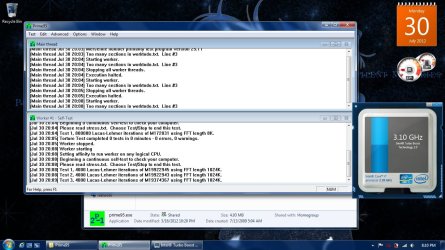
Intel Turbo Boost.jpg
 

My Computer

Computer type
Laptop
Computer Manufacturer/Model Number
Dell Optiplex SX270, Lenovo Z470
OS
Windows 7 Professional x64 SP1
CPU
Intel® Pentium® 4 @ 2.26 GHz, Intel Core i7-2670QM @ 2.20 GH
Motherboard
Dell, Lenovo
Memory
512MB Dual channel DDR SDRAM @ 400MHz 2.5-3-3-7, 8 GB DDR3
Graphics Card(s)
Intel 82865G, Nvidia GeForce 520M Graphics
Sound Card
SoundMax Integrated Audio, Integrated HD Audio
Monitor(s) Displays
LG W1952
Screen Resolution
1440x900, 1366 x 768
Hard Drives
40 GB 2.5" IDE 4200 RPM HDD, 500 GB 5400 RPM Sata 1.5 + 32 GB SSD
PSU
Dell 145 Watt, Lenovo 120 Watt Power Adapter
Case
Optiplex SX270 Small Form Factor, Laptop
Cooling
Dell Proprietary Air Cooling, Stock laptop cooling
Keyboard
Dell SK-8125 USB Keyboard
Mouse
Dell PS/2 2 button ball mouse with wheel scroll
Internet Speed
300 Mbit down / 20 Mbps up Time Warner Cable
Antivirus
MSE, Malwarebytes Scanner
Browser
Internet (Aizawa) Explorer 11
Other Info
Running Windows Server 2012 Datacenter on a virtual machine to run Metro Apps.
First try looking into your BIOS and see if Intel Turbo Boost Technology is enabled. If there are no options for that in the BIOS then Turbo Boost Tech is more than likely enabled. Boot to Windows and set the power plan from HP recommended to "High Performance". This forces the CPU to be at 100% frequency state (.ie. 2.0 - 2.9 GHz). If the frequency is still 2.0 GHz, you may have HP Thermal Assistant software installed and is set to "quiet" mode. Note that "quiet" mode disables Turbo boost technology so the CPU won't get as hot and the fan won't speed up. So set the mode to "maximum cooling." Turbo boost should now be working. Confirm by downloading prime95 and torture test with only 1 thread. If turbo boost doesn't work, reinstall HP thermal assistant software. Then Reset Defaul Power plan by following this link http://www.sevenforums.com/tutorials/950-power-plan-restore-default-settings.html . This should make your Turbo boost technology 100% working. Here's a screenshot with max turbo boost working with prime95:
Thanks for your reply.
I look the bios but there is no intel turbo boost or somethink.
but i uninstalled hp thermal software,rebooted and reinstalled.Tried with prime95 but still same.But i see somethink in the Event Viewer
Code:
The speed of processor 0 in group 0 is being limited by system firmware. The processor has been in this reduced performance state for 71 seconds since the last report.
Source Kernel-Processor-Power; Event id 37
Any ideas ?
 

My Computer

OS
Windows 7 Ultimate x64
I'm actually running out of ideas as it is the first time I've encountered a case like yours. Most of the time, resetting the power plan to defaults and setting it to high performace as well as enabling maximum cooling in the thermal management software will trigger Turbo Boost.

Based on the event viewer message, I think either HP programmed your BIOS to disable Turbo Boost or you have not installed Intel chipset drivers. The only solution that I could think of is downloading the latest BIOS for your laptop as well as the latest Intel Chipset driver for Intel HM65/67. You can find these at your laptop's HP support website.
 

My Computer

Computer type
Laptop
Computer Manufacturer/Model Number
Dell Optiplex SX270, Lenovo Z470
OS
Windows 7 Professional x64 SP1
CPU
Intel® Pentium® 4 @ 2.26 GHz, Intel Core i7-2670QM @ 2.20 GH
Motherboard
Dell, Lenovo
Memory
512MB Dual channel DDR SDRAM @ 400MHz 2.5-3-3-7, 8 GB DDR3
Graphics Card(s)
Intel 82865G, Nvidia GeForce 520M Graphics
Sound Card
SoundMax Integrated Audio, Integrated HD Audio
Monitor(s) Displays
LG W1952
Screen Resolution
1440x900, 1366 x 768
Hard Drives
40 GB 2.5" IDE 4200 RPM HDD, 500 GB 5400 RPM Sata 1.5 + 32 GB SSD
PSU
Dell 145 Watt, Lenovo 120 Watt Power Adapter
Case
Optiplex SX270 Small Form Factor, Laptop
Cooling
Dell Proprietary Air Cooling, Stock laptop cooling
Keyboard
Dell SK-8125 USB Keyboard
Mouse
Dell PS/2 2 button ball mouse with wheel scroll
Internet Speed
300 Mbit down / 20 Mbps up Time Warner Cable
Antivirus
MSE, Malwarebytes Scanner
Browser
Internet (Aizawa) Explorer 11
Other Info
Running Windows Server 2012 Datacenter on a virtual machine to run Metro Apps.
There is one more thing that I overlooked. Does your CPU stay at a constant rate of 2 GHz even at idle? If so, enable Speed Step in your BIOS because disabling Speed Step disables Turbo Boost as well. If not, just update your BIOS and the Intel chipset drivers and test with Prime95. If Turbo Boost still does not work, I'm very positive that HP disabled Turbo Boost from their BIOS.
 

My Computer

Computer type
Laptop
Computer Manufacturer/Model Number
Dell Optiplex SX270, Lenovo Z470
OS
Windows 7 Professional x64 SP1
CPU
Intel® Pentium® 4 @ 2.26 GHz, Intel Core i7-2670QM @ 2.20 GH
Motherboard
Dell, Lenovo
Memory
512MB Dual channel DDR SDRAM @ 400MHz 2.5-3-3-7, 8 GB DDR3
Graphics Card(s)
Intel 82865G, Nvidia GeForce 520M Graphics
Sound Card
SoundMax Integrated Audio, Integrated HD Audio
Monitor(s) Displays
LG W1952
Screen Resolution
1440x900, 1366 x 768
Hard Drives
40 GB 2.5" IDE 4200 RPM HDD, 500 GB 5400 RPM Sata 1.5 + 32 GB SSD
PSU
Dell 145 Watt, Lenovo 120 Watt Power Adapter
Case
Optiplex SX270 Small Form Factor, Laptop
Cooling
Dell Proprietary Air Cooling, Stock laptop cooling
Keyboard
Dell SK-8125 USB Keyboard
Mouse
Dell PS/2 2 button ball mouse with wheel scroll
Internet Speed
300 Mbit down / 20 Mbps up Time Warner Cable
Antivirus
MSE, Malwarebytes Scanner
Browser
Internet (Aizawa) Explorer 11
Other Info
Running Windows Server 2012 Datacenter on a virtual machine to run Metro Apps.
There is one more thing that I overlooked. Does your CPU stay at a constant rate of 2 GHz even at idle? If so, enable Speed Step in your BIOS because disabling Speed Step disables Turbo Boost as well. If not, just update your BIOS and the Intel chipset drivers and test with Prime95. If Turbo Boost still does not work, I'm very positive that HP disabled Turbo Boost from their BIOS.

Thanks but i solved it on HP Cool Sense.I Started Hp cool sense and changed to Best performance and fixed... But when i change to this.CPU's heat is like a hell.On idle 60-70 C* (just watching videos).On the game 80-83 C*
 

My Computer

OS
Windows 7 Ultimate x64
Your gaming temps are very good. Mine goes from 90 to 95 degrees when gaming since GPU and CPU share 1 heatsink and 1 fan, but if the GPU isn't used, temps are stable at 80 - 90 degrees when encoding videos, etc. Unless I'm gaming, I always set my power plan to "Balanced" to lower idle temperatures to around 40 to 50 oC when browsing and 50 - 60 oC when watching videos.
 

My Computer

Computer type
Laptop
Computer Manufacturer/Model Number
Dell Optiplex SX270, Lenovo Z470
OS
Windows 7 Professional x64 SP1
CPU
Intel® Pentium® 4 @ 2.26 GHz, Intel Core i7-2670QM @ 2.20 GH
Motherboard
Dell, Lenovo
Memory
512MB Dual channel DDR SDRAM @ 400MHz 2.5-3-3-7, 8 GB DDR3
Graphics Card(s)
Intel 82865G, Nvidia GeForce 520M Graphics
Sound Card
SoundMax Integrated Audio, Integrated HD Audio
Monitor(s) Displays
LG W1952
Screen Resolution
1440x900, 1366 x 768
Hard Drives
40 GB 2.5" IDE 4200 RPM HDD, 500 GB 5400 RPM Sata 1.5 + 32 GB SSD
PSU
Dell 145 Watt, Lenovo 120 Watt Power Adapter
Case
Optiplex SX270 Small Form Factor, Laptop
Cooling
Dell Proprietary Air Cooling, Stock laptop cooling
Keyboard
Dell SK-8125 USB Keyboard
Mouse
Dell PS/2 2 button ball mouse with wheel scroll
Internet Speed
300 Mbit down / 20 Mbps up Time Warner Cable
Antivirus
MSE, Malwarebytes Scanner
Browser
Internet (Aizawa) Explorer 11
Other Info
Running Windows Server 2012 Datacenter on a virtual machine to run Metro Apps.
i'm doing this too.Are u using laptop ?
 

My Computer

OS
Windows 7 Ultimate x64
Yeah, it is a dell inspiron 15r laptop with i7-2670qm, 8 GB DDR3-1333 MHz, NVIDIA GeForce 525M, 500 GB 5400rpm HDD.
 

My Computer

Computer type
Laptop
Computer Manufacturer/Model Number
Dell Optiplex SX270, Lenovo Z470
OS
Windows 7 Professional x64 SP1
CPU
Intel® Pentium® 4 @ 2.26 GHz, Intel Core i7-2670QM @ 2.20 GH
Motherboard
Dell, Lenovo
Memory
512MB Dual channel DDR SDRAM @ 400MHz 2.5-3-3-7, 8 GB DDR3
Graphics Card(s)
Intel 82865G, Nvidia GeForce 520M Graphics
Sound Card
SoundMax Integrated Audio, Integrated HD Audio
Monitor(s) Displays
LG W1952
Screen Resolution
1440x900, 1366 x 768
Hard Drives
40 GB 2.5" IDE 4200 RPM HDD, 500 GB 5400 RPM Sata 1.5 + 32 GB SSD
PSU
Dell 145 Watt, Lenovo 120 Watt Power Adapter
Case
Optiplex SX270 Small Form Factor, Laptop
Cooling
Dell Proprietary Air Cooling, Stock laptop cooling
Keyboard
Dell SK-8125 USB Keyboard
Mouse
Dell PS/2 2 button ball mouse with wheel scroll
Internet Speed
300 Mbit down / 20 Mbps up Time Warner Cable
Antivirus
MSE, Malwarebytes Scanner
Browser
Internet (Aizawa) Explorer 11
Other Info
Running Windows Server 2012 Datacenter on a virtual machine to run Metro Apps.
Are u using extra fan ? Because on my laptop when 80-85 C* my left hand is gone :D
 

My Computer

OS
Windows 7 Ultimate x64
No those temps are solely from just the laptop fan itself. I have not used any cooling pads. I tend to clean my laptop vents with compressed air every two weeks to minimize dust buildup.
 

My Computer

Computer type
Laptop
Computer Manufacturer/Model Number
Dell Optiplex SX270, Lenovo Z470
OS
Windows 7 Professional x64 SP1
CPU
Intel® Pentium® 4 @ 2.26 GHz, Intel Core i7-2670QM @ 2.20 GH
Motherboard
Dell, Lenovo
Memory
512MB Dual channel DDR SDRAM @ 400MHz 2.5-3-3-7, 8 GB DDR3
Graphics Card(s)
Intel 82865G, Nvidia GeForce 520M Graphics
Sound Card
SoundMax Integrated Audio, Integrated HD Audio
Monitor(s) Displays
LG W1952
Screen Resolution
1440x900, 1366 x 768
Hard Drives
40 GB 2.5" IDE 4200 RPM HDD, 500 GB 5400 RPM Sata 1.5 + 32 GB SSD
PSU
Dell 145 Watt, Lenovo 120 Watt Power Adapter
Case
Optiplex SX270 Small Form Factor, Laptop
Cooling
Dell Proprietary Air Cooling, Stock laptop cooling
Keyboard
Dell SK-8125 USB Keyboard
Mouse
Dell PS/2 2 button ball mouse with wheel scroll
Internet Speed
300 Mbit down / 20 Mbps up Time Warner Cable
Antivirus
MSE, Malwarebytes Scanner
Browser
Internet (Aizawa) Explorer 11
Other Info
Running Windows Server 2012 Datacenter on a virtual machine to run Metro Apps.
Back
Top