Cpu speed

Urbwolf

New member
Power User
Local time
2:11 PM
Messages
201
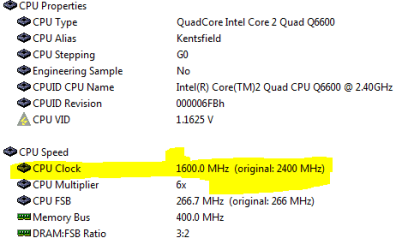
Clock speed on my cpu seems to be wrong. I have not overclocked the cpu yet. but its showing it at 1600.0 mhz and supposed to be at 2400 mhz. Or am I wrong?
 

Attachments

  • clockspeed.PNG
    clockspeed.PNG
    15.8 KB · Views: 148

My Computer

Computer type
PC/Desktop
Computer Manufacturer/Model Number
Custom
OS
Windows 7 64bit
CPU
Intel I7 4770k @4.5
Motherboard
Asus z87-pro
Memory
16GB corsair Vengence
Graphics Card(s)
EVGA GTX 980 TI SC acx2.0
Sound Card
XFI fatality gamer
Monitor(s) Displays
Samsung
Screen Resolution
1920 x 1080
Hard Drives
OCZ ssd Baracuda 1tb x2
PSU
Corsair 1200 watt
Case
NZXT Noctis 450
Cooling
Kraken X61
Keyboard
Logitech G510
Mouse
Razer naga
Internet Speed
100 down 25 up
Other Info
Nzxt Hue +
Clock speed on my cpu seems to be wrong. I have not overclocked the cpu yet. but its showing it at 1600.0 mhz and supposed to be at 2400 mhz. Or am I wrong?

You processor is probably lowering its speed while its not under extensive use. This saves power and reduces heat while the system is not requiring full power.
 

My Computer

Computer type
PC/Desktop
Computer Manufacturer/Model Number
Alienware Aurora ALX R4
OS
Windows 10 Pro (x64)
CPU
Intel Core i7-3930K (3.2GHz - 4.5GHz)
Motherboard
Alienware Aurora-R4 x79
Memory
4x Samsung 4GB PC3-12800 DDR3 (16GB 1600MHz)
Graphics Card(s)
Nvidia Geforce GTX 690
Sound Card
SteelSeries Siberia Elite
Monitor(s) Displays
Dell UltraSharp U3011
Screen Resolution
2560x1600
Hard Drives
Samsung 850 Pro 256 GB, Seagate 1TB Desktop Hybrid HDD, 2x Western Digital 4TB Green HDD
PSU
875W Some Dell PSU <.<
Case
Alienware Aurora ALX
Cooling
Custom Liquid Cooling (EK CPU & GPU blocks) dual EK 480RAD
Keyboard
Logitech G710+ Mechanical
Mouse
Logitech G700s
Internet Speed
Verizon Fios (50 mbps average)
Other Info
Server: Intel NUC D54250WYK: i5-4250U, 16GB, 256 GB mSATA, Windows Server 2012 R2
Yea i retested after i started a game running on other monitor and it jumped up to 2400 mhz. Anyone know what is a safe reliable clock speed for this cpu?
 

My Computer

Computer type
PC/Desktop
Computer Manufacturer/Model Number
Custom
OS
Windows 7 64bit
CPU
Intel I7 4770k @4.5
Motherboard
Asus z87-pro
Memory
16GB corsair Vengence
Graphics Card(s)
EVGA GTX 980 TI SC acx2.0
Sound Card
XFI fatality gamer
Monitor(s) Displays
Samsung
Screen Resolution
1920 x 1080
Hard Drives
OCZ ssd Baracuda 1tb x2
PSU
Corsair 1200 watt
Case
NZXT Noctis 450
Cooling
Kraken X61
Keyboard
Logitech G510
Mouse
Razer naga
Internet Speed
100 down 25 up
Other Info
Nzxt Hue +
I'm running mine at 2.6 but it will depend on your MOB and cooling. All systems seem to have their sweet point and you just need to experiment. But if you want reliability increase the cooling and leave the CPU alone. IMO

Ken
 

My Computer

Computer Manufacturer/Model Number
Dell Optiplex 980
OS
Win7 x64 Ultimate SP1
CPU
Intel i7-2600
Memory
8 Gig
Graphics Card(s)
Geforce gt 520
Monitor(s) Displays
LG & Acer
Screen Resolution
1920x1080
Internet Speed
Fios 45/35
Other Info
Windows Home Server
You prolly no this already but when you OC be sure to up the voltages accordingly too ;) Just a friendly reminder
 

My Computer

Computer Manufacturer/Model Number
Custom
OS
Windows 7 7600RTM X64
CPU
AMD Phenom(tm) 9600 Quad-Core Processor
Motherboard
ASUS M4A78 PRO
Memory
4GB 1066 DDR2 OCZ Gold Edition
Graphics Card(s)
NVIDIA GeForce 8600 GT
Sound Card
On board
Monitor(s) Displays
42" RCA LCD TV
Screen Resolution
1920x1080
Hard Drives
500GB 7200 RPM SATA
PSU
400W
Case
Crappy
Cooling
Fans
Keyboard
Logitech Wireless Keyboard W/Integrated Touchpad
Internet Speed
10Mbps DL
Yea i retested after i started a game running on other monitor and it jumped up to 2400 mhz. Anyone know what is a safe reliable clock speed for this cpu?

You probably have your power option set to 'balanced' or 'power saver' either of these modes will underclock your CPU when it is not in use for energy saving and immediately jump to full clock when the juice is required.
 

My Computer

OS
Win 7 Ultimate x64
CPU
Intel i7 950 OC'd @ 4.0Ghz (SpeedStep ON)
Motherboard
ASUS P6X58D-E BIOS 0303
Memory
3x2GB Patriot Extreme Viper II Sector 7 DDR3 @ 1600mhz
Graphics Card(s)
ATI MSI 5870 900mhz/1300mhz
Sound Card
Onboard Realtek ALC889
Monitor(s) Displays
2 X 24" BenQ G2412HD
Screen Resolution
1920x1080p
Hard Drives
Intel X25-M 80 GB (SSD)
W.D. Caviar Black 1TB (SATA)
Seagate Barricuda 1TB (SATA)
Seagate Barricuda 80GB (SATA)
PSU
Corsair AX850
Case
Antec 1200
Cooling
Lots and Lots of Air!
Keyboard
Razer Lycosa
Mouse
Microsoft Sidewinder
Internet Speed
25Mbps/1Mbps
nope, but dont max it out straight away, cuz more then likely it wont boot, or will sizzle into a nice pile of melted plastic X)
 

My Computer

Computer Manufacturer/Model Number
Custom Build
OS
W7 RTM Ultimate x64
CPU
Intel Q8400 @ 2.66GHZ
Motherboard
Gigabyte GA-EG45M-UD2H
Memory
4GB DDR2-800
Graphics Card(s)
Gainward GTS 450 GLH 1GB Edition
Sound Card
Integrated 8 Channel
Monitor(s) Displays
AOC 23.6 Inch Widescreen LCD
Screen Resolution
1920x1080
Hard Drives
Seagate 500GB Internal
Western Digital 1TB Internal

Hitachi 1TB External
PSU
Apevia Java Power 500W
Case
Cooler Master HAF 922 Black
Cooling
Stock Intel CPU Fan
Keyboard
HP SK-2960 Multimedia Keyboard
Mouse
Logitech M350 Wireless Gaming Mouse
Internet Speed
1.5MB
For some reason i cant even overclock to 2.8 i get the bsod right away. tried 2.7 same thing..
 

My Computer

Computer type
PC/Desktop
Computer Manufacturer/Model Number
Custom
OS
Windows 7 64bit
CPU
Intel I7 4770k @4.5
Motherboard
Asus z87-pro
Memory
16GB corsair Vengence
Graphics Card(s)
EVGA GTX 980 TI SC acx2.0
Sound Card
XFI fatality gamer
Monitor(s) Displays
Samsung
Screen Resolution
1920 x 1080
Hard Drives
OCZ ssd Baracuda 1tb x2
PSU
Corsair 1200 watt
Case
NZXT Noctis 450
Cooling
Kraken X61
Keyboard
Logitech G510
Mouse
Razer naga
Internet Speed
100 down 25 up
Other Info
Nzxt Hue +

My Computer

Computer Manufacturer/Model Number
Custom
OS
Windows 7 7600RTM X64
CPU
AMD Phenom(tm) 9600 Quad-Core Processor
Motherboard
ASUS M4A78 PRO
Memory
4GB 1066 DDR2 OCZ Gold Edition
Graphics Card(s)
NVIDIA GeForce 8600 GT
Sound Card
On board
Monitor(s) Displays
42" RCA LCD TV
Screen Resolution
1920x1080
Hard Drives
500GB 7200 RPM SATA
PSU
400W
Case
Crappy
Cooling
Fans
Keyboard
Logitech Wireless Keyboard W/Integrated Touchpad
Internet Speed
10Mbps DL
Not all chips will overclock well. Each and every single chip is just a little bit different with what it will allow. In addition, your RAM is also important when it comes to stable overclocking.
 

My Computer

Computer Manufacturer/Model Number
Self-Built in July 2009
OS
Windows 7 Ultimate x64
CPU
Intel Q9550 2.83Ghz OC'd to 3.40Ghz
Motherboard
Gigabyte GA-EP45-UD3R rev. 1.1, F12 BIOS
Memory
8GB G.Skill PI DDR2-800, 4-4-4-12 timings
Graphics Card(s)
EVGA 1280MB Nvidia GeForce GTX570
Sound Card
Realtek ALC899A 8 channel onboard audio
Monitor(s) Displays
23" Acer x233H
Screen Resolution
1920x1080
Hard Drives
Intel X25-M 80GB Gen 2 SSD
Western Digital 1TB Caviar Black, 32MB cache. WD1001FALS
PSU
Corsair 620HX modular
Case
Antec P182
Cooling
stock
Keyboard
ABS M1 Mechanical
Mouse
Logitech G9 Laser Mouse
Internet Speed
15/2 cable modem
Other Info
Windows and Linux enthusiast. Logitech G35 Headset.
For some reason i cant even overclock to 2.8 i get the bsod right away. tried 2.7 same thing..

You won't have much luck overclocking unless you use the correct divider for your memory along with some precise voltage adjustments. I noticed you are using a 6GB memory configuration. The only way to achieve this with your board is to mix different Ram sets together which is always a bad idea.

Suggest you go to a 4GB configuration for overclocking and if you plan on overclocking the FSB be sure and use a stable divider. I have a chart that will work for the 680i in case you aren't sure which dividers are stable. ;)
 

My Computer

Computer type
PC/Desktop
Computer Manufacturer/Model Number
Home built
OS
Windows 7 Ult, Windows 8.1 Pro,
CPU
Q9650-4.275GHz, E8600 4.5GHz, E6750-3.8GHz
Motherboard
Evga 780i FTW
Memory
G.Skill PC2 9600 1200Mhz 5 5 5 15 2T
Graphics Card(s)
GTX480
Sound Card
Asus Xonar D2
Monitor(s) Displays
HannsG
Screen Resolution
1680X1050
Hard Drives
GSkill Phoenix Pro 120GB SSD
PSU
ThermalTake Toughpower 1000Watt modular
Case
ThermalTake XaserV
Cooling
Xigmatek S1283
Keyboard
Logitech G15
Mouse
Logitech G9
Internet Speed
T1
Im decided against overclocking at this time. Im planning on doing a new build in a week or so. Anyone have any suggestions on a good mobo. Getting the I7 860 using socker 1156
 

My Computer

Computer type
PC/Desktop
Computer Manufacturer/Model Number
Custom
OS
Windows 7 64bit
CPU
Intel I7 4770k @4.5
Motherboard
Asus z87-pro
Memory
16GB corsair Vengence
Graphics Card(s)
EVGA GTX 980 TI SC acx2.0
Sound Card
XFI fatality gamer
Monitor(s) Displays
Samsung
Screen Resolution
1920 x 1080
Hard Drives
OCZ ssd Baracuda 1tb x2
PSU
Corsair 1200 watt
Case
NZXT Noctis 450
Cooling
Kraken X61
Keyboard
Logitech G510
Mouse
Razer naga
Internet Speed
100 down 25 up
Other Info
Nzxt Hue +
I just had the same problem and figured out it was a glitch with the "Cool and Quiet" option in the bios.
Make sure "cool and quiet" is disabled . seems windows 7 throttles the processor even if you haven't installed the application.:sarc:
Hope that helps.
 

My Computer

Computer Manufacturer/Model Number
Home Built
OS
Windows 7 64 ultimate
CPU
AMD Phenom II x4 550 3.4gHz
Motherboard
ASUS M4A785TD-V EVO AM3
Memory
Kingston HyperX 2GB DDR3 1800 (PC3 14400)
Graphics Card(s)
on board HD 4200
Sound Card
on board
Monitor(s) Displays
Samsung SyncMaster 204b
Screen Resolution
1600 x 1200
Hard Drives
WD 160gb SATA II
PSU
Antec TruePower 650w
Case
Crap
Keyboard
sunbeamtech green illuminated keyboard
Mouse
Razer Diamondback
Hi there
another tack
If you are a gamer why not go for a better GPU. W7 should remove most of the intensive graphic stuff to the GPU vastly lowering the load on the CPU so you shouldn't need to OC it anyway.


As computers are evolving in this direction - expect the next generation of SSD'S to handle most of the entire I/O processing so the CPU itself will only have to handle various interrupts,"dispatch tasks", and manage memory (virtual and real) OC'ing will be a thing of the past with no real use any more.

In other words the CPU will just handle the task element ( a small central kernel) whilst all the other processes (I/O, network communications, video, audio etc.) will be offloaded to the various components with their OWN in built processors.


This means future CPU's could actually become much LESS powerful than today's quads and still produce much greater throughput on the system.

Cheers
jimbo

 

My Computer

Computer type
PC/Desktop
Computer Manufacturer/Model Number
Custom built, several laptops HP/ASUS
OS
Linux CENTOS 7 / various Windows OS'es and servers
CPU
Intel i7 Intel i5
Memory
8GB, 16GB
Graphics Card(s)
On Motherboard
Sound Card
Realtek HD audio
Monitor(s) Displays
Apple Cinema display, Samsung LCD
Screen Resolution
1920 X 1080
Hard Drives
4 X 1TB SATA
Mouse
Toshiba wireless laser
Internet Speed
> 20MB up
Back
Top