
CPU Spike from “System” process makes system un-usable.
I’m having issues where my System process spikes to %100 and my computer becomes un-useable and I’m forced to do a hard reboot.
My System specs are :
OS: Windows 7 Professional (64 bit)
Processor: Intel Core i7-3770K
Mother Board: ASUS P8Z77-V
I’ve been able to look at the threads running under it with Process Explorer and when the CPU spiked I saw ~7 threads of
Ntoskrnl.exe!ExReleaseResourceAndLeavePriorityRegion+0x194
that are each taking up about 12% of the CPU.

I’ve been trying to run this command to get some info:
xperf -on latency -stackwalk profile -buffersize 2048 -MaxFile 1024 -FileMode Circular && timeout -1 && xperf -d C:\highCPUUsage.etl
It hasn’t been easy running the capture since when the CPU spikes to 100% nothing responds. I was able to get one capture by starting it before any issue were occurring and then having it write just prior to the system becoming un-useable. (It ended up creating two etl files kernel.etl and highCPUUsage.etc) I'm not sure how much info about the issue that was captured but I've uploaded the captures to my google drive account and they can be accessed here: https://drive.google.com/file/d/0BxY1mTgslXVJd2pYaktOZzJsNWs/view?usp=sharing.
I’ve also gotten the occasional BSOD but no crash dumps are being created I think I have my settings right.
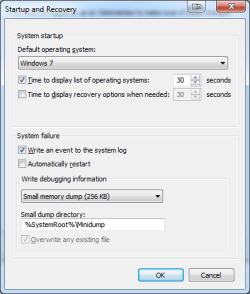
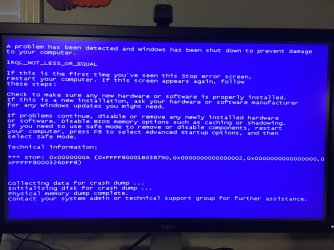
I can’t seem to find any particular behavior that causes the CPU to spike, it happens randomly sometimes with hours between occurrences sometime minutes. I would appreciate any help in tracking this down.
Thank you
I’m having issues where my System process spikes to %100 and my computer becomes un-useable and I’m forced to do a hard reboot.
My System specs are :
OS: Windows 7 Professional (64 bit)
Processor: Intel Core i7-3770K
Mother Board: ASUS P8Z77-V
I’ve been able to look at the threads running under it with Process Explorer and when the CPU spiked I saw ~7 threads of
Ntoskrnl.exe!ExReleaseResourceAndLeavePriorityRegion+0x194
that are each taking up about 12% of the CPU.
I’ve been trying to run this command to get some info:
xperf -on latency -stackwalk profile -buffersize 2048 -MaxFile 1024 -FileMode Circular && timeout -1 && xperf -d C:\highCPUUsage.etl
It hasn’t been easy running the capture since when the CPU spikes to 100% nothing responds. I was able to get one capture by starting it before any issue were occurring and then having it write just prior to the system becoming un-useable. (It ended up creating two etl files kernel.etl and highCPUUsage.etc) I'm not sure how much info about the issue that was captured but I've uploaded the captures to my google drive account and they can be accessed here: https://drive.google.com/file/d/0BxY1mTgslXVJd2pYaktOZzJsNWs/view?usp=sharing.
I’ve also gotten the occasional BSOD but no crash dumps are being created I think I have my settings right.
I can’t seem to find any particular behavior that causes the CPU to spike, it happens randomly sometimes with hours between occurrences sometime minutes. I would appreciate any help in tracking this down.
Thank you
My Computer
At a glance
Windows 7 Professional (64 bit)Intel Core i7-3770KGeForce GTX 680
- Computer type
- PC/Desktop
- Computer Manufacturer/Model Number
- custom build
- OS
- Windows 7 Professional (64 bit)
- CPU
- Intel Core i7-3770K
- Motherboard
- ASUS P8Z77-V
- Graphics Card(s)
- GeForce GTX 680
- Hard Drives
- C: PLEXTOR 256GB M6E PCIE SSD
H: Raid 1 with 2 3TB WDC WD3000FYYZ-01UL1B2
- Antivirus
- Microsoft Security Essentials
- Browser
- Chrome

