CPU temperature ?

youngjedi

New member
Local time
11:46 PM
Messages
6
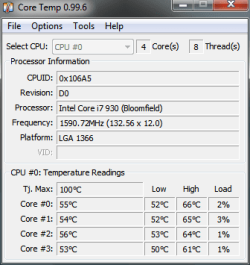
I have a i7 930 with a Cooler Master Hyper N520 on it and temperatures seem high. What is normal?
 

Attachments

  • CoreTemp-Scr.png
    CoreTemp-Scr.png
    8.8 KB · Views: 8

My Computer

Computer Manufacturer/Model Number
Custom Built
OS
Windows 7 Pro x64
CPU
i7 920
Motherboard
Evga FTW3
Memory
12GB Corsair Dominator
Graphics Card(s)
EVGA 470
Monitor(s) Displays
ASUS V222H
Hard Drives
750gb WD
PSU
Ultra X4 750W
Case
Ultra Clear Side
Cooling
Coolmaster V8
Those temps are high for idle; you'd expect to see something between the low 30s and low 40s depending on the temp of your room. I'm assuming you are not overclocking.
 

My Computer

Computer type
PC/Desktop
Computer Manufacturer/Model Number
Ignatz Special; 4 speed manual gearbox; factory air conditioning; one of one
OS
Windows 7 Home Premium SP1, 64-bit
CPU
Intel Skylake i5-6600K, not overclocked
Motherboard
AsRock Z170M Extreme 4, micro ATX
Memory
8 GB HyperX DDR4-2666 (2 x 4 GB)
Graphics Card(s)
none; graphics are integrated on CPU
Sound Card
onboard: Realtek ALC1150; external: USB Behringer UF0-202
Monitor(s) Displays
Dell S2340M 23 inch IPS
Screen Resolution
1600 x 900
Hard Drives
System: Crucial MX100 series SSD, 128 GB;
Data: Samsung Spinpoint 103SJ, 1 TB;
Backup: WD Caviar Green WD30EZRX-00D8PB0, 3 TB
PSU
Rosewill SilentNight 500 watt fanless, semi-modular
Case
Antec Solo II
Cooling
Noctua NH-U12S; Noctua F12 intake, Noctua S12A exhaust
Keyboard
Microsoft 200 6JH-00001 USB
Mouse
Dell or Microsoft optical wired; USB
Antivirus
Microsoft Security Essentials and Malwarebytes Premium
Browser
Pale Moon
Other Info
All fans PWM; speeds at idle: CPU circa 500 rpm; intake circa 600 rpm; exhaust circa 600 rpm; CPU temps 27 idle and 47 C load in a warm room (27 C/81 F) when running Intel Extreme Tuning Utility stress test.
have you tryed resetting your heatsink?. i have the (i7 870) room temps about 26c. and my cpu temp is about 35 to 40 c.

scrooge
 

My Computer

Computer Manufacturer/Model Number
home build
OS
win 7 ( 64 bit)
CPU
Intel Core i7-870 Lynnfield 2.93GHz 8MB L3 Cache LGA 1156 95
Motherboard
ASUS P7P55 LX LGA 1156
Memory
G.SKILL Sniper Series 16GB (4 x 4GB) 240-Pin DDR3 SDRAM
Graphics Card(s)
ATI Radeon HD6800 Series
Sound Card
hdmi
Monitor(s) Displays
42" lg 3d tv
Screen Resolution
1920 x 1080
Hard Drives
1 ssd pci-e revodrive
4 seagate 1.5 tb
PSU
Rosewill BRONZE Series RBR1000-M 1000W Continuous@40°C, 80Pl
Case
CoolMaster 922
Cooling
CORSAIR CWCH60 Hydro Series H60 High Performance Liquid CPU
Keyboard
logtech
Mouse
logitect
Internet Speed
5 mbit
I agree with Scrooge. You've got a very good heatsink/cooler.

You probably already know, but - just in case - check out the detailed instructions for tinting the CPU & heatsink & exactly where to apply the thermal compound here:

Arctic Silver Incorporated - Home

I built several PC's before following these instructions & found that it does make a difference in lower CPU temps.

The other thing is to make certain that the heatsink is making tight contact with the CPU.
 

My Computer

Computer type
PC/Desktop
Computer Manufacturer/Model Number
Custom Build
OS
Windows 7 Professional 64 Bit SP1
CPU
Intel i7-3770K. Mild Overclock to 4.2 Ghz
Motherboard
ASUS Sabertooth Z77
Memory
Crucial Ballistix Sport 32GB DDR3-1600 (PC3-12800)
Graphics Card(s)
Intel 4000 - On CPU
Sound Card
On Board
Monitor(s) Displays
HP w2408h
Screen Resolution
1920 x 1200
Hard Drives
Samsung 840 Pro 256Gb SSD, --
Two - WDC WD1001FALS-00J7B0 SATA
PSU
Antec EarthWatts Green Series 650 Watt ATX
Case
Fractal Design Core 3000 ATX
Cooling
Corsair H80i Water Cooled
Keyboard
Logitech Illuminated
Mouse
Logitech Wireless Trackball M570 + Touchpad T650
Internet Speed
9.5 Mbps down - 25.4 Mbps upload
Antivirus
MSE
Browser
IE 10, Chrome
Hey Guys,
I restarted my computer this morning after it running all night and went into the BIOS and checked the temps in there and it's running at 41C. Could it be CoreTemp is not reading properly? Would seem odd that each core is running 53C+ but overall temp would be 41C. I think i'm in the clear. I think it may be CoreTemp is not reading properly, I'll make sure I'm running the latest version.

I don't think resetting the heatsink would be necessary. I used proper amount of thermal paste and the heatsink is secure. (This isn't my first build)

Thanks to all you guys who replied much appreciated.

 

My Computer

Computer Manufacturer/Model Number
Custom Built
OS
Windows 7 Pro x64
CPU
i7 920
Motherboard
Evga FTW3
Memory
12GB Corsair Dominator
Graphics Card(s)
EVGA 470
Monitor(s) Displays
ASUS V222H
Hard Drives
750gb WD
PSU
Ultra X4 750W
Case
Ultra Clear Side
Cooling
Coolmaster V8
To verify or debunk CoreTemp, use Speccy, link in my sig. It provides other useful info about your build as well.
 

My Computer

Computer type
PC/Desktop
Computer Manufacturer/Model Number
Home Built Desktop By DataTech
OS
Windows 7 Ultimate X64 SP1
CPU
Intel i5-2550K, Differing ~4.4-4.8GHz No built in GPU
Motherboard
ASUS P8Z68-V PRO/GEN3
Memory
16GB G.Skill Sniper 1866MHz @ 2133MHz 2x8GB
Graphics Card(s)
ASUS GTX650TIB-DC2OC-2GD5, (650TI Boost)
Sound Card
Onboard Realtek 5-1
Monitor(s) Displays
Samsung P2570HD
Screen Resolution
1920x1080
Hard Drives
Samsung 840 Pro 256GB SSD for OS, 500GB Seagate Constellation (Enterprise drive) for Data
PSU
Corsair HX650W
Case
Inwin Dragon Rider
Cooling
Hyper 212 EVO w/two Noctua fans, push-pull, @1300 RPM
Keyboard
E-Z Eyes, bright yellow keys with large characters
Mouse
steelseries SENSEI Laser Pro Gaming
Internet Speed
48-51Mbs Mbs down, 11 Mbs up Xfinity Cable
Antivirus
Norton Internet Security 2013
Browser
IE 10, Opera, Pale Moon if needed
Other Info
4 case fans, LG BluRay-RE, ASUS DVD-RW, Mr. Fusion power supply, 1.21 gigawatts.
Back
Top