CPU temps

paulpicks21

Member
Guru
Gold Member
VIP
Local time
4:39 AM
Messages
6,060
Hi Guys,

I fitted a new cpu and artic cooler pro 7 (rev 2) a month or so ago.

Since then the temps in each core vary a fair bit from each other and 1 core seems locked at 40 degrees for some reason.

Room temp is currently 13 degrees

The temps as I type this are -

35
35
40 - Never changes
22

I am using coretemp to measure the temps but have tried a couple of other programs with the same results.

Any ideas to why one core is locked at 40 and one core is so low compared to the others?

Oh and CPU is not overclocked at all.

Cheers

Paul.
 

My Computer

OS
Windows 7 Professional 64 bit
Try using RealTemp to measure your temps (post snip).

Your CPU sensors could just be off.

~Lordbob
 

My Computer

Computer Manufacturer/Model Number
Hera
OS
Windows 7 Ultimate x64, Mint 9
CPU
Intel i5-2500k
Motherboard
ASUS P8P67 Pro
Memory
2x 4Gb Corsair VENGEANCE DDR3-1600
Graphics Card(s)
NVidia GeForce N260GTX Twin Frozr
Sound Card
Realtek HD OnBoard Audio
Monitor(s) Displays
ASUS 24" Monitor
Screen Resolution
1920x1080
Hard Drives
G.SKILL Phoenix Series 60GB SATA II MLC Internal Solid State Drive (SSD)
SAMSUNG Spinpoint F3R 1TB 7200 RPM 32MB Cache SATA II
PSU
Cooler Master Real Power Pro 750W
Case
Cooler Master Haf 932
Cooling
Fans
Keyboard
Razer Tarantula
Mouse
Razer Lachesis
Internet Speed
not fast enough
Hi Lordbob , cheers for your reply.

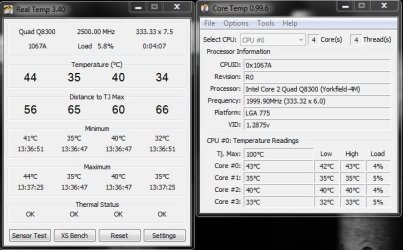
Here is a snip of both coretemp and realtemp running side by side.

The temps are higher than earlier due to room temperature being double what it was this morning.

Like I said earlier , for some reason one of the cores is locked at 40 degrees , it just never changes which I don't understand , must be a faulty sensor or something?


Cheers

Paul.
 

Attachments

  • Temps.JPG
    Temps.JPG
    55 KB · Views: 48

My Computer

OS
Windows 7 Professional 64 bit
Lets give something a try. Run Prime95 for a few minutes with RealTemp and CoreTemp open. After about 5 minutes snip them (so we can see). Is core 2 still at 40c?

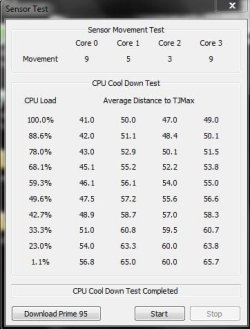
If so, try running the sensor test (after ending Prime95).

~Lordbob
 

My Computer

Computer Manufacturer/Model Number
Hera
OS
Windows 7 Ultimate x64, Mint 9
CPU
Intel i5-2500k
Motherboard
ASUS P8P67 Pro
Memory
2x 4Gb Corsair VENGEANCE DDR3-1600
Graphics Card(s)
NVidia GeForce N260GTX Twin Frozr
Sound Card
Realtek HD OnBoard Audio
Monitor(s) Displays
ASUS 24" Monitor
Screen Resolution
1920x1080
Hard Drives
G.SKILL Phoenix Series 60GB SATA II MLC Internal Solid State Drive (SSD)
SAMSUNG Spinpoint F3R 1TB 7200 RPM 32MB Cache SATA II
PSU
Cooler Master Real Power Pro 750W
Case
Cooler Master Haf 932
Cooling
Fans
Keyboard
Razer Tarantula
Mouse
Razer Lachesis
Internet Speed
not fast enough
Interesting , the core finally moved!

I think something is still up with the sensor , I can switch the pc on from cold 1st thing in the morning with a room temp of 8 degrees and its at 40 as soon as the pc is into windows.

Cheers

Paul.
 

Attachments

  • prime95.JPG
    prime95.JPG
    56.1 KB · Views: 15

My Computer

OS
Windows 7 Professional 64 bit
Results from a sensor test
 

Attachments

  • sensor test.JPG
    sensor test.JPG
    30.7 KB · Views: 21

My Computer

OS
Windows 7 Professional 64 bit
It is normal for it to heat up immediately, hopefully the sensor is unstuck now.

~Lordbob
 

My Computer

Computer Manufacturer/Model Number
Hera
OS
Windows 7 Ultimate x64, Mint 9
CPU
Intel i5-2500k
Motherboard
ASUS P8P67 Pro
Memory
2x 4Gb Corsair VENGEANCE DDR3-1600
Graphics Card(s)
NVidia GeForce N260GTX Twin Frozr
Sound Card
Realtek HD OnBoard Audio
Monitor(s) Displays
ASUS 24" Monitor
Screen Resolution
1920x1080
Hard Drives
G.SKILL Phoenix Series 60GB SATA II MLC Internal Solid State Drive (SSD)
SAMSUNG Spinpoint F3R 1TB 7200 RPM 32MB Cache SATA II
PSU
Cooler Master Real Power Pro 750W
Case
Cooler Master Haf 932
Cooling
Fans
Keyboard
Razer Tarantula
Mouse
Razer Lachesis
Internet Speed
not fast enough
Generally uneven temps are not unusual, but it could also be the Thermal Paste, CPU cooler installation. If you can, with the side panel open, and Real Temp running, see if you can apply slight pressure on the top of the cooler, and watch the temps. If they drop a few degress, or even out. Reinstallation could help. A Guy
 

My Computer

Computer type
PC/Desktop
OS
Windows 10 Home x64
CPU
INTEL Core i5-750 Quad-Core 3.37GHz
Motherboard
ASUS P7P55D
Memory
HyperX Fury Black Series 8GB (2 x 4GB) 1866Mhz
Graphics Card(s)
EVGA GeForce GTX 750 Superclocked 1GB 128-Bit GDDR5
Monitor(s) Displays
LG 32MA68HY 32" IPS
Screen Resolution
1920 x 1080
Hard Drives
Samsung 840 Evo 120GB, SEAGATE 500GB Barracuda® 7200.12, SATA 3 Gb/s, 7200 RPM, 16MB cache
PSU
ANTEC TruePower New TP-550, 80 PLUS, 550W
Case
ANTEC Three Hundred Illusion
Cooling
COOLER MASTER Hyper 212 Plus, 4 x 120mm 1 x 140mm Noctua's
Internet Speed
85 + Mbps
Antivirus
Avast
Browser
Vivaldi
Thanks for the help guys , still seems the same , but the temps are never high so I will forget about it for now.

Am planning on getting a new motherboard in the next day or 2 so perhaps that will change things.

Cheers

Paul.
 

My Computer

OS
Windows 7 Professional 64 bit
Stuck sensors are very common. One of mine was like that also but after some lengthy overclocking sessions the stuck sensor unfroze and now it's working normal again. It wouldn't go below a certain temp like yours but it unstuck itself after awhile.
 

My Computer

Computer type
PC/Desktop
Computer Manufacturer/Model Number
Home built
OS
Windows 7 Ult, Windows 8.1 Pro,
CPU
Q9650-4.275GHz, E8600 4.5GHz, E6750-3.8GHz
Motherboard
Evga 780i FTW
Memory
G.Skill PC2 9600 1200Mhz 5 5 5 15 2T
Graphics Card(s)
GTX480
Sound Card
Asus Xonar D2
Monitor(s) Displays
HannsG
Screen Resolution
1680X1050
Hard Drives
GSkill Phoenix Pro 120GB SSD
PSU
ThermalTake Toughpower 1000Watt modular
Case
ThermalTake XaserV
Cooling
Xigmatek S1283
Keyboard
Logitech G15
Mouse
Logitech G9
Internet Speed
T1
Arhh , cheers for the info Chev .

At least I know its not just me then.

If I could overclock it I would but the dam motherboard won't let me.

Posted another thread a little while ago regarding it.

Cheers

Paul.
 

My Computer

OS
Windows 7 Professional 64 bit
Back
Top