- Local time
- 7:09 PM
- Messages
- 176
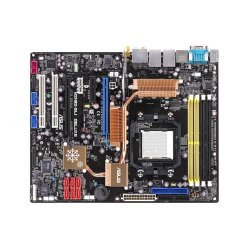
I bought a used motherboard with an AMD Dual Core 3.2Ghz processor, 2Gb Corsair ram and it had a huge old Blue orb heatsink fan on it,, b4 i made my purchase i ha dthe guy boot it into the bios for me to verify it was running and working ok,,, i didnt check temps or voltages because i wasnt sure what i would do with it.
So when i got it home i noticed the fan blades were busted off the main shaft,, i pulled up on the blades and the whole blade unit just came off the heat sink.,, So i tinkered around with it and figured well its no good anyhow so i put a dab of superglue on the center shaft and set the blades back on then fired up the PC,, it worked the blades no longer wobbled and made noise as they hit the outter aluminum fins.
I verified the fan speed in the bios and all was good,, watched the temps and saw it was running a bit hot at around 55 Degrees celsius,, so i booted into windows anyhow and i downloded CPUID's Pc Wizzard and installed it and then checked my temps from within windows and it was still hot between 55 and 60 at idle,,, to hot for me. So i gave in and just swapped out the Blue orb for a deep cool 2 heat pipe cooler i had on my other PC that was working fine and doing a good job of keeping temp around 34 at idle and 44ish under load.
Now that i swapped in the deep cool im getting a bit lower on the temps around 55ish at idle and she shoots up quick under load and gets to around 65-70ish before i give in and shut er down.
So my question is,,, is it possible the guy i got this thing from overheated it and did damage to the CPU or possibly overclocked it to much maybe and damaged it in that manner?
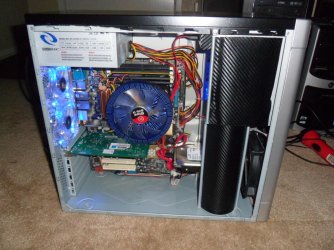
I have it set up in a decent raidmax case with a 120mm fan pulling air in from the front and 2 plus the PSU pushing it out the back so there should be suffecient air flow through the case.
Heres a pic when it had the blue orb on it.
So when i got it home i noticed the fan blades were busted off the main shaft,, i pulled up on the blades and the whole blade unit just came off the heat sink.,, So i tinkered around with it and figured well its no good anyhow so i put a dab of superglue on the center shaft and set the blades back on then fired up the PC,, it worked the blades no longer wobbled and made noise as they hit the outter aluminum fins.
I verified the fan speed in the bios and all was good,, watched the temps and saw it was running a bit hot at around 55 Degrees celsius,, so i booted into windows anyhow and i downloded CPUID's Pc Wizzard and installed it and then checked my temps from within windows and it was still hot between 55 and 60 at idle,,, to hot for me. So i gave in and just swapped out the Blue orb for a deep cool 2 heat pipe cooler i had on my other PC that was working fine and doing a good job of keeping temp around 34 at idle and 44ish under load.
Now that i swapped in the deep cool im getting a bit lower on the temps around 55ish at idle and she shoots up quick under load and gets to around 65-70ish before i give in and shut er down.
So my question is,,, is it possible the guy i got this thing from overheated it and did damage to the CPU or possibly overclocked it to much maybe and damaged it in that manner?
I have it set up in a decent raidmax case with a 120mm fan pulling air in from the front and 2 plus the PSU pushing it out the back so there should be suffecient air flow through the case.
Heres a pic when it had the blue orb on it.
Attachments
My Computer
At a glance
Win 7 64 UltimateAMD 8350 Bulldozer 4ghz6gbATI Radeon HD 5770 X 2
- Computer type
- PC/Desktop
- Computer Manufacturer/Model Number
- JRockZ
- OS
- Win 7 64 Ultimate
- CPU
- AMD 8350 Bulldozer 4ghz
- Motherboard
- Asus M5a97 R2
- Memory
- 6gb
- Graphics Card(s)
- ATI Radeon HD 5770 X 2
- Sound Card
- Board
- Monitor(s) Displays
- Dual Gateway 19" and 32" TV 3 displays at once :D
- Screen Resolution
- 1440X900
- Hard Drives
- OCZ Agility SSD Patriot Blaze 120
- PSU
- 750 Watt Thermaltake Tough Power
- Case
- Diablotek EVO Mid Tower Case CPA-6170 - 8X 120mm case fans
- Cooling
- Corsair Liquid Cooled
- Antivirus
- NAV
- Browser
- Always IE