Solved CPU Usage jumps 30-50% b/c WMIPrvSE.exe and System Processes

ladroncella

New member
Local time
1:27 PM
Messages
4
First time posting trying to fix this, but I noticed that for the past couple days my CPU usage jumps 30-50% (sometimes even higher) every minute or two at irregular intervals, regardless if the internet is connected, antivirus is on, or if the system is idle or if I have another application open. They last from anywhere between 3 and 20 seconds.

I first noticed this while playing games, since the jump of 50% CPU would cause hard lag in game. I performed a few Windows Updates in the past week, and there seems to be no other issues besides these CPU spikes, but I think I've had these jumps for the past month or so without me noticing (I'm very new to this).

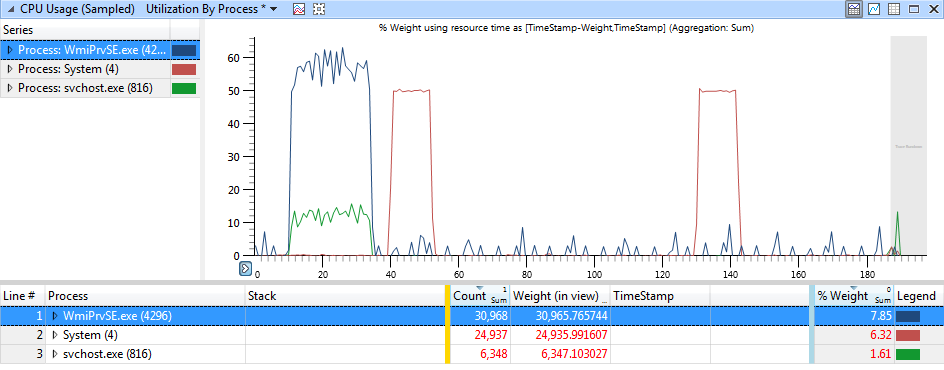
After looking at other forum posts, I have used Process Explorer to observe the CPU spikes, as well as recording the CPU for Windows Performance Analyzer. I have also enabled logging for WMIPrvSE.exe in the Event Viewer.

Everything shows that the System and WMIPrvSE.exe processes are the culprits and that they cause two separate CPU spikes (I don't know if they are related or not).

The CPU spikes look like this in Process Viewer and WPA (filtered to show the trouble processes):
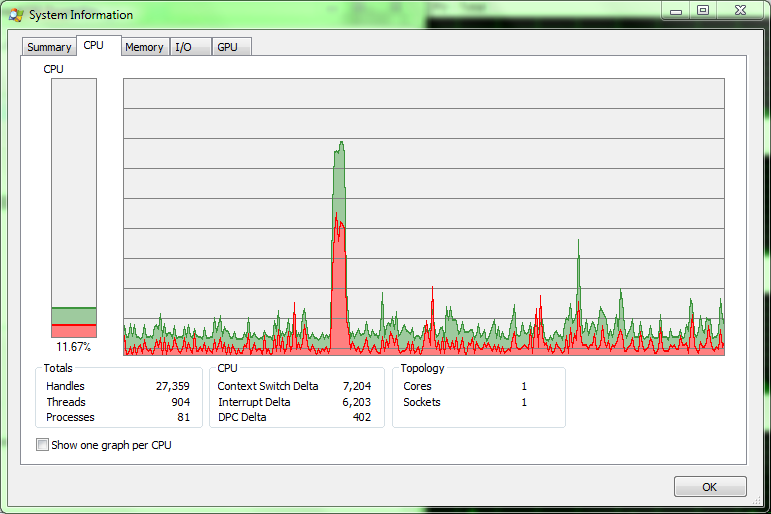
5E6LmeX.png


IUl2EMI.png


I've tried tracing down the stacks for each process in WPA, but I don't know what I'm looking for.

I have the .etl file ready to send if anyone wants to help me figure out the root of this problem.

Does anyone know what could be causing these CPU spikes?
 
Last edited:

My Computer My Computer

At a glance

Windows 7 Home Premium x64Intel Core i5-2410M6.00 GBIntel HD Graphics Family, AMD Radeon HD 7450M
Computer type
Laptop
Computer Manufacturer/Model Number
Dell Inspiron N5110
OS
Windows 7 Home Premium x64
CPU
Intel Core i5-2410M
Memory
6.00 GB
Graphics Card(s)
Intel HD Graphics Family, AMD Radeon HD 7450M
Sound Card
IDT High Definition Audio CODEC, Intel Display Audio
Hard Drives
Toshiba MK6475GSX HDD 600 GB
Antivirus
Avast Free Antivirus, MalwareBytes AntiMalware
Hi and welcome to SevenForums,
I have no idea if you found this or not
https://support.microsoft.com/en-us/kb/970067

Use Clean boot,
http://www.sevenforums.com/tutorial...ation-conflicts-performing-clean-startup.html
Click Start and type in the search box,
msconfig
Click on the suggestion on top or hit the Enter key,
Go to the Startup section and take some screen shots for a complete list,
Go to the Services section and on the bottom left Check the box to Hide All Microsoft services,
Repeat the screen shots,
See the links above my signature on how to take and upload screen shots here,
Cheers.
 

My Computer My Computer

At a glance

Win-7-Pro64bit 7-H-Prem-64biti7-5930K 2nd i9-9940x both water blocked VRM'...Trident-z 3200C14 2nd Trident-z 3600C16EVGA 1080ti ftw3 2nd Titan Xp both water blocked
Computer type
PC/Desktop
Computer Manufacturer/Model Number
Custom assembled by me :}
OS
Win-7-Pro64bit 7-H-Prem-64bit
CPU
i7-5930K 2nd i9-9940x both water blocked VRM's too
Motherboard
ASUS SABERTOOTH X99 2nd ASUS x299 Apex
Memory
Trident-z 3200C14 2nd Trident-z 3600C16
Graphics Card(s)
EVGA 1080ti ftw3 2nd Titan Xp both water blocked
Sound Card
Built-in Realtek
Monitor(s) Displays
1-AOC G2460PG 24"G-Sync 144Hz/ 2nd 1-ASUS VG248QE 24" 144Hz
Screen Resolution
1920 x 1080 144Hz
Hard Drives
2-Samsung M.2 Evo & Evo Plus
2-Samsung 850 EVO 500GB SSD's/ 3-2.5 W.D. Black 1tb-&3-1tb/3-3.5 WD Black 1tb hdd's
PSU
EVGA SuperNOVA 1000-P2 2nd 1200-P2
Case
2-Corsair Obsidian Series 450D Black ATX Mid Tower
Cooling
Custom water loops
Keyboard
Logitech G710+/ 2nd Logitech G910
Mouse
2-RedDragon M901 Perdition 16400 dpi Gaming mouse = wired
Internet Speed
Comcast Ping 19ms 89.31mbps download speed 6.12mbps upload
Antivirus
Malwarebytes Pro/ Superantispyware Pro
Browser
FireFox & Pale moon
Other Info
2nd ASUS X299 Apex/Intel i9-9940x with Custom water loop/7H-Prem-x64/Corsair 450D case/Ram Trident-z 3600C16 4x8gb / Samsung970Evo plus 500gb SSD/Dual ssd EZ swap evo/PSU EVGA SuperNova 1200w-P2 80+Platinum/GPU Titan Xp /8-ML-140 on push-pull on 2-280GTX rads
I performed a Safe Boot with networking before I saw your reply, and there were no spikes while in that mode. I restarted normally and had the CPU spikes again with the same System and WMIPrvSE.exe processes.

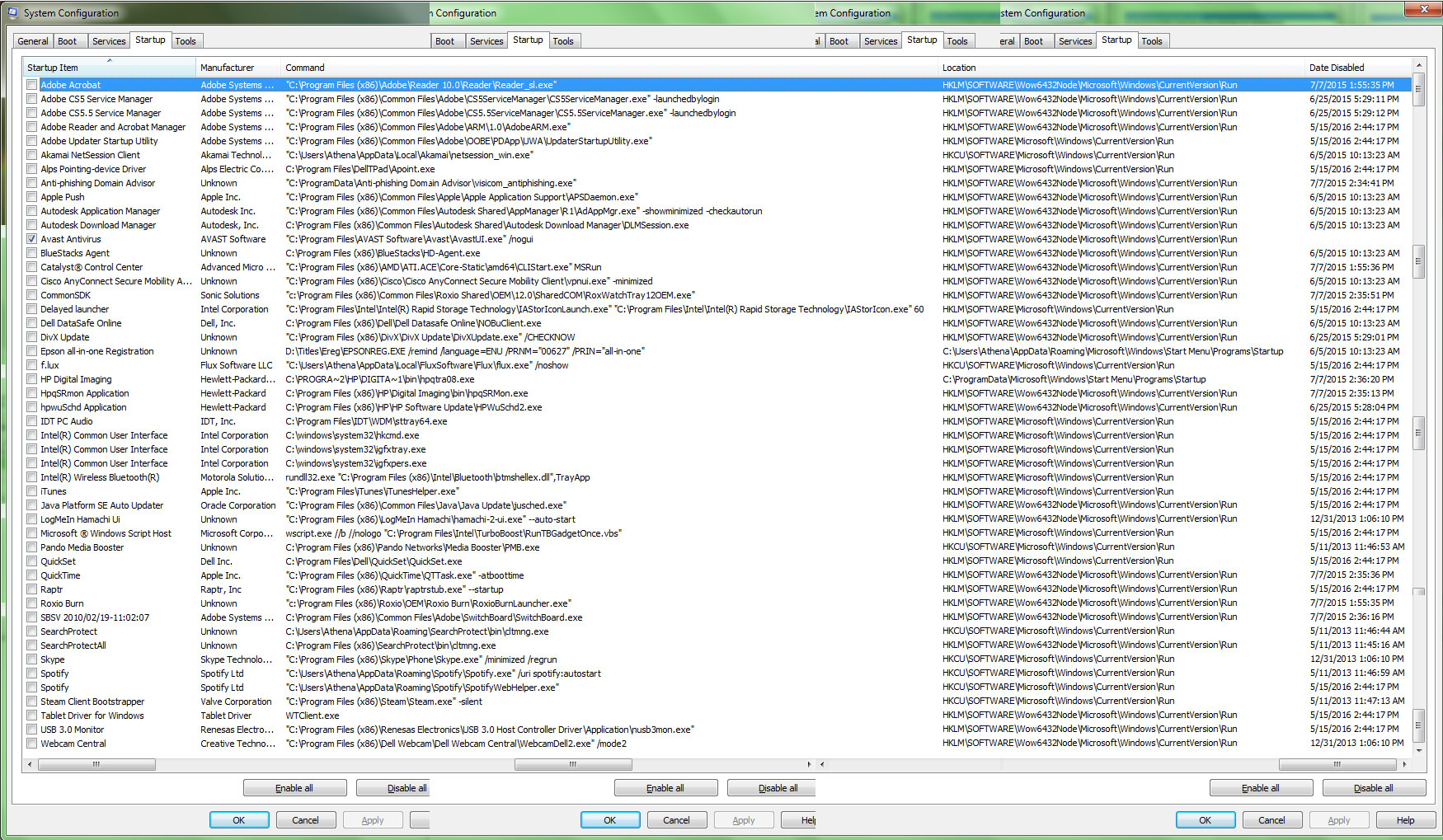
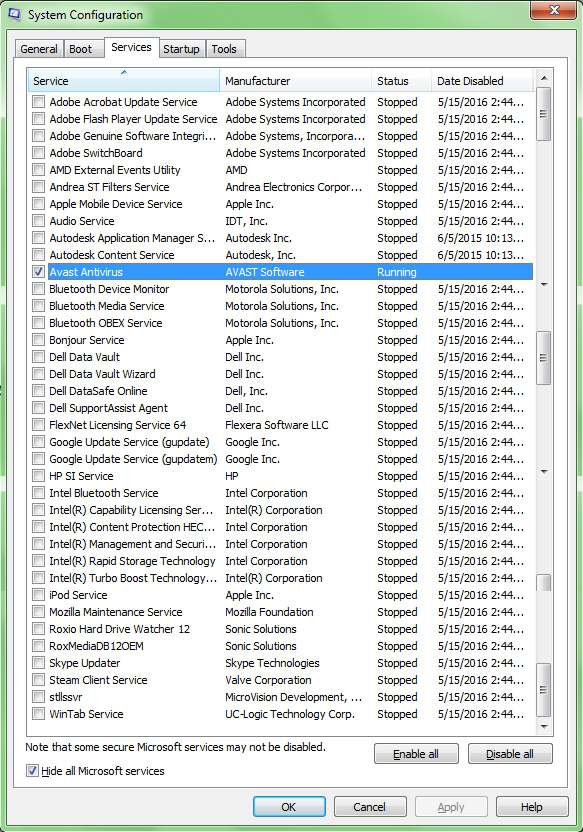
I performed the Clean Boot how your link suggested, and as far as I can tell, there are no spikes in in the Clean Boot mode, just the normal 2-7% CPU usage.

MSConfig Startup Tab:
NkgHKhl.jpg


MSConfig Services Tab after hiding Microsoft services:
FVJWGz7.jpg


Let me know if the images are too small to read or if you need different ones, though they should be able to open full-size in a new tab.


As for the Hotfix, would I be able to even use that since I'm running Windows 7 Home Premium and not Vista or Windows Server 2008 (as far as I know)?
 

My Computer My Computer

At a glance

Windows 7 Home Premium x64Intel Core i5-2410M6.00 GBIntel HD Graphics Family, AMD Radeon HD 7450M
Computer type
Laptop
Computer Manufacturer/Model Number
Dell Inspiron N5110
OS
Windows 7 Home Premium x64
CPU
Intel Core i5-2410M
Memory
6.00 GB
Graphics Card(s)
Intel HD Graphics Family, AMD Radeon HD 7450M
Sound Card
IDT High Definition Audio CODEC, Intel Display Audio
Hard Drives
Toshiba MK6475GSX HDD 600 GB
Antivirus
Avast Free Antivirus, MalwareBytes AntiMalware
Hi,
Holly $hit :shock:

I guess the point of clean boot is to disable one at a time and restart and see if the issue remains
This might take you a week :)
I'd start with just unchecking Intel management and security = Mcafee.
 

My Computer My Computer

At a glance

Win-7-Pro64bit 7-H-Prem-64biti7-5930K 2nd i9-9940x both water blocked VRM'...Trident-z 3200C14 2nd Trident-z 3600C16EVGA 1080ti ftw3 2nd Titan Xp both water blocked
Computer type
PC/Desktop
Computer Manufacturer/Model Number
Custom assembled by me :}
OS
Win-7-Pro64bit 7-H-Prem-64bit
CPU
i7-5930K 2nd i9-9940x both water blocked VRM's too
Motherboard
ASUS SABERTOOTH X99 2nd ASUS x299 Apex
Memory
Trident-z 3200C14 2nd Trident-z 3600C16
Graphics Card(s)
EVGA 1080ti ftw3 2nd Titan Xp both water blocked
Sound Card
Built-in Realtek
Monitor(s) Displays
1-AOC G2460PG 24"G-Sync 144Hz/ 2nd 1-ASUS VG248QE 24" 144Hz
Screen Resolution
1920 x 1080 144Hz
Hard Drives
2-Samsung M.2 Evo & Evo Plus
2-Samsung 850 EVO 500GB SSD's/ 3-2.5 W.D. Black 1tb-&3-1tb/3-3.5 WD Black 1tb hdd's
PSU
EVGA SuperNOVA 1000-P2 2nd 1200-P2
Case
2-Corsair Obsidian Series 450D Black ATX Mid Tower
Cooling
Custom water loops
Keyboard
Logitech G710+/ 2nd Logitech G910
Mouse
2-RedDragon M901 Perdition 16400 dpi Gaming mouse = wired
Internet Speed
Comcast Ping 19ms 89.31mbps download speed 6.12mbps upload
Antivirus
Malwarebytes Pro/ Superantispyware Pro
Browser
FireFox & Pale moon
Other Info
2nd ASUS X299 Apex/Intel i9-9940x with Custom water loop/7H-Prem-x64/Corsair 450D case/Ram Trident-z 3600C16 4x8gb / Samsung970Evo plus 500gb SSD/Dual ssd EZ swap evo/PSU EVGA SuperNova 1200w-P2 80+Platinum/GPU Titan Xp /8-ML-140 on push-pull on 2-280GTX rads
Yea it's a lot. This laptop has lasted me 5 years and a bachelors degree, so I'm not that surprised that there's a lot on it. And the spikes have been here a week, so I don't mind it taking a week to fix it if it works.

So to figure out which one it is, should I follow the Step 2 of that Troubleshooting link you posted where I check each of the Services and then each of the Startup items if needed? Also, do I restart into a clean boot (uncheck load startup items) or a normal startup?

What do I do when I isolate the process(es) that are causing the problem?


Side note: Do you have any idea if/how I can cut down on this ridiculous number of startup and service items? While I do try to cut down on unnecessary programs, I tend do be wary of removing something that I don't recognize until I'm sure that it's not essential to the computer.
 

My Computer My Computer

At a glance

Windows 7 Home Premium x64Intel Core i5-2410M6.00 GBIntel HD Graphics Family, AMD Radeon HD 7450M
Computer type
Laptop
Computer Manufacturer/Model Number
Dell Inspiron N5110
OS
Windows 7 Home Premium x64
CPU
Intel Core i5-2410M
Memory
6.00 GB
Graphics Card(s)
Intel HD Graphics Family, AMD Radeon HD 7450M
Sound Card
IDT High Definition Audio CODEC, Intel Display Audio
Hard Drives
Toshiba MK6475GSX HDD 600 GB
Antivirus
Avast Free Antivirus, MalwareBytes AntiMalware
Hi,
One example is steam
In it's settings it gives the option to not start with windows
I don't believe it gives the option on install though
But is the best example I can think of
Review all of the programs for startup options
Most will give the option on install if you read the options or use the custom install will show create a startup folder and desktop shortcut
I would usually uncheck both

If not I'd just search through the program or utilities settings and uncheck the option if it exists ;)
Keep in mind the statrup item would need to be checked Before you uninstall or change the programs settings
Otherwise if you uninstall it the unchecked item will leave a Unknown listing you'd have to use ccleaner to remove it.

Intel management and security or Avast could have issues with any of them
So I'd imagine I'd check all the Intel listings and restart
Then start enabling the other items one by one and see what happens.
 

My Computer My Computer

At a glance

Win-7-Pro64bit 7-H-Prem-64biti7-5930K 2nd i9-9940x both water blocked VRM'...Trident-z 3200C14 2nd Trident-z 3600C16EVGA 1080ti ftw3 2nd Titan Xp both water blocked
Computer type
PC/Desktop
Computer Manufacturer/Model Number
Custom assembled by me :}
OS
Win-7-Pro64bit 7-H-Prem-64bit
CPU
i7-5930K 2nd i9-9940x both water blocked VRM's too
Motherboard
ASUS SABERTOOTH X99 2nd ASUS x299 Apex
Memory
Trident-z 3200C14 2nd Trident-z 3600C16
Graphics Card(s)
EVGA 1080ti ftw3 2nd Titan Xp both water blocked
Sound Card
Built-in Realtek
Monitor(s) Displays
1-AOC G2460PG 24"G-Sync 144Hz/ 2nd 1-ASUS VG248QE 24" 144Hz
Screen Resolution
1920 x 1080 144Hz
Hard Drives
2-Samsung M.2 Evo & Evo Plus
2-Samsung 850 EVO 500GB SSD's/ 3-2.5 W.D. Black 1tb-&3-1tb/3-3.5 WD Black 1tb hdd's
PSU
EVGA SuperNOVA 1000-P2 2nd 1200-P2
Case
2-Corsair Obsidian Series 450D Black ATX Mid Tower
Cooling
Custom water loops
Keyboard
Logitech G710+/ 2nd Logitech G910
Mouse
2-RedDragon M901 Perdition 16400 dpi Gaming mouse = wired
Internet Speed
Comcast Ping 19ms 89.31mbps download speed 6.12mbps upload
Antivirus
Malwarebytes Pro/ Superantispyware Pro
Browser
FireFox & Pale moon
Other Info
2nd ASUS X299 Apex/Intel i9-9940x with Custom water loop/7H-Prem-x64/Corsair 450D case/Ram Trident-z 3600C16 4x8gb / Samsung970Evo plus 500gb SSD/Dual ssd EZ swap evo/PSU EVGA SuperNova 1200w-P2 80+Platinum/GPU Titan Xp /8-ML-140 on push-pull on 2-280GTX rads
So I followed Black Viper's recommendations to set some services to "Manual" startup, which had both sped up my boot time (as expected) and dropped the CPU spikes from ~50% to 25%, but it didn't get rid of them completely. And using Windows Performance Analyzer, it seems that Avast is causing the issues based on some small Self-Protection module, and disabling the Self-Protection module didn't fix it (nor is it recommended for AV function).

BUT changing some services to "Manual" startup completely eliminated the WMIPrvSE.exe spikes! :party:

So after all that, I've been going through MsConfig to disable services like you suggested. As far as I can tell, I can get rid of the CPU spikes when I disable Intel Management and Security Application..., Intel Rapid Storage Technology, and Intel Turbo Boost Technology Monitor 2.0. That is if I leave Avast enabled to see what it reacts to.

The problem is that I need to leave all three Intel services disabled to stop the CPU spikes. For example, if I enable the Turbo Boost first (no spikes) and then enable the Management and Security App, then the CPU spikes come back and I have to disable both to get rid of the CPU spikes again.


So now my question is: what do I do now?

Can I add exceptions to Avast for these three Intel services somehow and see if that stops the Avast Self-Protection module from repeatedly running and causing CPU spikes?

I have only one SATA HDD, so the Rapid Storage Technology seems excessive (I don't/can't have a RAID setup). I have no idea if I need the other two either.
 

My Computer My Computer

At a glance

Windows 7 Home Premium x64Intel Core i5-2410M6.00 GBIntel HD Graphics Family, AMD Radeon HD 7450M
Computer type
Laptop
Computer Manufacturer/Model Number
Dell Inspiron N5110
OS
Windows 7 Home Premium x64
CPU
Intel Core i5-2410M
Memory
6.00 GB
Graphics Card(s)
Intel HD Graphics Family, AMD Radeon HD 7450M
Sound Card
IDT High Definition Audio CODEC, Intel Display Audio
Hard Drives
Toshiba MK6475GSX HDD 600 GB
Antivirus
Avast Free Antivirus, MalwareBytes AntiMalware
Hi,
All i can say is I have none of the 3 Intel services and my x99 sabertooth i7 5930k works pretty well
So it's just bloatware especially if you're not using a raid

If you ever switch to a ssd you'd do more good than any raid configuration just get a large a one as you can
Currently I have 500gb samsung 850 evo it's plenty large enough for me anyway and fairly affordable.

It's either that or try another av
I use Panda free and it works pretty good
I also have mbam premium
 

My Computer My Computer

At a glance

Win-7-Pro64bit 7-H-Prem-64biti7-5930K 2nd i9-9940x both water blocked VRM'...Trident-z 3200C14 2nd Trident-z 3600C16EVGA 1080ti ftw3 2nd Titan Xp both water blocked
Computer type
PC/Desktop
Computer Manufacturer/Model Number
Custom assembled by me :}
OS
Win-7-Pro64bit 7-H-Prem-64bit
CPU
i7-5930K 2nd i9-9940x both water blocked VRM's too
Motherboard
ASUS SABERTOOTH X99 2nd ASUS x299 Apex
Memory
Trident-z 3200C14 2nd Trident-z 3600C16
Graphics Card(s)
EVGA 1080ti ftw3 2nd Titan Xp both water blocked
Sound Card
Built-in Realtek
Monitor(s) Displays
1-AOC G2460PG 24"G-Sync 144Hz/ 2nd 1-ASUS VG248QE 24" 144Hz
Screen Resolution
1920 x 1080 144Hz
Hard Drives
2-Samsung M.2 Evo & Evo Plus
2-Samsung 850 EVO 500GB SSD's/ 3-2.5 W.D. Black 1tb-&3-1tb/3-3.5 WD Black 1tb hdd's
PSU
EVGA SuperNOVA 1000-P2 2nd 1200-P2
Case
2-Corsair Obsidian Series 450D Black ATX Mid Tower
Cooling
Custom water loops
Keyboard
Logitech G710+/ 2nd Logitech G910
Mouse
2-RedDragon M901 Perdition 16400 dpi Gaming mouse = wired
Internet Speed
Comcast Ping 19ms 89.31mbps download speed 6.12mbps upload
Antivirus
Malwarebytes Pro/ Superantispyware Pro
Browser
FireFox & Pale moon
Other Info
2nd ASUS X299 Apex/Intel i9-9940x with Custom water loop/7H-Prem-x64/Corsair 450D case/Ram Trident-z 3600C16 4x8gb / Samsung970Evo plus 500gb SSD/Dual ssd EZ swap evo/PSU EVGA SuperNova 1200w-P2 80+Platinum/GPU Titan Xp /8-ML-140 on push-pull on 2-280GTX rads
Hi,
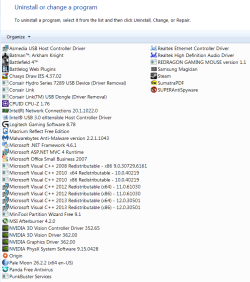
Here's exactly what of Intel I have installed that shows in programs and features
ASUS programs list.PNG
 

My Computer My Computer

At a glance

Win-7-Pro64bit 7-H-Prem-64biti7-5930K 2nd i9-9940x both water blocked VRM'...Trident-z 3200C14 2nd Trident-z 3600C16EVGA 1080ti ftw3 2nd Titan Xp both water blocked
Computer type
PC/Desktop
Computer Manufacturer/Model Number
Custom assembled by me :}
OS
Win-7-Pro64bit 7-H-Prem-64bit
CPU
i7-5930K 2nd i9-9940x both water blocked VRM's too
Motherboard
ASUS SABERTOOTH X99 2nd ASUS x299 Apex
Memory
Trident-z 3200C14 2nd Trident-z 3600C16
Graphics Card(s)
EVGA 1080ti ftw3 2nd Titan Xp both water blocked
Sound Card
Built-in Realtek
Monitor(s) Displays
1-AOC G2460PG 24"G-Sync 144Hz/ 2nd 1-ASUS VG248QE 24" 144Hz
Screen Resolution
1920 x 1080 144Hz
Hard Drives
2-Samsung M.2 Evo & Evo Plus
2-Samsung 850 EVO 500GB SSD's/ 3-2.5 W.D. Black 1tb-&3-1tb/3-3.5 WD Black 1tb hdd's
PSU
EVGA SuperNOVA 1000-P2 2nd 1200-P2
Case
2-Corsair Obsidian Series 450D Black ATX Mid Tower
Cooling
Custom water loops
Keyboard
Logitech G710+/ 2nd Logitech G910
Mouse
2-RedDragon M901 Perdition 16400 dpi Gaming mouse = wired
Internet Speed
Comcast Ping 19ms 89.31mbps download speed 6.12mbps upload
Antivirus
Malwarebytes Pro/ Superantispyware Pro
Browser
FireFox & Pale moon
Other Info
2nd ASUS X299 Apex/Intel i9-9940x with Custom water loop/7H-Prem-x64/Corsair 450D case/Ram Trident-z 3600C16 4x8gb / Samsung970Evo plus 500gb SSD/Dual ssd EZ swap evo/PSU EVGA SuperNova 1200w-P2 80+Platinum/GPU Titan Xp /8-ML-140 on push-pull on 2-280GTX rads
Back
Top