Solved cpu will not take windows 64 bit

Yeah.. thing about Windows 7.. there is a way to get in.. heheh .. Good luck in this .. should work ..
 

My Computer

Computer type
PC/Desktop
Computer Manufacturer/Model Number
Dell optiplex 740
OS
Win 7 Home Premium SP1 32 bit
CPU
AMD Athlon 64 X2 5000B
Motherboard
Dell Inc. 0YP696 (Socket M2 )
Memory
4.00 GB Dual-Channel DDR2 @ 370MHz (6-6-6-18)
Graphics Card(s)
Acer E181H (1366x768@60Hz) 64MB GeForce 6150 LE (Dell)
Sound Card
SigmaTel High Definition Audio CODEC
Monitor(s) Displays
Acer E181H (1366x768@60Hz) 64MB GeForce 6150 LE (Dell)
Hard Drives
699GB Seagate ST375064 0NS SCSI Disk Device (ATA)
Case
Mini tower
Internet Speed
Ping 36 ms, Download 57.71 mbps , Upload 11.79mbps
Antivirus
Free Avast. Pro paid Mbam , Free Sas
Browser
Palemoon .
Don't buy one

I thought that he meant he didn't know the Linux password.

iv also noticed on ebay that the linux mint discs are so cheap.is there one i should look out for as there seems to be so many on there
Don't buy a disc from Ebay.
You can download Linux Desktop Distros for free. :)

Ubuntu 14.04
Download Ubuntu Desktop | Download | Ubuntu

Linux Mint 17 (Long Term Support)
Download - Linux Mint

I prefer Linux Mint 17 MATE.
There are other versions:

  • Cinnamon
  • KDE
  • Xfce
New features in Linux Mint 17 MATE - Linux Mint
New features in Linux Mint 17 Cinnamon - Linux Mint

Since you can run them from a DVD/USB you could download different versions and try them out.
They will run slower from a DVD/USB, than if they were installed.

You should copy your important files from the Linux laptop (to an externalHDD/USB) and then install a new version to replace the old one.
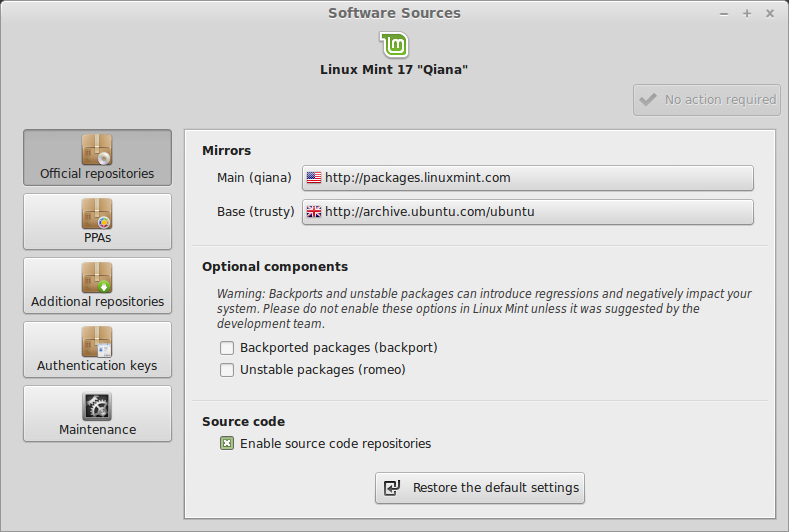
After you have installed the new OS, but before you update it, change the "Software Sources" to one with a better speed, or one provided by your ISP.
You will have to wait for the Software Sources list to populate to determine which mirror is the best for you.

Our ISP has a Linux Repository mirror, so downloads are fast and don't count against our download limit. :)
From the Linux Mint site.

mintsources.png

I've asked whs to post his Linux Mint tutorial links for you. :)
 
Last edited:

My Computer

Computer type
PC/Desktop
Computer Manufacturer/Model Number
n/a
OS
W7 Ultimate SP1, LM19.2 MATE, W10 Home 1703, W10 Pro 1703 VM, #All 64 bit
CPU
AMD Phenom II x6 1100T, 3.3 GHz
Motherboard
ASUS M4A88T-M/USB3 (AM3)
Memory
12GB DDR3 1333 G-Skill (4GB x 2), G-Skill (2GB x 2)
Graphics Card(s)
NVIDIA GeForce GTX 660
Sound Card
Realtek?
Monitor(s) Displays
Samsung S23B350
Screen Resolution
1920x1080
Hard Drives
WD Green 2TB (SATA), WD Green 3TB (SATA), WD Blue 4TB (SATA), WD Blue 6TB (SATA)
PSU
Cooler Master
Case
Antec GX300 Tower
Cooling
3x Antec TRICOOL 120mm Fans
Mouse
Wired Optical
Internet Speed
DSL
Antivirus
Avast
Browser
Pale Moon (64 bit)
Other Info
2018-12-27 Upgraded HDDs
2015-12-10 Upgraded case, graphics card, storage
2015-08-15 Upgraded motherboard & RAM
2015-07-15 Upgraded LM17.1 to LM17.2
You can download the Mint Mate iso from here. Then burn that to CD and install it like any OS. Note that when this installation is done, you only have a bootstrap system. Double click on the CD icon on the desktop for the complete installation.

The result will be a basic system. Here are a set of tutorials that show you how to make a full setup. And this is how a fully setup system will look like. This version is running from a stick but is exactly the same as running it as a system that is installed on an internal HDD.

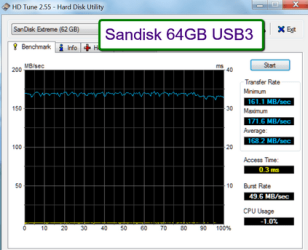
If your PC can boot from a stick and has a USB3 port, you can also try the stick version. This is how. Just make sure you use a fast USB3 stick. Example:
 

Attachments

  • 2014-04-12_1920.png
    2014-04-12_1920.png
    22.6 KB · Views: 12

My Computer

Computer Manufacturer/Model Number
HP, Dell, Gateway, Toshiba - 4 laptops and 2 desktops
OS
Vista, Windows7, Mint Mate, Zorin, Windows 8
CPU
from 1.6GHz Duo to i7
Monitor(s) Displays
2x HP w2207
Hard Drives
5x HDD, 7x SSD, 12x Externals
Keyboard
with trackball - no mices
Mouse
Trackball mice
Internet Speed
DSL 6000
thankyou all so much for your help and advice.its been brilliant.if i cant get windows 7 32 bit on then i think i will try linux.just need to figure out which one will suite my laptop as its quite an old one even thou i do intend to upgrade the ram to 2g as there is only 512mb on it at the moment.the laptop being a toshiba p10 804 which i purchased recently as its in mint condition.i wasnt aware it was so old thou.should have done my homework first:confused:
 

My Computer

Computer type
Laptop
Computer Manufacturer/Model Number
toshiba
OS
windows 7 professional 64 bit
Memory
512mb
Hard Drives
80gb
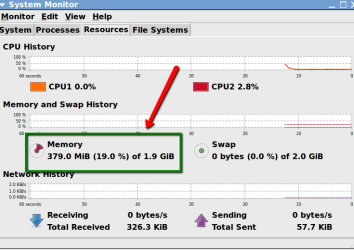
With the suggestions I made you will be OK with the 512MB. No need to upgrade. Here are the statistics of my Mint Mate at this moment.
 

Attachments

  • 2014-04-12_1920.png
    2014-04-12_1920.png
    16.6 KB · Views: 0

My Computer

Computer Manufacturer/Model Number
HP, Dell, Gateway, Toshiba - 4 laptops and 2 desktops
OS
Vista, Windows7, Mint Mate, Zorin, Windows 8
CPU
from 1.6GHz Duo to i7
Monitor(s) Displays
2x HP w2207
Hard Drives
5x HDD, 7x SSD, 12x Externals
Keyboard
with trackball - no mices
Mouse
Trackball mice
Internet Speed
DSL 6000
Back
Top