I have tried to find some information about my problem on this forum, but I have had no luck...
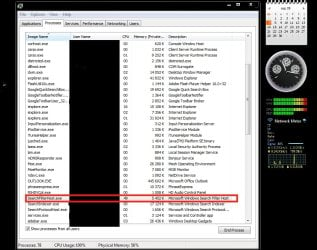
Here is my problem: I have used Win7 for a long time, and I have reinstalled at leas 3-4 times because of "bluescreen" -- now is there another issue that drives me nuts. The sound of the fan on full speed all the time, and the fact that the system started some few days ago to work very slow.... I have found that there is a process called "searchFilterHost.exe" used by System that are "killing" my computer.. I have tried to end the process, but it just restart the next second. See the screenshot, and you will see the process - as well as the cpu's are on 100% while the ram is about 56% usage -- the "searchfilterhost.exe" is all the time using about 50% of all cpu capasity - so when using other software the computer is soooo hot and overworked... Is there any solution to get this process closed ? and alsom what does it do ? most important, could I just delete the file in the folder of windows just to stop it ?
Thanks in advance for all help!
Here is my problem: I have used Win7 for a long time, and I have reinstalled at leas 3-4 times because of "bluescreen" -- now is there another issue that drives me nuts. The sound of the fan on full speed all the time, and the fact that the system started some few days ago to work very slow.... I have found that there is a process called "searchFilterHost.exe" used by System that are "killing" my computer.. I have tried to end the process, but it just restart the next second. See the screenshot, and you will see the process - as well as the cpu's are on 100% while the ram is about 56% usage -- the "searchfilterhost.exe" is all the time using about 50% of all cpu capasity - so when using other software the computer is soooo hot and overworked... Is there any solution to get this process closed ? and alsom what does it do ? most important, could I just delete the file in the folder of windows just to stop it ?
Thanks in advance for all help!
Attachments
My Computer
- Computer Manufacturer/Model Number
- Hp Pavilion tx2000 tablet
- OS
- Win 7
- Memory
- 4gb
- Monitor(s) Displays
- LG 23inch ws
- Hard Drives
- 320gb internal
120gb and 500gb external


 )
)
 Why not just hide the column in preferences...?
 Anyway, your thoughts about that has nothing to do with the problem -- just being careful perhaps