Cracking audio via video card's HDMI port.

lolmachine

New member
Local time
2:12 AM
Messages
7
Hey guys, just wanted to check if anyone has experienced this issue. Specs are below:

ASUS z97-A motherboard
EVGA GeForce GTX 970 SC ACX 2.0 (running on stock)
Corsair Vengeance 2x4GB 1866
i5 4690k (running on stock)

There is very alarming crackling audio when I use my PC via my video card's HDMI slot. On some bootups it's non existent and on some, it is terrible (I'd say it happens 50% of the time I start my computer). Motherboard sound is fine. I tried hooking my monitor to vga and using on board sound and I have not noticed the cracking happen when I go that route. But I really wanna game in HDMI because I find the quality a lot better.

I have tried flashing my BIOS, uninstalling nvidia audio drivers, install latest motherboard chipset and network drivers, using different HDMI cables, disabling on board sound via BIOS but have had no luck. Any help would be appreciated. Thanks!


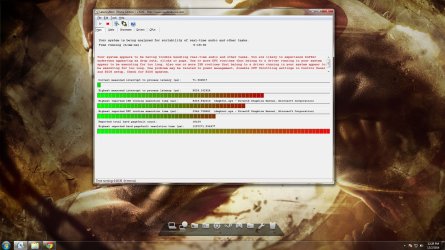
UPDATE:On one of my bad boot ups, I ran the latency checker and I am seeing it spike through the roof. Below is a screenshot:
imgur: the simple image sharer
Ty5zLf1
 
Last edited:

My Computer My Computer

At a glance

Windows 7 Ultimate 64 BitIntel i5 4690K (stock speed)Corsair Vengeance 2x4GBEVGA GeForce GTX 970 SC ACX 2.0
Computer type
PC/Desktop
OS
Windows 7 Ultimate 64 Bit
CPU
Intel i5 4690K (stock speed)
Motherboard
ASUS z97-A
Memory
Corsair Vengeance 2x4GB
Graphics Card(s)
EVGA GeForce GTX 970 SC ACX 2.0
Monitor(s) Displays
Toshiba 23" HDTV
Screen Resolution
1920x1080p
PSU
Seasonic 500w 80 Bronze
Case
Silverstone Redline RL01
Antivirus
Microsoft Security Essentials
When you use the HDMI audio, the audio is generated by the on-board audio chip in the Video card. The regular PC audio is not used. Thus the problem mostly points to the video card and/or the drivers.

The DPC latency is terrible and shows a major problem.

Run the Resplendence Latency Mon program and maybe it will pin point the problem.

I would also reseat the video card, install or reinstall the latest video drivers and look for any other running programs that could be causing the spikes.

Resplendence Software - Advanced System Tools and Developer Components

BTW, here is how to post screenshots on this forum, from the forum tutorials.

http://www.sevenforums.com/tutorials/9733-screenshots-files-upload-post-seven-forums.html
 

My Computer My Computer

At a glance

Windows 10 64 bitIntel i7 6700K16GB Corsair DominatorIntel CPU Graphics
Computer type
PC/Desktop
Computer Manufacturer/Model Number
My Own Build
OS
Windows 10 64 bit
CPU
Intel i7 6700K
Motherboard
ASUS ROG Maximus VIII Hero
Memory
16GB Corsair Dominator
Graphics Card(s)
Intel CPU Graphics
Sound Card
RealTek
Monitor(s) Displays
27" Dell S2719dgf
Screen Resolution
2560X1440
Hard Drives
1 TB Samsung 850 EVO SSD for Win 10 Pro
500GB Samsung 850 EVO SSD for Win 10 Insider
2 TB drive for backup
PSU
EVGA Supernova 750G2
Case
BeQuiet Silent Base 600
Cooling
Deepcool Captain 120EX
Keyboard
Microsoft Wireless 2000
Mouse
Microsoft wireless
Internet Speed
100 MB/sec (Cable)
Antivirus
Microsoft Defender and Malwarebytes
Browser
Edge/Firefox
Other Info
Cakewalk (Sonar) by BandLab and Studio One 4.1 Pro recording studio software. MOTU 896Mk3 Hybrid recording interface, Frontier Tranzport wireless control unit, Behringer X-Touch Control Surface.
Five USB connected optical drives for CD Audio production using Nero BurningROM
One additional item to check is the actual HDMI Cable, Here in the UK I have found a lot of variation in quality of cables, the obvious one of a cheap verses a premium cable, but also two cables from the same range. There is also the old issue of Shielding, with desktop computers especially there is often a lot of power cabling at the rear of the install, Shielded AV cables are less prone to interference than unshielded.

I would suggest you look at borrowing, (Friends & Family, Other devices) a cable or two from other makes than your own just to eliminate this possible cause :)
 

My Computers My Computers

  • At a glance

    Windows 11 Pro x64 [Latest Release and Releas...Ryzen 9 5950X, 3.8 - 5.2 MHz64GB [2 x 32GB] DDR4 3200MHz4GB NVIDIA GEFORCE GTX 1650 Ti
    Computer type
    PC/Desktop
    Computer Manufacturer/Model Number
    ChillBlast - Custom to my design
    OS
    Windows 11 Pro x64 [Latest Release and Release Preview]
    CPU
    Ryzen 9 5950X, 3.8 - 5.2 MHz
    Motherboard
    Asus Prime X570-Pro
    Memory
    64GB [2 x 32GB] DDR4 3200MHz
    Graphics Card(s)
    4GB NVIDIA GEFORCE GTX 1650 Ti
    Sound Card
    On-board SPDIF to 5.1 System + HDMI [5.1 system]
    Monitor(s) Displays
    32" UHD 32 Bit HDR Monitor + 43" UHD 4K 32Bit HDR TV
    Screen Resolution
    2 x 3840 x 2160 @60Hz
    Hard Drives
    1TB M2 SSD OS, 500GB Fast Access SSD, 2 x 8TB Data + Various Externals from 1TB to 4TB, 10TB NAS
    PSU
    NZXT C750 80 PLUS Gold 750W Modular PSU
    Case
    Workstation Case [Matt Black]
    Cooling
    NZXT Kraken X63 280mm CPU Cooler +2x Quiet Case fans
    Keyboard
    Logitech Wireless MX Keys & K400 + others
    Mouse
    Logitech Wireless MX Master 3S
    Internet Speed
    920 MB Down 50 MB Up
    Antivirus
    BitDefender Total Security Pro
    Browser
    Chrome (always run latest Non-Beta)
    Other Info
    Also run ...
    Laptop - Quad 8GB - Windows 10 Pro x64
    Nexus 7 Android tablet x2
    Samsung 10.2" tablet
    Blackview TAB 8 4G Android Tablet c/w Keyboard
    Wacom Intuos Pro Medium Pen Pad
    Wacom Intuos Pro Small Pen Pad
    Wacom Expresskeys Remote
    Loopdeck+ Graphics Controller
    Shuttle Pro v2 Control
  • At a glance

    Windows 11 Pro x64 Latest RPIntel I7 10750H 5.0GHz32GB [2x16GB] DDR4 2933 MHznVidia GTX1650Ti 4 GB GDDR6
    Computer type
    Laptop
    System Manufacturer/Model Number
    Dell XPS 17 10750H
    OS
    Windows 11 Pro x64 Latest RP
    CPU
    Intel I7 10750H 5.0GHz
    Motherboard
    Dell XPS
    Memory
    32GB [2x16GB] DDR4 2933 MHz
    Graphics Card(s)
    nVidia GTX1650Ti 4 GB GDDR6
    Sound Card
    Stock [Realtek] 4 Speaker
    Monitor(s) Displays
    17" IPS UHD+ Infinity Edge Touchscreen
    Screen Resolution
    3840 x 2400
    Hard Drives
    2TB M2 NVMe, 4TB External + various 500GB & 1TB External NVMe (also have access to spinner HDD from
    PSU
    Stock
    Case
    Stock XPS Aluminium & Carbon Fibre
    Cooling
    Stock - Active Fan Control
    Keyboard
    Backlit + Various Logitech
    Mouse
    Stock Track Pad + Logitech MX Trackball
    Internet Speed
    72 MB Down 18MB Up
    Browser
    Chrome
    Other Info
    Also run ...
    Laptop - Quad 8GB - Windows 10 Pro x64
    Nexus 7 Android tablet x2
    10.2" tablet
    Sony Z3 Android Smartphone
    Wacom Intuos Pro Medium Pen Pad
    Wacom Intuos Pro Small Pen Pad
    Wacom Expresskeys Remote
    Loopdeck+ Graphics Controller
    Shuttle Pro v2 Control Pad
    10TB NAS
Based on the extremely high spikes in the DPC Latency Checker, I wouldn't suspect the HDMI cable. The high spikes in the DPC Latency Checker point back to a system/hardware problem.
 

My Computer My Computer

At a glance

Windows 10 64 bitIntel i7 6700K16GB Corsair DominatorIntel CPU Graphics
Computer type
PC/Desktop
Computer Manufacturer/Model Number
My Own Build
OS
Windows 10 64 bit
CPU
Intel i7 6700K
Motherboard
ASUS ROG Maximus VIII Hero
Memory
16GB Corsair Dominator
Graphics Card(s)
Intel CPU Graphics
Sound Card
RealTek
Monitor(s) Displays
27" Dell S2719dgf
Screen Resolution
2560X1440
Hard Drives
1 TB Samsung 850 EVO SSD for Win 10 Pro
500GB Samsung 850 EVO SSD for Win 10 Insider
2 TB drive for backup
PSU
EVGA Supernova 750G2
Case
BeQuiet Silent Base 600
Cooling
Deepcool Captain 120EX
Keyboard
Microsoft Wireless 2000
Mouse
Microsoft wireless
Internet Speed
100 MB/sec (Cable)
Antivirus
Microsoft Defender and Malwarebytes
Browser
Edge/Firefox
Other Info
Cakewalk (Sonar) by BandLab and Studio One 4.1 Pro recording studio software. MOTU 896Mk3 Hybrid recording interface, Frontier Tranzport wireless control unit, Behringer X-Touch Control Surface.
Five USB connected optical drives for CD Audio production using Nero BurningROM
Hey guys! I am so glad you found my post.

@Barman58, I picked up a couple HDMI cables this weekend but that didn't fix it. Now I have extra HDMI cables, who needs one? lol :D

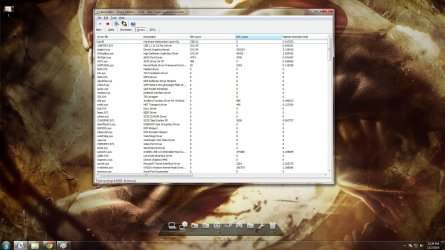
@Fireberd Yeah, I have a screenshot below. Running Latency Mon, I have noticed the 2 most consistent I see are dx graphics kernel, dxgkrnl.sys and nvidia nvlddmkm.sys. This is the first time of around 30 times that I see iusb3xhc.sys show up on Latency Mon.

Untitled.jpg
 
Last edited:

My Computer My Computer

At a glance

Windows 7 Ultimate 64 BitIntel i5 4690K (stock speed)Corsair Vengeance 2x4GBEVGA GeForce GTX 970 SC ACX 2.0
Computer type
PC/Desktop
OS
Windows 7 Ultimate 64 Bit
CPU
Intel i5 4690K (stock speed)
Motherboard
ASUS z97-A
Memory
Corsair Vengeance 2x4GB
Graphics Card(s)
EVGA GeForce GTX 970 SC ACX 2.0
Monitor(s) Displays
Toshiba 23" HDTV
Screen Resolution
1920x1080p
PSU
Seasonic 500w 80 Bronze
Case
Silverstone Redline RL01
Antivirus
Microsoft Security Essentials
The link you posted is invalid, on the forum. Post as the instructions I linked.

The two are video card related. For testing, I see yhou have an i5 that should have built in Intel Video and HDMI (video and audio). Temporarily remove the NVIDIA video card and use the Intel Video. Run the DPC latency and see what happens.
 

My Computer My Computer

At a glance

Windows 10 64 bitIntel i7 6700K16GB Corsair DominatorIntel CPU Graphics
Computer type
PC/Desktop
Computer Manufacturer/Model Number
My Own Build
OS
Windows 10 64 bit
CPU
Intel i7 6700K
Motherboard
ASUS ROG Maximus VIII Hero
Memory
16GB Corsair Dominator
Graphics Card(s)
Intel CPU Graphics
Sound Card
RealTek
Monitor(s) Displays
27" Dell S2719dgf
Screen Resolution
2560X1440
Hard Drives
1 TB Samsung 850 EVO SSD for Win 10 Pro
500GB Samsung 850 EVO SSD for Win 10 Insider
2 TB drive for backup
PSU
EVGA Supernova 750G2
Case
BeQuiet Silent Base 600
Cooling
Deepcool Captain 120EX
Keyboard
Microsoft Wireless 2000
Mouse
Microsoft wireless
Internet Speed
100 MB/sec (Cable)
Antivirus
Microsoft Defender and Malwarebytes
Browser
Edge/Firefox
Other Info
Cakewalk (Sonar) by BandLab and Studio One 4.1 Pro recording studio software. MOTU 896Mk3 Hybrid recording interface, Frontier Tranzport wireless control unit, Behringer X-Touch Control Surface.
Five USB connected optical drives for CD Audio production using Nero BurningROM
Sorry, I forgot to go advanced. The image should be visible now if you check. I will try reseating the video card, and then completely remove it from the rig if the first option doesn't work.

I have a friend who is experiencing the same issues, and has exactly the same parts that I have. Not sure if that rules out hardware problems although it is not impossible that both of graphics cards are defective (that is just poor luck). Just really not sure why it doesn't have a problem if I go VGA+on board sound, vs HDMI.

Thanks for the assistance Fireberd! I will post an update of my findings.
 

My Computer My Computer

At a glance

Windows 7 Ultimate 64 BitIntel i5 4690K (stock speed)Corsair Vengeance 2x4GBEVGA GeForce GTX 970 SC ACX 2.0
Computer type
PC/Desktop
OS
Windows 7 Ultimate 64 Bit
CPU
Intel i5 4690K (stock speed)
Motherboard
ASUS z97-A
Memory
Corsair Vengeance 2x4GB
Graphics Card(s)
EVGA GeForce GTX 970 SC ACX 2.0
Monitor(s) Displays
Toshiba 23" HDTV
Screen Resolution
1920x1080p
PSU
Seasonic 500w 80 Bronze
Case
Silverstone Redline RL01
Antivirus
Microsoft Security Essentials
As I previously noted, when you use HDMI audio, the audio is generated from the sound chip ("sound card") on the video card. The HDMI Audio is set as the "default playback device" and the PC sound is not used. The regular PC sound apparently is not affected so there are no pops, clicks, etc. It points back to the video card and/or drivers. There could be an issue with the PCIe bus, the Intel video/audio conflicting, etc. Disable the Intel HD Audio in the Device Manger and see if that makes any difference. Actually all you should have in the Device Manager, Audio section is the HDMI Audio from the Video Card and the PC Audio (e.g. RealTek or whatever you have).
 

My Computer My Computer

At a glance

Windows 10 64 bitIntel i7 6700K16GB Corsair DominatorIntel CPU Graphics
Computer type
PC/Desktop
Computer Manufacturer/Model Number
My Own Build
OS
Windows 10 64 bit
CPU
Intel i7 6700K
Motherboard
ASUS ROG Maximus VIII Hero
Memory
16GB Corsair Dominator
Graphics Card(s)
Intel CPU Graphics
Sound Card
RealTek
Monitor(s) Displays
27" Dell S2719dgf
Screen Resolution
2560X1440
Hard Drives
1 TB Samsung 850 EVO SSD for Win 10 Pro
500GB Samsung 850 EVO SSD for Win 10 Insider
2 TB drive for backup
PSU
EVGA Supernova 750G2
Case
BeQuiet Silent Base 600
Cooling
Deepcool Captain 120EX
Keyboard
Microsoft Wireless 2000
Mouse
Microsoft wireless
Internet Speed
100 MB/sec (Cable)
Antivirus
Microsoft Defender and Malwarebytes
Browser
Edge/Firefox
Other Info
Cakewalk (Sonar) by BandLab and Studio One 4.1 Pro recording studio software. MOTU 896Mk3 Hybrid recording interface, Frontier Tranzport wireless control unit, Behringer X-Touch Control Surface.
Five USB connected optical drives for CD Audio production using Nero BurningROM
Okay makes sense. What I have right now is Intel HD Audio (for the card's HDMI) and Realtek on board audio drivers. I didn't bother installing NVIDIA HD audio drivers because I read on multiple sites that it causes problems as well. So I'll make sure I disable Intel and install NVIDAI HD audio for the card's HDMI sound instead.
 

My Computer My Computer

At a glance

Windows 7 Ultimate 64 BitIntel i5 4690K (stock speed)Corsair Vengeance 2x4GBEVGA GeForce GTX 970 SC ACX 2.0
Computer type
PC/Desktop
OS
Windows 7 Ultimate 64 Bit
CPU
Intel i5 4690K (stock speed)
Motherboard
ASUS z97-A
Memory
Corsair Vengeance 2x4GB
Graphics Card(s)
EVGA GeForce GTX 970 SC ACX 2.0
Monitor(s) Displays
Toshiba 23" HDTV
Screen Resolution
1920x1080p
PSU
Seasonic 500w 80 Bronze
Case
Silverstone Redline RL01
Antivirus
Microsoft Security Essentials
Another option is to use the HDMI for Video only, (you should be able to switch off the HDMI sound option in the Video or audio control panel, depending on which one you have installed), and simply use the Realtek for sound via the speakers.
 

My Computers My Computers

  • At a glance

    Windows 11 Pro x64 [Latest Release and Releas...Ryzen 9 5950X, 3.8 - 5.2 MHz64GB [2 x 32GB] DDR4 3200MHz4GB NVIDIA GEFORCE GTX 1650 Ti
    Computer type
    PC/Desktop
    Computer Manufacturer/Model Number
    ChillBlast - Custom to my design
    OS
    Windows 11 Pro x64 [Latest Release and Release Preview]
    CPU
    Ryzen 9 5950X, 3.8 - 5.2 MHz
    Motherboard
    Asus Prime X570-Pro
    Memory
    64GB [2 x 32GB] DDR4 3200MHz
    Graphics Card(s)
    4GB NVIDIA GEFORCE GTX 1650 Ti
    Sound Card
    On-board SPDIF to 5.1 System + HDMI [5.1 system]
    Monitor(s) Displays
    32" UHD 32 Bit HDR Monitor + 43" UHD 4K 32Bit HDR TV
    Screen Resolution
    2 x 3840 x 2160 @60Hz
    Hard Drives
    1TB M2 SSD OS, 500GB Fast Access SSD, 2 x 8TB Data + Various Externals from 1TB to 4TB, 10TB NAS
    PSU
    NZXT C750 80 PLUS Gold 750W Modular PSU
    Case
    Workstation Case [Matt Black]
    Cooling
    NZXT Kraken X63 280mm CPU Cooler +2x Quiet Case fans
    Keyboard
    Logitech Wireless MX Keys & K400 + others
    Mouse
    Logitech Wireless MX Master 3S
    Internet Speed
    920 MB Down 50 MB Up
    Antivirus
    BitDefender Total Security Pro
    Browser
    Chrome (always run latest Non-Beta)
    Other Info
    Also run ...
    Laptop - Quad 8GB - Windows 10 Pro x64
    Nexus 7 Android tablet x2
    Samsung 10.2" tablet
    Blackview TAB 8 4G Android Tablet c/w Keyboard
    Wacom Intuos Pro Medium Pen Pad
    Wacom Intuos Pro Small Pen Pad
    Wacom Expresskeys Remote
    Loopdeck+ Graphics Controller
    Shuttle Pro v2 Control
  • At a glance

    Windows 11 Pro x64 Latest RPIntel I7 10750H 5.0GHz32GB [2x16GB] DDR4 2933 MHznVidia GTX1650Ti 4 GB GDDR6
    Computer type
    Laptop
    System Manufacturer/Model Number
    Dell XPS 17 10750H
    OS
    Windows 11 Pro x64 Latest RP
    CPU
    Intel I7 10750H 5.0GHz
    Motherboard
    Dell XPS
    Memory
    32GB [2x16GB] DDR4 2933 MHz
    Graphics Card(s)
    nVidia GTX1650Ti 4 GB GDDR6
    Sound Card
    Stock [Realtek] 4 Speaker
    Monitor(s) Displays
    17" IPS UHD+ Infinity Edge Touchscreen
    Screen Resolution
    3840 x 2400
    Hard Drives
    2TB M2 NVMe, 4TB External + various 500GB & 1TB External NVMe (also have access to spinner HDD from
    PSU
    Stock
    Case
    Stock XPS Aluminium & Carbon Fibre
    Cooling
    Stock - Active Fan Control
    Keyboard
    Backlit + Various Logitech
    Mouse
    Stock Track Pad + Logitech MX Trackball
    Internet Speed
    72 MB Down 18MB Up
    Browser
    Chrome
    Other Info
    Also run ...
    Laptop - Quad 8GB - Windows 10 Pro x64
    Nexus 7 Android tablet x2
    10.2" tablet
    Sony Z3 Android Smartphone
    Wacom Intuos Pro Medium Pen Pad
    Wacom Intuos Pro Small Pen Pad
    Wacom Expresskeys Remote
    Loopdeck+ Graphics Controller
    Shuttle Pro v2 Control Pad
    10TB NAS
Hey guys, I'm back :)

Things I tried:

1.Resetting CMOS
2.Reseating the video card
3.ACPI I think is automatically switched on in BIOS, I don 't see it as one of the values I can change. But when I go to device manager>system devices> I am seeing a ton of ACPI acoompanied by the high precision event timer.
4. Nvidia control panel 3d settings>global settings>power management> switched to maximum performance
5. Control panel>power options>maximum performance profile>disabled power management for the line items
6. Did a clean install of Nvidie 344.75, including nVidia HD AUDIO (intel HD sound is not visible under the device manager's sound device drivers anymore)
7. Installed the newest Realtek sound drivers Intel website (ASUS site is outdated)
8. Installed newest Intel MEI drivers from Intel website (ASUS site is outdated)
9. Installed newest Intel LAN drivers from Intel website (ASUS site is outdated)
10. Installed newest Intel Rapid storage technology drivers from Intel website (ASUS site is outdated)
11. Ran CMD with admin privileges and activated hpet bcdedit /set useplatformclock true

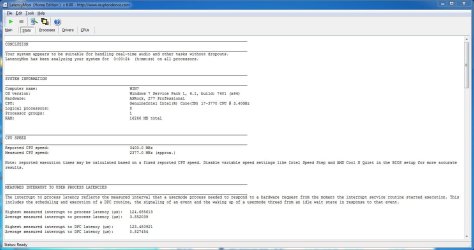
Latency Mon still showing the partners in crime though, dxgkrnl.sys and nvlddmkm.sys. It is very intermittent. Sometimes it's there. Sometimes it's not. Anything else I can try?

Screenshots from my latest readings after trying all of the above
1.jpg
2.jpg
 
Last edited:

My Computer My Computer

At a glance

Windows 7 Ultimate 64 BitIntel i5 4690K (stock speed)Corsair Vengeance 2x4GBEVGA GeForce GTX 970 SC ACX 2.0
Computer type
PC/Desktop
OS
Windows 7 Ultimate 64 Bit
CPU
Intel i5 4690K (stock speed)
Motherboard
ASUS z97-A
Memory
Corsair Vengeance 2x4GB
Graphics Card(s)
EVGA GeForce GTX 970 SC ACX 2.0
Monitor(s) Displays
Toshiba 23" HDTV
Screen Resolution
1920x1080p
PSU
Seasonic 500w 80 Bronze
Case
Silverstone Redline RL01
Antivirus
Microsoft Security Essentials
Are you doing any overclocking?

RealTek, as I previously noted, has nothing to do with HDMI sound.
 

My Computer My Computer

At a glance

Windows 10 64 bitIntel i7 6700K16GB Corsair DominatorIntel CPU Graphics
Computer type
PC/Desktop
Computer Manufacturer/Model Number
My Own Build
OS
Windows 10 64 bit
CPU
Intel i7 6700K
Motherboard
ASUS ROG Maximus VIII Hero
Memory
16GB Corsair Dominator
Graphics Card(s)
Intel CPU Graphics
Sound Card
RealTek
Monitor(s) Displays
27" Dell S2719dgf
Screen Resolution
2560X1440
Hard Drives
1 TB Samsung 850 EVO SSD for Win 10 Pro
500GB Samsung 850 EVO SSD for Win 10 Insider
2 TB drive for backup
PSU
EVGA Supernova 750G2
Case
BeQuiet Silent Base 600
Cooling
Deepcool Captain 120EX
Keyboard
Microsoft Wireless 2000
Mouse
Microsoft wireless
Internet Speed
100 MB/sec (Cable)
Antivirus
Microsoft Defender and Malwarebytes
Browser
Edge/Firefox
Other Info
Cakewalk (Sonar) by BandLab and Studio One 4.1 Pro recording studio software. MOTU 896Mk3 Hybrid recording interface, Frontier Tranzport wireless control unit, Behringer X-Touch Control Surface.
Five USB connected optical drives for CD Audio production using Nero BurningROM
Nope, no overclocking. Yes, i get that, but I updated all the same to compare if there is cracking/popping from on board sound.
 

My Computer My Computer

At a glance

Windows 7 Ultimate 64 BitIntel i5 4690K (stock speed)Corsair Vengeance 2x4GBEVGA GeForce GTX 970 SC ACX 2.0
Computer type
PC/Desktop
OS
Windows 7 Ultimate 64 Bit
CPU
Intel i5 4690K (stock speed)
Motherboard
ASUS z97-A
Memory
Corsair Vengeance 2x4GB
Graphics Card(s)
EVGA GeForce GTX 970 SC ACX 2.0
Monitor(s) Displays
Toshiba 23" HDTV
Screen Resolution
1920x1080p
PSU
Seasonic 500w 80 Bronze
Case
Silverstone Redline RL01
Antivirus
Microsoft Security Essentials
You initially reported the on-board (PC) sound was OK.

The latency mon still points to video as the potential problem.

BTW, if you use the clipping tool you can just get the screen shot of the panel, not the entire PC screen.

Here's an example
 

Attachments

  • Capture.JPG
    Capture.JPG
    102.3 KB · Views: 1

My Computer My Computer

At a glance

Windows 10 64 bitIntel i7 6700K16GB Corsair DominatorIntel CPU Graphics
Computer type
PC/Desktop
Computer Manufacturer/Model Number
My Own Build
OS
Windows 10 64 bit
CPU
Intel i7 6700K
Motherboard
ASUS ROG Maximus VIII Hero
Memory
16GB Corsair Dominator
Graphics Card(s)
Intel CPU Graphics
Sound Card
RealTek
Monitor(s) Displays
27" Dell S2719dgf
Screen Resolution
2560X1440
Hard Drives
1 TB Samsung 850 EVO SSD for Win 10 Pro
500GB Samsung 850 EVO SSD for Win 10 Insider
2 TB drive for backup
PSU
EVGA Supernova 750G2
Case
BeQuiet Silent Base 600
Cooling
Deepcool Captain 120EX
Keyboard
Microsoft Wireless 2000
Mouse
Microsoft wireless
Internet Speed
100 MB/sec (Cable)
Antivirus
Microsoft Defender and Malwarebytes
Browser
Edge/Firefox
Other Info
Cakewalk (Sonar) by BandLab and Studio One 4.1 Pro recording studio software. MOTU 896Mk3 Hybrid recording interface, Frontier Tranzport wireless control unit, Behringer X-Touch Control Surface.
Five USB connected optical drives for CD Audio production using Nero BurningROM
Okay so by now I am convinced it is a faulty card/driver.
I have turned the internet upside down looking for related issues and others seem to be suggesting it could be a power supply issue. I replaced my seasonic 500w to a Corsair cx 750m but no cigar. At this point, I will go and use HDMI for video but use Realtek on board sound for audio; and hope that nvidia miraculously releases a driver that fixes it someday (this is wishful thinking). Thank you for your assistance @Fireberd and @Barman58! I have run out of ideas for now, but if you come across any other solutions, feel free to post!
 
Last edited:

My Computer My Computer

At a glance

Windows 7 Ultimate 64 BitIntel i5 4690K (stock speed)Corsair Vengeance 2x4GBEVGA GeForce GTX 970 SC ACX 2.0
Computer type
PC/Desktop
OS
Windows 7 Ultimate 64 Bit
CPU
Intel i5 4690K (stock speed)
Motherboard
ASUS z97-A
Memory
Corsair Vengeance 2x4GB
Graphics Card(s)
EVGA GeForce GTX 970 SC ACX 2.0
Monitor(s) Displays
Toshiba 23" HDTV
Screen Resolution
1920x1080p
PSU
Seasonic 500w 80 Bronze
Case
Silverstone Redline RL01
Antivirus
Microsoft Security Essentials
Back
Top