
Hey guys! I'm new to the Seven Forums and are very pleased with the detailed answers that everyone gives. They are very well informed and most give very simplistic instructions. Just thought I'd put that out there...So anyways to my problem
To get to the point, I'll put this in point-to-point format.
1. About two days ago I bought a 1/8-1/4 audio jack to connect my guitar to computer.
2. A couple of failed attempts at connecting and I finally got it to work.
3. I downloaded Asio4all to reduce latency when recording. Mixcraft was the recording software
4. After I was done recording, my problems arose
Here I'll go into a little more detail. I got on World of Warcraft to play with some friends and I noticed that my audio was make crackling noises. I had WMP playing in the background and all the sound get distorted. After I closed WoW, everything sounded fine, no noise whatsoever. When I reopened WoW, the crackling noises started to arise again. I then went online and checked to see if my video was the same. I went to Youtube/Megavideo and both still had the crackling noises (It was even worse in full screen as the video lagged as well). Now here's everything I did to try and solve the problem.
-Reinstalled and updated my audio drivers (I use realtek HD)
-Tried Vista and manufacturer drivers as well.
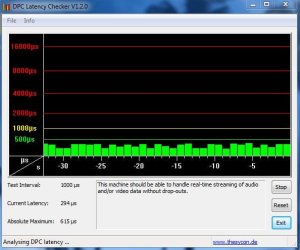
-Checked my latency with DPC latency checker-all green.
-Searched seven and other forums for an answer-nothing.
-Tried a system restore-nothing.
-Tried both speakers and headphones, same crackling/static noise.
-Updated from both Realtek and Microsoft for the drivers-nothing.
-Tried different web browsers-same static noise. [I use Firefox]
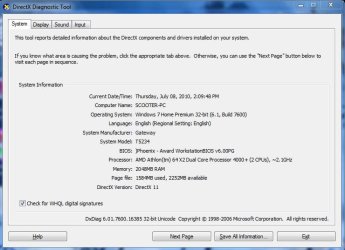
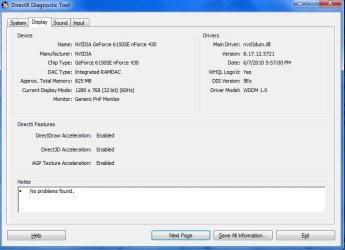
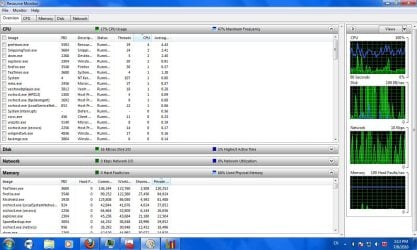
So yeah...I've tried many solutions, yet no luck :huh:. My sure fire thought is that I somehow damaged my sound card. It was only after I successfully was able to hear my guitar when connected did the problems arise. Now I'm not a 100% computer tech who knows things such as BIOS or that sort, but I'm fairly decent with solving an issue on Windows, that is if I can see a taskbar and mouse ! So what are you guy's take on this? Anything else that might be the problem I could try? ANY answers would be a great help. Thank you all in advance. --Also below I posted my system specs and any other info you might need ~O:
My regards,
scooter11
To get to the point, I'll put this in point-to-point format.
1. About two days ago I bought a 1/8-1/4 audio jack to connect my guitar to computer.
2. A couple of failed attempts at connecting and I finally got it to work.
3. I downloaded Asio4all to reduce latency when recording. Mixcraft was the recording software
4. After I was done recording, my problems arose
Here I'll go into a little more detail. I got on World of Warcraft to play with some friends and I noticed that my audio was make crackling noises. I had WMP playing in the background and all the sound get distorted. After I closed WoW, everything sounded fine, no noise whatsoever. When I reopened WoW, the crackling noises started to arise again. I then went online and checked to see if my video was the same. I went to Youtube/Megavideo and both still had the crackling noises (It was even worse in full screen as the video lagged as well). Now here's everything I did to try and solve the problem.
-Reinstalled and updated my audio drivers (I use realtek HD)
-Tried Vista and manufacturer drivers as well.
-Checked my latency with DPC latency checker-all green.
-Searched seven and other forums for an answer-nothing.
-Tried a system restore-nothing.
-Tried both speakers and headphones, same crackling/static noise.
-Updated from both Realtek and Microsoft for the drivers-nothing.
-Tried different web browsers-same static noise. [I use Firefox]
So yeah...I've tried many solutions, yet no luck :huh:. My sure fire thought is that I somehow damaged my sound card. It was only after I successfully was able to hear my guitar when connected did the problems arise. Now I'm not a 100% computer tech who knows things such as BIOS or that sort, but I'm fairly decent with solving an issue on Windows, that is if I can see a taskbar and mouse
! So what are you guy's take on this? Anything else that might be the problem I could try? ANY answers would be a great help. Thank you all in advance. --Also below I posted my system specs and any other info you might need ~O:My regards,
scooter11
Attachments

My Computer
- OS
- Windows 7


 .
.