
Hello all,
I'm having a bit of trouble when trying to get my PC out of standby/sleep mode. I would leave my computer on and go to work. When I come back and try to wake the computer using my mouse or keyboard, the computer would respond but my screen would stay blank, the monitor lights stay orange, then my computer would just reboot.
Here is my current build:
Core i7 920 Nehalem 2.66 GHz
Newegg.com - Intel Core i7 920 Nehalem 2.66GHz 4 x 256KB L2 Cache 8MB L3 Cache LGA 1366 130W Quad-Core Processor - Processors - Desktops
Patriot Viper 6GB (3x2GB) DDR3
Newegg.com - Patriot Viper 6GB (3 x 2GB) 240-Pin DDR3 SDRAM DDR3 1600 (PC3 12800) Desktop Memory - Desktop Memory
OCZ Apex 120GB SSD
Newegg.com - OCZ Apex Series OCZSSD2-1APX120G 2.5" 120GB SATA II MLC Internal Solid state disk (SSD) - Solid State Disks
EVGA E7580-TR motherboard
Newegg.com - EVGA E758-TR 3-Way SLI (x16/x16/x8) LGA 1366 Intel X58 ATX Intel Motherboard - Intel Motherboards
EVGA GTX260
Newegg.com - EVGA 896-P3-1255-AR GeForce GTX 260 Core 216 896MB 448-bit GDDR3 PCI Express 2.0 x16 HDCP Ready SLI Supported Video Card - Desktop Graphics / Video Cards
Corsair CMPSU-850TX 850W PSU
Newegg.com - CORSAIR CMPSU-850TX 850W ATX12V 2.2 / EPS12V 2.91 SLI Ready CrossFire Ready Active PFC Power Supply - Power Supplies
Attached USB devices:
WD MyBook 2TB external drive
Razer Death Adder mouse
Razer ProType keyboard
Any help would be appreciated. Please let me know any additional information is needed.
Also, attached is my WEI.
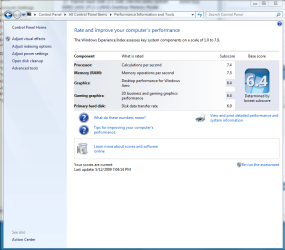
My graphics score is kinda disappointing... Any recommendations?
Thanks!
I'm having a bit of trouble when trying to get my PC out of standby/sleep mode. I would leave my computer on and go to work. When I come back and try to wake the computer using my mouse or keyboard, the computer would respond but my screen would stay blank, the monitor lights stay orange, then my computer would just reboot.
Here is my current build:
Core i7 920 Nehalem 2.66 GHz
Newegg.com - Intel Core i7 920 Nehalem 2.66GHz 4 x 256KB L2 Cache 8MB L3 Cache LGA 1366 130W Quad-Core Processor - Processors - Desktops
Patriot Viper 6GB (3x2GB) DDR3
Newegg.com - Patriot Viper 6GB (3 x 2GB) 240-Pin DDR3 SDRAM DDR3 1600 (PC3 12800) Desktop Memory - Desktop Memory
OCZ Apex 120GB SSD
Newegg.com - OCZ Apex Series OCZSSD2-1APX120G 2.5" 120GB SATA II MLC Internal Solid state disk (SSD) - Solid State Disks
EVGA E7580-TR motherboard
Newegg.com - EVGA E758-TR 3-Way SLI (x16/x16/x8) LGA 1366 Intel X58 ATX Intel Motherboard - Intel Motherboards
EVGA GTX260
Newegg.com - EVGA 896-P3-1255-AR GeForce GTX 260 Core 216 896MB 448-bit GDDR3 PCI Express 2.0 x16 HDCP Ready SLI Supported Video Card - Desktop Graphics / Video Cards
Corsair CMPSU-850TX 850W PSU
Newegg.com - CORSAIR CMPSU-850TX 850W ATX12V 2.2 / EPS12V 2.91 SLI Ready CrossFire Ready Active PFC Power Supply - Power Supplies
Attached USB devices:
WD MyBook 2TB external drive
Razer Death Adder mouse
Razer ProType keyboard
Any help would be appreciated. Please let me know any additional information is needed.
Also, attached is my WEI.
My graphics score is kinda disappointing... Any recommendations?
Thanks!
My Computer
At a glance
Windows 7
- OS
- Windows 7
