
Hi, I custom built a computer a couple months ago, and starting a month or two ago, I've been getting blue screens fairly often. It stopped for a couple weeks, and came back a couple days ago. Sometimes it's a blue screen, sometimes my monitor just displays a wierd lined screen (graphics card acting up probably).

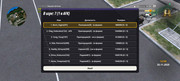
I went to msinfo32 and the only things occupying the memory address of the crashed component are System Board and Motherboard Resources.
The reason I think it's the memory is because I found out my motherboard doesn't take DDR3 memory, only DDR2, but it still works fine most of the time, so I'm not sure what's up.
SPECS:
Windows 7 Professional x64
Full Retail
<6 months old
not reinstalled since then
I went to msinfo32 and the only things occupying the memory address of the crashed component are System Board and Motherboard Resources.
The reason I think it's the memory is because I found out my motherboard doesn't take DDR3 memory, only DDR2, but it still works fine most of the time, so I'm not sure what's up.
SPECS:
Windows 7 Professional x64
Full Retail
<6 months old
not reinstalled since then
My Computer
- Computer Manufacturer/Model Number
- BIOSTAR Group/Custom Built
- OS
- Windows 7 Professional x64
- CPU
- AMD Phenom II X6 1075T Processor, 3.0GHz, 6 Cores
- Motherboard
- BIOSTAR TA890GXB HD
- Memory
- CORSAIR XMS3 4GB (2 x 2GB) 240-Pin DDR3 SDRAM DDR3 1600
- Graphics Card(s)
- Radeon HD 5450 1GB 64-bit DDR2
- Sound Card
- Integrated Sound
- Monitor(s) Displays
- Old LCD Display
- Hard Drives
- Seagate Barracuda 7200.12 ST3500418AS 500GB 7200 RPM SATA 3.0Gb/s 3.5" Internal Hard Drive
- PSU
- Antec EarthWatts EA750 750W
- Case
- COOLER MASTER RC-692-KKN2 CM690 II Advanced Black Steel ATX
- Cooling
- No Add-Ons
