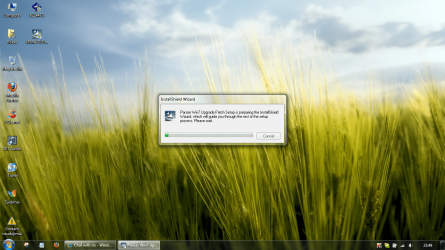
Crative SoundBlaster X-Fi Sofware Enabled

Kadras

New member
Local time
6:56 PM
Messages
19
Location
Lithuania
Hello, i'm using W7 64, and i can't install Crative SoundBlaster X-Fi Sofware. I have DELL STUDIO XPS 1640. It's closes after this:

Please, HELP!
 

Attachments

  • Untitled.png
    Untitled.png
    461.1 KB · Views: 285

My Computer

Computer Manufacturer/Model Number
Dell Studio XPS 16
OS
Windows 7 x64 Ultimate
CPU
Intel Core 2 Duo P8600
Memory
6GB DDR3-1066
Graphics Card(s)
ATI HD4670 1GB
Hard Drives
Seagate 500GB 7,2K
Mouse
Microsoft Laser Mouse 5000
How are you tring to install the X-Fi Drivers?

With the CD that came with it for Vista?

I would recoomend going to Creatives official Site, and download:

Console launcher
X-Fi Driver
Alchemy (if needed)

Any other software you need.

These will all run and install under 7 x64 without issue.


If you want use of the Volume Panel, and THX console, you need to install these ONLY from the Vista disc.

Do this first if you want these.

Do not let it Auto run, and browse the disk for the setup.exe.
right click and choose to run compatability mode Vista SP2.
Now run the installer, choose custom install, and ONLY install THX console & Volume panel.

then instal the Console launcher, and the XiFi Driver you downloaded earlier in that order.
 

My Computer

Computer Manufacturer/Model Number
Custom (Self Build)
OS
Windows 7 Home Premium 64bit
CPU
Intel Core i7 2700k
Motherboard
eVGA P67 SLI
Memory
8GB Mushkin Redline Ridgebacks @1866
Graphics Card(s)
EVGA GTX570 SC
Sound Card
XiFi Titanium HD
Monitor(s) Displays
LG W2453V
Screen Resolution
1920x1080
Hard Drives
Intel 320 80GB -- Intel X25-V 40GB --WD Black 1TB x2 -- WD Blue 640GB
PSU
Seasonic x750
Case
Corsair 600T SE White
Cooling
eVGA Superclocked CPU Cooler
Keyboard
Saitek Cyborg
Antivirus
Kaspersky
Browser
IE
Other Info
LG BD/DVD
Where i can find it?
Console launcher
X-Fi Driver
Alchemy (if needed)

EDIT It's only Software Enabled, rah says Dell. I know it, but in Vista, there was some Creative panel, but when i download drivers for WIN7 64, it isn't works!
 

My Computer

Computer Manufacturer/Model Number
Dell Studio XPS 16
OS
Windows 7 x64 Ultimate
CPU
Intel Core 2 Duo P8600
Memory
6GB DDR3-1066
Graphics Card(s)
ATI HD4670 1GB
Hard Drives
Seagate 500GB 7,2K
Mouse
Microsoft Laser Mouse 5000
How are you tring to install the X-Fi Drivers?

With the CD that came with it for Vista?

I would recoomend going to Creatives official Site, and download:

Console launcher
X-Fi Driver
Alchemy (if needed)

None of those will do him any good, his laptop doesn't have a Creative card in it. What it has is an IDT based audio chip in it that gets to use some of the X-Fi software (also known as X-Fi MB).

Kadras have you downloaded the Windows 7 version of it from Dell yet,

Drivers and Downloads

If not you should as you will not get it from Creative.
 

My Computer

Computer type
PC/Desktop
Computer Manufacturer/Model Number
Me
OS
Win 7 Ultimate x64
CPU
FX-8350 @ 4.6 GHz so far
Motherboard
Asus M5A97 EVO
Memory
ADATA XPG V1 Series Black 8GB DDR3 1600
Graphics Card(s)
Sapphire R9 270x Dual-X
Sound Card
Xonar DGX w/ Corsair Vengence 1300
Monitor(s) Displays
Acer S232HL Abid
Screen Resolution
1920x1080
Hard Drives
120 GB OCZ Vertex 3
500 GB Seagate 7200.12
PSU
Antec Earthwatts 650W Green
Case
Antec Three Hundred
Cooling
Cooler Master 212 EVO
Keyboard
Logitech G510
Mouse
Logitech G500s
Internet Speed
35000/3000
I completely missed it was a laptop. Thought he has the card.

Apologies. :-/
 

My Computer

Computer Manufacturer/Model Number
Custom (Self Build)
OS
Windows 7 Home Premium 64bit
CPU
Intel Core i7 2700k
Motherboard
eVGA P67 SLI
Memory
8GB Mushkin Redline Ridgebacks @1866
Graphics Card(s)
EVGA GTX570 SC
Sound Card
XiFi Titanium HD
Monitor(s) Displays
LG W2453V
Screen Resolution
1920x1080
Hard Drives
Intel 320 80GB -- Intel X25-V 40GB --WD Black 1TB x2 -- WD Blue 640GB
PSU
Seasonic x750
Case
Corsair 600T SE White
Cooling
eVGA Superclocked CPU Cooler
Keyboard
Saitek Cyborg
Antivirus
Kaspersky
Browser
IE
Other Info
LG BD/DVD
Wouldn't worry about it. Seen enough with a Dell desktop and the same thing, using either the X-Fi MB or the older Audigy MB (the X-Fi MB also comes with most of the Asus motherboards with the SupremeFX audio as well), on just about every onboard solution out there (ADI/Soundmax, IDT, even the odd Realtek one).
 

My Computer

Computer type
PC/Desktop
Computer Manufacturer/Model Number
Me
OS
Win 7 Ultimate x64
CPU
FX-8350 @ 4.6 GHz so far
Motherboard
Asus M5A97 EVO
Memory
ADATA XPG V1 Series Black 8GB DDR3 1600
Graphics Card(s)
Sapphire R9 270x Dual-X
Sound Card
Xonar DGX w/ Corsair Vengence 1300
Monitor(s) Displays
Acer S232HL Abid
Screen Resolution
1920x1080
Hard Drives
120 GB OCZ Vertex 3
500 GB Seagate 7200.12
PSU
Antec Earthwatts 650W Green
Case
Antec Three Hundred
Cooling
Cooler Master 212 EVO
Keyboard
Logitech G510
Mouse
Logitech G500s
Internet Speed
35000/3000

My Computer

Computer Manufacturer/Model Number
Dell Studio XPS 16
OS
Windows 7 x64 Ultimate
CPU
Intel Core 2 Duo P8600
Memory
6GB DDR3-1066
Graphics Card(s)
ATI HD4670 1GB
Hard Drives
Seagate 500GB 7,2K
Mouse
Microsoft Laser Mouse 5000
So, is there any sollution of this problemm?
 

My Computer

Computer Manufacturer/Model Number
Dell Studio XPS 16
OS
Windows 7 x64 Ultimate
CPU
Intel Core 2 Duo P8600
Memory
6GB DDR3-1066
Graphics Card(s)
ATI HD4670 1GB
Hard Drives
Seagate 500GB 7,2K
Mouse
Microsoft Laser Mouse 5000
According to the Description on DELL's download site for this it is just a patch for the application for systems that upgraded from Vista 64 to Windows 64 all others do not require it. It does show the sound card to be IDT which is what my Alienware M17x has but my DELL 435T 9000 has the X-Fi Extreme Gamer Card, the M17x does not use the SB app but the 435T 9000 does.

If you indeed upgraded from Vista 64 to Windows 64 you might try uninstalling the sound card driver then run CCleaner and Drive Sweeper and reboot the laptop and let Windows 7 reinstall the driver and try running the patch from DELL using the instructions there, good luck.
 

My Computer

Computer Manufacturer/Model Number
DELL XPS Studio 435T
OS
Vista 64 Ultimate, Windows 7 64 Ultimate, Ubuntu 9.10
CPU
i7 975 3.3 GHz Extreme (Factory OC'd to 3.6 GHz)
Motherboard
DELL provided
Memory
18 Gb Tri-Channel 1066
Graphics Card(s)
ATI 5970 2048 Mb
Sound Card
X-Fi Extreme Gamer
Monitor(s) Displays
Vizio 37" HD-TV
Screen Resolution
1920 x 1080
Hard Drives
1.5 Tb HDD
1.5 Tb HDD
2.0 Tb Network Drive
512 Gb Crucial SSD
PSU
DELL Provided 475 watts
Case
DELL
Cooling
3 fans
Keyboard
Logitech Performance K350 Wireless
Mouse
Logitech Performance MX Wireless
Internet Speed
3 Mb up 750 Kb down
Other Info
Bamboo Fun Tablet, Belkin N+ Wireless router, Pioneer Dolby System Wireless Headphones, Bose 5.1 Dolby Surround Sound System, LifeCam VX 3000 Webcam, Blu-Ray/Hi Def DVD +RW combo and Blu-ray +RW,l 15 in 1 media card reader, Logitech Rumblepad 2, Hauppauge 2250 DTV Tuner with MS Media Center Remote

Laptop:Alienware M17x, Q9100 CPU, 8Gb RAM, 1920x1200 WUXGA LCD driven by 4870's in CrossFireX, Bl
According to the Description on DELL's download site for this it is just a patch for the application for systems that upgraded from Vista 64 to Windows 64 all others do not require it. It does show the sound card to be IDT which is what my Alienware M17x has but my DELL 435T 9000 has the X-Fi Extreme Gamer Card, the M17x does not use the SB app but the 435T 9000 does.

If you indeed upgraded from Vista 64 to Windows 64 you might try uninstalling the sound card driver then run CCleaner and Drive Sweeper and reboot the laptop and let Windows 7 reinstall the driver and try running the patch from DELL using the instructions there, good luck.

Unfortunatly, this wasn't the solluton. It's still not working... :rolleyes: I have no idea, what to do...
 

My Computer

Computer Manufacturer/Model Number
Dell Studio XPS 16
OS
Windows 7 x64 Ultimate
CPU
Intel Core 2 Duo P8600
Memory
6GB DDR3-1066
Graphics Card(s)
ATI HD4670 1GB
Hard Drives
Seagate 500GB 7,2K
Mouse
Microsoft Laser Mouse 5000

My Computer

Computer type
PC/Desktop
Computer Manufacturer/Model Number
Me
OS
Win 7 Ultimate x64
CPU
FX-8350 @ 4.6 GHz so far
Motherboard
Asus M5A97 EVO
Memory
ADATA XPG V1 Series Black 8GB DDR3 1600
Graphics Card(s)
Sapphire R9 270x Dual-X
Sound Card
Xonar DGX w/ Corsair Vengence 1300
Monitor(s) Displays
Acer S232HL Abid
Screen Resolution
1920x1080
Hard Drives
120 GB OCZ Vertex 3
500 GB Seagate 7200.12
PSU
Antec Earthwatts 650W Green
Case
Antec Three Hundred
Cooling
Cooler Master 212 EVO
Keyboard
Logitech G510
Mouse
Logitech G500s
Internet Speed
35000/3000
There is no X-Fi MB in software DVD, that I get from DELL. But when I bought loptop, there was X-Fi program...

I have instaled the latest drivers, always cheecking suport.dell.com for new drivers.

But there must be any sollution.
 

My Computer

Computer Manufacturer/Model Number
Dell Studio XPS 16
OS
Windows 7 x64 Ultimate
CPU
Intel Core 2 Duo P8600
Memory
6GB DDR3-1066
Graphics Card(s)
ATI HD4670 1GB
Hard Drives
Seagate 500GB 7,2K
Mouse
Microsoft Laser Mouse 5000
OK. After few days I found some interesting information, witch gives me the sollution, but there's new questions.

"Install only for Vista-to-Win7 upgrade.
Apply AFTER Win7 upgrade.
" - Says DELL Support


I have a clean Windows Install, so there is problem.

But I don't have official Windows 7 upgrade from Vista, I bouht new Windows 7 with box, so what I need to do now?

If I will install Vista, could I upgrade From DELL Vista to Mine 7 with installation DVD, not upgrade?
 

My Computer

Computer Manufacturer/Model Number
Dell Studio XPS 16
OS
Windows 7 x64 Ultimate
CPU
Intel Core 2 Duo P8600
Memory
6GB DDR3-1066
Graphics Card(s)
ATI HD4670 1GB
Hard Drives
Seagate 500GB 7,2K
Mouse
Microsoft Laser Mouse 5000
Or you could (and should) contact Dell and explain it to them. They are the only one you can get it from.
 

My Computer

Computer type
PC/Desktop
Computer Manufacturer/Model Number
Me
OS
Win 7 Ultimate x64
CPU
FX-8350 @ 4.6 GHz so far
Motherboard
Asus M5A97 EVO
Memory
ADATA XPG V1 Series Black 8GB DDR3 1600
Graphics Card(s)
Sapphire R9 270x Dual-X
Sound Card
Xonar DGX w/ Corsair Vengence 1300
Monitor(s) Displays
Acer S232HL Abid
Screen Resolution
1920x1080
Hard Drives
120 GB OCZ Vertex 3
500 GB Seagate 7200.12
PSU
Antec Earthwatts 650W Green
Case
Antec Three Hundred
Cooling
Cooler Master 212 EVO
Keyboard
Logitech G510
Mouse
Logitech G500s
Internet Speed
35000/3000
It's damn life. I bought loptop January 8, and January 1 ended FREE Vista to 7 upgrade.... So, i will live without X-Fi few yers...
 

My Computer

Computer Manufacturer/Model Number
Dell Studio XPS 16
OS
Windows 7 x64 Ultimate
CPU
Intel Core 2 Duo P8600
Memory
6GB DDR3-1066
Graphics Card(s)
ATI HD4670 1GB
Hard Drives
Seagate 500GB 7,2K
Mouse
Microsoft Laser Mouse 5000
Back
Top