CRC Error..HDD failure or Windows failure?

inwell

New member
Member
Local time
2:32 AM
Messages
53
I have seagate hdd with windows 7 ultimate installed on partition C and the partition D for data.

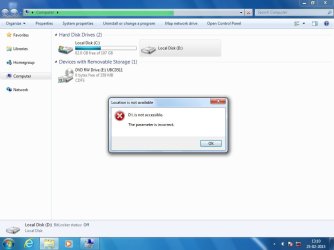
Suddenly while booting, windows ask me for disk checking volume/partition D for consistency. If i let it check, the utility will run for endless time stucking at 6% mark . If i cancel the disk check, windows will take long time to load further to logon page and finally boots. But windows explorer wont show any properties for volume D (total space , used space etc). When clicked on D: icon, explorer will take a long time and finally will say DISK IS NOT FORMATTED..do you want to format it now ?


Disk management will show the volume as RAW


I checked the disk with minitools partition magic, and the volume shows NTFS and OK. I can also explore the volume and find all the files present on D drive. (not visible from windows)


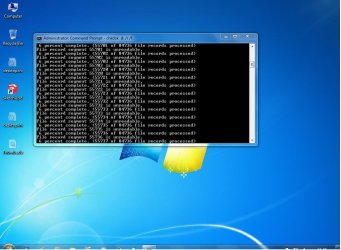
CHKDSK with diff keys (/r / f etc) run from windows boot cd and the result is same..scanning wont go past 6-7% (File Record Segment xxxxxxxx Unreadable )


Any chance to make the volume accessible in windows again without loosing data ? !
 

Attachments
  • prob.jpg
    prob.jpg
    94.9 KB · Views: 1
  • prob1.jpg
    prob1.jpg
    49.1 KB · Views: 0
  • prob2.jpg
    prob2.jpg
    78.3 KB · Views: 0

My Computer

OS
Windows 7 Pro x64 ,Windows 8 Ent x64 and Windows Xp SP2
CPU
AMD FX-8150
Motherboard
ASUS M5A97 R2.0
Memory
32Gb
Hard Drives
500Gb Seagate 7200 rpm
PSU
Coolermaster 600Watt 80+
Case
Coolermaster 690 ii
Keyboard
Logitech
Mouse
Logitech
The first thing I would do is copy the data off the partition using linux, if you don't already have a backup. I would also take a system image. Then you can figure out if the drive is usable.
 

My Computer

Computer type
PC/Desktop
Computer Manufacturer/Model Number
dell precision t3400 tower
OS
Linux Lite 3.2 x64; Windows 7, 8.1
CPU
Core2Duo 2.4
Memory
6GB ddr2
Graphics Card(s)
nVidia
Hard Drives
120gb SSD, 1TB HD, 2TB HD; sata II
Internet Speed
12/2
Browser
Vivaldi, Slimjet (Chromium) x64
thank you paul....
I have already backed up my imp files . i have system image too.
now how can i make this volume visible in windows ? without formatting is it possible? (some partition tools)

latest info is seatools for dos shows failure in test result for both Short and Long test
 

My Computer

OS
Windows 7 Pro x64 ,Windows 8 Ent x64 and Windows Xp SP2
CPU
AMD FX-8150
Motherboard
ASUS M5A97 R2.0
Memory
32Gb
Hard Drives
500Gb Seagate 7200 rpm
PSU
Coolermaster 600Watt 80+
Case
Coolermaster 690 ii
Keyboard
Logitech
Mouse
Logitech
If you have a backup you could delete and recreate the partition, run chkdsk /r and then retest. But if the data is important you probably will need a replacement drive. It's a good thing you are backed up.
 

My Computer

Computer type
PC/Desktop
Computer Manufacturer/Model Number
dell precision t3400 tower
OS
Linux Lite 3.2 x64; Windows 7, 8.1
CPU
Core2Duo 2.4
Memory
6GB ddr2
Graphics Card(s)
nVidia
Hard Drives
120gb SSD, 1TB HD, 2TB HD; sata II
Internet Speed
12/2
Browser
Vivaldi, Slimjet (Chromium) x64
paul...

As i said chkdsk command will not go past 6-7% for days....
After re partitioning and trying for fresh install, set is not completing at all... setup freezes randomly at any point...
 

My Computer

OS
Windows 7 Pro x64 ,Windows 8 Ent x64 and Windows Xp SP2
CPU
AMD FX-8150
Motherboard
ASUS M5A97 R2.0
Memory
32Gb
Hard Drives
500Gb Seagate 7200 rpm
PSU
Coolermaster 600Watt 80+
Case
Coolermaster 690 ii
Keyboard
Logitech
Mouse
Logitech
btw , general question

if disk/partition is bad and windows wont detect it not windows show any files...how bootable tool disks / live cds can view and access data on these corrupted/bad partitions ?
 

My Computer

OS
Windows 7 Pro x64 ,Windows 8 Ent x64 and Windows Xp SP2
CPU
AMD FX-8150
Motherboard
ASUS M5A97 R2.0
Memory
32Gb
Hard Drives
500Gb Seagate 7200 rpm
PSU
Coolermaster 600Watt 80+
Case
Coolermaster 690 ii
Keyboard
Logitech
Mouse
Logitech
paul...

As i said chkdsk command will not go past 6-7% for days....
After re partitioning and trying for fresh install, set is not completing at all... setup freezes randomly at any point...

Sometimes deleting the partition frees up chkdsk. But not this time. Time for a new drive.

Not sure why Windows doesn't see the data, but perhaps the basic partition info got corrupted. Windows only sees some partition types. For instance, it doesn't see Linux. Just one corrupted bit could do this.
 

My Computer

Computer type
PC/Desktop
Computer Manufacturer/Model Number
dell precision t3400 tower
OS
Linux Lite 3.2 x64; Windows 7, 8.1
CPU
Core2Duo 2.4
Memory
6GB ddr2
Graphics Card(s)
nVidia
Hard Drives
120gb SSD, 1TB HD, 2TB HD; sata II
Internet Speed
12/2
Browser
Vivaldi, Slimjet (Chromium) x64
Back
Top