create a folder containing link into start menu

mfran2002

New member
Local time
9:37 AM
Messages
6
create a folder containing links, into start menu

Hi all,
I would need something already existing into WinXP, the possibility to create a folder into the start menu, containing some links to files.

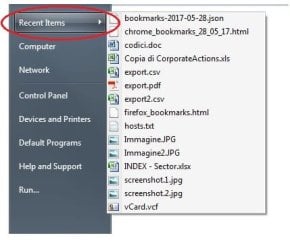
BUT the behaviour of this folder should be similar to "Recents items" or, to better explain, when I click onto this folder, I only should have to open a dropdown menu listing all my links.

Into WinXP it is possible and I really appreciate it could be still possible.

thanks to all of you
michele
 
Last edited:

My Computer

Computer type
PC/Desktop
OS
Win7 Pro x64
select the folder and drag it onto the start menu icon. done.
 

My Computer

Computer type
PC/Desktop
Computer Manufacturer/Model Number
HP (HP-P6212F)
OS
Microsoft Windows 7 Home Premium 64-bit 7601 Multiprocessor Free Service Pack 1
CPU
Pentium(R) Dual-Core CPU E5300 @ 2.60GHz
Motherboard
PEGATRON CORPORATION Benicia
Memory
6.00 GB
Graphics Card(s)
Intel(R) G33/G31 Express Chipset Family
Sound Card
Realtek High Definition Audio
Monitor(s) Displays
24'' HP WS LCD
Screen Resolution
1920 x 1080 x 32 bits (4294967296 colors) @ 60 Hz
Hard Drives
(1) ATA Hitachi HDT72106 SCSI Disk Device (2) Generic- Compact Flash USB Device (3) Generic- MS/MS-Pro USB Device (4) Generic- SD/MMC USB Device (5) Generic- SM/xD-Picture USB Device (6) Verbatim STORE N GO USB Device
Keyboard
Logitech G510s
Mouse
Logitech Trackball M570
Antivirus
Microsoft Security Essentials / Malwarebytes
Browser
IE / Firefox / Chrome
Already tried, obviously, but, as I said, I do not want to open a folder.
I just want to open a menu of links, exactly like the behaviour of "Recent Items".

see pictures...

In WinXP it is possible, I did it, but in Win7 I don't know how to do
 

Attachments

  • Untitled.jpg
    Untitled.jpg
    44.7 KB · Views: 18

My Computer

Computer type
PC/Desktop
OS
Win7 Pro x64
sorry, my bad. Start menu is designed to 'start' stuff. However, you can always put the links folder under any of the existing items (Computer, Documents, Downloads, etc.) and get the behavior you desire.
 

My Computer

Computer type
PC/Desktop
Computer Manufacturer/Model Number
HP (HP-P6212F)
OS
Microsoft Windows 7 Home Premium 64-bit 7601 Multiprocessor Free Service Pack 1
CPU
Pentium(R) Dual-Core CPU E5300 @ 2.60GHz
Motherboard
PEGATRON CORPORATION Benicia
Memory
6.00 GB
Graphics Card(s)
Intel(R) G33/G31 Express Chipset Family
Sound Card
Realtek High Definition Audio
Monitor(s) Displays
24'' HP WS LCD
Screen Resolution
1920 x 1080 x 32 bits (4294967296 colors) @ 60 Hz
Hard Drives
(1) ATA Hitachi HDT72106 SCSI Disk Device (2) Generic- Compact Flash USB Device (3) Generic- MS/MS-Pro USB Device (4) Generic- SD/MMC USB Device (5) Generic- SM/xD-Picture USB Device (6) Verbatim STORE N GO USB Device
Keyboard
Logitech G510s
Mouse
Logitech Trackball M570
Antivirus
Microsoft Security Essentials / Malwarebytes
Browser
IE / Firefox / Chrome
recent items to start menu

Hello mfran2002, This is another one you can try.

Right click on Taskbar

Properties

Select Start Menu Tab

Customise

Scroll down and check box, select recent items, okay, and apply.
 

My Computer

Computer type
PC/Desktop
Computer Manufacturer/Model Number
ASUS A85XM-A custom build
OS
Windows 10 Pro 64 bit
CPU
AMD A4-5300 APU with Radeon(tm) HD Graphics
Motherboard
ASUSTeK COMPUTER INC. A85XM-A
Memory
8.00 GB
Graphics Card(s)
AMD Radeon HD 7480D
Sound Card
(1) High Definition Audio Device (2) Realtek High Definiti
Monitor(s) Displays
HP W2072a 20 inch Led Backlit Monitor
Screen Resolution
1600 x 900 x 32 bits (4294967296 colors) @ 60 Hz
Hard Drives
TOSHIBA DT01ACA100 SATA Disk Device
Keyboard
Acer
Mouse
Acer
Internet Speed
varies
Antivirus
Windows Defender Antivirus
Browser
Waterfox, Edge
Back
Top