Solved Create Blur Start Menu - Win7/Vista style builder

Local time
2:44 AM
Messages
30
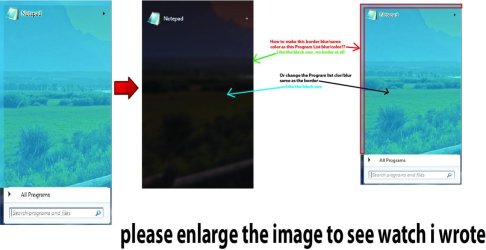
Hello,May I know how to make : -

Untitled-1.jpg
located : - StartMenu > Panels > Aero > Top > Programs List &
StartMenu > Panels > Aero > Top > Programs ListExtended


Also making the treeview transparent/blur
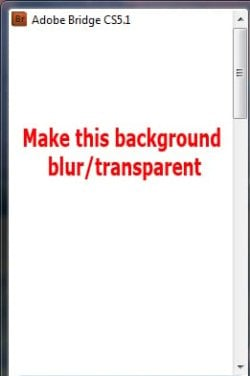
ttt.jpg
located : - Explorer & Shell > Explorer > TreeView


i have no prblem with the openbox & more program but the seem get problem with programlist & treeview...

I try everything, find a thread on sevenforum & other web but i cant find/didnt works for me...... :(
 

My Computer

OS
Windows 7 Ultimate x32
I may be able to help you.
I need to verify you have a legal copy of Windows Style Builder if you are able to join here VistaStyleBuilder - Index using your e-mail address and Windows Style Builder serial number/key when you purchased it, then message me through my profile there View the profile of Bongo then I will be willing to give you some help.
Jerry
 

My Computer

Computer type
Laptop
Computer Manufacturer/Model Number
Sager NP9170
OS
Win 7 Pro x64 / Win 10 Pro
CPU
Intel(R) Core(TM) i7-3630QM CPU @ 2.40GHz
Motherboard
CLEVO P170EM
Memory
12 GB
Graphics Card(s)
(1) Intel(R) HD Graphics 4000 (2) NVIDIA GeForce GTX 675M
Sound Card
(1) Realtek High Definition Audio (2) Intel(R) Display Aud
Monitor(s) Displays
17.3
Screen Resolution
1920x1080
Hard Drives
(1) Samsung 860 EVO 500GB(OS) (1) Samsung 860 EVO 500GB(Data)
Keyboard
Backlite
Antivirus
MSE, Malwarebytes Pro
Browser
Firefox
Other Info
DESKTOP: Custom-built.
OS: Win 10 Pro x64.
CASE: Rosewill R5.
CPU: Intel I5 4670K CPU @ 3.40GHz.
CPU COOLER: Cool Master Hyper 212 EVO.
MOTHERBOARD: Asus Z87-A.
MEMORY: Kingston HyperX 2x4 GB.
GPU: Nvidia Geforce 650 TI.
PSU: Corsair TX750.
DRIVES: (1) Samsung 840 120 GB SSD (2) Western Digital blue 500 GB 7200 RPM.
Thanks for reply but i already figure it out 3 days ago, i got it from my old friend :D : -

Add all these properties and make them checked and remove any CompositedOpaque:Bool properties

Start Menu > Menus > Aero > Link > Composited:Bool
Start Menu > Menus > Aero > EmptyMarkup > Composited:Bool
Start Menu > Menus > Aero > ListView > Composited:Bool
Start Menu > Menus > Aero > PlaceList:ListView > Composited:Bool
Start Menu > Menus > Aero > KeyBoard:TreeView > Composited:Bool
Start Menu > Menus > Aero > Hover:TreeView > Composited:Bool
Start Menu > Menus > Aero > StartMenuCompositedMFU::ListView > Composited:Bool
Start Menu > Menus > Aero > TopMatchComposited::ListView > Composited:Bool

Start Menu > Panels > Aero > Top > OpenBox > ContentMargins:Margins > 0, -200, -2000, -1998

Sorry for the late reply , BTW again thanks for the reply :)
 

My Computer

OS
Windows 7 Ultimate x32
Back
Top