JavaScript is disabled. For a better experience, please enable JavaScript in your browser before proceeding.
You are using an out of date browser. It may not display this or other websites correctly.
You should upgrade or use an
alternative browser .
Create custom icon in system tray
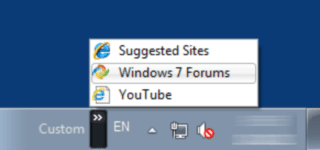
Is there a way I can create my own icon in the system tray that would behave as follows?
Jerry ☮ 1956-2019 R.I.P.
VIP
SF Team
Welcome to the Seven Forums
Computer type Laptop Computer Manufacturer/Model Number Sager NP9170 OS Win 7 Pro x64 / Win 10 Pro CPU Intel(R) Core(TM) i7-3630QM CPU @ 2.40GHz Motherboard CLEVO P170EM Memory 12 GB Graphics Card(s) (1) Intel(R) HD Graphics 4000 (2) NVIDIA GeForce GTX 675M Sound Card (1) Realtek High Definition Audio (2) Intel(R) Display Aud Monitor(s) Displays 17.3 Screen Resolution 1920x1080 Hard Drives (1) Samsung 860 EVO 500GB(OS) (1) Samsung 860 EVO 500GB(Data) Keyboard Backlite Antivirus MSE, Malwarebytes Pro Browser Firefox Other Info DESKTOP: Custom-built.
Short of writing an application which will run in the system tray, I can't think of a way of implementing this. There may be applications which could provide this functionality, but I know of none.
Another alternative would be to look into
Rainmeter - It is possible there is a skin available for this. Rainmeter overlays different data on your desktop, and through scripting becomes highly customisable. It has a large, active community creating all sorts of new things to do with it. (Rainmeter skins can be found elsewhere, such as deviantart)
Or, you could look into options for docks, they may provide applets which can provide some similar functionality
Computer Manufacturer/Model Number Custom Build OS Windows 7 Ultimate 64bit CPU Intel Core i5 2500k @ 3.3GHz (soon to change) Motherboard ASUS P8Z 68-V LX Memory 8GB 1333MHz DDR3 (Generic) Graphics Card(s) MSI Nvidia GTX 550 Ti 1024MB GDDR5 Monitor(s) Displays Bush TV Screen Resolution 1920x1080 Hard Drives OCZ Agility 3 60GB SSD PSU EZCOOL Ambience 80+ 700W Case Coolermaster 430 Elite Cooling Air Keyboard Tesco Multimedia Keyboard Mouse Technika wireless mouse
For second part of your request you can use a new custom toolbar.
toolbar.png
6.7 KB
· Views: 303
Computer type PC/Desktop OS Windows 8.1 ; Windows 7 x86 (Dec2008-Jan2013) Other Info "The scale icon at the top right of a post or tutorial is how you can give rep to the member."