hi guys.
i want to create a Bootable DVD that has 4 things:
1-windows 7 ultimate 64 bit
2-Windows Xp service pack 3
3-minitool partition wizard
4-windows seven password remover
i want that when i insert the DVD in system and boot from the DVD it shows me these 4 things to use them?
please explain easilly because i am not professional
I believe what you want can be found at this link below but I it's a pretty intense process that a casual user may have issues with, multi-boot USBs can be created though.
I stopped short of suggesting YUMI since OP wanted both Windows 7 and Windows XP. YUMI will not take Windows XP. If the OP takes it off from his list then YUMI is the best choice.
Guidelines to OP:
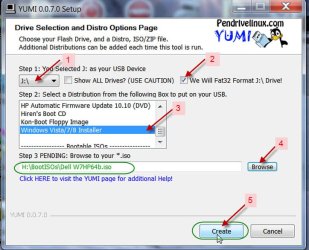
Download YUMI and with your pendrive plugged in run YUMI-0.0.7.0.exe (the current version)
Follow the screenshot to make the Win7 Installer.
For other ISOs if that ISO is listed (as was Windows7) choose that in the drop box and continue.
If the ISO is not listed choose "Try an unlisted ISO" in the drop down box.
When using the "Try an Unlisted ISO option", the ISO file name must contain no spaces.
Once you have created the MULTIBOOT pendrive, you can access the menu list and edit the title to be displayed if you want.
My Computer > your Multiboot Pendrive > multiboot > menu > menu.lst
The screenshot shows the menu list after I created the AOMEI Partition Assistant WinPE.
OK, once you make your multiboot pendrive and confirmed that it works as it should, make an ISO image of it and write it to your DVD. Though I haven't tried it, I think that should work. (If you can accomodate what all Bootable ISOs you want on a 4GB pendrive, a single layer DVD will do. If you needed an 8GB pendrive, then you will write the ISO to a dual layer DVD. I would suggest that in the first instance you limit it to 4GB, write the created ISO to a DVD-RW. If everything works well and you gain confidence you can write to DVD-R either single layer or dual layer as may be needed.)
My preliminary trials indicate that that idea does not work or is not that easy as I thought it to be. I shall report if I succeed and if it can be achieved in any easy way from bootable pendrive to bootable DVD.
That said it is possible to create a multiboot CD/DVD from scratch. In fact I had created one long back that can boot into Partition Magic and Acronics Recovery CD but then I spent nearly 3 sleepless months to achieve that objective. With XP gone and pendrives having taken over, it is all totally forgotten and I wouldn't venture into it again.
thnaks vety much jumanji.
so if you find a way to create multiboot DVD from these 4 things that i said in my first post , I appreciate you if you put it here
Here is something that should help you. Download SARDU from http://www.sarducd.it/ and extract it to a folder named SARDU. (There are two *.exe files one for 32 bit and one for 64 bit. Run the appropriate one for your system.)
SARDU only supports the software listed in it natively. From your list except Windows 7 Password Remover others are covered.
So here you go.
Preliminary step: Move/copy your Windows 7, Windows XP (Home, Professional and x64) and Partition Wizard ISOs to the ISO Folder in the SARDU main folder.
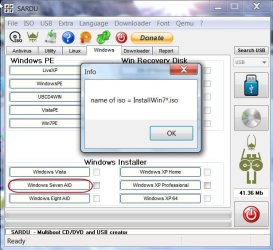
Run SARDU. Click on the Windows tab , then on the Windows Installer tabs and rename the Windows installer as indicated.
Do the same to the Partition Wizard under the Utility tab. It may not require renaming.
(For this demo, I have used Windows 7 Home 32 bit and Windows XP Professional OEM ISOs and pwe5 ISO I have.)
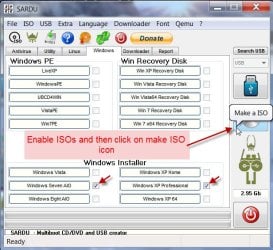
If the ISOs under both tabs are not enabled as shown by a check mark next to the tabs, enable them by clicking on it and then click on Make a ISO Icon
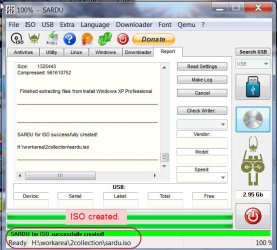
Choose the folder to save the ISO > OK. Multiboot ISO creation process begins.
Multiboot ISO creation completed
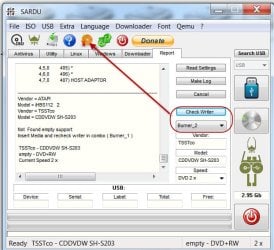
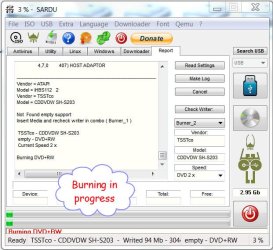
Insert a blank DVD-RW ( if successful you can burn the ISO to DVD-R later by any burner). Click on Check Writer (allow a few seconds for the burner/s to be identified), select your burner with Blank DVD-RW and then click on Burn ISO.
( I am breaking for my midnight coffee as the burning is in progress)
Burn completed and the multiboot DVD is ready. Multiboot CD booted and checked. ( I am too lazy/sleepy to take my camera and capture the SARDU boot menu.)
Yes, there is a provision to add “extra” ISOs (not supported though).
“For customize the extra folder , user must have knowledge of multiboot and isolinux.” I don’t have.
I find that Passcape Reset Windows Password is successful. If that is the one you are interested, then you may seek help from other experts who are conversant with manipulating the extra ISOs in SARDU. If need be, you may raise a separate query in the Software section of this Forum. May be it will catch the attention of other experts who can help you in it.




 Though I haven't tried it, I think that should work. (If you can accomodate what all Bootable ISOs you want on a 4GB pendrive, a single layer DVD will do. If you needed an 8GB pendrive, then you will write the ISO to a dual layer DVD. I would suggest that in the first instance you limit it to 4GB, write the created ISO to a DVD-RW. If everything works well and you gain confidence you can write to DVD-R either single layer or dual layer as may be needed.)