Create New parition, Seperate Windows from myData

ilcaa

New member
Local time
3:37 AM
Messages
24
Hello, I have seen many videos on how to create partitions on my computer, very helpful. All these videos show how to create the space and create the drive.

My question is how do i seperate the windows OS from my personal data (all the files that are created from various programs, downloads, etc).

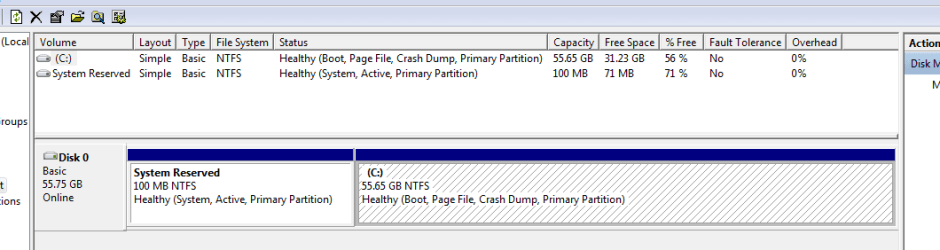
My HardDrive looks like this: 100MB System Reserved and 55GB NTFS (Primary Partition, PageFile, Boot). Thats it.

I assume I will create a new partition, say 30GB of this 55GB for my files...
So 25GB for Windows and 30 for me. It that enough too small, overkill??

** Say I install a program, will that be installed in my 30GB or in Windows 25GBs?

** If I create a file from any of my applications how will the application know to place all the files I create on my side.

** Also, Once I create this new Data Partition, do I just change the "location" of My Docs, My Pics, etc? or do I need to create NEW folders in this new partition?

Thanks for any help, understanding how to actually seperate Windows and my data files that are created.
 

My Computer My Computer

Computer Manufacturer/Model Number
dell
OS
Window 7 Pro 32bit
CPU
1.3 core duo
Motherboard
?
Memory
4gbs
Hello ilcaa.


Before we make any specific recommendations will you please post a snip/screen-shot of the entire disk management drive map with a full description as to which drive/partition is which, so we can see 'first hand' what you have going on.

In the Windows start menu right click computer and click manage, in the left pane of the "Computer Management" window that opens click disk management and post a snip of that.


How to Upload and Post a Screenshot and File in Seven Forums
 

My Computer My Computer

Computer Manufacturer/Model Number
* BFK Customs *
OS
W 7 64-bit Ultimate
CPU
Intel Q9550 Yorkfield
Motherboard
ASUS P5Q Pro
Memory
8GB Dominator 8500C5D
Graphics Card(s)
ATI : XFX 5870
Sound Card
Realtek HD Audio 7-1
Monitor(s) Displays
1x 47" LCD HDMI & 3x 26" LCD HDMI
Screen Resolution
1920x1080P & 1920x1200
Hard Drives
1x 80GB Intel X25-M G2 SSD : 1x 500GB & 1x 640GB WD Caviar Black(s)
PSU
Corsair 620HX
Case
Cooler Master RC-690
Cooling
Tuniq Tower 120, 2x 140mm and 3x 120mm case fans
Keyboard
Microsoft 500
Mouse
Razer Diamondback 3G
Internet Speed
14 Mb/s
Other Info
1x Koutech 3Gb/s SATA HDD Hot Swap Rack
thanks, here is the drive, below is a quick explaination on what/why i need to do it. Basically seperate all windwos OS functionality from my user activities (again below explains what and why.

My Hard Disk.PNG

Read this thread 1st...Generic solution to fix OS stuttering and stalling for XP and Vista (32-bit)

SteadyState – “Safe” alternative
The “safe” alternative requires the user to create two partitions on his SSD. The first partition is the system partition where Windows resides and which will be subject to the Disk Protection of SteadyState. The second partition is the data partition, where the user data files, documents, ost- and pst files reside.

By storing the data files on a non-Windows system partition, the user will avoid potential data loss in case of power failure or system freeze but will still benefit significantly from the improvements in system responsiveness and the improved random write capacity on the non Disk Protected volume.
 

My Computer My Computer

Computer Manufacturer/Model Number
dell
OS
Window 7 Pro 32bit
CPU
1.3 core duo
Motherboard
?
Memory
4gbs

My Computers My Computers

System One System Two

  • Computer type
    PC/Desktop
    OS
    7 X64
    CPU
    i5 8400
    Motherboard
    gigabyte b365m ds3h
    Memory
    2x8gb 3200mhz
    Hard Drives
    various
    PSU
    pure power 11 400w cm
    Case
    Coolermaster
    Cooling
    cryorig m9i
  • Computer type
    PC/Desktop
    OS
    7x64
    CPU
    g5400
    Motherboard
    ga b365m ds3h
    Memory
    8gb ddr4 2400
    PSU
    xfx pro 450w
thank you for the link, my mistake i wasnt aware SteadyState did not work on Win7, I should of read more clearly. i still want to learn more about partitioning the OS system from user files...

But thanks again for the link, Ill give it a read. The purpose of using SteadyState was not for its intended purpose (getting a windows machine back to an original state) I am using it to allow my SSD drive to work better and faster by changing the way it writes data to the drive, then cleaning those writes (First generation Solid State Drives, MLC-drives (including the Core series) have far greater sequential write performance than random write performance. Converting random writes into sequential writes is a very efficient way of improving performance on systems that are experiencing problems.) ---This is acheived by using SteadyState.

The initail quick glance for the enclosed docs is more for security settings and preserving a systems state, as opposed to changing writing performance, but ill look deeper and see if it mentions those topics. Thanks again'
 

My Computer My Computer

Computer Manufacturer/Model Number
dell
OS
Window 7 Pro 32bit
CPU
1.3 core duo
Motherboard
?
Memory
4gbs

My Computer My Computer

Computer Manufacturer/Model Number
* BFK Customs *
OS
W 7 64-bit Ultimate
CPU
Intel Q9550 Yorkfield
Motherboard
ASUS P5Q Pro
Memory
8GB Dominator 8500C5D
Graphics Card(s)
ATI : XFX 5870
Sound Card
Realtek HD Audio 7-1
Monitor(s) Displays
1x 47" LCD HDMI & 3x 26" LCD HDMI
Screen Resolution
1920x1080P & 1920x1200
Hard Drives
1x 80GB Intel X25-M G2 SSD : 1x 500GB & 1x 640GB WD Caviar Black(s)
PSU
Corsair 620HX
Case
Cooler Master RC-690
Cooling
Tuniq Tower 120, 2x 140mm and 3x 120mm case fans
Keyboard
Microsoft 500
Mouse
Razer Diamondback 3G
Internet Speed
14 Mb/s
Other Info
1x Koutech 3Gb/s SATA HDD Hot Swap Rack
Yes,

I understood your post.

I don't think Steady state replacement will help.

A new ssd is the way forward.:(


thank you for the link, my mistake i wasnt aware SteadyState did not work on Win7, I should of read more clearly. i still want to learn more about partitioning the OS system from user files...

But thanks again for the link, Ill give it a read. The purpose of using SteadyState was not for its intended purpose (getting a windows machine back to an original state) I am using it to allow my SSD drive to work better and faster by changing the way it writes data to the drive, then cleaning those writes (First generation Solid State Drives, MLC-drives (including the Core series) have far greater sequential write performance than random write performance. Converting random writes into sequential writes is a very efficient way of improving performance on systems that are experiencing problems.) ---This is acheived by using SteadyState.

The initail quick glance for the enclosed docs is more for security settings and preserving a systems state, as opposed to changing writing performance, but ill look deeper and see if it mentions those topics. Thanks again'
 

My Computers My Computers

System One System Two

  • Computer type
    PC/Desktop
    OS
    7 X64
    CPU
    i5 8400
    Motherboard
    gigabyte b365m ds3h
    Memory
    2x8gb 3200mhz
    Hard Drives
    various
    PSU
    pure power 11 400w cm
    Case
    Coolermaster
    Cooling
    cryorig m9i
  • Computer type
    PC/Desktop
    OS
    7x64
    CPU
    g5400
    Motherboard
    ga b365m ds3h
    Memory
    8gb ddr4 2400
    PSU
    xfx pro 450w
Back
Top