create shortcut

s00

New member
Member
VIP
Local time
12:51 PM
Messages
220
Location
SISTAN
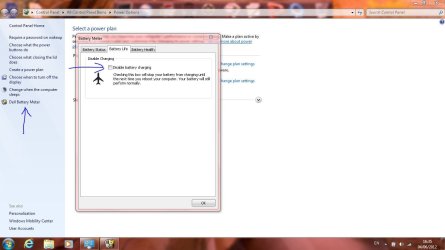
how to create a shortcut for disable battery charging Operation
Capture.JPG
 

My Computer

Computer Manufacturer/Model Number
dell 1558
OS
windows 7 home preminm x64
CPU
i7
Motherboard
dell
Memory
DDR3 4G
Graphics Card(s)
ATI HD 5470 1G
Monitor(s) Displays
15.6 LED
Hard Drives
Hitachi 500G
I'm curious....why would you want to disable battery charging?
 

My Computer

OS
Windows 7 Ultimate x64 SP1
CPU
Intel Core i7-2600
Motherboard
Gigabyte GA-P67A-UD3P-B3
Memory
12 GB Patriot Extreme DDR3-1333
Graphics Card(s)
Nvidia GTX 470
Monitor(s) Displays
Dell UltraSharp 2209WA
Hard Drives
OCZ Agility3 240 GB, WD5001AALS, WD7501AALS
PSU
OCZ ModStream 700W
Case
CoolerMaster HAF 912 Advanced
Cooling
CoolerMaster Hyper 212 Plus
Is it that he/she want to run on mains whilst leaving the battery in to prolong its life with the quick ability to switch it back on at command
IMO this should be a default option on all laptops because sometime just removing the battery is just not viable in certain situations
Unfortunately i do not know the command lines needed to create the 2 batch files needed for the on and off however im sure someone will know and maybe have the time to make such batch files
 

My Computer

Computer Manufacturer/Model Number
Me :P
OS
Windows 7 Home Premium x64 SP1
CPU
Core 2 Quad Q6600
Motherboard
Abit IN9 32X MAX
Memory
8 GB OCZ PC2-6400 nVIDIA SLI-Ready Edition (4X2GB)
Graphics Card(s)
AMP! GeForce GTX 260² 896MB 448-bit GDDR3 (650MHz/2100MHz)
Sound Card
Realtek 7.1 CH HD Audio
Monitor(s) Displays
37" LG 1080p HD LCD TV
Screen Resolution
1280x1024 + 1360x768
Hard Drives
40GB Mushkin SSD
60GB Intel 520 SSD
150GB Raptor HDD
500GB Caviar HDD
PSU
Thermaltake W0133RB 1200W PSU
Case
Antec 900
Cooling
OCZ Vendetta 2 + Antec 900 case fans
Keyboard
Logitech G15 (full layout)
Mouse
R.A.T.9
Internet Speed
Not fast enough!
That's a myth anyway. You aren't using the battery once the laptop recharges to 100% when connected to a power source. It doesn't "prolong" battery life at all. I'm not sure how this myth or rumor started, but it's laughable to anyone who works in corporate I.T. and maintains a fleet of laptops that almost always stay on their docks.
 

My Computer

OS
Windows 7 Ultimate x64 SP1
CPU
Intel Core i7-2600
Motherboard
Gigabyte GA-P67A-UD3P-B3
Memory
12 GB Patriot Extreme DDR3-1333
Graphics Card(s)
Nvidia GTX 470
Monitor(s) Displays
Dell UltraSharp 2209WA
Hard Drives
OCZ Agility3 240 GB, WD5001AALS, WD7501AALS
PSU
OCZ ModStream 700W
Case
CoolerMaster HAF 912 Advanced
Cooling
CoolerMaster Hyper 212 Plus
That's a myth anyway. You aren't using the battery once the laptop recharges to 100% when connected to a power source. It doesn't "prolong" battery life at all. I'm not sure how this myth or rumor started, but it's laughable to anyone who works in corporate I.T. and maintains a fleet of laptops that almost always stay on their docks.

Perhaps the myth, as you state, is based on multiple articles regarding laptop battery life. I am no expert in this field and so I read articles from sources that have a much greater understanding of the subject and go from there. Most of what I read seems to support the concept of prolonged life; true or false? I don't know.

A couple of examples of the articles available;

http://mobileoffice.about.com/od/usingyourlaptop/f/laptopbattery1.htm

http://www.makeuseof.com/tag/remove-laptop-battery-increase-life-geeks-weigh/

I have no horse in this race and my post is simply to provide a reason why people may be confused by the issue.
 

My Computer

Computer type
PC/Desktop
Computer Manufacturer/Model Number
Custom Built
OS
Windows 7 Professional x64
CPU
Intel i5 quad processor
Motherboard
DP67BG
Memory
16 GB
Graphics Card(s)
Radeon HD 5770
Sound Card
Realtek High Definition Audio
Monitor(s) Displays
Samsung SyncMaster
Screen Resolution
1920X1080
Hard Drives
WD 2TB (SATA Internal)
WD 1TB (USB External)
PSU
Corsair GS800
Case
Tower (Generic)
Cooling
3 Internal Fans
Keyboard
MS Wireless
Mouse
MS Optical Wired
Internet Speed
54 mbps
Antivirus
Emsisoft
Browser
IE-Version 9, Palemoon-Version 24.2.0
There's quite a bit of debate on the subject, but few people seem to remember two important facts:

1. Laptops are designed to shut off charging to the battery when it reaches 100%, and are designed to sit and run on AC power while the battery is in place.

2. Millions of I.T. staffers manage fleets of laptops that rarely ever come off of their docks, and those batteries often last for years.

Two many people put too much emphasis on things they've read, as opposed to "how things really are". Worrying about editing settings on a laptop to prolong the life of the battery cells is way way down on the list of priorities.

 

My Computer

OS
Windows 7 Ultimate x64 SP1
CPU
Intel Core i7-2600
Motherboard
Gigabyte GA-P67A-UD3P-B3
Memory
12 GB Patriot Extreme DDR3-1333
Graphics Card(s)
Nvidia GTX 470
Monitor(s) Displays
Dell UltraSharp 2209WA
Hard Drives
OCZ Agility3 240 GB, WD5001AALS, WD7501AALS
PSU
OCZ ModStream 700W
Case
CoolerMaster HAF 912 Advanced
Cooling
CoolerMaster Hyper 212 Plus
i konw Laptops are designed to shut off charging to the battery when it reaches 100% but What is the use of performance disable battery charging ?
What is your opinion؟
 

My Computer

Computer Manufacturer/Model Number
dell 1558
OS
windows 7 home preminm x64
CPU
i7
Motherboard
dell
Memory
DDR3 4G
Graphics Card(s)
ATI HD 5470 1G
Monitor(s) Displays
15.6 LED
Hard Drives
Hitachi 500G
I can't imagine a reason for wanting to disable the battery charging, to be honest. There's no factual truth to show that would extend your batteries' lifetime. I wouldn't worry about it at all. I don't on either of my two laptops.
 

My Computer

OS
Windows 7 Ultimate x64 SP1
CPU
Intel Core i7-2600
Motherboard
Gigabyte GA-P67A-UD3P-B3
Memory
12 GB Patriot Extreme DDR3-1333
Graphics Card(s)
Nvidia GTX 470
Monitor(s) Displays
Dell UltraSharp 2209WA
Hard Drives
OCZ Agility3 240 GB, WD5001AALS, WD7501AALS
PSU
OCZ ModStream 700W
Case
CoolerMaster HAF 912 Advanced
Cooling
CoolerMaster Hyper 212 Plus
Thank you from all Especially Sir George for useful articles
Furthermore Is there a way to make a shortcut?
 

My Computer

Computer Manufacturer/Model Number
dell 1558
OS
windows 7 home preminm x64
CPU
i7
Motherboard
dell
Memory
DDR3 4G
Graphics Card(s)
ATI HD 5470 1G
Monitor(s) Displays
15.6 LED
Hard Drives
Hitachi 500G
Back
Top