Creating a bootable flash drive from ISO file

subcook69420

New member
Local time
11:28 AM
Messages
19
First and foremost, I would like to apologize, as this is in regards to WinXP....

I have a friend that need to install Windows XP 32Bit, SP2.

I do not have a hard copy, but I do have an ISO file, its about 640 MB. Its a custom computer that does not have USB bootable capabilities, But I'm going to introduce my friend to PloP, which has gotten me out of a few binds myself, and has never failed me.

How do I get this ISO file, onto a USB flash drive, so that he may boot off of it, and install Windows XP?

Thank in Advance....


-Cheers
 

My Computer My Computer

At a glance

Microsoft Windows 7 Ultimate 64-bit 7601 Mult...AMD Phenom(tm) II X4 810 Processor8.00 GBNVIDIA GeForce GTX 460
Computer type
PC/Desktop
OS
Microsoft Windows 7 Ultimate 64-bit 7601 Multiprocessor Free Service Pack 1
CPU
AMD Phenom(tm) II X4 810 Processor
Motherboard
Gateway RS780
Memory
8.00 GB
Graphics Card(s)
NVIDIA GeForce GTX 460
Sound Card
(1) NVIDIA High Definition Audio (2) NVIDIA High Definitio
Screen Resolution
1600 x 900 x 32 bits (4294967296 colors) @ 59 Hz
Hard Drives
(1) WDC WD10EADS-22M2B0 ATA Device (2) WDC WD5000AADS-00M2B0 ATA Device (3) Generic Mini SD Reader USB Device (4) Generic USB CF Reader USB Device (5) Generic USB MS Reader USB Device (6) Generic USB SD Reader USB Device (7) Generic USB x
Last edited by a moderator:

My Computer My Computer

At a glance

Windows 7 Ultimate x64P4 3.2DDR 400ATI HD3850
OS
Windows 7 Ultimate x64
CPU
P4 3.2
Motherboard
Intel 815GM
Memory
DDR 400
Graphics Card(s)
ATI HD3850
Sound Card
C-Media 7.1
Monitor(s) Displays
SyncMaster 244T
Screen Resolution
1920*1200
Hard Drives
Several
PSU
500
Case
PowerSpec $24
Cooling
ThermalTake copper
Internet Speed
Blazing
Either way, I assume you need to have an XP license key.
Some may not realise that this thread is about installing an existing legally owned copy of XP.
 
Last edited:

My Computer My Computer

At a glance

Windows 7x64 Home Premium SP1Intel i7 2600kG.Skill Ripjaws (DDR3-1600) 2x4GBNvidia GeForce GTS 450; Intel HD Graphics 300...
Computer type
PC/Desktop
Computer Manufacturer/Model Number
Own build
OS
Windows 7x64 Home Premium SP1
CPU
Intel i7 2600k
Motherboard
ASUS P8Z68 Deluxe
Memory
G.Skill Ripjaws (DDR3-1600) 2x4GB
Graphics Card(s)
Nvidia GeForce GTS 450; Intel HD Graphics 3000(GT2+)
Monitor(s) Displays
Dell Ultrasharp IPS panel U2311H, Samsung SyncMaster P2350
Screen Resolution
1920x1080
Hard Drives
Samsung 850 Pro SSD 256GB, Samsung SSD 840 120GB, Seagates 1TB Barracuda ST31000528AS x2
PSU
Seasonic M12II 520W
Case
Lian Li Lancool PC-K60
Cooling
Case: 1x120mm, 3x140mm CPU: Hyper 212+
Keyboard
Logitech MK520 (wireless)
Mouse
Logitech MK520
Internet Speed
6-7 Mbps
Antivirus
Norton Security Premium, Malwarebytes on 2 (MSE on 3rd PC)
Browser
FireFox
Other Info
Audio: Logitech Z523 2.1
It is not necessary to include the license in the boot medium. Its absence will bring up a screen for key entry.
 

My Computer My Computer

At a glance

Windows 7 Ultimate x64P4 3.2DDR 400ATI HD3850
OS
Windows 7 Ultimate x64
CPU
P4 3.2
Motherboard
Intel 815GM
Memory
DDR 400
Graphics Card(s)
ATI HD3850
Sound Card
C-Media 7.1
Monitor(s) Displays
SyncMaster 244T
Screen Resolution
1920*1200
Hard Drives
Several
PSU
500
Case
PowerSpec $24
Cooling
ThermalTake copper
Internet Speed
Blazing
I used this site to create a bootable USB drive for XP installs
Install Windows XP on a Mini-Note (USB stick method)

I hope this one; does not have the hal.dll error.

OP's ISO looks to big, XP pro with sp3 is only 602 mb.
Iso size varies between editions and also between languages.

Known Windows XP SP3 CD Labels (Windows XP) [Page: 1 of 2] - TACKtech Corp.

OP's iso may be a modded version, though I suppose its OK if he has a genuine key and is sure the iso is clean.
 
Last edited by a moderator:

My Computer My Computer

At a glance

Windows 7 x64 pro/ Windows 7 x86 Pro/ XP SP3 x86
Computer Manufacturer/Model Number
Too many to describe...
OS
Windows 7 x64 pro/ Windows 7 x86 Pro/ XP SP3 x86
Now just to verify, I will be able to boot off of the USB flash drive (the BIOS does support this) and install XP onto the HDD with this method?

I have burnt the ISO (613MB) onto disc and booted and installed using this file before. My buddy's cd-rom seems to not recognize DVD+R discs, So I'm helping him with this workaround
 

My Computer My Computer

At a glance

Microsoft Windows 7 Ultimate 64-bit 7601 Mult...AMD Phenom(tm) II X4 810 Processor8.00 GBNVIDIA GeForce GTX 460
Computer type
PC/Desktop
OS
Microsoft Windows 7 Ultimate 64-bit 7601 Multiprocessor Free Service Pack 1
CPU
AMD Phenom(tm) II X4 810 Processor
Motherboard
Gateway RS780
Memory
8.00 GB
Graphics Card(s)
NVIDIA GeForce GTX 460
Sound Card
(1) NVIDIA High Definition Audio (2) NVIDIA High Definitio
Screen Resolution
1600 x 900 x 32 bits (4294967296 colors) @ 59 Hz
Hard Drives
(1) WDC WD10EADS-22M2B0 ATA Device (2) WDC WD5000AADS-00M2B0 ATA Device (3) Generic Mini SD Reader USB Device (4) Generic USB CF Reader USB Device (5) Generic USB MS Reader USB Device (6) Generic USB SD Reader USB Device (7) Generic USB x
First and foremost, I would like to apologize, as this is in regards to WinXP....

I have a friend that need to install Windows XP 32Bit, SP2.

I do not have a hard copy, but I do have an ISO file, its about 640 MB. Its a custom computer that does not have USB bootable capabilities, But I'm going to introduce my friend to PloP, which has gotten me out of a few binds myself, and has never failed me.

How do I get this ISO file, onto a USB flash drive, so that he may boot off of it, and install Windows XP?

Thank in Advance....


-Cheers

http://www.edmartechguide.com/2009/09/how-to-install-windows-xp-using-usb.html

This might be of some help. :D
 

My Computer My Computer

At a glance

Windows 7 Ultimate (64-bit)Intel Core 2 Duo E6420 (2.13Ghz)4GB DDR2-800 (2x2GB)AMD HD4670 (512MB DDR3)
Computer Manufacturer/Model Number
Custom-built desktop computer
OS
Windows 7 Ultimate (64-bit)
CPU
Intel Core 2 Duo E6420 (2.13Ghz)
Motherboard
Gigabyte G31M-S2C
Memory
4GB DDR2-800 (2x2GB)
Graphics Card(s)
AMD HD4670 (512MB DDR3)
Sound Card
Integrated
Monitor(s) Displays
17" CTX LCD (1280x1024)
Hard Drives
* W.D. 320GB SATA
* W.D. 250GB SATA
PSU
Enermax EG465P-VE (431W)
Case
Antec 300
Cooling
Stock Intel HSF
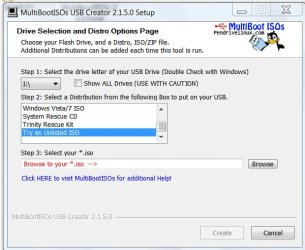
Boot ISOs from a pendrive

Look no farther than my thread in this very forum here .

Here is how you can create your bootable pendrive.

1. Download the latest version of MultibootISOs from here .

2. FAT32 format your pendrive.

3. Run Multiboot ISOs and select your pendrive.

4. From the list select "Try an unlisted ISO", browse to the ISO and click "Create"

MultibootISO.jpg

And that is it. Check the menu.lst to confirm that your ISO is listed. If not edit the menu using Notepad to include it.

(In the previous versions, there was no provision to try an unlisted ISO. One had to select atleast one ISO from the list, allow the program download it and then create a bootable pendrive in the first instance. Thereafter one can copy any bootable ISOs to the pendrive and then edit the menu.lst to include it. With each new version, the author has incorporated improvements. I have not tried the new version, but you should have no difficulty after going through my thread.)

Good luck.
 

My Computer My Computer

At a glance

Windows 7 Ultimate 32bitAMD Phenom II X3 720 ProcessorTranscend DDR2 (PC2 6400) 4 X 1GBIntegrated + ATI Radeon 4550
Computer Manufacturer/Model Number
self-assembled
OS
Windows 7 Ultimate 32bit
CPU
AMD Phenom II X3 720 Processor
Motherboard
Gigabyte GA-MA78GM-S2H Revision 1.0
Memory
Transcend DDR2 (PC2 6400) 4 X 1GB
Graphics Card(s)
Integrated + ATI Radeon 4550
Sound Card
Integrated Realtek ALC 889A
Monitor(s) Displays
DELL 1704 FPT
Screen Resolution
1280 x 1024
Hard Drives
Western Digital Caviar SE16 250 GB x2 in RAID 0
PSU
Coolermaster 400 W
Case
Zebronics Cube
Cooling
stock
Keyboard
Microsoft - wired
Mouse
Microsoft - wired
Internet Speed
ADSL 256-512Kbps
That worked like a charm!!! Thanks!
 

My Computer My Computer

At a glance

Microsoft Windows 7 Ultimate 64-bit 7601 Mult...AMD Phenom(tm) II X4 810 Processor8.00 GBNVIDIA GeForce GTX 460
Computer type
PC/Desktop
OS
Microsoft Windows 7 Ultimate 64-bit 7601 Multiprocessor Free Service Pack 1
CPU
AMD Phenom(tm) II X4 810 Processor
Motherboard
Gateway RS780
Memory
8.00 GB
Graphics Card(s)
NVIDIA GeForce GTX 460
Sound Card
(1) NVIDIA High Definition Audio (2) NVIDIA High Definitio
Screen Resolution
1600 x 900 x 32 bits (4294967296 colors) @ 59 Hz
Hard Drives
(1) WDC WD10EADS-22M2B0 ATA Device (2) WDC WD5000AADS-00M2B0 ATA Device (3) Generic Mini SD Reader USB Device (4) Generic USB CF Reader USB Device (5) Generic USB MS Reader USB Device (6) Generic USB SD Reader USB Device (7) Generic USB x
Glad you got it right. Now you can copy any bootable ISO and boot your computer with it. That includes your backup and restore recovery CDs and thats the power of the USB pendrives unleashed.

If you have any problems down the line, please do report here for us to know.
 

My Computer My Computer

At a glance

Windows 7 Ultimate 32bitAMD Phenom II X3 720 ProcessorTranscend DDR2 (PC2 6400) 4 X 1GBIntegrated + ATI Radeon 4550
Computer Manufacturer/Model Number
self-assembled
OS
Windows 7 Ultimate 32bit
CPU
AMD Phenom II X3 720 Processor
Motherboard
Gigabyte GA-MA78GM-S2H Revision 1.0
Memory
Transcend DDR2 (PC2 6400) 4 X 1GB
Graphics Card(s)
Integrated + ATI Radeon 4550
Sound Card
Integrated Realtek ALC 889A
Monitor(s) Displays
DELL 1704 FPT
Screen Resolution
1280 x 1024
Hard Drives
Western Digital Caviar SE16 250 GB x2 in RAID 0
PSU
Coolermaster 400 W
Case
Zebronics Cube
Cooling
stock
Keyboard
Microsoft - wired
Mouse
Microsoft - wired
Internet Speed
ADSL 256-512Kbps
please help, i tried to make the bottable flash drive and from my 8GB flas is now just 1GB and from 4GB is 256MB. i found in computer management tools that it made new partitions in both flashs. 1, how can i reverse this 2, how can i make XGB bottable discs ?
 

My Computer My Computer

At a glance

Windows 7 Home Premium
OS
Windows 7 Home Premium
please help, i tried to make the bottable flash drive and from my 8GB flas is now just 1GB and from 4GB is 256MB. i found in computer management tools that it made new partitions in both flashs. 1, how can i reverse this 2, how can i make XGB bottable discs ?

More information is required.

What exactly is the purpose for creating a bootable pendrive?

What exactly did you do?

You may try formatting both the pendrives to clean it. On My Computer, right click on the pendrive icon and click on format. Choose FAT32 file system to format, if you want to create a multiboot ISO pendrive. Uncheck the Quick format and click on Start so that a full format is done. You may then go ahead creating your multiboot ISO pendrive as detailed in a previous post. Of course you must have a clean bootable ISO, whatever ISO it is.
 

My Computer My Computer

At a glance

Windows 7 Ultimate 32bitAMD Phenom II X3 720 ProcessorTranscend DDR2 (PC2 6400) 4 X 1GBIntegrated + ATI Radeon 4550
Computer Manufacturer/Model Number
self-assembled
OS
Windows 7 Ultimate 32bit
CPU
AMD Phenom II X3 720 Processor
Motherboard
Gigabyte GA-MA78GM-S2H Revision 1.0
Memory
Transcend DDR2 (PC2 6400) 4 X 1GB
Graphics Card(s)
Integrated + ATI Radeon 4550
Sound Card
Integrated Realtek ALC 889A
Monitor(s) Displays
DELL 1704 FPT
Screen Resolution
1280 x 1024
Hard Drives
Western Digital Caviar SE16 250 GB x2 in RAID 0
PSU
Coolermaster 400 W
Case
Zebronics Cube
Cooling
stock
Keyboard
Microsoft - wired
Mouse
Microsoft - wired
Internet Speed
ADSL 256-512Kbps
thx for the reply but i just solved the problem. the problem was that i installed on both pendrives Chromium OS and than i just did a normal format to make bootable pendrives without looking on the capacity. so not the app for making bootable pendrive but chromium os caused the problem. i repaired the pendrives in DOS with:

diskpart
list disk
select disk X (select the one you need)
select partition 1
delete partition 1
create partition primary
than offcourse: EXIT

i allways forget this method :o but this is 100%. maybe for someone will be better to do this for 4 steps and skip others just write CLEAR, EXIT.
THX
 

My Computer My Computer

At a glance

Windows 7 Home Premium
OS
Windows 7 Home Premium
Back
Top