
- Local time
- 1:19 AM
- Messages
- 661
Hi. Following advice from this forum I moved my bootmgr to the C drive from the System Reserved partition, using EasyBCD. Total disaster - Windows now takes four minutes to boot instead of 20 seconds or so - even though I have moved the bootmgr back to the System Reserved partition. Even when I restore an image I made of the O/S before I made the change, the boot time remains ridiculously long.
I have spent days Googling this, trying to create boot traces and the like (no success so far - they fail 'waiting for prefetcher') and I am into the horrible cycle of troubleshooting, not the original problem, but why my troubleshooting steps aren't working! I could scream...
Well, given that that wouldn't help matters, before I do a full Windows repair, or finally a complete reinstall, I would try adding another Windows 7 (x64) to the same physical disc (an SSD), different partition, to check that a clean installation boots normally. If it doesn't then I presumably have hardware problems - although this seems unlikely as the problem started when I moved the bootmgr, so for now I am sticking with it being a software problem.
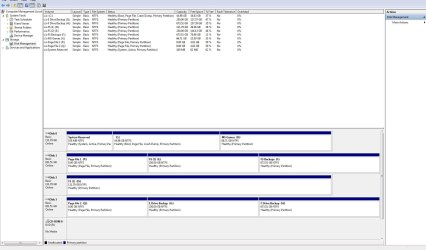
Could someone please advise the best way of creating a multiboot - both Win7 x64? I have done this years ago, creating an Windows XP/Millennium dual boot, but obviously things have moved on. I could temporarily delete the data from my 'X' partition (see screenshot below) - I have all the folders backed up - and install the 2nd. instance of Windows 7 there?
How does Win7 work when you boot with two O/Ss? With no boot.ini file, are you presented with a similar screen to XP at startup, with a choice of O/S?
Any help appreciated - I don't want to make a bad situation worse - and I certainly don't want to reinstall my primary O/S only to discover boot times are still very slow. Need to do a test like this first..
Thanks,
Martin
I have spent days Googling this, trying to create boot traces and the like (no success so far - they fail 'waiting for prefetcher') and I am into the horrible cycle of troubleshooting, not the original problem, but why my troubleshooting steps aren't working! I could scream...
Well, given that that wouldn't help matters, before I do a full Windows repair, or finally a complete reinstall, I would try adding another Windows 7 (x64) to the same physical disc (an SSD), different partition, to check that a clean installation boots normally. If it doesn't then I presumably have hardware problems - although this seems unlikely as the problem started when I moved the bootmgr, so for now I am sticking with it being a software problem.
Could someone please advise the best way of creating a multiboot - both Win7 x64? I have done this years ago, creating an Windows XP/Millennium dual boot, but obviously things have moved on. I could temporarily delete the data from my 'X' partition (see screenshot below) - I have all the folders backed up - and install the 2nd. instance of Windows 7 there?
How does Win7 work when you boot with two O/Ss? With no boot.ini file, are you presented with a similar screen to XP at startup, with a choice of O/S?
Any help appreciated - I don't want to make a bad situation worse - and I certainly don't want to reinstall my primary O/S only to discover boot times are still very slow. Need to do a test like this first..
Thanks,
Martin
Attachments
My Computer
- Computer type
- PC/Desktop
- Computer Manufacturer/Model Number
- Custom Build
- OS
- Windows 7 Home Premium SP1 64-bit
- CPU
- Intel Core i7-4790K CPU @ 4.5GHz
- Motherboard
- Asus H97I-PLUS
- Memory
- 16GB KINGSTON HYPER-X FURY DUAL-DDR3 1600MHz
- Graphics Card(s)
- 8GB NVIDIA GEFORCE GTX 1070
- Monitor(s) Displays
- HannsG 28" & Dell 24"
- Screen Resolution
- 1920x1200
- Hard Drives
- 1 x 2TB Samsung Evo 860 SSD
2 x 500GB Samsung Evo 850 SSD
- PSU
- CORSAIR 650W CS SERIES
- Case
- Thermaltake Core V1 Mini ITX Cube
- Cooling
- NOCTUA NH-L12
- Browser
- Firefox
- Other Info
- Custom PC used for X-Plane 11
