
Solved Creating a Shortcut direct to a control panel sub-level window

ddd990

New member
Member
Local time
6:33 AM
Messages
31
Location
UK/Germany/NYC
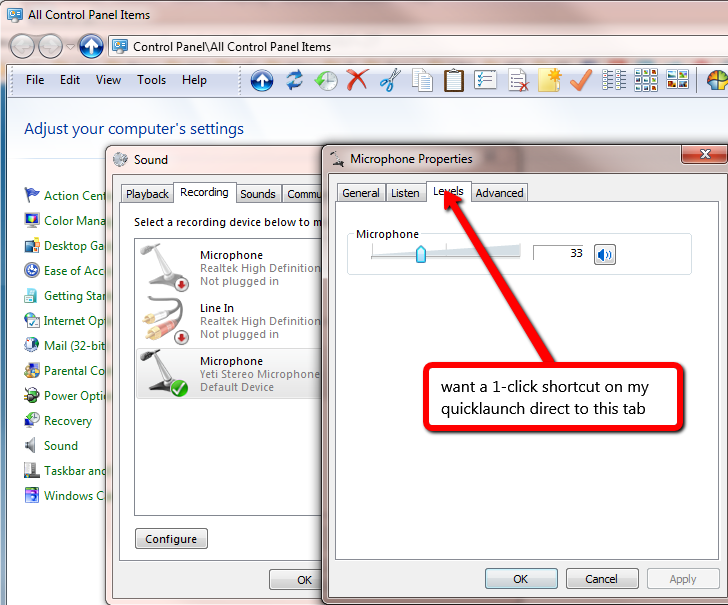
I find that I'm wanting to change the Microphone level quite often and wonder if I can somehow create a shortcut direct to it, so it's a 1-click thing, straight to the Levels tab.

Currently I have to click about 7 times to get to that tab. Is it possible to create a shortcut to a drilled down level like that? If not, does anyone know if there's a way to find where in the registry the Level number is stored ? Then I can at least create a few preset .reg files that I can click on to set it without even going into that Levels dialog.
NqUHZd0.png
 

My Computer

Computer Manufacturer/Model Number
Custom build
OS
Windows 7 Pro x64
CPU
i7-2600K @ 3.5GHz
Motherboard
Gigabyte GA-P67A-UD5
Memory
16GB DDR3-1600
Graphics Card(s)
Gigabyte HD5850 "OC" 1GB
Sound Card
basic motherboard onboard, with Logitech Z4 speakers
Monitor(s) Displays
1.LG 27" E2750V, 2.Samsung 19" 913N
Screen Resolution
1920x1080, 1280x1024
Hard Drives
Intel X25-M G2 160GB SSD, 2TB SATA 600 internal, 2TB SATA 600 USB3.0 external
PSU
Seasonic X-460FL 80+ Gold
Case
Fractal "Define R3"
Cooling
Scythe BIG Shuriken
Keyboard
Logitech Illuminated 920-000914 (Super super quiet)
Mouse
Microsoft Optical
Internet Speed
DSL

My Computer

Computer type
PC/Desktop
Computer Manufacturer/Model Number
Self built custom
OS
64-bit Windows 11 Pro for Workstations
CPU
Intel i7-8700K OC'd to 5 GHz
Motherboard
ASUS ROG Maximus XI Formula Z390
Memory
64 GB (4x16GB) G.SKILL TridentZ RGB DDR4 3600 MHz
Graphics Card(s)
ASUS ROG-STRIX-GTX1080TI-O11G-GAMING
Sound Card
Integrated
Monitor(s) Displays
2 x Samsung Odyssey G7 27"
Screen Resolution
2560x1440
Hard Drives
1TB Samsung 990 PRO M.2,
4TB Samsung 990 PRO PRO M.2,
TerraMaster F8 SSD Plus NAS
PSU
Seasonic Prime Titanium 850W
Case
Thermaltake Core P3
Cooling
Corsair Hydro H115i
Keyboard
Logitech wireless K800
Mouse
Logitech MX Master 4
Internet Speed
2 Gb/s Download and 100 Mb/s Upload
Antivirus
Malwarebyte Anti-Malware Premium
Browser
Google Chrome
Other Info
Logitech Z625 speaker system,
Logitech BRIO 4K Pro webcam,
HP Color LaserJet Pro MFP M477fdn,
APC SMART-UPS RT 1000 XL - SURT1000XLI,
Galaxy S23 Plus phone
Hello ddd990,

If you like for now, you could use the shortcut in the tutorial below to open to the "Recording" tab in Sound properties to save a few clicks.
Hope this helps some, :)
Shawn
Yes it does helps some. About 50% of my clicks are gone :D

I see now that it's come up before, and this is as close as anyone got.

I'd love to know where Windows is storing this recording level value though. It's got to be either in the registry or in a file.
 

My Computer

Computer Manufacturer/Model Number
Custom build
OS
Windows 7 Pro x64
CPU
i7-2600K @ 3.5GHz
Motherboard
Gigabyte GA-P67A-UD5
Memory
16GB DDR3-1600
Graphics Card(s)
Gigabyte HD5850 "OC" 1GB
Sound Card
basic motherboard onboard, with Logitech Z4 speakers
Monitor(s) Displays
1.LG 27" E2750V, 2.Samsung 19" 913N
Screen Resolution
1920x1080, 1280x1024
Hard Drives
Intel X25-M G2 160GB SSD, 2TB SATA 600 internal, 2TB SATA 600 USB3.0 external
PSU
Seasonic X-460FL 80+ Gold
Case
Fractal "Define R3"
Cooling
Scythe BIG Shuriken
Keyboard
Logitech Illuminated 920-000914 (Super super quiet)
Mouse
Microsoft Optical
Internet Speed
DSL
Replying to my own (old) thread for completeness. I did end up solving my problem in a different way. My main goal was to get to change the volume level quickly. I thought that getting to that screen was the best way, but it turns out it's easier than that. By installing NirCmd, I can create batch files that immediately change the volume to a preset level and I can have a couple of them on my desktop for different values. I even created a batch file that uses the nircmdc command which has a loop property, so it re-sets the volume 10 times per second and that overrides the automatic volume takeover features of things like skype, lync, and gotomeeting. Sometimes they'll raise your recording volume to 100% if they detect no noise from you (which can be because you're not doing/saying anything, so it's correct). With the microphone I have, the perfect recording level is 10%, so naturally I deafen everyone when these dumb programs take over. With my nircmdc loop, I get to fight back and change it back to 10% before it can even be noticed they made a change.
 

My Computer

Computer Manufacturer/Model Number
Custom build
OS
Windows 7 Pro x64
CPU
i7-2600K @ 3.5GHz
Motherboard
Gigabyte GA-P67A-UD5
Memory
16GB DDR3-1600
Graphics Card(s)
Gigabyte HD5850 "OC" 1GB
Sound Card
basic motherboard onboard, with Logitech Z4 speakers
Monitor(s) Displays
1.LG 27" E2750V, 2.Samsung 19" 913N
Screen Resolution
1920x1080, 1280x1024
Hard Drives
Intel X25-M G2 160GB SSD, 2TB SATA 600 internal, 2TB SATA 600 USB3.0 external
PSU
Seasonic X-460FL 80+ Gold
Case
Fractal "Define R3"
Cooling
Scythe BIG Shuriken
Keyboard
Logitech Illuminated 920-000914 (Super super quiet)
Mouse
Microsoft Optical
Internet Speed
DSL
Back
Top