Creating Lenovo Laptop Recovery media from DVDs. Laptop wont let me do

NellyPuff

New member
Local time
5:19 AM
Messages
24
Basically i have a Lenovo ThinkPad L530 laptop.

I've created the recovery DVDs, but unbeknown to me at the time - you're only allowed to create one set. What i'd like is to put this onto a USB stick.

Currently i have:

DVD #1 - Boot Media: (312mb)

The boot DVD containing "BOOT" folder, BootMgr file which is quite small & Winre.Wim at about 300mb.

DVD #2 - Data DVD #1: (4.03GB)

factory recovery folder, recovery folder & Autorun file

DVD #3 - Data DVD #2: (3.87GB)

factory recovery folder & recovery folder (NO autorun file)

DVD #4 - Data DVD #3: (3.04GB)

factory recovery folder, recovery folder, LenovoQDrive file, qdrive icon file.


My USB stick is 16GB capacity.

So basically i'd like to make the USB stick the recovery media. I can't do this from the laptop as Lenovo only let you create one ......... so how can i do this? Can i do this would be the first question & if so - how?
 

My Computer My Computer

At a glance

Win7 Pro 64bit & WinXP Pro
OS
Win7 Pro 64bit & WinXP Pro
Hi Nelly I also have an Lenovo its a different model than yous is but I can make as many copies of the recovery discs
as I want . You could make a systems image which would be a lot better than the recovery discs as with them you will always have the bloated software that comes with Lenovo models saying that you would need a lot more space than your 16gb usb drive .
 

My Computer My Computer

At a glance

windows 7 home 64bitINTEL-CORE I716GB
Computer Manufacturer/Model Number
W530-3630QM1
OS
windows 7 home 64bit
CPU
INTEL-CORE I7
Memory
16GB
Hard Drives
750GB
Browser
Chrome
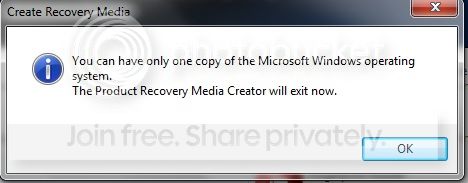
Yeah - i know using the Lenovo standard recovery discs would put me back to factory settings (including all the crap that comes with it), but as far as the USB stick goes, i'm happy with that. I'd just like to know how to do it as trying it through the laptop gives me the following:

recovery.jpg


I don't want to focus too much on the following, but how would i go about making a system image? Is this basically something like - set it up how i want it, then use something like Acronis True Image & burn the file to an external HDD?
 

My Computer My Computer

At a glance

Win7 Pro 64bit & WinXP Pro
OS
Win7 Pro 64bit & WinXP Pro
how would i go about making a system image? Is this basically something like - set it up how i want it, then use something like Acronis True Image & burn the file to an external HDD?

Correct. I tend to use Macrium Reflect for that. Here is the Macrium WinPE - write it to a USB flash drive using something like YUMI. You can create and restore images from this WinPE, directly from the USB flsh drive.

https://drive.google.com/#folders/0B6gVug1Gs-l1b1VvWWd6b0dLSE0

More info on Macrium Reflect:
http://www.sevenforums.com/tutorials/73828-imaging-free-macrium.html
 

My Computer My Computer

At a glance

Windows 10 Pro x64 ; Xubuntu x64Intel i7 860 @ 2.80 GHz O/C'ed to 4.0GHz16GB Corsair Vengance DDR3 @ 661 MHz Dual Cha...EVGA NVidia GTX 560 1024MB
Computer type
PC/Desktop
Computer Manufacturer/Model Number
Golden Mk. I.4
OS
Windows 10 Pro x64 ; Xubuntu x64
CPU
Intel i7 860 @ 2.80 GHz O/C'ed to 4.0GHz
Motherboard
Gigabyte P55A-UD3R Rev.1. Award BIOS F13
Memory
16GB Corsair Vengance DDR3 @ 661 MHz Dual Channel (9-9-9-24)
Graphics Card(s)
EVGA NVidia GTX 560 1024MB
Sound Card
Realtek Integrated
Monitor(s) Displays
Dual Samsung SyncMaster 2494HS
Screen Resolution
1920*1080 and 1920*1080
Hard Drives
1*Samsung 840 EVO 120GB SSD;
1*OCZ Vertex 2 60GB SSD;
2*Samsung F3 SpinPoint 1TB in RAID0;
1*Samsung F1 SpinPoint 1TB;
2*Western Digital 1TB External USB 3.0
1*Western Digital 500GB External USB 3.0
1*Seagate 500GB External USB 2.0
PSU
Thermaltake ToughPower QFan 750W
Case
Thermaltake Element S VK60001W2Z
Cooling
Corsair H60 Water Cooling, 2*230mm and 2*80mm case fans
Keyboard
Logitech G110
Mouse
Logitech MX518
.............

My USB stick is 16GB capacity.

So basically i'd like to make the USB stick the recovery media. I can't do this from the laptop as Lenovo only let you create one ......... so how can i do this? Can i do this would be the first question & if so - how?
I agree with comments about using system images. I personally use both Windows inbuilt imaging and the free Macrium Reflect.

But concerning your original question. I don't think it is easy to transfer the functionality of the factory restore DVDs to a USB flash drive. What I would do is make ISO files for each of the restore DVDs using
Imgburn. Store the ISOs on an external HDD or wherever you want. Using Imgburn again and the ISO files you can burn new factory restore DVDs whenever you like.
 

My Computer My Computer

At a glance

Windows 7x64 Home Premium SP1Intel i7 2600kG.Skill Ripjaws (DDR3-1600) 2x4GBNvidia GeForce GTS 450; Intel HD Graphics 300...
Computer type
PC/Desktop
Computer Manufacturer/Model Number
Own build
OS
Windows 7x64 Home Premium SP1
CPU
Intel i7 2600k
Motherboard
ASUS P8Z68 Deluxe
Memory
G.Skill Ripjaws (DDR3-1600) 2x4GB
Graphics Card(s)
Nvidia GeForce GTS 450; Intel HD Graphics 3000(GT2+)
Monitor(s) Displays
Dell Ultrasharp IPS panel U2311H, Samsung SyncMaster P2350
Screen Resolution
1920x1080
Hard Drives
Samsung 850 Pro SSD 256GB, Samsung SSD 840 120GB, Seagates 1TB Barracuda ST31000528AS x2
PSU
Seasonic M12II 520W
Case
Lian Li Lancool PC-K60
Cooling
Case: 1x120mm, 3x140mm CPU: Hyper 212+
Keyboard
Logitech MK520 (wireless)
Mouse
Logitech MK520
Internet Speed
6-7 Mbps
Antivirus
Norton Security Premium, Malwarebytes on 2 (MSE on 3rd PC)
Browser
FireFox
Other Info
Audio: Logitech Z523 2.1
.............

My USB stick is 16GB capacity.

So basically i'd like to make the USB stick the recovery media. I can't do this from the laptop as Lenovo only let you create one ......... so how can i do this? Can i do this would be the first question & if so - how?
I agree with comments about using system images. I personally use both Windows inbuilt imaging and the free Macrium Reflect.

But concerning your original question. I don't think it is easy to transfer the functionality of the factory restore DVDs to a USB flash drive. What I would do is make ISO files for each of the restore DVDs using
Imgburn. Store the ISOs on an external HDD or wherever you want. Using Imgburn again and the ISO files you can burn new factory restore DVDs whenever you like.
I don't want to create more DVDs. The 4 i have is plenty. I wanted it shifted to 1x USB stick for the advantages this would offer over the same stuff being spanned over 4 DVDs.

I'll look at the clean install links provided tomorrow when i'm a bit more awake. Thanks.
 

My Computer My Computer

At a glance

Win7 Pro 64bit & WinXP Pro
OS
Win7 Pro 64bit & WinXP Pro
Hi,

MJF's solution is the best : write the 4 x ISO's to an external USB drive. If you need DVD's, thats when you burn them from these ISO's.

Regards,
Golden
 

My Computer My Computer

At a glance

Windows 10 Pro x64 ; Xubuntu x64Intel i7 860 @ 2.80 GHz O/C'ed to 4.0GHz16GB Corsair Vengance DDR3 @ 661 MHz Dual Cha...EVGA NVidia GTX 560 1024MB
Computer type
PC/Desktop
Computer Manufacturer/Model Number
Golden Mk. I.4
OS
Windows 10 Pro x64 ; Xubuntu x64
CPU
Intel i7 860 @ 2.80 GHz O/C'ed to 4.0GHz
Motherboard
Gigabyte P55A-UD3R Rev.1. Award BIOS F13
Memory
16GB Corsair Vengance DDR3 @ 661 MHz Dual Channel (9-9-9-24)
Graphics Card(s)
EVGA NVidia GTX 560 1024MB
Sound Card
Realtek Integrated
Monitor(s) Displays
Dual Samsung SyncMaster 2494HS
Screen Resolution
1920*1080 and 1920*1080
Hard Drives
1*Samsung 840 EVO 120GB SSD;
1*OCZ Vertex 2 60GB SSD;
2*Samsung F3 SpinPoint 1TB in RAID0;
1*Samsung F1 SpinPoint 1TB;
2*Western Digital 1TB External USB 3.0
1*Western Digital 500GB External USB 3.0
1*Seagate 500GB External USB 2.0
PSU
Thermaltake ToughPower QFan 750W
Case
Thermaltake Element S VK60001W2Z
Cooling
Corsair H60 Water Cooling, 2*230mm and 2*80mm case fans
Keyboard
Logitech G110
Mouse
Logitech MX518
Here's a thought-

Stick your CD/DVD into the drive & start up/restart your machine & it boots to it no problem.

Does it do that for USB? It's no good having the boot media on a USB stick if the machine can't see the USB port on startup. You'll have to excuse my lack of know-how.


EDIT: Trying the IMGBurn approach. It's making a *.bin file & not a *.iso file.
 

My Computer My Computer

At a glance

Win7 Pro 64bit & WinXP Pro
OS
Win7 Pro 64bit & WinXP Pro
I used UltraISO to create .iso's of the DVDs i made from my laptop.

Can i make these bootable, or do i need a proper Windows 7 DVD to do this?
 

My Computer My Computer

At a glance

Win7 Pro 64bit & WinXP Pro
OS
Win7 Pro 64bit & WinXP Pro
I used UltraISO to create .iso's of the DVDs i made from my laptop.

Can i make these bootable, or do i need a proper Windows 7 DVD to do this?
I don't understand why you had the imgburn problem. I'll look into for my own satisfaction.

Re the question above. You can use a number of tools (YUMI being popular) to boot a single ISO made from a bootable CD/DVD. But the factory restore process has multiple ISOs. You need to use them to burn DVDs and boot from the DVDs. In the restore process it asks you to insert the next DVD as part of the process.
 

My Computer My Computer

At a glance

Windows 7x64 Home Premium SP1Intel i7 2600kG.Skill Ripjaws (DDR3-1600) 2x4GBNvidia GeForce GTS 450; Intel HD Graphics 300...
Computer type
PC/Desktop
Computer Manufacturer/Model Number
Own build
OS
Windows 7x64 Home Premium SP1
CPU
Intel i7 2600k
Motherboard
ASUS P8Z68 Deluxe
Memory
G.Skill Ripjaws (DDR3-1600) 2x4GB
Graphics Card(s)
Nvidia GeForce GTS 450; Intel HD Graphics 3000(GT2+)
Monitor(s) Displays
Dell Ultrasharp IPS panel U2311H, Samsung SyncMaster P2350
Screen Resolution
1920x1080
Hard Drives
Samsung 850 Pro SSD 256GB, Samsung SSD 840 120GB, Seagates 1TB Barracuda ST31000528AS x2
PSU
Seasonic M12II 520W
Case
Lian Li Lancool PC-K60
Cooling
Case: 1x120mm, 3x140mm CPU: Hyper 212+
Keyboard
Logitech MK520 (wireless)
Mouse
Logitech MK520
Internet Speed
6-7 Mbps
Antivirus
Norton Security Premium, Malwarebytes on 2 (MSE on 3rd PC)
Browser
FireFox
Other Info
Audio: Logitech Z523 2.1
I found this which seems to show how to make a USB drive bootable: How to make a bootable flash drive - YouTube Which seemed easier to understand. Not sure whether it works or not.

I followed that & copied over the .iso's i made from the DVDs. Time to see if it works.
 

My Computer My Computer

At a glance

Win7 Pro 64bit & WinXP Pro
OS
Win7 Pro 64bit & WinXP Pro
Last edited:

My Computer My Computer

At a glance

Win7 Pro 64bit & WinXP Pro
OS
Win7 Pro 64bit & WinXP Pro
This explains the MBR boot process.
http://www.sevenforums.com/software/139658-reflect-updates-3.html#post1207608
The you tube link in a sense preps the USB for booting and is standard practice.
Clean - wipes partition (not fully) and inserts bootcode in the USB MBR
Create partition primary - adds a partition table entry to the MBR
Active - set the MBR 08 flag which tells the BIOS to consider this a bootable device
Format - sets the format code ID in the MBR and adds a file system to the USB

If this is all you do you then you proceed part way though the boot process. The Partition boot record then goes looking for a boot manager. If it doesn't find one then you get the "BOOTMGR is missing" message.
Now if you copy all the files from a system repair DVD then the USB will boot like a System Repair DVD because it contains the other elements to boot something meaningful. What you have added is a Winre environment (Repair). By adding a Winpe (preinstall) environment you can run a number of Windows executables - *.exe which can be added to the USB. You may want to read up on this.

To be able to boot multiple applications YUMI is often used.
I've gone into some detail here because I think others ask the same question as yourself.
 

My Computer My Computer

At a glance

Windows 7x64 Home Premium SP1Intel i7 2600kG.Skill Ripjaws (DDR3-1600) 2x4GBNvidia GeForce GTS 450; Intel HD Graphics 300...
Computer type
PC/Desktop
Computer Manufacturer/Model Number
Own build
OS
Windows 7x64 Home Premium SP1
CPU
Intel i7 2600k
Motherboard
ASUS P8Z68 Deluxe
Memory
G.Skill Ripjaws (DDR3-1600) 2x4GB
Graphics Card(s)
Nvidia GeForce GTS 450; Intel HD Graphics 3000(GT2+)
Monitor(s) Displays
Dell Ultrasharp IPS panel U2311H, Samsung SyncMaster P2350
Screen Resolution
1920x1080
Hard Drives
Samsung 850 Pro SSD 256GB, Samsung SSD 840 120GB, Seagates 1TB Barracuda ST31000528AS x2
PSU
Seasonic M12II 520W
Case
Lian Li Lancool PC-K60
Cooling
Case: 1x120mm, 3x140mm CPU: Hyper 212+
Keyboard
Logitech MK520 (wireless)
Mouse
Logitech MK520
Internet Speed
6-7 Mbps
Antivirus
Norton Security Premium, Malwarebytes on 2 (MSE on 3rd PC)
Browser
FireFox
Other Info
Audio: Logitech Z523 2.1
I used the YUMI program just now, but clearly i don't know what i'm doing.

It booted, but when i did it, it just said:

Booting-
boot

& then did nothing.

Looks like i'm resigned to sticking with the DVDs as going the USB route clearly isn't going to work for me as i don't understand what i'm doing.
 

My Computer My Computer

At a glance

Win7 Pro 64bit & WinXP Pro
OS
Win7 Pro 64bit & WinXP Pro
Who ever knows what they are doing to start with? The beauty of a flash drive is you can play around with it for as long as you have the time.
A quick google search came up with YouTube - he says his grandma could do it:)
 

My Computer My Computer

At a glance

Windows 7x64 Home Premium SP1Intel i7 2600kG.Skill Ripjaws (DDR3-1600) 2x4GBNvidia GeForce GTS 450; Intel HD Graphics 300...
Computer type
PC/Desktop
Computer Manufacturer/Model Number
Own build
OS
Windows 7x64 Home Premium SP1
CPU
Intel i7 2600k
Motherboard
ASUS P8Z68 Deluxe
Memory
G.Skill Ripjaws (DDR3-1600) 2x4GB
Graphics Card(s)
Nvidia GeForce GTS 450; Intel HD Graphics 3000(GT2+)
Monitor(s) Displays
Dell Ultrasharp IPS panel U2311H, Samsung SyncMaster P2350
Screen Resolution
1920x1080
Hard Drives
Samsung 850 Pro SSD 256GB, Samsung SSD 840 120GB, Seagates 1TB Barracuda ST31000528AS x2
PSU
Seasonic M12II 520W
Case
Lian Li Lancool PC-K60
Cooling
Case: 1x120mm, 3x140mm CPU: Hyper 212+
Keyboard
Logitech MK520 (wireless)
Mouse
Logitech MK520
Internet Speed
6-7 Mbps
Antivirus
Norton Security Premium, Malwarebytes on 2 (MSE on 3rd PC)
Browser
FireFox
Other Info
Audio: Logitech Z523 2.1
Thanks for the reply.

I did actually follow those steps, but it didn't work. I'll go through step by step what i did...

The files i turned into .iso's were on the USB stick when i started this process - that's the boot DVD & the 3 data DVDs.
Insert USB stick (Drive M)
Select drive M
Step2: scroll towards the bottom to find something resembling Windows 7 .... i chose "Ophcrack Vista/7 (Password Finder)"
Step3: Selected browse & then selected what was the .iso created from the boot DVD as part of the recovery set of disks.

I guess i'm not as clever as his granny as this clearly hasn't worked for me. I must've done something wrong.
 

My Computer My Computer

At a glance

Win7 Pro 64bit & WinXP Pro
OS
Win7 Pro 64bit & WinXP Pro
Step2: scroll towards the bottom to find something resembling Windows 7 .... i chose "Ophcrack Vista/7 (Password Finder)"

Why Ophcrack?

Choose the "Unlisted ISO" at the very bottom - make sure the ISO has NO spaces in the name or it will NOT boot.
 

My Computer My Computer

At a glance

Windows 10 Pro x64 ; Xubuntu x64Intel i7 860 @ 2.80 GHz O/C'ed to 4.0GHz16GB Corsair Vengance DDR3 @ 661 MHz Dual Cha...EVGA NVidia GTX 560 1024MB
Computer type
PC/Desktop
Computer Manufacturer/Model Number
Golden Mk. I.4
OS
Windows 10 Pro x64 ; Xubuntu x64
CPU
Intel i7 860 @ 2.80 GHz O/C'ed to 4.0GHz
Motherboard
Gigabyte P55A-UD3R Rev.1. Award BIOS F13
Memory
16GB Corsair Vengance DDR3 @ 661 MHz Dual Channel (9-9-9-24)
Graphics Card(s)
EVGA NVidia GTX 560 1024MB
Sound Card
Realtek Integrated
Monitor(s) Displays
Dual Samsung SyncMaster 2494HS
Screen Resolution
1920*1080 and 1920*1080
Hard Drives
1*Samsung 840 EVO 120GB SSD;
1*OCZ Vertex 2 60GB SSD;
2*Samsung F3 SpinPoint 1TB in RAID0;
1*Samsung F1 SpinPoint 1TB;
2*Western Digital 1TB External USB 3.0
1*Western Digital 500GB External USB 3.0
1*Seagate 500GB External USB 2.0
PSU
Thermaltake ToughPower QFan 750W
Case
Thermaltake Element S VK60001W2Z
Cooling
Corsair H60 Water Cooling, 2*230mm and 2*80mm case fans
Keyboard
Logitech G110
Mouse
Logitech MX518
Step2: scroll towards the bottom to find something resembling Windows 7 .... i chose "Ophcrack Vista/7 (Password Finder)"

Why Ophcrack?
Because i don't know what i'm doing. I saw "Windows 7", figured as i'm using Windows 7 then that's what i need to select. That was my logic behind it.

Choose the "Unlisted ISO" at the very bottom - make sure the ISO has NO spaces in the name or it will NOT boot.
Thanks. Will try this & post back with the results.
 

My Computer My Computer

At a glance

Win7 Pro 64bit & WinXP Pro
OS
Win7 Pro 64bit & WinXP Pro
Back
Top