Creating Logical Volumes??

Slim

New member
Local time
3:39 PM
Messages
3
hi...

i m using windows 7...and i want to make logical volumes on my drives...as a friend of mine said....it increases performance in some cases....Partitioning ur drive in simple Volumes are easy and every volume is primary when u made partitions.....


i have two HDD... one is 80GB and 2nd is 320Gb.....


please help me with it...

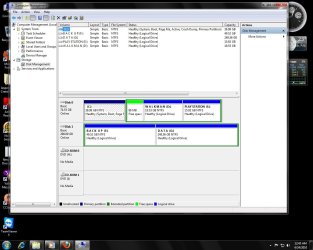
i have jpg of my system drives dont know how i created these logical drives :p but i want to create volumes on my friend's PC as well...
 

Attachments

  • Untitled.jpg
    Untitled.jpg
    118.6 KB · Views: 215

My Computer

Computer Manufacturer/Model Number
Intel
OS
Windows 7
CPU
Core 2 duo
Motherboard
DG31PR
Memory
2GB DDR2
Graphics Card(s)
8600GT
Hard Drives
SATA II 80GB
SATA II 320 GB
I've never heard of a logical drive increasing performance, but be that as it may, its seems that with W7, that you have to create 3 primary partitions first, before it will add a logical partition. If you use a third party partitioner, you can add a logical drive anytime that you wish.
 

My Computer

Computer Manufacturer/Model Number
DIY
OS
W7x64 Pro, SuSe 12.1/** W7 x64 Pro, XP MCE
CPU
Phenom II 1090T w/Noctua NH-D14 /**4400+ X2 w/CM Hyper TX 3
Motherboard
ASRock 890FX Deluxe 4/**A8N-SLI
Memory
2 x 2GB Patriot PGS34g1600LLKA/**4x1GB Corsair VS
Graphics Card(s)
EVGA GTX460 SC/**EVGA 8800GTS
Sound Card
Asus Xonar D2X/**Xonar D1
Monitor(s) Displays
Acer X233H, Dell E152FPc /**LG M237-WD
Screen Resolution
1920x1080 & 1024x768/**1980x1080
Hard Drives
WDC 2TB, 1.5TB, 1TB, 500GB,Seagate 500GB , Maxtor 80GB /**500GB Seagate & WDC 1TB Black
PSU
CM RS600 w/ APC BX1000G/**Antec 500 TP w/ APC BX1000
Case
HAF922/**Antec 1040IIB
Cooling
3x200mm, 1x140 and 1x120mm/**5x80mm fans
Keyboard
Logitech Media USB/**Saitek Eclipse
Mouse
Cordless Trackman Wheel/**Ditto
Internet Speed
3.3Mbps
Other Info
SB 560 5.1 w/ Sennheiser RS140/**Creative T20 speakers, Dvico FusionHDTV7 Gold RT, Cisco E3000, HP 5510V AIO, Linksys E3000, Belkin F5U237 hub and **F5D8055 adapter
(** = 2nd rig)
Thanks for the reply.....

yes, i have created Logical Volume after creating 3 primary...but what if i want it after my primary volume...is it possible when Installing windows 7????(windows 7 installation setup).....while searching for it i read somewhere that it is done while installing windows xp. is it true???... and what 3rd party partition tool u suggest best working for it??? :opartition magic 8 is not compatible with windows 7....

regards
 

My Computer

Computer Manufacturer/Model Number
Intel
OS
Windows 7
CPU
Core 2 duo
Motherboard
DG31PR
Memory
2GB DDR2
Graphics Card(s)
8600GT
Hard Drives
SATA II 80GB
SATA II 320 GB

My Computer

Computer Manufacturer/Model Number
HP, Dell, Gateway, Toshiba - 4 laptops and 2 desktops
OS
Vista, Windows7, Mint Mate, Zorin, Windows 8
CPU
from 1.6GHz Duo to i7
Monitor(s) Displays
2x HP w2207
Hard Drives
5x HDD, 7x SSD, 12x Externals
Keyboard
with trackball - no mices
Mouse
Trackball mice
Internet Speed
DSL 6000
hi...

i m using windows 7...and i want to make logical volumes on my drives...as a friend of mine said....it increases performance in some cases....Partitioning ur drive in simple Volumes are easy and every volume is primary when u made partitions.....


i have two HDD... one is 80GB and 2nd is 320Gb.....


please help me with it...

i have jpg of my system drives dont know how i created these logical drives :p but i want to create volumes on my friend's PC as well...

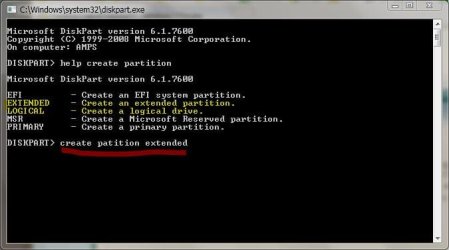
The program you wan is "diskpart.exe" part of win 7's built in kit.

WinKey+R -> Diskpart

Capture.JPG


I've highlited the juicy parts for you...

However, I think you'll find that primary partitions are the best bet... as already pointed out beyond 3 primaries you will need Diskpart to make them. The reason I recommend primaries is that it eliminates one step... In an extended partition the NTFS manager has to first look up the partition boundary to get the logical drive boundary before it can access directories. In a primary it can go straight to the directory. In an application that doesn't use many files the extra step goes almost unnoticed but when you are mainipulating a lot of files, the extra step imposes a small performance hit.
 

My Computer

Computer Manufacturer/Model Number
Homebrew
OS
XP Pro SP3 X86 / Win7 Pro X86
CPU
Amd 64 x2 4200 (2.4ghz)
Motherboard
Asus M2N-MX SE Plus
Memory
Kingston DDR2 800 2gb
Graphics Card(s)
Nvidia GF-8400
Sound Card
Realtek on Motherboard
Monitor(s) Displays
Acer x-193bw
Screen Resolution
1440 x 900
Hard Drives
Western Digital 500g
PSU
350watt In-Win
Case
In-Win
Cooling
Air
Keyboard
yes
Mouse
yes
Internet Speed
5mpbs
Other Info
Also ASRock ION 330 as HTPC (on XP).
Acer Aspire as GP netbook (on XP).
Thanks alot for u r help my problem is solved here :D.. thanks seekermiester, whs, and commontater....
 

My Computer

Computer Manufacturer/Model Number
Intel
OS
Windows 7
CPU
Core 2 duo
Motherboard
DG31PR
Memory
2GB DDR2
Graphics Card(s)
8600GT
Hard Drives
SATA II 80GB
SATA II 320 GB
Back
Top