Creating new partition

mmahesh85

New member
Local time
3:02 AM
Messages
2
hi ,

recently i bought acer laptop they given laptop with installed windows 7 it is totally 32GB hard disk and it is having only one partition (ie. C drive) but now i want totaly 4 partions(including c) . Please tel me is there any way with out formating we can create partions

Regards
Mahesh Kumar
 

My Computer

OS
Windows 7
Hi, before you proceed with re-partitioning, I would recommend creating a System Image first.
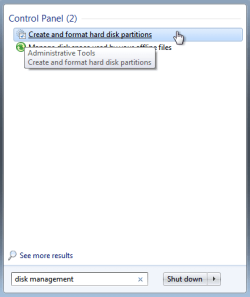
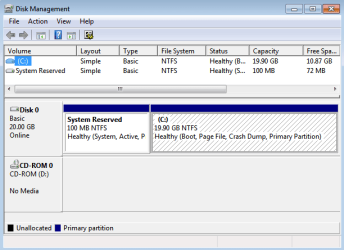
You are aware that Win7 creates a 100Mb boot partition. You can verify your existing partitions via Computer Management / Disk Management. It's from this area that you manage partitions (wihtout using 3rd party apps). So for example you Right-Click C: drive, select Shrink, then Right-Click on the newly created partition, format it and give it a drive letter. Be very careful with all this as C: is the Boot, Page File, Primary Partition. If it is feasable, leave C: alone and purchase a secondary Hard Disk - SATA 1Tb is cheap nowadays :)
 

My Computer

OS
Windows 7 Professional 64Bit
CPU
Intel® Core i7-930 - 8M Cache, 2.80 GHz, 4.80 GT/s
Motherboard
ASROCK X58 Extreme 3
Memory
6Gb DDR3 1600MHz
Graphics Card(s)
Gigabyte GeForce GTX 470 1280MB - NVIDIA
Sound Card
On Board Realtek HD Audio
Monitor(s) Displays
HP L1950g LCD
Screen Resolution
1280x1024
Hard Drives
2 x SATAII C:500Gb D:1Tb
PSU
750W Antec TruePower
Case
ZALMAN
Cooling
air
Internet Speed
6 Mb/s
Hello mmahesh85, welcome to Seven Forums!


If you truly have only a 32GB HDD as you posted it's not big enough to create other partitions. Please post a screen-shot/snip of the complete disk management so we can see what you have, it'll look like this.

How to Post a Screenshot in Seven Forums


click an image to enlarge
HDM.PNGDM.PNG
 

My Computer

Computer Manufacturer/Model Number
* BFK Customs *
OS
W 7 64-bit Ultimate
CPU
Intel Q9550 Yorkfield
Motherboard
ASUS P5Q Pro
Memory
8GB Dominator 8500C5D
Graphics Card(s)
ATI : XFX 5870
Sound Card
Realtek HD Audio 7-1
Monitor(s) Displays
1x 47" LCD HDMI & 3x 26" LCD HDMI
Screen Resolution
1920x1080P & 1920x1200
Hard Drives
1x 80GB Intel X25-M G2 SSD : 1x 500GB & 1x 640GB WD Caviar Black(s)
PSU
Corsair 620HX
Case
Cooler Master RC-690
Cooling
Tuniq Tower 120, 2x 140mm and 3x 120mm case fans
Keyboard
Microsoft 500
Mouse
Razer Diamondback 3G
Internet Speed
14 Mb/s
Other Info
1x Koutech 3Gb/s SATA HDD Hot Swap Rack
Creating Partition in Win7

hi ,
recently i bought acer laptop , they given with pre loded Win 7 OS and only one drive (i.e C 320GB) but when
i refer Computer Management in Administrative Tools it shows 2 primary drives after that i did shrink
operation its created new primary partition .Now while checking in my computer it shows 2 partitions (ie. C,D)
.When i refer Computer Management in Administrative Tools it shows 3 primary partitions now again did
shrink operation but it troughs error more than 3 primary partitions are not allowed.But my objective
is i totally 4 drives (including C drive) .Please help me
 

My Computer

OS
Windows 7
I couldnt do a partion it wont let me!followed the guide step by step .So i give up on it /
 

My Computer

Computer Manufacturer/Model Number
home build/gigabyte mobo
OS
windows 7 64 bit premium
CPU
q6600 2.4 overclocked to 3.2 ghz
Motherboard
gigabyte ga_73pvm.s2h rev 1.0
Memory
4 gb 800 mhz corsair
Graphics Card(s)
gtx 480 mbfg o/c
Sound Card
onboard realtek hd audio
Monitor(s) Displays
benq 24 inch (led)
Screen Resolution
1920x1080p
Hard Drives
barracuda 7200rpm 320gb
PSU
jeantech 900watts
Case
Novatech prowler midi tower v2 gaming case
Cooling
artic cooling 7 pro rev 2.0, 120mm front,rear and side
Keyboard
saitek eclipse 2
Mouse
mad catz mw2 laser mouse
Internet Speed
50mb virgin
Other Info
Adding a raptor hdd for gaming use only.
hi ,
recently i bought acer laptop , they given with pre loded Win 7 OS and only one drive (i.e C 320GB) but when
i refer Computer Management in Administrative Tools it shows 2 primary drives after that i did shrink
operation its created new primary partition .Now while checking in my computer it shows 2 partitions (ie. C,D)
.When i refer Computer Management in Administrative Tools it shows 3 primary partitions now again did
shrink operation but it troughs error more than 3 primary partitions are not allowed.But my objective
is i totally 4 drives (including C drive) .Please help me


You have to format the new partition for it to show in "My Computer".
 

My Computer

Computer Manufacturer/Model Number
DELL/Alienware Area-51
OS
Windows 7 Ultimate x64
CPU
Intel I7 980x @ 3.47 GHz
Motherboard
X58
Memory
6 GB (3 x 2GB) 1333 MHz
Graphics Card(s)
2 EVGA GTX 480's in SLI
Sound Card
Creative X-Fi Titanium
Monitor(s) Displays
DELL Ultra Sharp 2709W
Screen Resolution
1920 x 1200
Hard Drives
OS = 750 GB Seagate
Data = 750 GB Seagate
Music = 1 TB WD Black
PSU
1.2 KW
Case
DELL Alienware Area-51
Cooling
Liquid for CPU
Keyboard
Alienware TactX
Mouse
Alienware TactX
Internet Speed
Cable 5-9 MB
Why would you ever want four partitions on one drive? At most, I'd go with two primary, individual partitions. One for the OS, and one for user data storage. Follow the K.I.S.S motto.
 

My Computer

OS
Windows 7 Ultimate x64 SP1
CPU
Intel Core i7-2600
Motherboard
Gigabyte GA-P67A-UD3P-B3
Memory
12 GB Patriot Extreme DDR3-1333
Graphics Card(s)
Nvidia GTX 470
Monitor(s) Displays
Dell UltraSharp 2209WA
Hard Drives
OCZ Agility3 240 GB, WD5001AALS, WD7501AALS
PSU
OCZ ModStream 700W
Case
CoolerMaster HAF 912 Advanced
Cooling
CoolerMaster Hyper 212 Plus
Back
Top